

 Español
 Català
 Deutsch
 Français
 Português
 Italiano
 Nederlands
 Polski
Before you install: version, price and service
Which Odoo versions is it available for, and what does it cost?
The module is published on Odoo Apps for Odoo 17.0, 18.0, 19.0 and 20.0. On the listing for each of those versions it costs €9 excluding VAT, as a one-off payment per version. You can check it on the Odoo Apps listing.
What else do I need besides the module?
It is a module with a FlexigoTech Cloud local service. The service costs €29/month or €290/year excluding VAT; the Pro plan is €58/month or €580/year excluding VAT. With the subscription, the module for new Odoo versions is included if you bought it on flexigotech.com; if you buy it on the Odoo App Store, each Odoo version is bought there. The details are on the module page at flexigotech.com.
What happens if I cancel the subscription or the service is suspended?
Without a subscription, or with the service suspended, whatever the subscription provides stops. Your data stays in your Odoo.
Settings and fields to fill in
Which checkbox should I look at for the FlexigoTech Cloud calculation?
It is a boolean field with the technical name ca_climate_cloud_consent and the label Compute the GHG inventory in FlexigoTech Cloud. Its help text says the GHG inventory of each reporting period and the CARB rules are computed by FlexigoTech Cloud. The technical name includes the word consent: before you start, decide with the right people in your company whether to tick it, and keep a record of that decision.
What do I see on a reporting period form?
The period form holds the entity, the dates and the disclosure year, a set of buttons in the header and a FlexigoTech Cloud section with the emission scopes. When you create your first period, take your time with the entity, the dates and the disclosure year, and check they match what you are going to report.
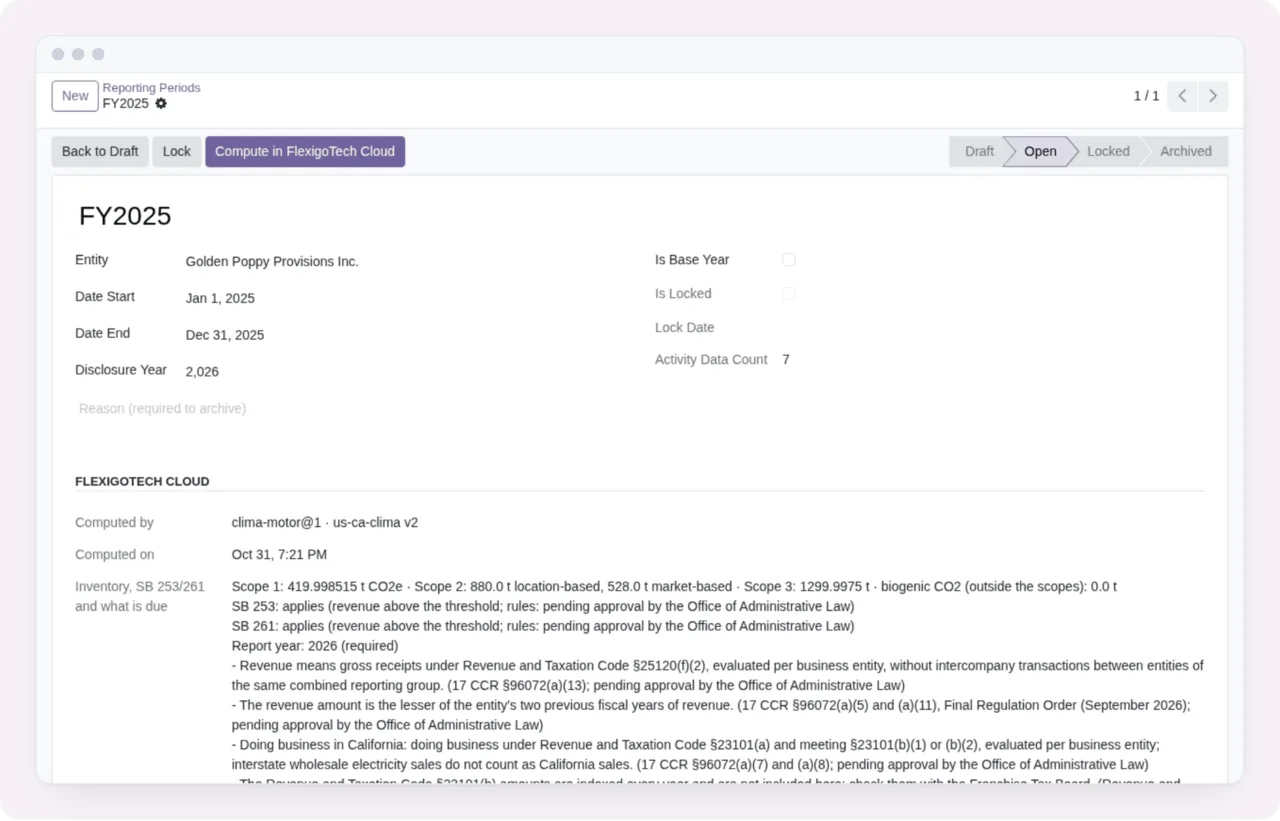
Open state, with the Back to Draft, Lock and Compute buttons and the FlexigoTech Cloud section showing the emission scopes (demo data).If you want to understand which menus the module adds and what a record goes through behind the scenes, see how the module works inside Odoo.
What do the legal_status and program_fee_status fields mean?
They are two selection fields in the module. legal_status accepts Voluntary (Enforcement Paused) and Mandatory. program_fee_status accepts Not Applicable, Invoiced, Paid and Overdue. These are the values the module offers, not a legal interpretation: which one applies to you is something you decide with your adviser, based on your company's situation.
Record states and what to check in the first week
Which states does the module define?
These are the sets of states as the module defines them, with their values:
- A
statefield withDraft,Computed,VerifiedandLocked. - A
statusfield withPlanned,In Progress,ConcludedandWithdrawn. - A
statefield withDraft,In Review,FiledandLocked(this set appears twice). - A
statefield withSubmitted,Verified,In Progress,CompletedandDenied. - A
statefield withDraft,Open,LockedandArchived.
This gives you the values, not the rules for moving from one to the next. To know where each record stands, look at the state column or label on each screen: in the screenshots in this article, the FY2025 period is Open, the activity data is Verified or Computed, the assurance engagements are In Progress and the disclosure package is In Review.
What should I check in Activity Data in the first week?
Open the list and go through each row: category, scope, quantity, unit and emissions in tonnes. Note which records are Computed and which are Verified, and if a quantity or unit does not match your source data, correct it before moving on.
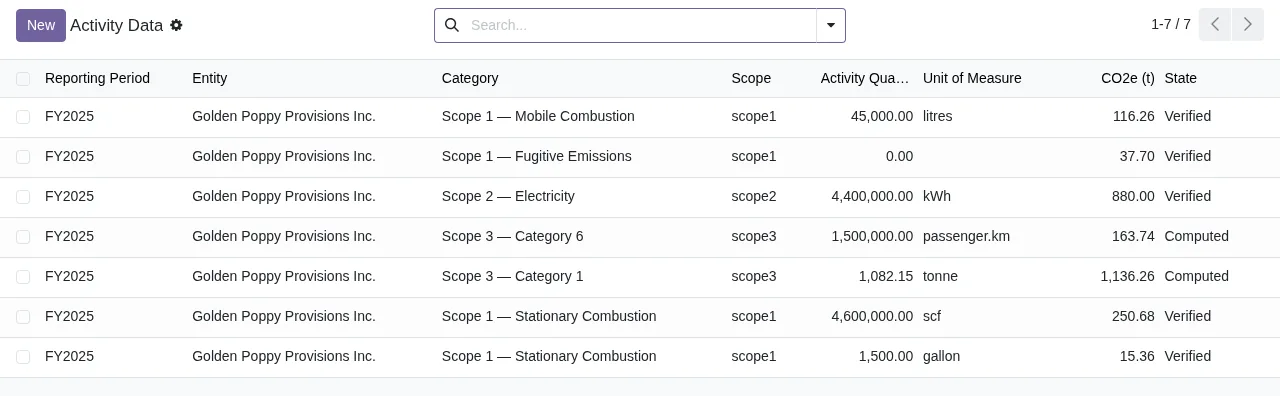
Activity Data list for FY2025 with seven records in Verified or Computed state (demo data).And in Assurance Engagements and the disclosure package?
In Assurance Engagements, check the provider, the type of assurance, the scopes it covers and the state of each engagement. In the disclosure package, review the entity, the period, the emissions by scope and the Methodology tab.
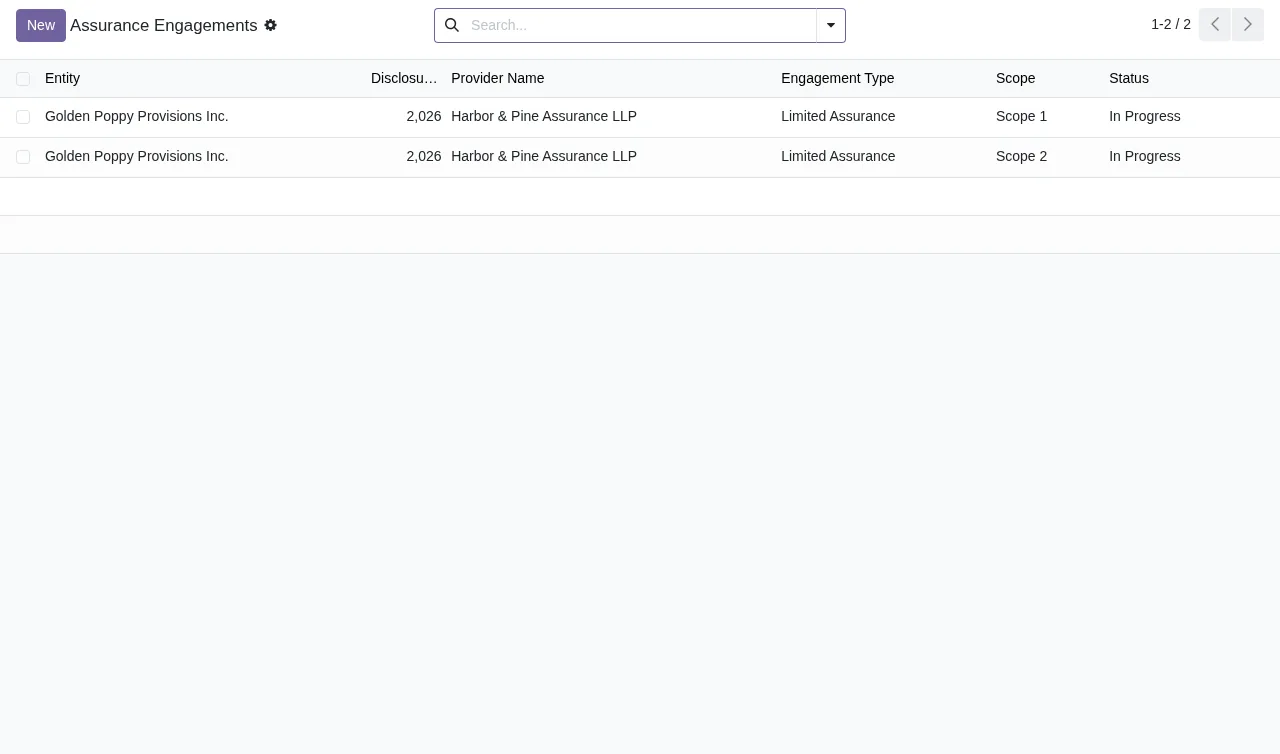
Limited Assurance engagements with Harbor & Pine Assurance LLP, in In Progress state (demo data).
In Review, by way of the assurance engagements (demo data).If a warning or error message comes up during this review, you will find the exact wording and what to do about each one in the module's error messages and warnings.
How FlexigoTech can help
At FlexigoTech we implement Odoo 17, 18, 19 and 20 and build bespoke connectors and integrations. If you need to bring activity data into Odoo from another system, or adapt the module's setup to the way you work, we can help you get it ready before your first reporting period.
Keep reading
Checked in the module's source code (version 20.0) and the linked sources
Sources
- Module source code: flexigo_california_sb_253_sb_261_climate_disclosure_pac 20.0 (7632c5e6): models/res_config_settings.py
- Module source code: flexigo_california_sb_253_sb_261_climate_disclosure_pac 20.0 (7632c5e6): models/activity_data.py
- Module source code: flexigo_california_sb_253_sb_261_climate_disclosure_pac 20.0 (7632c5e6): models/assurance.py
- Module source code: flexigo_california_sb_253_sb_261_climate_disclosure_pac 20.0 (7632c5e6): models/disclosure_sb253.py
- Module source code: flexigo_california_sb_253_sb_261_climate_disclosure_pac 20.0 (7632c5e6): models/disclosure_sb261.py
- Module source code: flexigo_california_sb_253_sb_261_climate_disclosure_pac 20.0 (7632c5e6): models/privacy.py
- Module source code: flexigo_california_sb_253_sb_261_climate_disclosure_pac 20.0 (7632c5e6): models/reporting_period.py
- apps.odoo.com/apps/modules/20.0/flexigo_california_sb_253_sb_261_climate_disclosure_pac
- apps.odoo.com/apps/modules/17.0/flexigo_california_sb_253_sb_261_climate_disclosure_pac
- apps.odoo.com/apps/modules/18.0/flexigo_california_sb_253_sb_261_climate_disclosure_pac
- apps.odoo.com/apps/modules/19.0/flexigo_california_sb_253_sb_261_climate_disclosure_pac
- flexigotech.com/en/services.html
- flexigotech.com/precios.html
- Module source code: flexigo_california_sb_253_sb_261_climate_disclosure_pac 20.0 (7632c5e6): __manifest__.py