

 Español
 Català
 Deutsch
 Français
 Português
 Italiano
 Nederlands
 Polski
What appears in Odoo when you install the module
The module adds a top-level menu, CA Climate Disclosure. Inside it you will find a Dashboard and seven sections: Entities, Reporting Periods, GHG Inventory, Disclosures, Assurance, Compliance and Configuration. In this article you will see menu and scheduled action names in English, as they appear in the module, in backticks.
Configuration has a single submenu, Regulatory Parameters. The rest of the screens are spread across the other six sections, each grouping several submenus.
The route through the menu, from Dashboard to Configuration
The clearest way to read the module as a timeline is to follow the order in which the menu itself lays out the sections. This is the menu order, not a step-by-step procedure: which fields to fill in and what to check first is covered in getting California SB 253 and 261 up and running.
DashboardThe first entry underCA Climate Disclosure, just above the working sections.
EntitiesGroupsReporting Entities,Scope Determinations,FacilitiesandApplicability Exclusions.
Reporting PeriodsHoldsReporting Periods,Structural ChangesandBase-Year Recalculations.
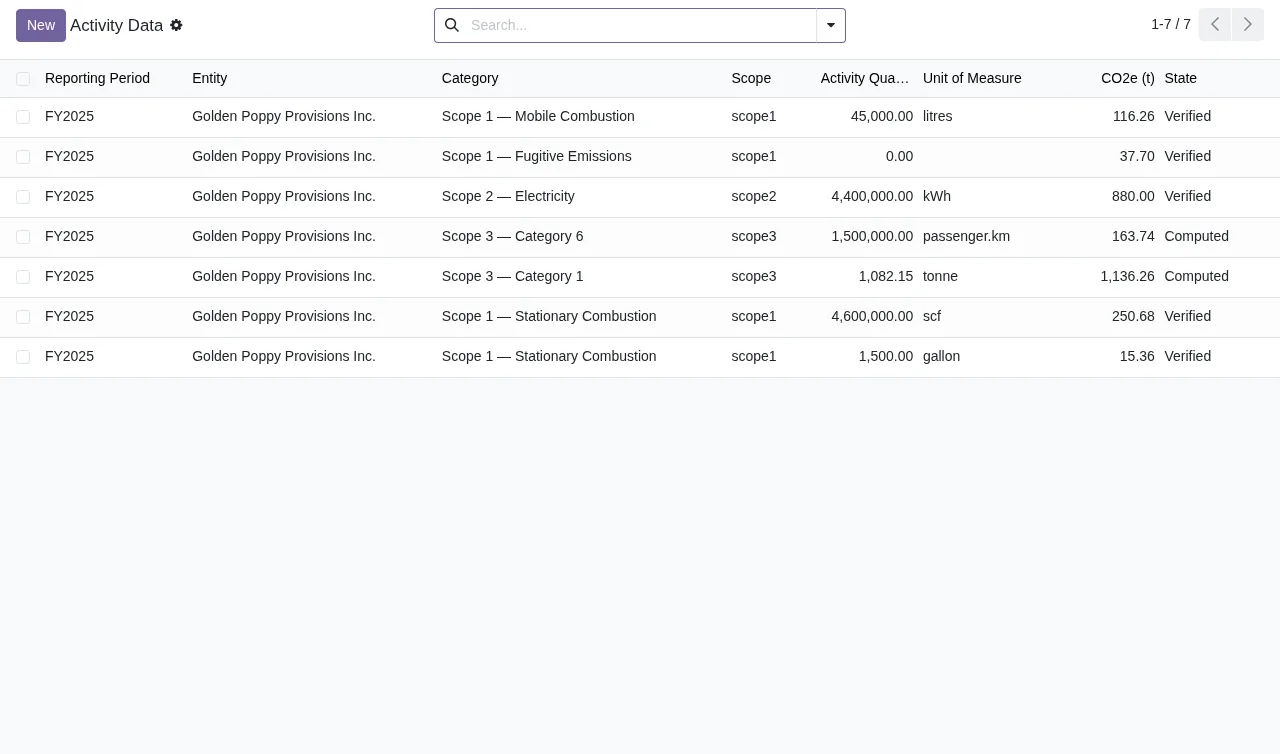
GHG InventoryBrings togetherActivity Data,Contractual Instruments,Emission FactorsandEmission Factor Sources. In the screenshots below, eachActivity Dataline shows category, scope, quantity, unit, equivalent emissions in tonnes and status.
DisclosuresIncludesSB 253 Packages,SB 261 ReportsandGap Statements. The animated walkthrough shows an SB 253 package in theIn Reviewstate.
AssuranceContainsEngagements,Scope AssignmentsandComments.
ComplianceGroupsDeadlines,Data Quality Issues,Retention Bundles,Acknowledgments,DSAR RequestsandAudit Trail.
ConfigurationAt the bottom of the menu, withRegulatory Parameters.
What the inventory and assurance screens look like
The Activity Data list sits under GHG Inventory. In the screenshot, with demo data, every record belongs to the same company's 2025 financial year period, and each one shows its category, scope, quantity and unit, equivalent emissions in tonnes and the status it is in.
The same list lets you read the records by category and by scope. The statuses shown in the screenshot are Verified and Computed, so you can see at a glance which one each line is in.
Verified or Computed.Under Assurance › Engagements you will find the list of assurance engagements. The screenshot shows two records for the same company, with year, provider, type of assurance, scopes covered and status.

Limited Assurance, scopes one and two, and status In Progress.If you want to see how one screen leads to the next, the animated walkthrough moves through the inventory and assurance lists and ends on the form of a disclosure package.
Activity Data list for the 2025 financial year to the engagements in In Progress, then to an SB 253 package form in In Review with entity, period, scope one, two and three emissions, and the Methodology tab with operational control.The scheduled actions that run every day
Alongside the menus, the module installs three scheduled actions. All three run once a day and come active:
CA Climate: Deadline Reminders
CA Climate: Data Quality Checks
CA Climate: Build Retention Bundles
Their names match three Compliance submenus: Deadlines, Data Quality Issues and Retention Bundles. When you look at those screens, you know which scheduled action shares their name. For the module's warnings and messages, with their literal text and what to do about each one, see the article on California SB 253 and 261 errors and warnings.
All three scheduled actions are active when the module is installed. If any of them shows as inactive in your database, check it before assuming it runs daily.
Local service, price and Odoo versions
The module works with a local FlexigoTech Cloud service. On Odoo Apps it is published for Odoo 17, 18, 19 and 20, at €9 per Odoo version, one-off payment, excluding VAT; the local service costs €29/month or €290/year excluding VAT (Pro: €58/month or €580/year).
Without a subscription, or with the service suspended, whatever the subscription provides stops, and your data stays in your Odoo. With the subscription, the module for new Odoo versions is included if you bought it on flexigotech.com; if you buy it on the Odoo App Store, each Odoo version is bought there. You can find the listing on Odoo Apps and the module page on flexigotech.com.
How FlexigoTech can help
At FlexigoTech we implement Odoo 17, 18, 19 and 20 and build bespoke connectors and integrations. If you are rolling out Odoo and want California SB 253 and 261 to fit with the rest of your setup, or you need to bring data from another system into GHG Inventory, we can help you put it together. Get in touch through the module page and tell us which Odoo version you are on.
Keep reading
Checked in the module's source code (version 20.0) and the linked sources
Sources
- Module source code: flexigo_california_sb_253_sb_261_climate_disclosure_pac 20.0 (7632c5e6): views/menus.xml
- Module source code: flexigo_california_sb_253_sb_261_climate_disclosure_pac 20.0 (7632c5e6): data/ir_cron.xml
- apps.odoo.com/apps/modules/20.0/flexigo_california_sb_253_sb_261_climate_disclosure_pac
- apps.odoo.com/apps/modules/17.0/flexigo_california_sb_253_sb_261_climate_disclosure_pac
- apps.odoo.com/apps/modules/18.0/flexigo_california_sb_253_sb_261_climate_disclosure_pac
- apps.odoo.com/apps/modules/19.0/flexigo_california_sb_253_sb_261_climate_disclosure_pac
- flexigotech.com/en/services.html
- flexigotech.com/precios.html