

 Español
 Català
 Deutsch
 Français
 Português
 Italiano
 Nederlands
 Polski
The case: one order, two deliveries
A Billbee order comes into Odoo with two products, and only one is in stock. You validate the delivery with what you have and leave the rest in a backorder, which ships when the goods arrive. The sales order now has two outgoing deliveries, each with its carrier and its tracking number.
In its help centre, in German, Billbee explains that if you do not ship from Billbee but, for example, through a fulfilment provider, that provider can send it the shipment data through the API. With the connector, Odoo plays that role.
The first delivery
When you validate it, Odoo creates its Billbee shipment with the delivery's carrier and tracking number. With a tracking number, the shipment is Pending Push and, with Auto-push tracking to Billbee, on by default, it goes to Billbee right then. It does not matter who validates the delivery: the shipment goes even if that person has no Billbee rights in Odoo.
Billbee receives the tracking number and, in the comment, the name of the Odoo carrier. The Billbee carrier is only sent if the Odoo carrier's name contains one Billbee knows, such as DHL, DPD, GLS, UPS, Hermes, Deutsche Post or FedEx. The carrier and the tracking number are delivery fields that come from Odoo's carrier module, which the connector depends on since version 1.2.11.
The sales order still has the second delivery open. Billbee already has the first shipment with its tracking number, but the order's status in Billbee does not change.
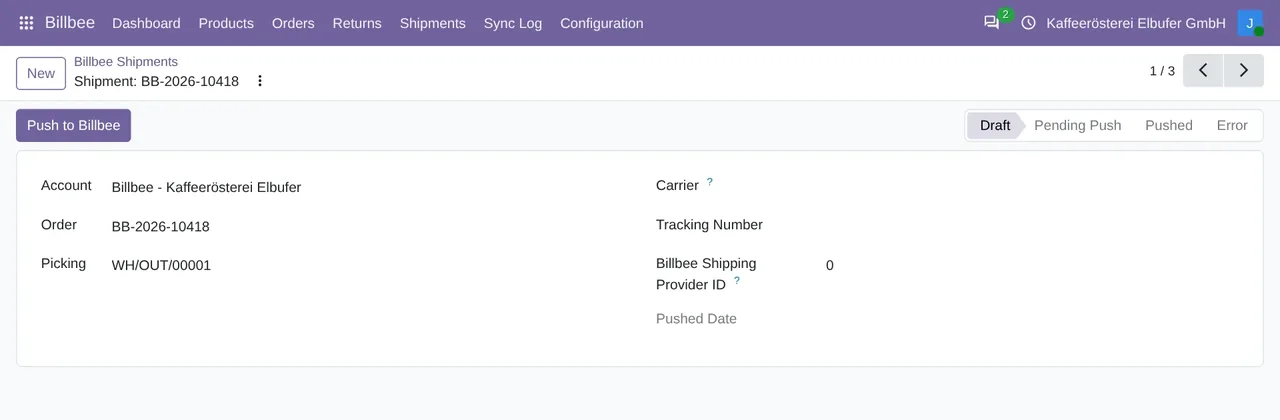
Billbee › Shipments: the shipment of one delivery, with its order, its transfer, the carrier, the tracking number and its status.The second delivery closes the order
When the goods arrive and you validate the second delivery, Odoo sends its shipment with its own tracking number. No delivery is left open, so Odoo moves the order to shipped in Billbee (its status 4), if it was still waiting to ship there.
If Billbee refuses that status change, Odoo writes it in the log and does not send the shipment again, because Billbee would have it twice. A delivery whose shipment was already sent is not sent again either.
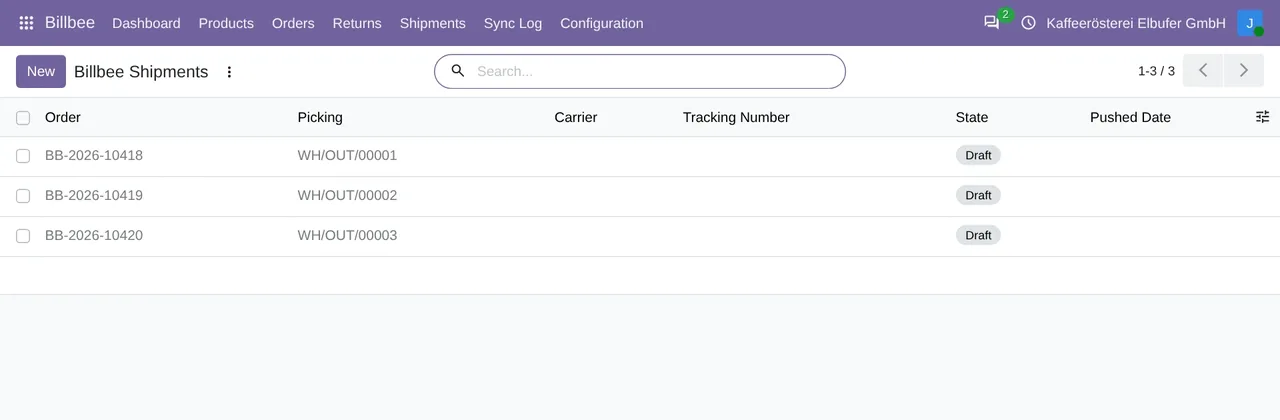
Billbee › Shipments: one shipment per delivery, with its order, its transfer and its status.If Billbee does not answer
A failure to send the shipment never stops you from validating the delivery. If Billbee refuses it, the shipment is left with an error and the failure goes to the log. If Billbee does not answer in time, it stays Pending Push. Either way, an administrator can send it again with Push to Billbee, on the shipment itself. That button shows on every shipment that has not been sent yet.
The label, requested from Odoo
If Billbee makes the label, you request it from the delivery, in the Action menu, with Request Billbee Shipping Label and Billbee's shipping provider and shipping product. The wizard's Request Label button is for administrators only and only works for deliveries of orders that are already in Billbee.
Once the label is made, Odoo saves the tracking number Billbee returns on the shipment, already as sent. Odoo does not bring in the label PDF. As in the case above, the order moves to shipped in Billbee only if this is the last open delivery.
If your Billbee account has no shipping provider yet, the wizard says so: Billbee did not create the label, you need to add one in Billbee, and nothing is marked as shipped.
The notice to the buyer
With Auto-notify buyer on shipment, off by default, Odoo asks Billbee to send its notice to the buyer after it sends each shipment. Requesting the label from Odoo does not trigger that notice.
How the order reaches Odoo is in Billbee orders in Odoo.
We tested it with a Billbee account
On 17-11-2026, with a Billbee merchant test account and Odoo 20, we validated a delivery with its tracking number and the order ended up in status 4 in Billbee, with its shipment. On 18-11-2026 we repeated that test with version 1.2.11 on Odoo 17, 18, 19 and 20, with the same result.
Questions about Billbee shipping from Odoo
Does Billbee mark the order as shipped with the first delivery?
No. Odoo changes it once the sales order has no outgoing delivery left open. Until then, Billbee receives each delivery's shipment with its tracking number.
What if my carrier is not one Billbee knows?
The shipment still goes, with the tracking number and the carrier's name in the comment, but without the Billbee carrier.
How much does it cost?
The module costs €9 per Odoo version on Odoo Apps. It runs with FlexigoTech Cloud, from €49/month: Connector plan Standard at €49/month or €490/year, or Pro at €98/month or €980/year, VAT excluded. The trial is 14 days, free and without a card. It includes 2 months of support to get it running and, while you stay subscribed, updates and support, as the terms of sale 2.2 say. It is all on the Billbee connector page.
Which Odoo versions does it work with?
Odoo 17, 18, 19 and 20, on Odoo.sh or on your own server. It does not work on Odoo Online. Your Billbee account, with its username and an API password, and its plan are separate.
Keep reading
Checked in the connector's source code (version 20.0) and the linked sources
Sources
- Module source code: flexigobe_billbee_connector 20.0 (a5ae481e): models/billbee_shipment.py:139
- Module source code: flexigobe_billbee_connector 20.0 (a5ae481e): models/billbee_shipment.py:157
- Module source code: flexigobe_billbee_connector 20.0 (a5ae481e): models/stock_picking.py:89
- Module source code: flexigobe_billbee_connector 20.0 (a5ae481e): models/billbee_shipment.py:220
- Module source code: flexigobe_billbee_connector 20.0 (a5ae481e): models/billbee_shipment.py:101
- Module source code: flexigobe_billbee_connector 20.0 (a5ae481e): views/billbee_shipment_views.xml:27
- Module source code: flexigobe_billbee_connector 20.0 (a5ae481e): models/billbee_api_client.py:153
- Module source code: flexigobe_billbee_connector 20.0 (a5ae481e): models/billbee_shipment.py:194
- Module source code: flexigobe_billbee_connector 20.0 (a5ae481e): wizard/billbee_shipping_label_wizard.py:119
- Module source code: flexigobe_billbee_connector 20.0 (a5ae481e): wizard/billbee_shipping_label_wizard.py:61
- Module source code: flexigobe_billbee_connector 20.0 (a5ae481e): wizard/billbee_shipping_label_wizard.py:134
- Module source code: flexigobe_billbee_connector 20.0 (a5ae481e): __manifest__.py:47
- Module source code: flexigobe_billbee_connector 20.0 (a5ae481e): models/billbee_api_client.py:99
- hilfe.billbee.io/article/1487-best-practice-sendungsnummern-per-api-an-billbee-ubermitteln
- www.billbee.io/
- www.billbee.io/en
- FlexigoTech real test with a Billbee test account (17 and 18-11-2026)
- flexigotech.com/en/billbee-connector-odoo.html
- flexigotech.com/en/condiciones-contratacion.html