

 Español
 Català
 Deutsch
 Français
 Português
 Italiano
 Nederlands
 Polski
What Billbee asks for
According to its help centre, in German, the Billbee API needs the application's API key and, on top of that, your Billbee username and a special API password that identifies you as a merchant. That password must be at least 12 characters long and cannot contain a colon. Billbee adds that API access has no access restrictions.
Since 1 November 2025, according to its page on API pricing, the first 100,000 calls a month remain free for each connection or tool. Each tool gets exactly one API key, and the invoice always goes to the owner of the connection.
The key is FlexigoTech's and your credentials go to FlexigoTech Cloud
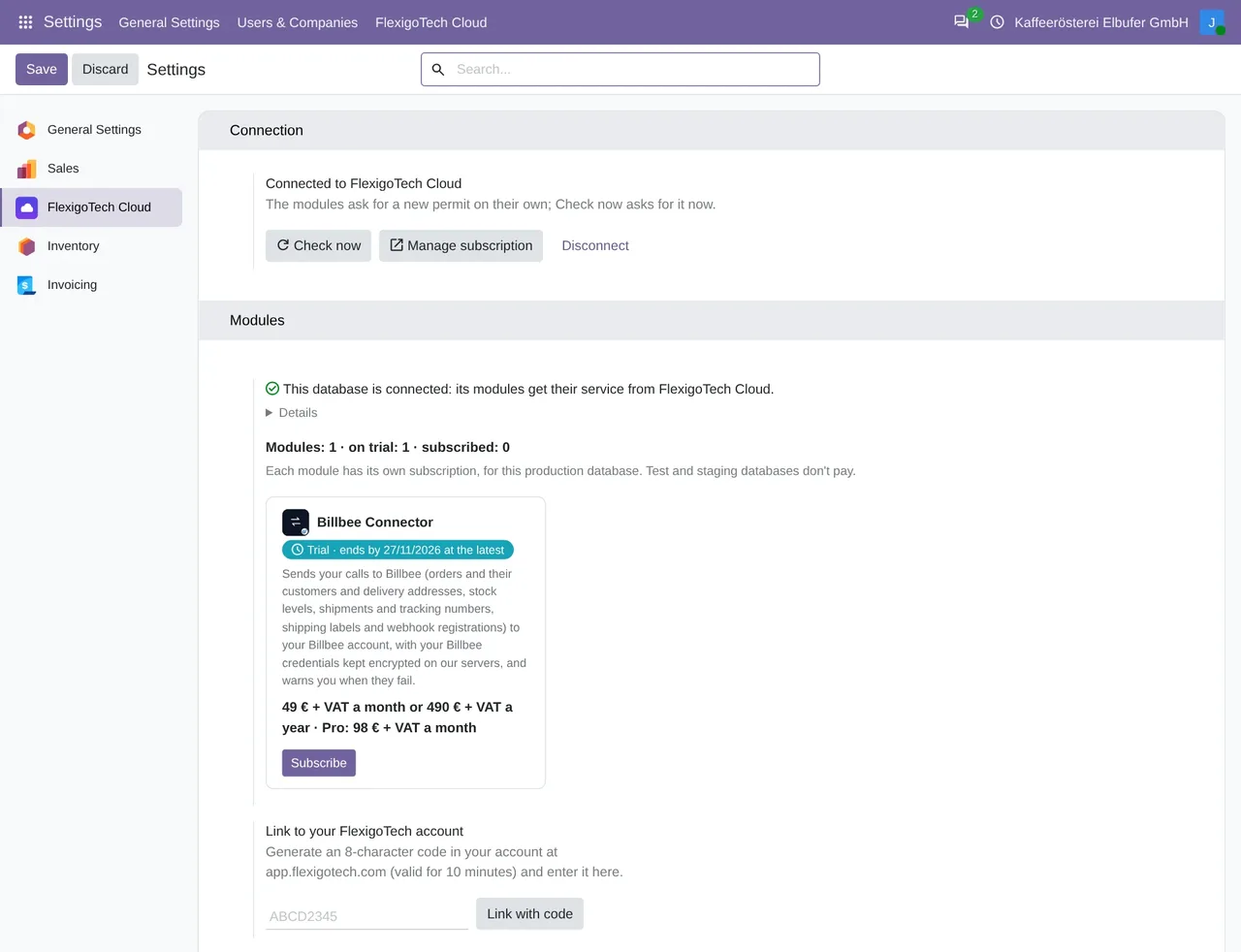
Because Billbee issues one key per tool, the connector's key is FlexigoTech's. Every call from your Odoo to Billbee goes through FlexigoTech Cloud, on our servers in Germany, which adds your username and API password, stored encrypted, together with that key. No call goes out unless there is an active FlexigoTech Cloud trial or subscription.
The Api Password is write-only and is not stored in Odoo. When you save it on the account in Billbee › Configuration › Accounts, your username, which does stay on the record, and the password go together to FlexigoTech Cloud. Before that, you tick that you accept that FlexigoTech Cloud keeps your Billbee credentials and that the calls go through it. The field's help reminds you that it is the API password, separate from the login one, at least 12 characters long and with no colon.
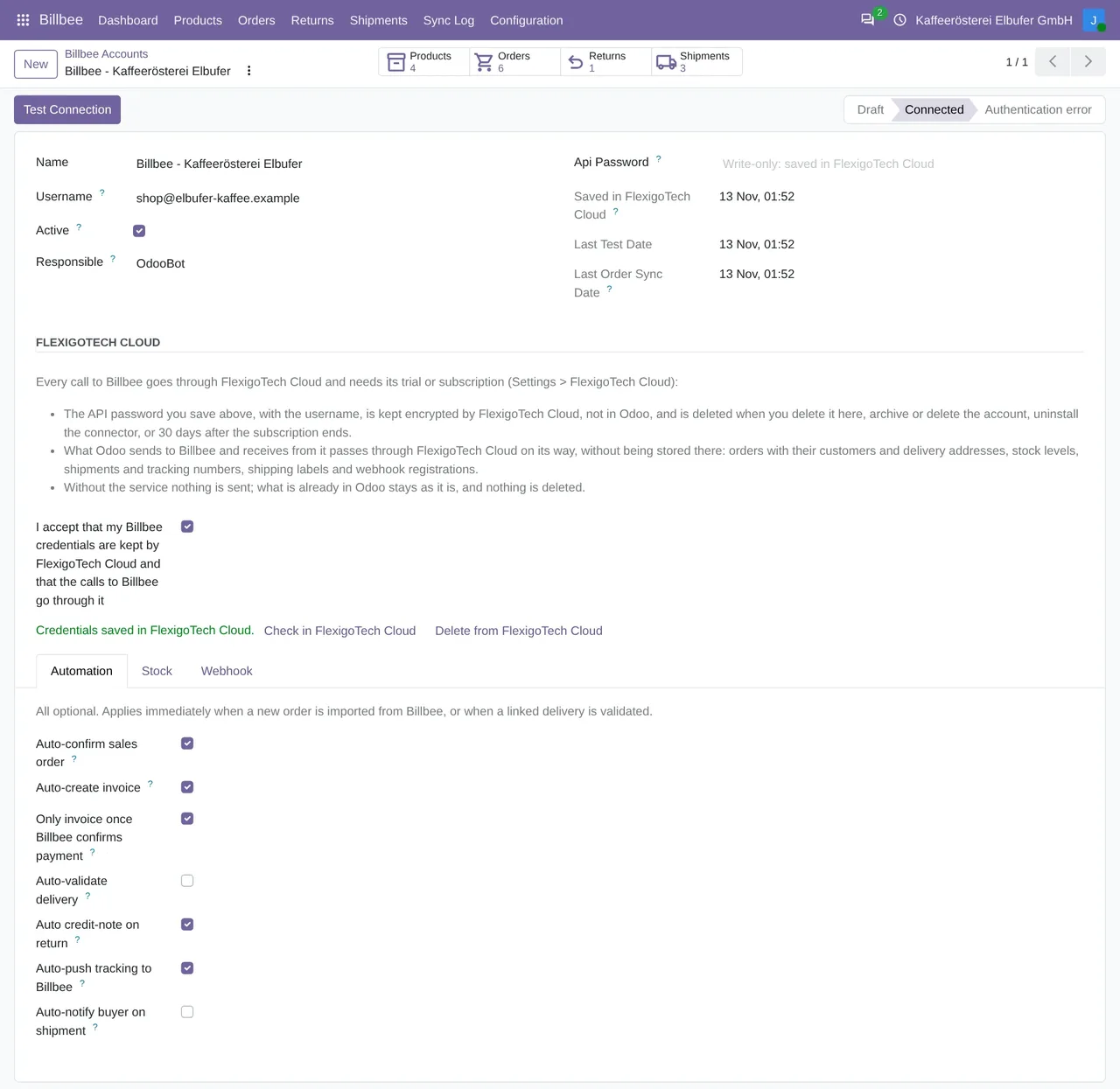
Billbee › Configuration › Accounts: the connected account, with the credentials saved in FlexigoTech Cloud and the date of the last test.Testing the connection
Test Connection reads one page with a single order from Billbee. If Billbee answers, the account becomes Connected, stores the test date and the record reloads on its own. If it answers 401 or 403, the account becomes Authentication error and asks you to check the username and the API password.
Only an Odoo administrator can call Billbee with those credentials. The scheduled tasks, the orders notification and the shipment sent when a delivery is validated call as the system. If you archive the account, Odoo stops calling Billbee with it: it is the switch that stops everything.
The call quota: asking only for what changed
To use few calls, each orders run asks only for the orders that changed since the previous one, and the stock task sends only the products whose number changed, up to 100 per call. The connector does not count calls: Billbee's usage call is in its code, but no screen or task uses it. Calls are still written to Billbee › Sync Log, with the method, the path, the response code and the milliseconds.
When something fails
If Billbee answers 429, too many calls, Odoo retries up to 5 times, waiting as long as Billbee asks or for a wait that doubles on each attempt, 300 seconds at most each time. A Billbee 5xx error is retried up to 3 times. A FlexigoTech Cloud pause is not retried.
Odoo does not follow redirects: if Billbee answered with one, the call is refused with an error, so the credentials are not sent somewhere else.
Each error in the log creates an activity for the account's responsible user (if there is none, for whoever was working). The daily clean-up deletes log lines older than 90 days.
The orders notification
With Register Webhook with Billbee (best-effort), on the account, Odoo registers the new-orders notification in Billbee. Before accepting it, Billbee checks the address, and Odoo answers with the same text only if the address carries the account's secret. After that, each notification makes Odoo read that order or, if it cannot find it, start the orders run right then. Without the notification, orders still arrive with the task every 15 minutes.
What each run does with the orders is in Billbee orders in Odoo, and Billbee's vocabulary in what Billbee is.
We tested it with a Billbee account
On 17-11-2026, with a Billbee merchant test account and the FlexigoTech Cloud test service, we tested the connection, the stock, the orders and the shipment end to end on Odoo 20, with no errors. On 18-11-2026, with version 1.2.11 on Odoo 17, 18, 19 and 20, we registered the orders notification, and Billbee checked the address first. On Odoo 17, 18 and 20, an order created in Billbee afterwards came into Odoo.
Questions about the Billbee API and Odoo
Do I need my own Billbee API key?
No. The key is the integration's, and it is FlexigoTech's. You enter your Billbee username and an API password, which you create in Billbee separately from your login password.
Where is my API password stored?
In FlexigoTech Cloud, encrypted. In your Odoo the field is write-only: you can change it, but not read it.
How much does it cost?
The module costs €9 per Odoo version on Odoo Apps. It runs with FlexigoTech Cloud, from €49/month: Connector plan Standard at €49/month or €490/year, or Pro at €98/month or €980/year, VAT excluded. The trial is 14 days, free and without a card. It includes 2 months of support to get it running and, while you stay subscribed, updates and support, as the terms of sale 2.2 say. It is all on the Billbee connector page.
Which Odoo versions does it work with?
Odoo 17, 18, 19 and 20, on Odoo.sh or on your own server. It does not work on Odoo Online. Your Billbee account, with its username and an API password, and its plan are separate.
Keep reading
Checked in the connector's source code (version 20.0) and the linked sources
Sources
- Module source code: flexigobe_billbee_connector 20.0 (a5ae481e): models/billbee_api_client.py:172
- Module source code: flexigobe_billbee_connector 20.0 (a5ae481e): models/billbee_account.py:103
- Module source code: flexigobe_billbee_connector 20.0 (a5ae481e): models/billbee_account.py:110
- Module source code: flexigobe_billbee_connector 20.0 (a5ae481e): models/billbee_account.py:541
- Module source code: flexigobe_billbee_connector 20.0 (a5ae481e): models/billbee_api_client.py:230
- Module source code: flexigobe_billbee_connector 20.0 (a5ae481e): models/billbee_api_client.py:215
- Module source code: flexigobe_billbee_connector 20.0 (a5ae481e): models/billbee_api_client.py:196
- Module source code: flexigobe_billbee_connector 20.0 (a5ae481e): models/billbee_api_client.py:153
- Module source code: flexigobe_billbee_connector 20.0 (a5ae481e): models/billbee_api_client.py:148
- Module source code: flexigobe_billbee_connector 20.0 (a5ae481e): models/billbee_api_client.py:265
- Module source code: flexigobe_billbee_connector 20.0 (a5ae481e): models/billbee_sync_log.py:76
- Module source code: flexigobe_billbee_connector 20.0 (a5ae481e): models/billbee_sync_log.py:117
- Module source code: flexigobe_billbee_connector 20.0 (a5ae481e): controllers/main.py:144
- Module source code: flexigobe_billbee_connector 20.0 (a5ae481e): controllers/main.py:96
- Module source code: flexigobe_billbee_connector 20.0 (a5ae481e): models/billbee_order.py:582
- Module source code: flexigobe_billbee_connector 20.0 (a5ae481e): models/billbee_product.py:237
- Module source code: flexigobe_billbee_connector 20.0 (a5ae481e): models/billbee_product.py:124
- Module source code: flexigobe_billbee_connector 20.0 (a5ae481e): models/billbee_api_client.py:342
- hilfe.billbee.io/article/1505-nutzung-der-billbee-api
- hilfe.billbee.io/article/1506-preisgestaltung-der-billbee-api
- FlexigoTech real test with a Billbee test account (17 and 18-11-2026)
- flexigotech.com/en/billbee-connector-odoo.html
- flexigotech.com/en/condiciones-contratacion.html
- www.billbee.io/
- www.billbee.io/en