

 Español
 Català
 Deutsch
 Français
 Português
 Italiano
 Nederlands
 Polski
What Billbee says
On its inventory management page, in German, Billbee explains that it acts as the hub of your inventory and recalculates minimum and target stock every night from your sales. With the connector, the stock that calculation starts from comes from Odoo.
Which number Odoo sends
The connector sends the free stock of each linked product: what you have minus what Odoo has already reserved, for any channel. From that it takes off the units of Billbee orders that are already in Odoo, are still unconfirmed and that Billbee still has to ship. A confirmed order has already reserved its units, so they are not taken off twice. The number never goes below zero.
The orders that count are the ones Billbee still has to ship: ordered, confirmed, paid, packed, being fulfilled or with a payment reminder pending. One that was shipped, closed or cancelled no longer counts.
By default it is the stock of the whole company. If you run several warehouses and only one serves Billbee orders, pick it in Stock Source Warehouse, on the account in Billbee › Configuration › Accounts. That way Billbee does not sell units from a warehouse you never ship from.
Every 15 minutes, only what changed
The scheduled task runs every 15 minutes and sends only the products whose number changed since the last push, in batches of up to 100 per call. Billbee answers product by product: one it accepts becomes Synced, and one it refuses is marked with an error, with the reason in the log.
The number goes as a new quantity, and Odoo asks Billbee not to subtract what it has pending, so Billbee keeps the number Odoo calculated.
If you do not want to wait, an administrator can push it right away from the product list: the products they pick or all of the account's, in a single call.
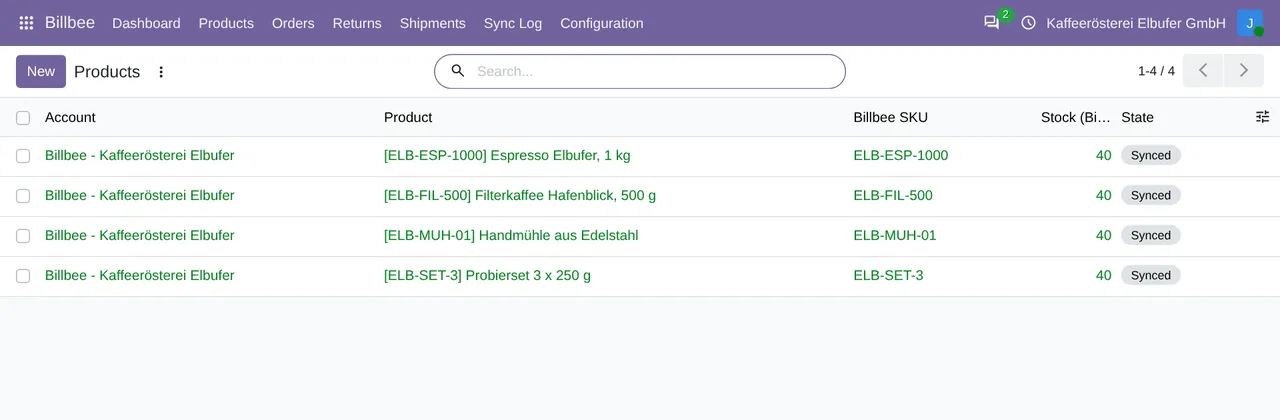
Billbee › Products: each product with its Billbee SKU, the stock last sent and its status.The six-hourly comparison does not touch your stock
Every 6 hours Odoo reads the stock Billbee says it has and compares it with the last number it sent. If they differ, it writes one line in the log with how many SKUs differ and, for up to 20 of them, both numbers, and changes nothing in Odoo. A difference can come from a manual change in Billbee or from another channel that touches its number.
Each error in the log also creates an activity for the account's responsible user, so it does not sit in a list nobody reads.
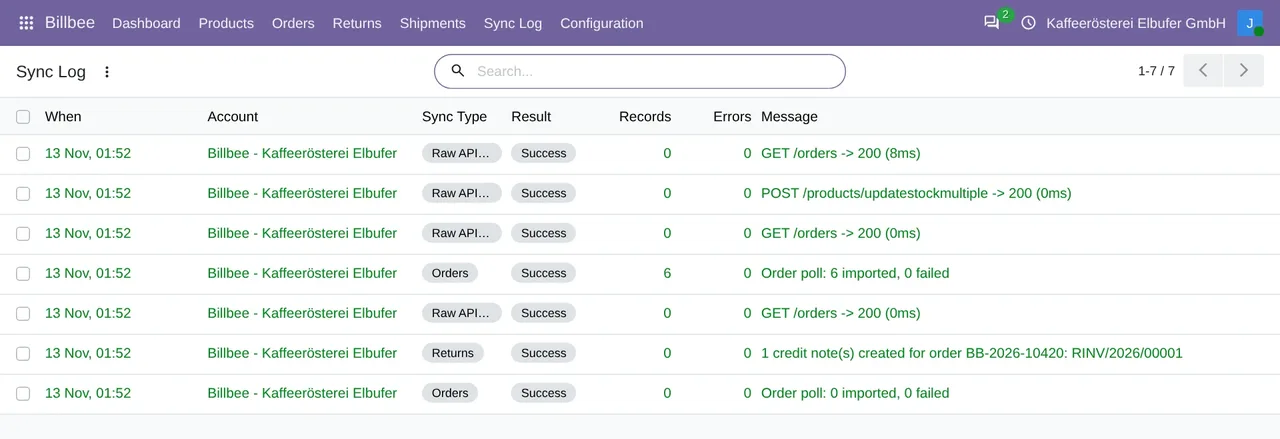
Billbee › Sync Log: the calls to Billbee, with their result.We tested it with a Billbee account
On 17-11-2026 we tested it with a Billbee merchant test account: Odoo sent a stock of 7 for the linked product and, read back in Billbee afterwards, it was 7.
What it does not do
It does not create products in Billbee. They are created there and linked in Odoo in Billbee › Products: by hand, or on their own when an order brings a SKU equal to a product's internal reference. A product that is not linked sends no stock.
The units taken off come from imported orders: how they arrive is in Billbee orders in Odoo.
Questions about Billbee stock in Odoo
Does Odoo take off the Billbee orders I have not confirmed yet?
Yes. The units of a Billbee order that came into Odoo as a quotation, and that Billbee still has to ship, come off the number that is sent.
What if I change the stock by hand in Billbee?
Odoo does not correct it on its own. The six-hourly comparison writes the difference in the log, and Odoo sends its number again when the stock changes in Odoo or when an administrator pushes it.
How much does it cost?
The module costs €9 per Odoo version on Odoo Apps. It runs with FlexigoTech Cloud, from €49/month: Connector plan Standard at €49/month or €490/year, or Pro at €98/month or €980/year, VAT excluded. The trial is 14 days, free and without a card. It includes 2 months of support to get it running and, while you stay subscribed, updates and support, as the terms of sale 2.2 say. It is all on the Billbee connector page.
Which Odoo versions does it work with?
Odoo 17, 18, 19 and 20, on Odoo.sh or on your own server. It does not work on Odoo Online. Your Billbee account, with its username and an API password, and its plan are separate.
Keep reading
Checked in the connector's source code (version 20.0) and the linked sources
Sources
- Module source code: flexigobe_billbee_connector 20.0 (a5ae481e): data/billbee_cron_data.xml:8
- Module source code: flexigobe_billbee_connector 20.0 (a5ae481e): models/billbee_product.py:214
- Module source code: flexigobe_billbee_connector 20.0 (a5ae481e): models/billbee_api_client.py:99
- Module source code: flexigobe_billbee_connector 20.0 (a5ae481e): models/billbee_product.py:213
- Module source code: flexigobe_billbee_connector 20.0 (a5ae481e): models/billbee_product.py:237
- Module source code: flexigobe_billbee_connector 20.0 (a5ae481e): models/billbee_product.py:124
- Module source code: flexigobe_billbee_connector 20.0 (a5ae481e): models/billbee_product.py:120
- Module source code: flexigobe_billbee_connector 20.0 (a5ae481e): models/billbee_product.py:292
- Module source code: flexigobe_billbee_connector 20.0 (a5ae481e): wizard/billbee_stock_resync_wizard.py:47
- Module source code: flexigobe_billbee_connector 20.0 (a5ae481e): models/billbee_api_client.py:305
- Module source code: flexigobe_billbee_connector 20.0 (a5ae481e): models/billbee_product.py:385
- Module source code: flexigobe_billbee_connector 20.0 (a5ae481e): security/ir.access.csv:6
- Module source code: flexigobe_billbee_connector 20.0 (a5ae481e): models/billbee_api_client.py:265
- Module source code: flexigobe_billbee_connector 20.0 (a5ae481e): models/billbee_sync_log.py:76
- www.billbee.io/loesungen/bestandsverwaltung
- FlexigoTech real test with a Billbee test account (17 and 18-11-2026)
- flexigotech.com/en/billbee-connector-odoo.html
- flexigotech.com/en/condiciones-contratacion.html
- www.billbee.io/
- www.billbee.io/en