

 Español
 Català
 Deutsch
 Français
 Português
 Italiano
 Nederlands
 Polski
The company in this case and what it wants
Example Illustrative case: the company and its figures are made up to explain the flow.
Distribuciones Kessel SRL is a made-up company that sells office supplies to other businesses in Belgium and invoices from Odoo 18. It has just installed Belgium Peppol B2B E-Invoicing Compliance and wants to send its invoices over Peppol while keeping track of what has gone out, what has arrived and what has failed. Its finance lead, Marta, spends the first week getting everything in order. What follows is what she does and what she sees in each list.
Day one: the company's compliance profile
Marta starts in Compliance Profiles, under Invoicing. In the animation further down, with demo data, you can see a profile for the company Acme Belgium SPRL with its Peppol ID, the status Completed, the mode Test / SMK and the outbound box ticked.
Among the statuses the module defines there is a state field with the values Draft, In Progress and Completed. The module also has per-step status fields, from step_1_state to step_7_state, and each can be Not Started, In Progress or Completed. Marta notes these names so she recognises them when they appear, and she doesn't consider the setup finished while any step shows Not Started or In Progress.
Day two: customers' Peppol IDs
Before sending anything, Marta checks who she is sending to. The module stores a peppol_id_status with these values: Not Yet Resolved, Resolved, Not Found, Non-Belgian Scheme and Lookup Failed. There is also an inbound_endpoint_status with Unknown, Resolvable and Not Resolvable.
Her rule is simple: customers in Resolved go ahead; those showing Not Found, Lookup Failed or Non-Belgian Scheme she reviews one by one before invoicing them over Peppol, and those still in Not Yet Resolved she leaves pending. The labels are the module's own wording and are best read as they are, without mentally swapping them for something else.
Day three: validation rules before the first invoice
Under Invoicing › Belgium Peppol › Validation Rules Marta finds the list of rules. The columns are Rule Name, Rule Code, Severity, FR Reference and Active. In the list almost all of them block transmission and one is only a warning, so she knows which rules will stop an invoice and which will just flag it.
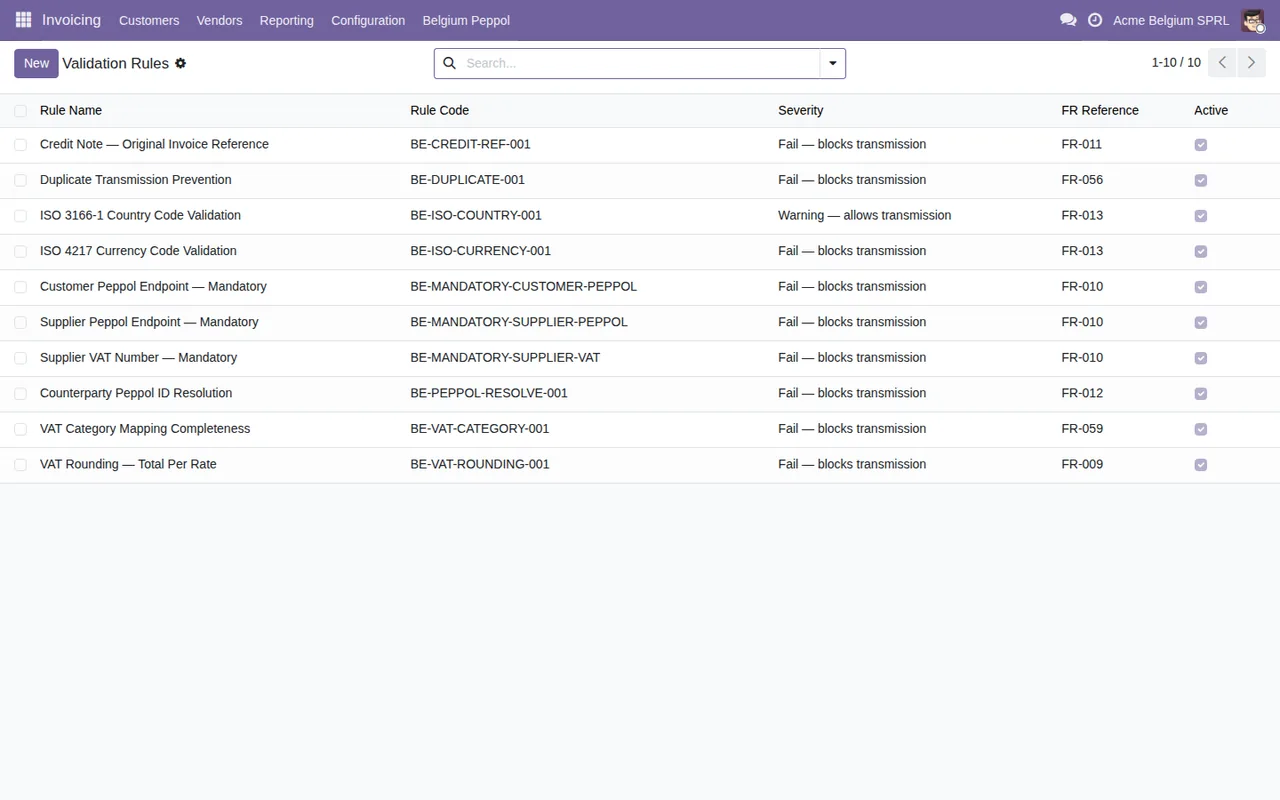
She doesn't touch the Active column without knowing what each rule does. If an invoice doesn't pass, the exact wording of the message is explained in the module's error messages and warnings.
The first week: reading the Transmission Log
Once the first invoices are out, the list Marta opens every morning is Transmission Log. There she sees the invoice reference, the direction, the recipient's Peppol ID, the transmission date and the status.
The status field can take these values: Draft / Validation, Sent, Delivered, Acknowledged, Failed, Received and Manual. There is also a transmission_status with Sent, Delivered and Failed. Marta's routine in the first week:
- Filter by
Failedand don't close the day with any left unchecked. - Review those still in
Draft / Validation. - Open the ones in
Manualand check each of them. - Check that incoming documents show as
Received.
Other statuses Marta learns to recognise
The module uses two more sets of statuses. One with New, Acknowledged, Resolved and Dismissed, and another with Open, Resolved and Past Deadline. The rule Marta sets herself is to leave nothing in New by the end of the week and to treat any Past Deadline as a priority.
She also finds a record with the fields company_id (Company), field_name (Field Name), old_value (Old Value), new_value (New Value), user_id (User), timestamp (Timestamp) and notes (Notes). Marta keeps the column names in mind so she can read them when she needs to, and she uses Notes to leave her comments.
Archive and evidence packs
In Archive Scans each record shows the scan date, the result Pass or Fail, the total number of files and columns for missing and altered files. Marta looks out for any Fail and for those last two columns.
Under Invoicing › Evidence Packs is the list of evidence packs, with the New button and the Pack Name column.
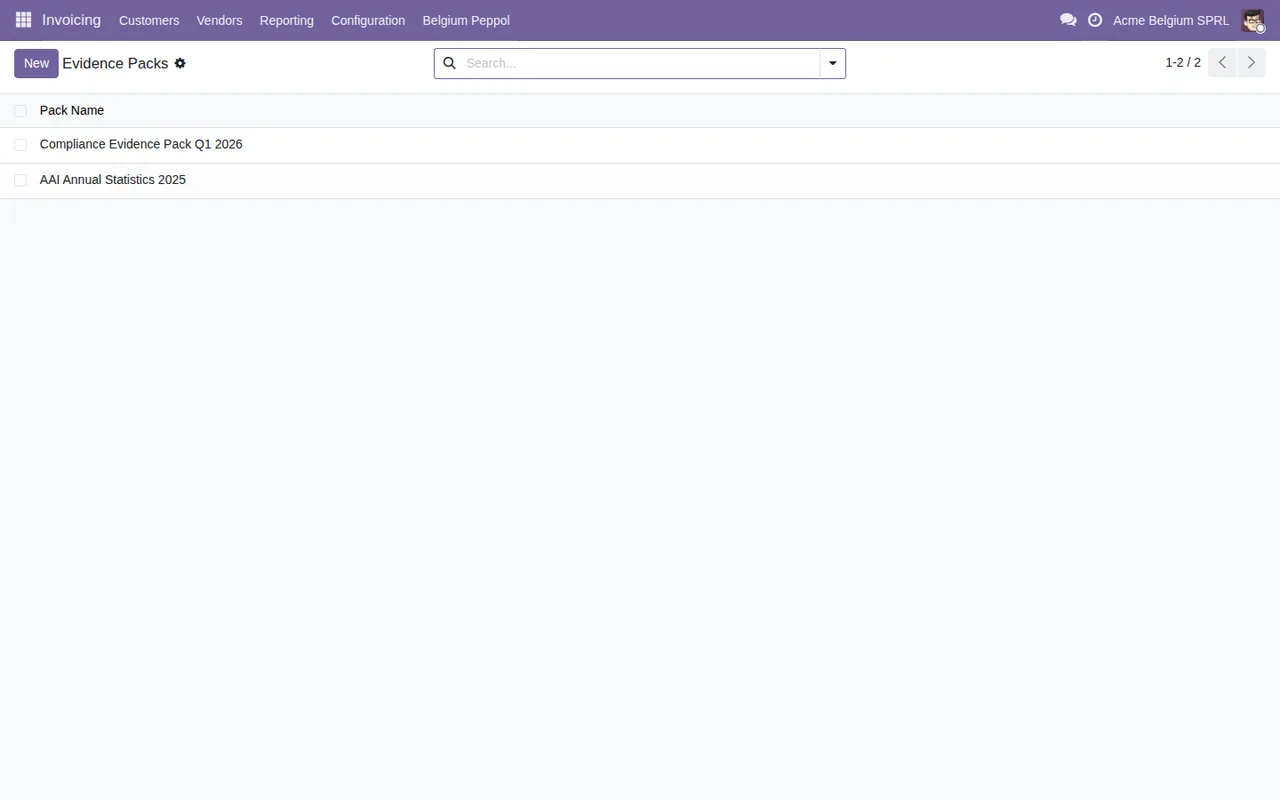
The module defines the statuses Draft, Generating, Done and Error for one state field, and Draft, Running, Done and Partial Success for another. Marta doesn't treat anything in Error or Partial Success as finished.
The 2028 Readiness list
Finally she opens Invoicing › 2028 Readiness. It is a list with a code, a title, a readiness status, a type and an owner. The readiness status takes the values Ready, Partial and Gap.
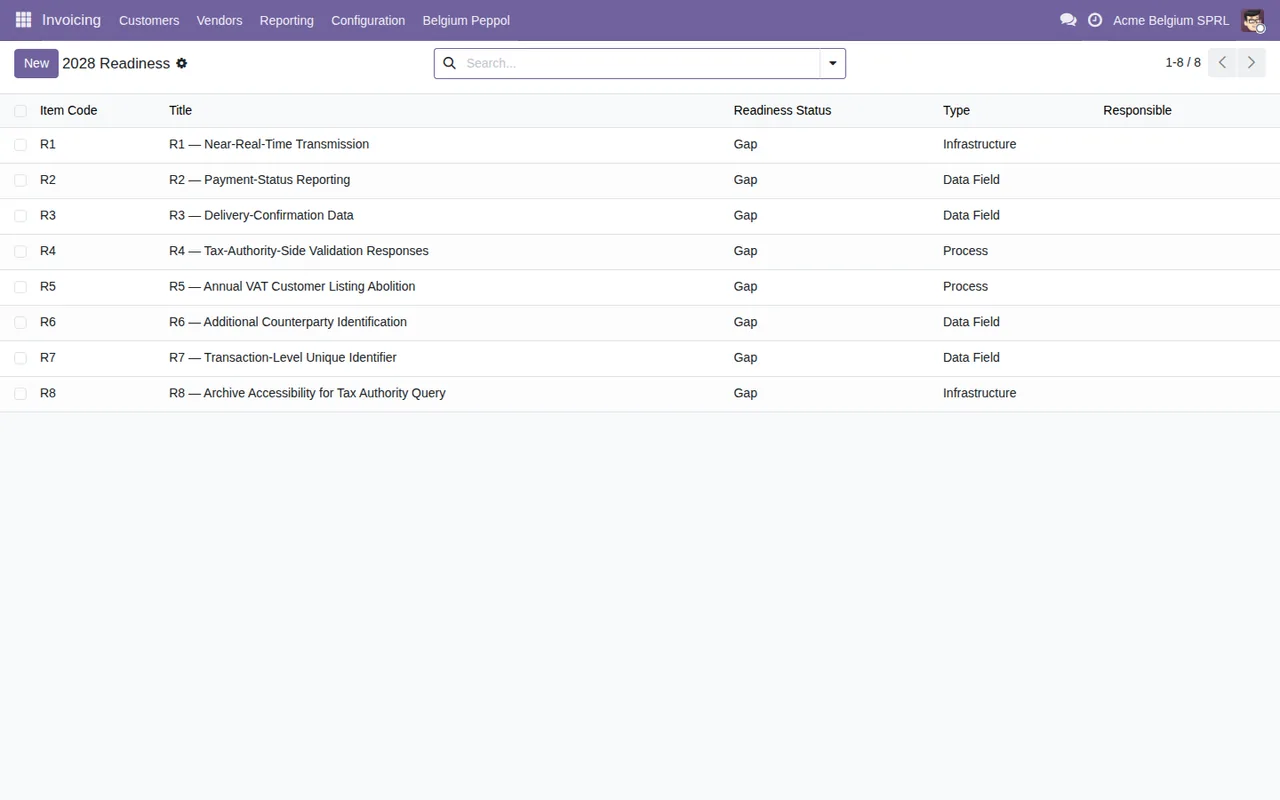
The first thing she does is give each item an owner, because the list shows them empty.
What to take from the case
- Review the compliance profile before anything else and learn the per-step statuses.
- Check customers'
peppol_id_statusbefore sending, not afterwards. - Read the validation rules so you know which block and which only warns.
- In the first week, the
Transmission Logfiltered byFailedis your daily list. - Assign owners in
2028 Readinessfrom day one.
If you want to see how menus and records fit together under the bonnet, read how the module works in Odoo.
How FlexigoTech can help
FlexigoTech implements Odoo 17, 18, 19 and 20 and builds bespoke connectors and integrations, so we can support you through this setup or adapt the flow to your business. On Odoo Apps, the module costs €9 per Odoo version (17, 18, 19 and 20), one-off and excluding VAT; each Odoo version is bought there separately. The local service costs €29/month or €290/year excluding VAT (Pro: €58/month or €580/year), and with the subscription the module for new Odoo versions is included if you bought it on flexigotech.com. Without a subscription, or with the service suspended, whatever the subscription provides stops, but your data stays in your Odoo; you'll find the details on the module page and on the Odoo Apps listing.
Keep reading
Checked in the module's source code (version 20.0) and the linked sources
Sources
- Module source code: flexigo_belgium_peppol_b2b_e_invoicing_compliance_wizar 20.0 (8c3e3f48): models/be_peppol_configuration_snapshot.py
- Module source code: flexigo_belgium_peppol_b2b_e_invoicing_compliance_wizar 20.0 (8c3e3f48): models/be_peppol_alert.py
- Module source code: flexigo_belgium_peppol_b2b_e_invoicing_compliance_wizar 20.0 (8c3e3f48): models/be_peppol_compliance_profile.py
- Module source code: flexigo_belgium_peppol_b2b_e_invoicing_compliance_wizar 20.0 (8c3e3f48): models/be_peppol_evidence_pack.py
- Module source code: flexigo_belgium_peppol_b2b_e_invoicing_compliance_wizar 20.0 (8c3e3f48): models/be_peppol_fallback_entry.py
- Module source code: flexigo_belgium_peppol_b2b_e_invoicing_compliance_wizar 20.0 (8c3e3f48): models/be_peppol_readiness_item.py
- Module source code: flexigo_belgium_peppol_b2b_e_invoicing_compliance_wizar 20.0 (8c3e3f48): models/be_peppol_transmission_log.py
- Module source code: flexigo_belgium_peppol_b2b_e_invoicing_compliance_wizar 20.0 (8c3e3f48): wizard/be_peppol_batch_evidence_wizard.py
- Module source code: flexigo_belgium_peppol_b2b_e_invoicing_compliance_wizar 20.0 (8c3e3f48): wizard/be_peppol_historical_import_wizard.py
- Module source code: flexigo_belgium_peppol_b2b_e_invoicing_compliance_wizar 20.0 (8c3e3f48): wizard/be_peppol_setup_wizard.py
- apps.odoo.com/apps/modules/20.0/flexigo_belgium_peppol_b2b_e_invoicing_compliance_wizar
- apps.odoo.com/apps/modules/17.0/flexigo_belgium_peppol_b2b_e_invoicing_compliance_wizar
- apps.odoo.com/apps/modules/18.0/flexigo_belgium_peppol_b2b_e_invoicing_compliance_wizar
- apps.odoo.com/apps/modules/19.0/flexigo_belgium_peppol_b2b_e_invoicing_compliance_wizar
- flexigotech.com/en/services.html
- flexigotech.com/precios.html