

 Español
 Català
 Deutsch
 Français
 Português
 Italiano
 Nederlands
 Polski
Everything sits under Invoicing › Belgium Peppol
The module adds its own menu inside Invoicing, Invoicing › Belgium Peppol, and every screen it brings lives there. The full tree is:
Invoicing › Belgium Peppol › DashboardInvoicing › Belgium Peppol › Configuration, withCompliance Profiles,Access Points,Validation RulesandVAT Category MappingsInvoicing › Belgium Peppol › Logs & Audit, withTransmission Log,Archive Scans,Alerts,Evidence Packs,Batch Evidence PacksandFallback EntriesInvoicing › Belgium Peppol › 2028 Readiness
The first configuration screen you will open is the profiles list. The screenshot shows it with a single demo profile.
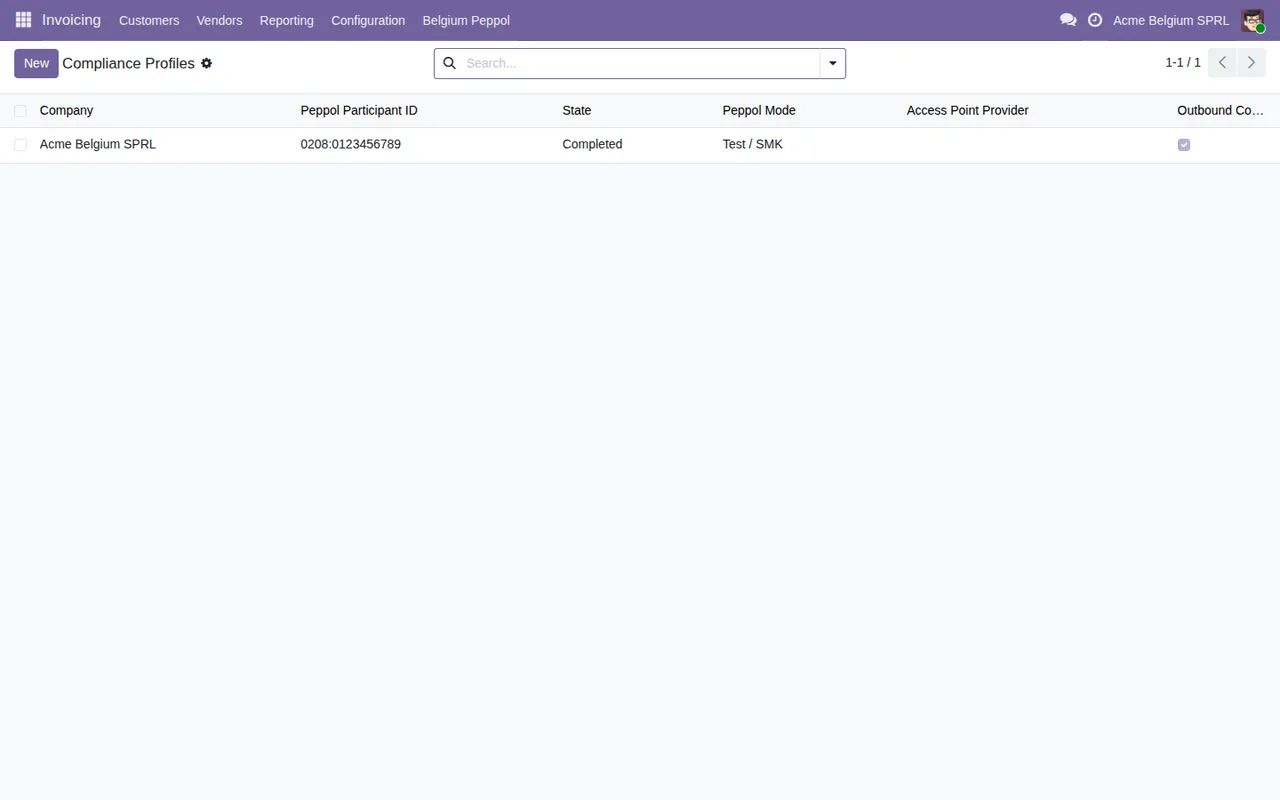
Compliance Profiles with a single demo profile (Acme Belgium SPRL), in Completed status and Test / SMK mode.Configuration, audit and 2028 readiness, compared
The screens fall into three areas. The table sets them side by side with the module's data models that share the same name, which helps if you plan to export data, check records in developer mode or commission custom work on top.
| Menu area | Screens | Models with the same name |
|---|---|---|
Configuration | Compliance Profiles, Access Points, Validation Rules, VAT Category Mappings | be.peppol.compliance.profile, be.peppol.access.point, be.peppol.validation.rule, be.peppol.vat.category.mapping |
Logs & Audit | Transmission Log, Archive Scans, Alerts, Evidence Packs, Batch Evidence Packs, Fallback Entries | be.peppol.transmission.log, be.peppol.archive.scan, be.peppol.alert, be.peppol.evidence.pack, be.peppol.fallback.entry |
2028 Readiness | 2028 Readiness | be.peppol.readiness.item |
How to read it: Configuration holds the settings records. Their descriptions make this clear: Belgium Peppol Compliance Profile for the profile, Peppol Access Point Provider for the Peppol access point provider, Belgium Peppol Validation Rule for the rules and VAT to Peppol Category Mapping for matching VAT to a Peppol category.
Logs & Audit holds what leaves a trail: Peppol Transmission Log Entry (each entry in the transmission log), Archive Integrity Scan Result (archive integrity scan results), Compliance Alert, Compliance Evidence Pack and Fallback Transmission Entry. The Batch Evidence Packs screen sits here too.
The 2028 Readiness menu matches by name with E-Reporting Readiness Item, readiness items for e-reporting.
The models that are not in the table
There is one more model worth knowing: be.peppol.configuration.snapshot, described as Configuration Snapshot (Append-Only Audit Trail). Going by its name, it is a history of configuration snapshots that records are only ever added to.
There are also reports:
report.be_peppol_evidence_pack.report_evidence_pack:Evidence Pack PDF Report(only in Odoo 19 and 20)report.be_peppol_readiness.report_readiness:2028 Readiness Report PDFreport.be_peppol_annual_stats.report_annual_stats:Annual Authority Information Statistics Report(only in Odoo 19 and 20)
The first two have «PDF» in their names.
The four scheduled actions, side by side
| Action | How often | Active |
|---|---|---|
Belgium Peppol: Archive Integrity Scan | every 7 days | yes |
Belgium Peppol: Annual AAI Statistics Report | every month | yes |
Belgium Peppol: Monthly Compliance Digest | every month | yes |
Belgium Peppol: Fallback Deadline Alert | every day | yes |
How to read it: all four come flagged as active. The archive integrity scan runs every 7 days; the AAI statistics report and the compliance digest, once a month; the fallback deadline alert, daily. Note that Annual AAI Statistics Report has «Annual» in its name yet its configured frequency is monthly.
Next to the weekly action you have the Archive Scans menu and the Archive Integrity Scan Result model; next to the daily one, the Fallback Entries menu and the Fallback Transmission Entry model.
What you see for each transmitted invoice
Transmission Log is the list of entries in the be.peppol.transmission.log model. In the screenshot, with demo data, each line shows the invoice reference, the direction, the recipient's Peppol ID, the transmission date, the status and the company.
This is how the log and configuration screens follow on from one another:
Archive Scans, with scan date, Pass or Fail result, total files and columns for missing and altered files (demo data).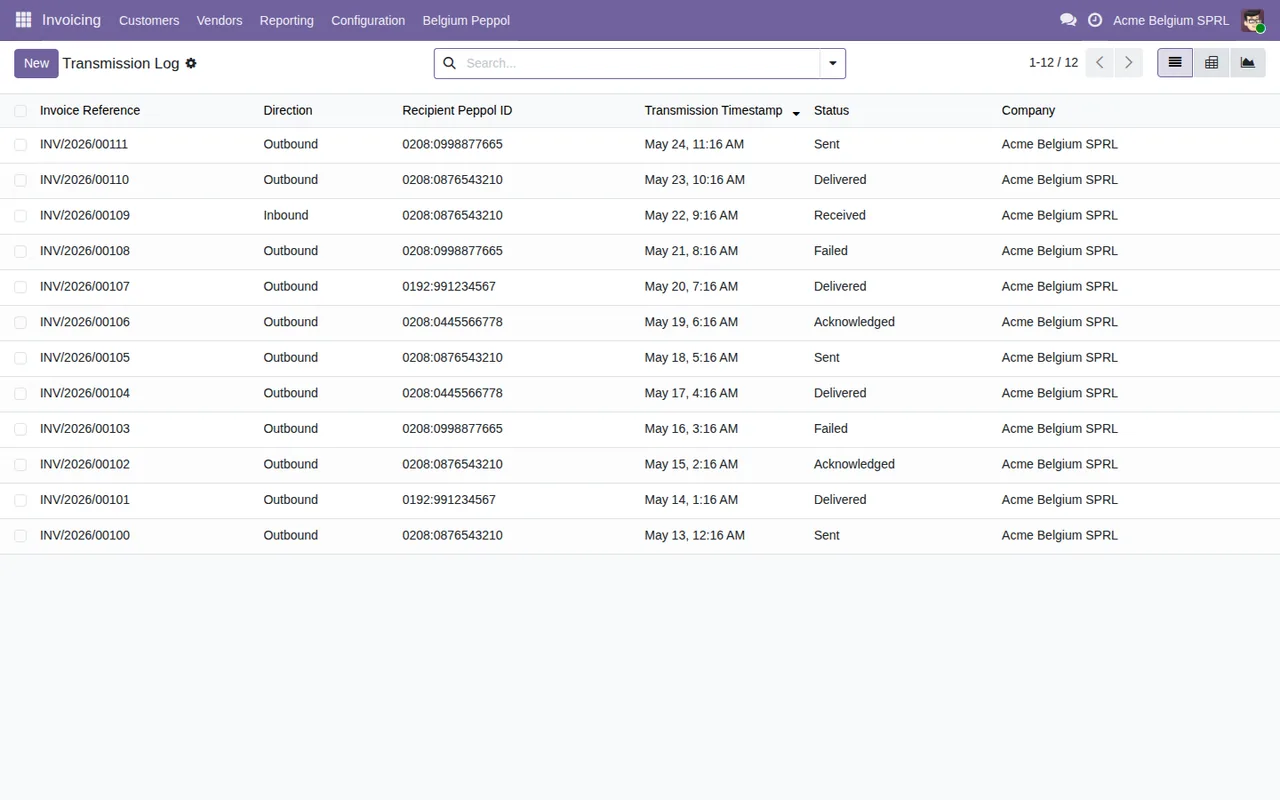
If a line ends up as Failed, the article on the module's error messages and warnings lists the literal texts and what to do about each one. For the fields to fill in and what to check in the first few days, see the step-by-step setup.
Which part relies on the FlexigoTech Cloud service
The Odoo Apps listing flags it with its own heading: Before you buy: some features of this app use a paid external service. The module works with a local FlexigoTech Cloud service.
The module costs €9 per Odoo version on Odoo Apps, a one-off payment excluding VAT, for 17, 18, 19 and 20. The service costs €29/month or €290/year excluding VAT (Pro: €58/month or €580/year).
Without a subscription, or with the service suspended, whatever the subscription provides stops, and your data stays in your Odoo. With the subscription, the module for new Odoo versions is included if you bought it on flexigotech.com; on the Odoo App Store, each version is bought there (Odoo Apps listing).
How we can help
At FlexigoTech we implement Odoo 17, 18, 19 and 20 and build custom connectors and integrations. If you need the profiles, validation rules or VAT mappings adjusted to your case, or want a report or an integration built on top of these models, tell us what you have via the module page.
Keep reading
Checked in the module's source code (version 20.0) and the linked sources
Sources
- Module source code: flexigo_belgium_peppol_b2b_e_invoicing_compliance_wizar 20.0 (8c3e3f48): views/be_peppol_menus.xml
- Module source code: flexigo_belgium_peppol_b2b_e_invoicing_compliance_wizar 20.0 (8c3e3f48): data/be_peppol_cron.xml
- Module source code: flexigo_belgium_peppol_b2b_e_invoicing_compliance_wizar 20.0 (8c3e3f48): static/description/index.html
- Module source code: flexigo_belgium_peppol_b2b_e_invoicing_compliance_wizar 20.0 (8c3e3f48): models/be_peppol_access_point.py
- Module source code: flexigo_belgium_peppol_b2b_e_invoicing_compliance_wizar 20.0 (8c3e3f48): models/be_peppol_alert.py
- Module source code: flexigo_belgium_peppol_b2b_e_invoicing_compliance_wizar 20.0 (8c3e3f48): models/be_peppol_archive_scan.py
- Module source code: flexigo_belgium_peppol_b2b_e_invoicing_compliance_wizar 20.0 (8c3e3f48): models/be_peppol_compliance_profile.py
- Module source code: flexigo_belgium_peppol_b2b_e_invoicing_compliance_wizar 20.0 (8c3e3f48): models/be_peppol_configuration_snapshot.py
- Module source code: flexigo_belgium_peppol_b2b_e_invoicing_compliance_wizar 20.0 (8c3e3f48): models/be_peppol_evidence_pack.py
- Module source code: flexigo_belgium_peppol_b2b_e_invoicing_compliance_wizar 20.0 (8c3e3f48): models/be_peppol_fallback_entry.py
- Module source code: flexigo_belgium_peppol_b2b_e_invoicing_compliance_wizar 20.0 (8c3e3f48): models/be_peppol_readiness_item.py
- Module source code: flexigo_belgium_peppol_b2b_e_invoicing_compliance_wizar 20.0 (8c3e3f48): models/be_peppol_transmission_log.py
- Module source code: flexigo_belgium_peppol_b2b_e_invoicing_compliance_wizar 20.0 (8c3e3f48): models/be_peppol_validation_rule.py
- Module source code: flexigo_belgium_peppol_b2b_e_invoicing_compliance_wizar 20.0 (8c3e3f48): models/be_peppol_vat_category_mapping.py
- Module source code: flexigo_belgium_peppol_b2b_e_invoicing_compliance_wizar 20.0 (8c3e3f48): report/be_peppol_report.py
- apps.odoo.com/apps/modules/20.0/flexigo_belgium_peppol_b2b_e_invoicing_compliance_wizar
- apps.odoo.com/apps/modules/17.0/flexigo_belgium_peppol_b2b_e_invoicing_compliance_wizar
- apps.odoo.com/apps/modules/18.0/flexigo_belgium_peppol_b2b_e_invoicing_compliance_wizar
- apps.odoo.com/apps/modules/19.0/flexigo_belgium_peppol_b2b_e_invoicing_compliance_wizar
- flexigotech.com/en/services.html
- flexigotech.com/precios.html