

 Español
 Català
 Deutsch
 Français
 Português
 Italiano
 Nederlands
 Polski
The VSME menu, entry by entry
Once the module is installed, the VSME root menu holds the app's screens. These are its main entries:
VSME › ESG DashboardVSME › Reporting PeriodsVSME › DisclosuresVSME › QuestionnairesVSME › Inbound RequestsVSME › ConfigurationVSME › Audit Log
The order of this list is the menu structure, not a working order. To find your way the first time you open the app, what helps is knowing where each thing lives and what it is called. If you are after the settings and fields to fill in on each screen, see getting VSME up and running.
Questionnaires and inbound requests
VSME › Questionnaires splits into two submenus: VSME › Questionnaires › Templates and VSME › Questionnaires › Responses. Alongside it, with its own entry in the root menu, sits VSME › Inbound Requests. The module listing on Odoo Apps gives each of these two blocks (Questionnaires and Inbound Requests) its own section within its key features.
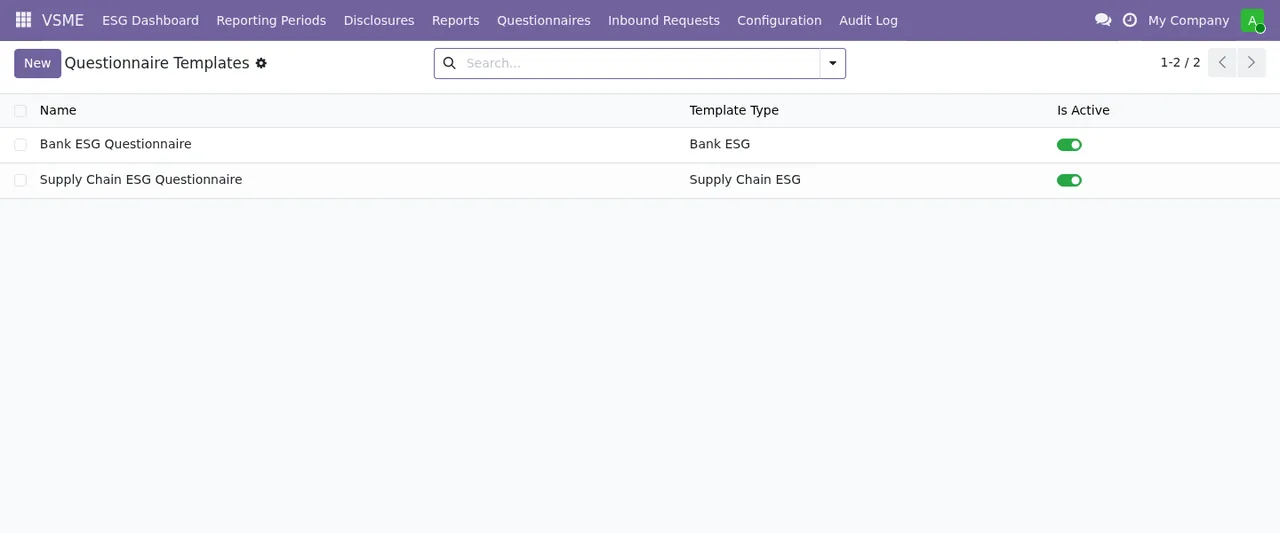
Questionnaire Templates list with two templates, their template type and the Is Active toggle switched on, plus the New button and the search bar.The screenshot shows the template list view: each row is a template with its type and its Is Active toggle, with the New button and the search bar at the top. Responses have their own submenu, Responses, kept apart from the templates.
Configuration: the reference data
VSME › Configuration brings together five lists:
VSME › Configuration › CampaignsVSME › Configuration › Emission FactorsVSME › Configuration › BenchmarksVSME › Configuration › Taxonomy ConfigVSME › Configuration › Thresholds
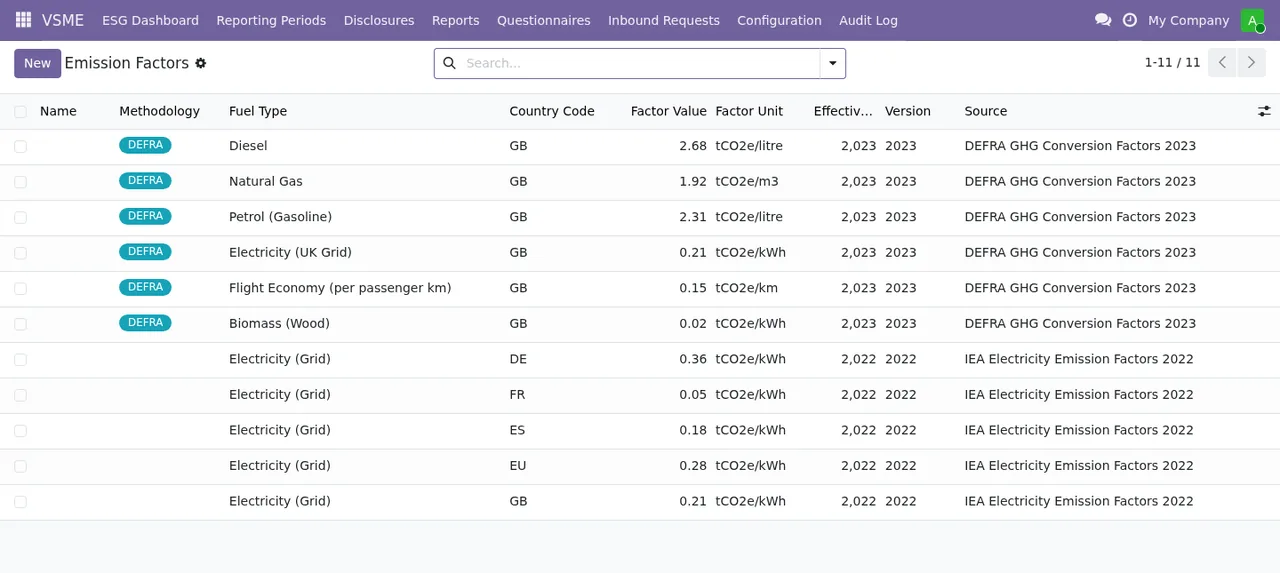
Emission Factors list: each row carries methodology, fuel type, country, value, unit, effective year, version and source (DEFRA, IEA).The Emission Factors screenshot shows which columns each factor has: methodology, fuel type, country, value, unit, effective year, version and source.
Wizards and privacy within configuration
Four further entries hang off VSME › Configuration:
Setup WizardImport DataGDPR Erasure (Art. 17)GDPR DSAR (Art. 15)
The names of the last two refer to articles of the GDPR. The module listing has a GDPR & Privacy section and a Legal and Regulatory Basis section.
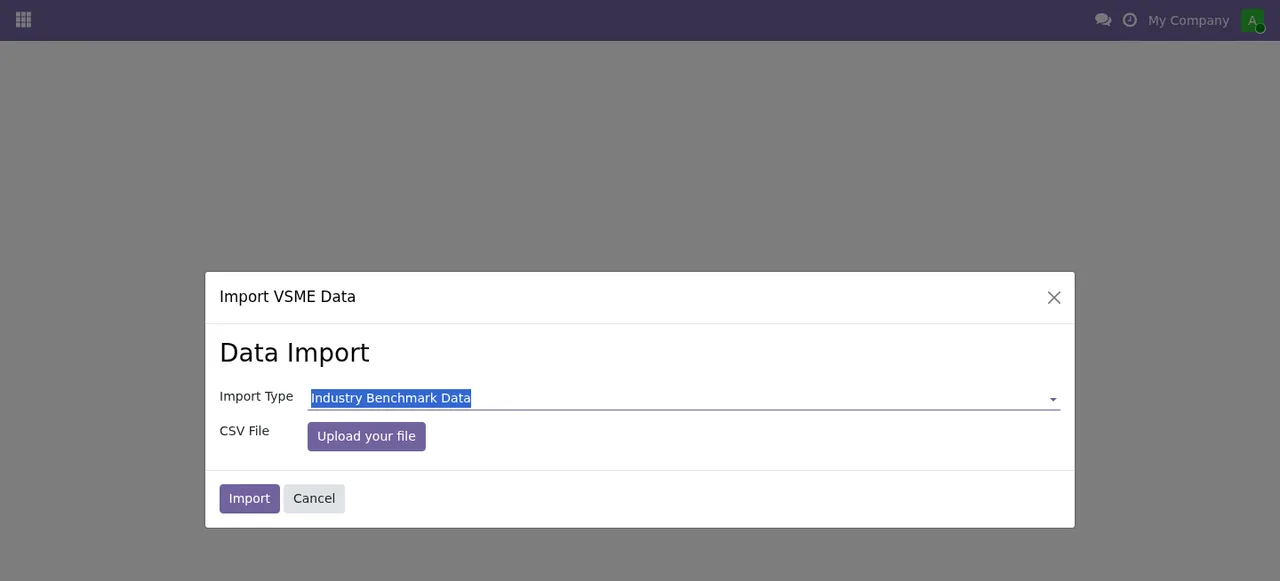
Import VSME Data dialogue, titled Data Import, with the type Industry Benchmark Data, the CSV File field with Upload your file and the Import and Cancel buttons.In the import dialogue you see the Import Type selector, the CSV File field with its Upload your file button, and the Import and Cancel buttons.
Timeline of the scheduled tasks
The module ships three scheduled tasks, all with the VSME prefix in their name. From most to least frequent:
- Starting point All three tasks are listed as active.
- Every day
Send Data Owner Remindersruns.
- Every week
Data Quality Checksruns.
- Every month
Auto-create Annual Reporting Periodsruns.
If you want to know which warning texts the module shows, the article on VSME error messages and warnings collects the literal texts and what to do about each one.
Where you see each type of record
Reporting periods have their list in VSME › Reporting Periods. Disclosures are in VSME › Disclosures, questionnaire responses in VSME › Questionnaires › Responses and requests you receive in VSME › Inbound Requests. The module also has a VSME › Audit Log menu. What to fill in on each screen is covered in getting started.
Import VSME Data dialogue to the Emission Factors, questionnaire template and Taxonomy Configuration lists, the last one with a single record carrying an EFRAG URL, marked as included and active.How the Odoo Apps listing is organised
The listing is titled VSME Voluntary Sustainability Reporting and groups its Key Features into these blocks:
Data CollectionReporting & ExportQuestionnairesInbound RequestsGDPR & PrivacyMulti-Company & Config
After those come the VSME Disclosure Groups Covered, Getting Started, Screenshots, Legal and Regulatory Basis, Support and Contact and Support included sections. If you want to compare what you have seen in the menus with what each block describes, the Odoo Apps listing is the place.
Versions and price
The module is published on Odoo Apps for Odoo 17.0, 18.0 and 19.0, and the listing for each of those three versions shows €39 excluding VAT, a one-off payment per version (checked in November 2026).
How FlexigoTech can help
At FlexigoTech we implement Odoo and build bespoke connectors and integrations. If you want VSME working inside your implementation, or you need the data that feeds it to come in from another system, you will find more information on the module page.
Keep reading
Checked in the module's source code (version 19.0) and the linked sources
Sources
- Module source code: flexigo_vsme_voluntary_sustainability_reporting_for_sme 19.0 (18bc0d83): views/menu.xml
- Module source code: flexigo_vsme_voluntary_sustainability_reporting_for_sme 19.0 (18bc0d83): wizard/wizard_views.xml
- Module source code: flexigo_vsme_voluntary_sustainability_reporting_for_sme 19.0 (18bc0d83): data/cron_jobs.xml
- Module source code: flexigo_vsme_voluntary_sustainability_reporting_for_sme 19.0 (18bc0d83): static/description/index.html
- apps.odoo.com/apps/modules/19.0/flexigo_vsme_voluntary_sustainability_reporting_for_sme
- apps.odoo.com/apps/modules/17.0/flexigo_vsme_voluntary_sustainability_reporting_for_sme
- apps.odoo.com/apps/modules/18.0/flexigo_vsme_voluntary_sustainability_reporting_for_sme
- flexigotech.com/en/services.html