

 Español
 Català
 Deutsch
 Français
 Português
 Italiano
 Nederlands
 Polski
What the module does, in one line
Before getting into menus and models, it helps to pin down the idea the module itself is presented with. Everything else in this glossary builds on it.
snapshot- A point-in-time copy of data. On its Odoo Apps listing the module is headed «Export Odoo snapshots to Snowflake»: exporting Odoo snapshots to Snowflake.
With that settled, what you need in order to run it is where its screens are, which scheduled action it has and what the records it stores are called. The full description is on the Odoo Apps listing.
Where to find it: the menu under Settings
The module's menus sit under Settings, not in an app on the main menu. There are three entries, and these are their names exactly as they appear on screen.
Settings › Snowflake Export- Menu entry the module adds under Settings. The other two hang from it.
Configurations- Submenu at
Settings › Snowflake Export › Configurations. This holds the Snowflake export configurations. The list shows the name, company, account, database, schema, theActivecheckbox and theLast Synccolumn.
Sync Logs- Submenu at
Settings › Snowflake Export › Sync Logs. It carries the same sync log name as theflexigo.snowflake.sync.logmodel, covered further down.
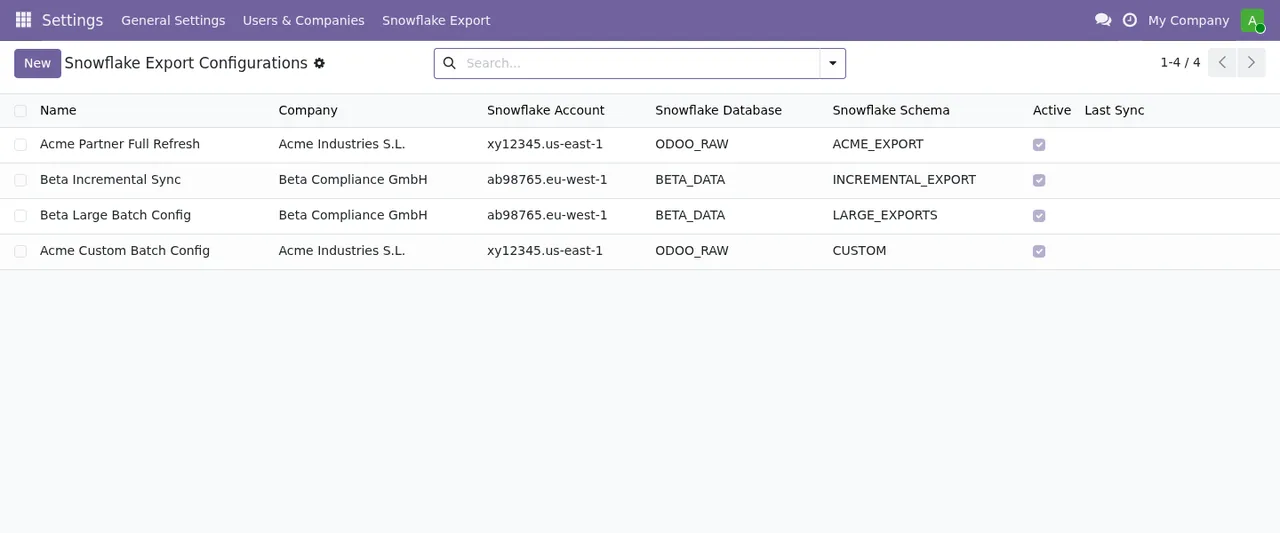
Active checkbox ticked; the Last Sync column is empty.In this list, each row is one configuration with its own company, account, database and Snowflake schema. The New button and the search bar sit at the top, as in any Odoo list. In the screenshot, the Last Sync column has no dates yet.
The scheduled action and how often it runs
The module ships with a single scheduled action. If you administer Odoo, this is the one to look for when you review scheduled actions.
Snowflake Export: Sync Active Configurations- The module's scheduled action. It runs every 15 minutes and is active by default.
Its name refers to syncing active configurations, and the configurations list has an Active checkbox on each record. What you can rely on is the frequency: every 15 minutes, for as long as the action stays active.
The models underneath
If you are a consultant, or you are going to work on access rights, reports or imports, the technical names are worth knowing. These are the module's models with their literal descriptions.
flexigo.snowflake.config- Snowflake Snapshot Export Configuration. The model behind the export configurations you see under
Configurations.
flexigo.snowflake.model.line- Snowflake Export Model Line. Model lines: in their list each row shows the configuration it belongs to, the Odoo model name, the table and the sync mode.
flexigo.snowflake.field.line- Snowflake Export Field Line. Field lines: their list shows the model, the field name, the type, whether it is included, the column and the Snowflake data type.
flexigo.snowflake.sync.log- Snowflake Export Sync Log. The export's sync log.
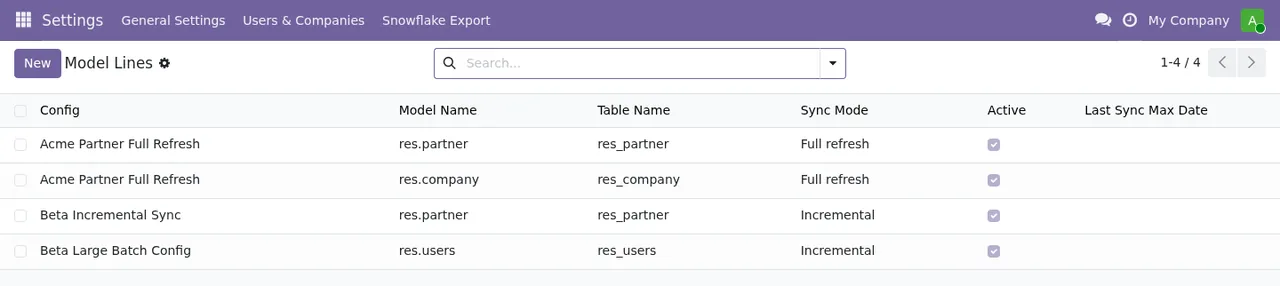
Full refresh or Incremental mode and the Active checkbox ticked; the last sync date is empty.What a record goes through, from configuration to columns
Reading the lists in order shows how the pieces fit. At the top is the configuration, with its company, account, database and schema. Below it, each model line points to a configuration and states which Odoo model goes to which table, and with which sync mode. The field lines take you down to the detail: which fields of each model are included, under which column and with which Snowflake data type.
The field lines list also shows a security warning alongside the columns. If you plan to include fields from models such as res.users, res.partner or res.company, which are the ones in the screenshot, read that warning before ticking anything. If something does not add up when syncing, the article on the module's error messages and warnings lists the literal texts and what to do about each one.
The connection: FlexigoTech Cloud and the subscription
The module is a connector that goes through a FlexigoTech service. These are the two terms worth being clear about.
- FlexigoTech Cloud
- The service the connection runs through. It stores credentials encrypted, monitors the sync and emails you if it fails. If the platform changes its API, both the module and the service are adapted.
- Connector plan
- The subscription that gives access to that service. Without a subscription, or with the service suspended, whatever the subscription provides stops; your data stays in your Odoo.
The module is published on Odoo Apps for Odoo 17, 18, 19 and 20, at €9 per Odoo version on each, as a one-off payment excluding VAT; the Connector plan costs €49 a month or €490 a year, excluding VAT. With the subscription, the module for new Odoo versions is included if you bought it on flexigotech.com; on the Odoo App Store, each Odoo version is bought there.
How FlexigoTech can help
If you already run Odoo, you install and configure the module from the screens in this glossary. If you are mid-implementation or need something the connector does not cover, FlexigoTech implements Odoo 17, 18, 19 and 20 and builds bespoke connectors and integrations. Details and purchase are on the module page.
Keep reading
Checked in the connector's source code (version 20.0) and the linked sources
Sources
- Module source code: flexigo_odoo_to_snowflake_snapshot_exporter 20.0 (289554a6): views/snowflake_views.xml
- Module source code: flexigo_odoo_to_snowflake_snapshot_exporter 20.0 (289554a6): data/ir_cron.xml
- Module source code: flexigo_odoo_to_snowflake_snapshot_exporter 20.0 (289554a6): static/description/index.html
- Module source code: flexigo_odoo_to_snowflake_snapshot_exporter 20.0 (289554a6): models/config.py
- Module source code: flexigo_odoo_to_snowflake_snapshot_exporter 20.0 (289554a6): models/field_line.py
- Module source code: flexigo_odoo_to_snowflake_snapshot_exporter 20.0 (289554a6): models/model_line.py
- Module source code: flexigo_odoo_to_snowflake_snapshot_exporter 20.0 (289554a6): models/sync_log.py
- apps.odoo.com/apps/modules/20.0/flexigo_odoo_to_snowflake_snapshot_exporter
- apps.odoo.com/apps/modules/17.0/flexigo_odoo_to_snowflake_snapshot_exporter
- apps.odoo.com/apps/modules/18.0/flexigo_odoo_to_snowflake_snapshot_exporter
- apps.odoo.com/apps/modules/19.0/flexigo_odoo_to_snowflake_snapshot_exporter
- flexigotech.com/en/services.html
- flexigotech.com/precios.html