

 Español
 Català
 Deutsch
 Français
 Português
 Italiano
 Nederlands
 Polski
What you do today before the data reaches Snowflake
If you already have a Snowflake account but your day-to-day management (customers, orders, invoices, staff) lives outside Odoo, every load depends on you: pulling data from each tool, deciding which columns go in, giving them a data type and doing it again whenever something changes. We won't try to measure what that costs you. Instead, we'll look at what shifts once Odoo becomes the source and a module handles the export.
There are two parts to it. The first is Odoo as your management system, which FlexigoTech implements on versions 17, 18, 19 and 20. The second is Flexigo Odoo to Snowflake Snapshot Exporter, which exports snapshots of your Odoo data to your Snowflake account through FlexigoTech Cloud, with a subscription to that service.

What the module does once Odoo is the source
According to the module's documentation, this is what you set up and what it does:
- You configure the Snowflake connection: account, user, role, warehouse, database and schema.
- You authenticate with a password or with key-pair authentication from a filesystem PEM.
- You pick specific Odoo models and, for each one, the fields to include.
- The module infers the Snowflake data type from the Odoo field type, and you can override it field by field.
- You run full-refresh or incremental syncs, manually or every 15 minutes.
- Records are processed in batches of configurable size; the default is five thousand records.
- Each run leaves a log with its state, row counts, duration and connection time.
- Protected system models and credential-like fields are excluded by default.
Last Sync column still emptyThe case: a distributor arriving at Odoo with Snowflake already in place
Example Illustrative case: the company and its figures are made up to explain the flow.
Albera Supplies is a made-up company selling office materials. Its analytics team already queries Snowflake, but sales information reaches it from spreadsheets and an old invoicing program. Management decides to move day-to-day operations onto Odoo and keep Snowflake as the analytics warehouse.
First, get Odoo running
Albera starts with the Odoo implementation. The module exports records and fields from the Odoo models you choose, so the first step is getting customers, contacts and company data into Odoo. Until then, the connector has nothing to send.
Connecting the Snowflake account
With the FlexigoTech Cloud subscription active, the data lead creates the configuration with the Snowflake account, user, role, warehouse, database and schema. She chooses key-pair authentication with a PEM. The Snowflake key is kept encrypted.
Choosing what goes to Snowflake
She adds the models the analytics team wants to query and, in each one, ticks the fields to include. She reviews the data type the module suggests for each field and overrides a few. Protected system models and credential-like fields are already excluded by default, so she doesn't have to remember to remove them.
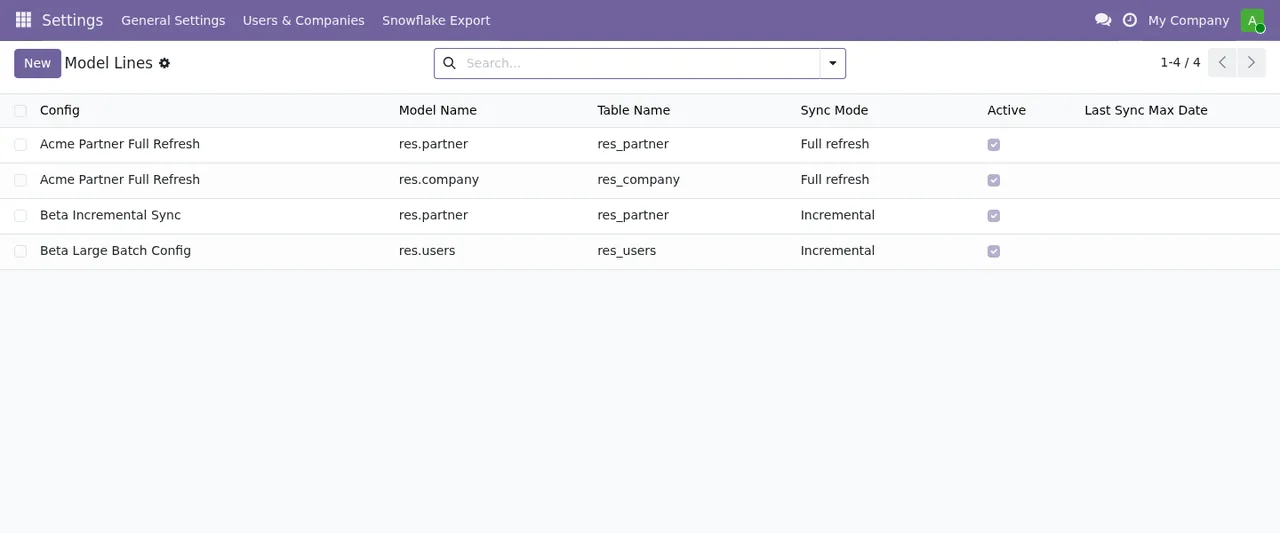
Full refresh or IncrementalThe first load and the ones after
She runs the first sync manually in full-refresh mode. Then she schedules it every 15 minutes and picks incremental mode for some models. She keeps the default batch size of five thousand records, knowing she can change it.
Reading the log for each run
Every run is logged with its state, rows, duration and connection time. If a sync fails, FlexigoTech Cloud sends an email alert. To make sense of a specific failure, Albera checks the module's error messages explained one by one.
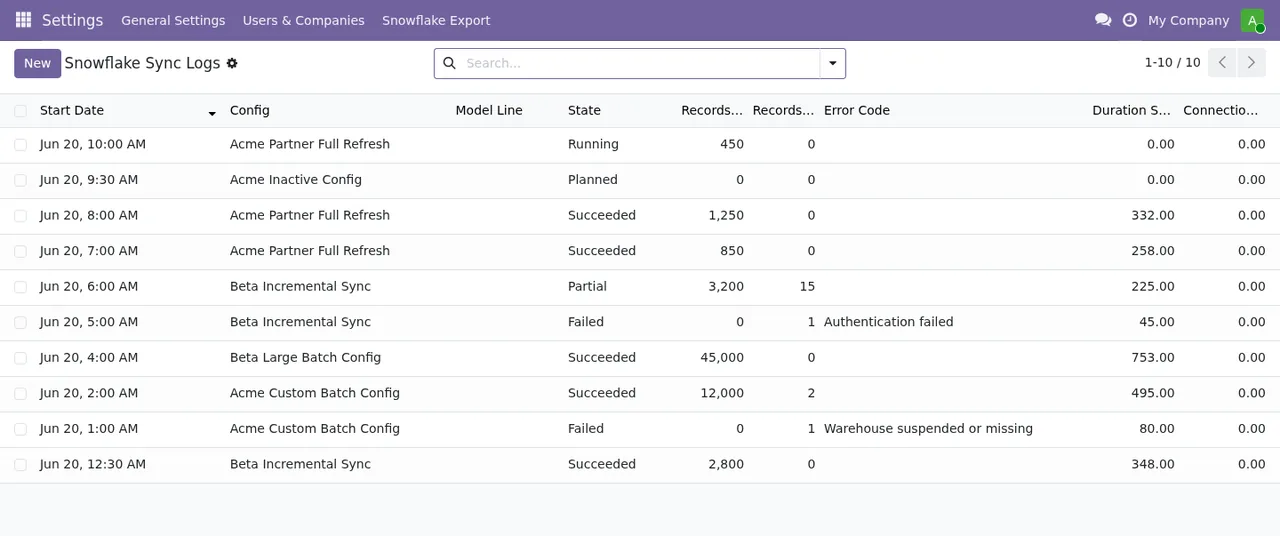
Running, Planned, Succeeded, Partial and Failed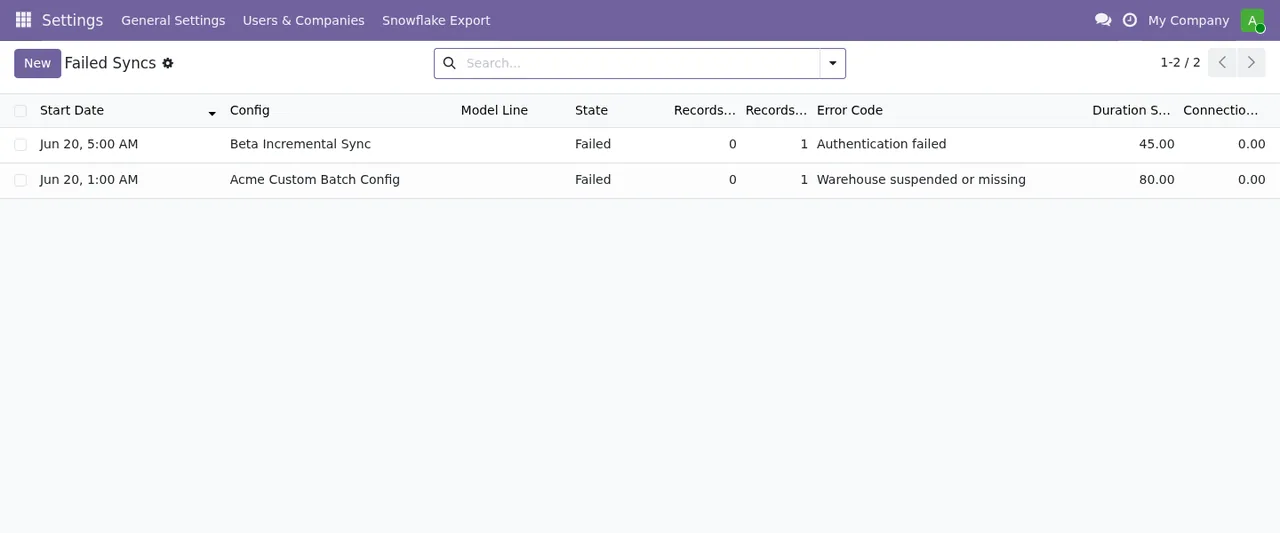
Failed Syncs list, with two failed syncs and their error codesWhat to take from the case
- Order matters: Odoo first with your data in it, then the connector.
- You decide which models and fields reach Snowflake, model by model and field by field.
- The data types the module infers are a starting point you can adjust per field.
- You can mix full and incremental loads, run manually or every 15 minutes.
- Every run leaves a trace, and if one fails you get an email alert.
If you'd like to see which menus it adds and what a record goes through inside, read how the module works in Odoo.
What data passes through FlexigoTech Cloud
Each request to Snowflake carries the snapshots you export: the records and fields of the Odoo models you choose, plus the statements that create and fill their tables in your Snowflake account. It may include personal data about your customers or employees; FlexigoTech Cloud passes it on and keeps it only for as long as needed to deliver it. Credentials are stored encrypted and, if Snowflake changes its API, both the module and the service are adapted.
Without a subscription, or with the service suspended, the export to Snowflake stops; your data stays in your Odoo.
Where to start with FlexigoTech
If you're not on Odoo yet, the first step is implementation: FlexigoTech implements Odoo 17, 18, 19 and 20 and builds bespoke connectors and integrations when you need more than the module does. Once Odoo is running, you connect the Snapshot Exporter from its page on flexigotech.com or from its Odoo Apps listing.
The module costs €9 per Odoo version, for 17, 18, 19 and 20, excluding VAT; the connection needs the Connector plan, at €49/month or €490/year excluding VAT, with up to 3 accounts (Pro: €98/month or €980/year, up to 10). With the subscription, if you buy the module on flexigotech.com, new Odoo versions are included; on the Odoo App Store, each version is bought there.
Keep reading
Checked in the connector's source code (version 20.0) and the linked sources
Sources
- Module source code: flexigo_odoo_to_snowflake_snapshot_exporter 20.0 (289554a6): README.rst
- Module source code: flexigo_odoo_to_snowflake_snapshot_exporter 20.0 (289554a6): static/description/index.html
- apps.odoo.com/apps/modules/20.0/flexigo_odoo_to_snowflake_snapshot_exporter
- apps.odoo.com/apps/modules/17.0/flexigo_odoo_to_snowflake_snapshot_exporter
- apps.odoo.com/apps/modules/18.0/flexigo_odoo_to_snowflake_snapshot_exporter
- apps.odoo.com/apps/modules/19.0/flexigo_odoo_to_snowflake_snapshot_exporter
- flexigotech.com/en/services.html
- flexigotech.com/precios.html