

 Español
 Català
 Deutsch
 Français
 Português
 Italiano
 Nederlands
 Polski
On the Mirakl Instances form, several fields decide what the Mirakl connector brings into Odoo and when. The form opens from Mirakl › Configuration › Marketplaces. The fields and their default values are those of the Odoo 20 code; the module is published for Odoo 17, 18, 19 and 20.
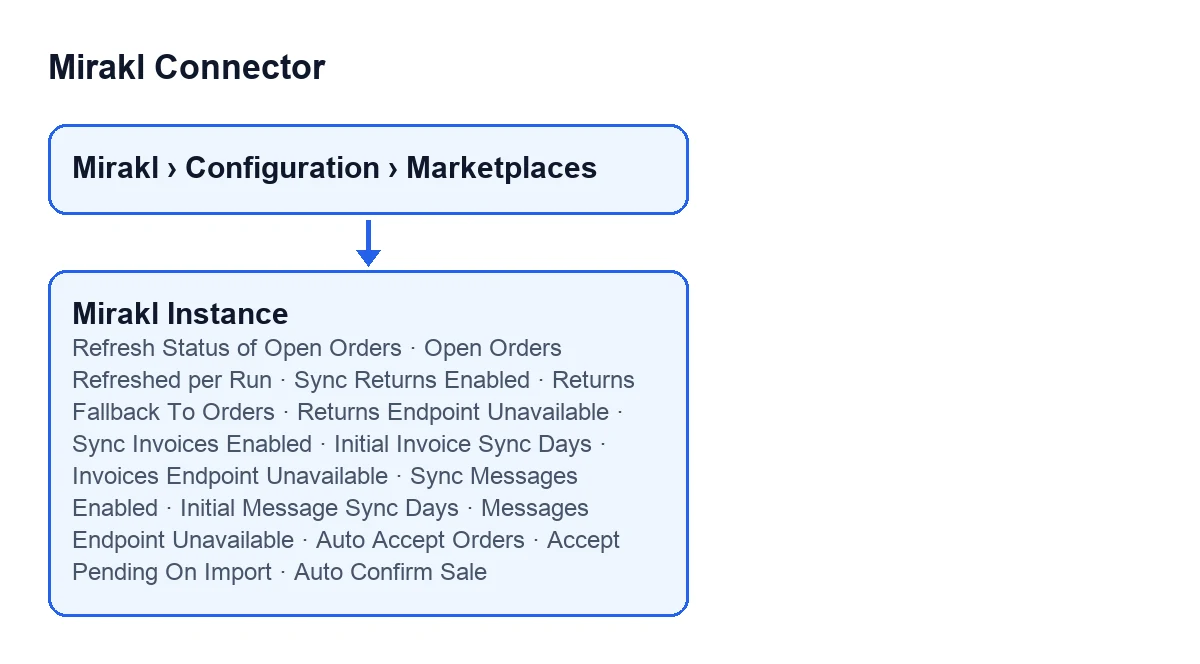
The fields sit on two tabs: Orders and Returns and Invoices and Messages.
Open orders: re-reading what is already in Odoo
Refresh Status of Open Orders- Tick box on the
Orders and Returnstab, in theWindowsgroup. It starts unticked. According to its help, after each import it re-reads from Mirakl every order already in Odoo that is not finished yet (not received, closed, refused or cancelled) and updates its state, even when the order is older than the import window. Without it, an order whose status changes on the marketplace long after it was created keeps its old state in Odoo. What to set: tick it if you want those late changes to reach Odoo.
Open Orders Refreshed per Run- Whole number in the same
Windowsgroup. It only appears when the box above is ticked, so with the default values you do not see it. It starts at 100. Its help says it is the maximum number of open orders re-read from Mirakl on each run, read oldest-refreshed first, so the whole backlog is covered over successive runs. What to set: you can start with the value it comes with; the help itself indicates that the backlog does not have to fit in a single run.

Returns: switch, fallback and warning
Sync Returns Enabled- Tick box in the
Sync Policygroup of theOrders and Returnstab; it also shows in theMirakl Instanceslist. It starts unticked. Its help: enable the scheduled generic Mirakl returns import for this instance. The scheduled taskMirakl - Sync Returnsruns every 30 minutes and is active on install. What to set: tick it on the instances whose returns you want to import on a schedule.
Returns Fallback To Orders- Tick box in the same group; unlike the ones above, it starts ticked. Its help reads: if /returns is not available, build generic return records from refunds found in orders payloads. What to set: leave it as it comes if you want that fallback; untick it only if you do not.
Returns Endpoint Unavailable- Read-only tick box in the same group: you do not fill it in. Its help says it is set automatically when /returns returns 404 so scheduled sync skips the endpoint until retried manually. The code that clears it is the returns sync, reached from the
Import Returnsbutton and from the scheduled task. What to check: if it is ticked, the scheduled sync skips that endpoint.
Accepting and confirming orders
The next three fields are in Sync Policy and start unticked. Their help texts describe different things, so it pays to read them one by one.
Auto Accept Orders- Its help: automatically accept imported orders that require seller acceptance in Mirakl. What to set: tick it if you want that acceptance to happen on its own.
Accept Pending On Import- Its help: try to accept waiting orders right after each manual or scheduled order import.
Auto Confirm Sale- Its help: automatically confirm imported sale orders after sync. What to set: tick it only if you want those sale orders confirmed without a person stepping in.
Invoices (settlements)
They are on the Invoices and Messages tab, in the Invoices (Settlements) group.
Sync Invoices Enabled- It starts unticked. Its help: enable scheduled invoice sync for this instance. The task
Mirakl - Sync Invoicesruns once a day and is switched off on install.
Initial Invoice Sync Days- Whole number that starts at 90. Its help defines it as the historical window, in days, for manual invoice sync. What to set: the days of history you want to bring in when you run it by hand.
Invoices Endpoint Unavailable- Read-only tick box. It is set automatically when /invoices returns 404 so scheduled sync skips the endpoint until retried manually. The code that clears it is the invoice sync, reached from the
Import Invoicesbutton and from the scheduled task.
Messages
On the same tab, in the Messages group.
Sync Messages Enabled- It starts unticked. Its help: enable scheduled message sync for this instance. The task
Mirakl - Sync Messagesruns every 30 minutes and is switched off on install.
Initial Message Sync Days- Whole number that starts at 30. According to its help, it is the historical window, in days, for manual message sync.
Messages Endpoint Unavailable- Read-only tick box. It is set automatically when /messages returns 410 Gone or 404 (not exposed by this operator), and scheduled sync skips the endpoint until retried manually. The code that clears it is the message sync, reached from the
Import Messagesbutton and from the scheduled task.
How this fits with FlexigoTech
The connection to Mirakl goes through FlexigoTech Cloud: it stores the credentials encrypted, watches the synchronisation and emails you if it fails. The module needs that subscription, Connector plan: €49 a month or €490 a year, excluding VAT. Without a subscription, or with the service suspended, whatever the subscription provides stops, and your data stays in your Odoo. You can see the module on its Odoo Apps listing and on the FlexigoTech page.
If you are implementing Odoo and want help deciding which sync policy each marketplace needs, FlexigoTech implements Odoo 17, 18, 19 and 20 and builds connectors and custom integrations.
Keep reading
Checked in the connector's source code (version 20.0) and the linked sources
Sources
- Module source code: flexigobe_mirakl_connector 20.0 (aa05e537): models/mirakl_instance.py
- Module source code: flexigobe_mirakl_connector 20.0 (aa05e537): models/mirakl_ai.py
- apps.odoo.com/apps/modules/20.0/flexigobe_mirakl_connector
- flexigotech.com/en/services.html
- flexigotech.com/precios.html