
 Español
 Català
 Deutsch
 Français
 Português
 Italiano
 Nederlands
 Polski



Mirakl connector for Odoo
Sell on any Mirakl marketplace (Leroy Merlin, Decathlon, Carrefour…) from Odoo 17, 18, 19 or 20, Community or Enterprise: import orders, returns, settlements and messages; publish products, prices and stock; and post each settlement as a balanced journal entry.
€49/month14 days free, no card
Yearly and Pro
- Standard€49/month · €490/year
- Pro€98/month · €980/year
Reply within 1 working day; with Pro, 4 hours. FlexigoTech Cloud pricing
After you buy
- You pay for the license (€9 + VAT) and get an email with the link to download the module.
- You install it in your Odoo, on Odoo.sh or your own server.
- In Settings → FlexigoTech Cloud you accept the data list and press «Try free for 14 days». The trial doesn't ask for a card.
- To continue, you press «Subscribe», create your account on app.flexigotech.com and pay for the plan by card.
Every purchase includes 2 months of support: we help you install it, set it up and get it working, by email and video call.
- Tested on Odoo 17, 18, 19 and 20
- Downloaded by 12 customers
- Odoo Learning Partner
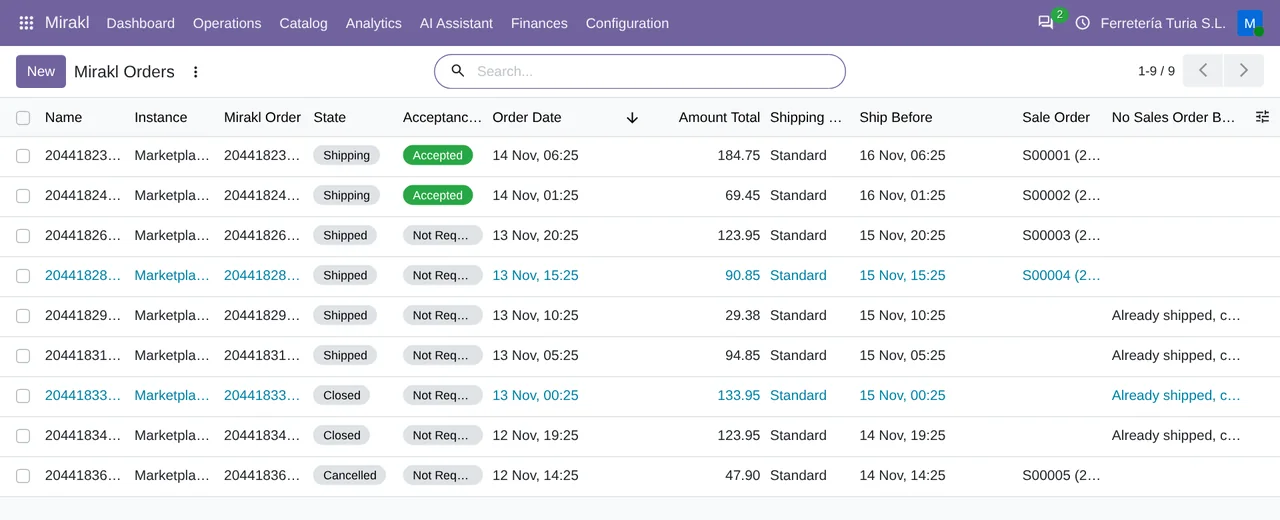
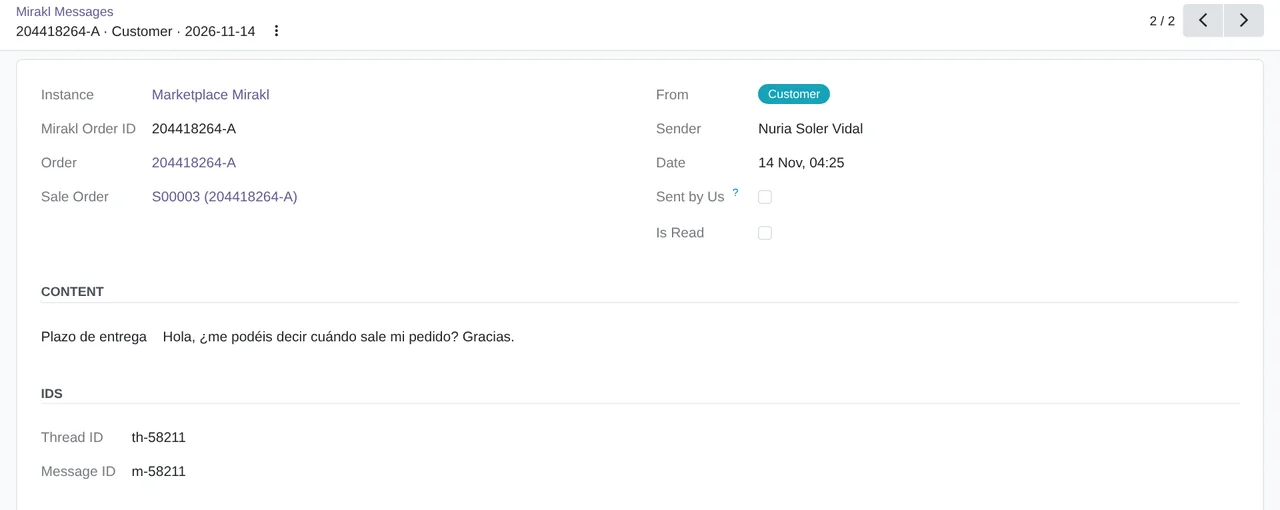
 The order, in SalesReal Odoo screenshot
Get started in 3 steps
- Install the moduleFrom Odoo Apps, on Odoo.sh or on your own server.
- Start the trialIn Settings › FlexigoTech Cloud, an administrator accepts the data list and starts the 14-day trial. No card.
- Connect your marketplaceIn Mirakl › Configuration › Marketplaces: the operator URL, its API URL and your API key; accept the consent and press «Test Connection».
Turn on the sync They all start switched off: turn on orders, returns, offers, prices or stock in its tabs.
What you need Your seller account on a Mirakl marketplace with its API key. Odoo 17, 18, 19 or 20 on Odoo.sh or your own server, not Odoo Online.
What it does
- Orders inside OdooEvery order becomes a sales order.
- Publishing with its real statusSent or rejected; never a false success.
- Posted settlementsOne balanced entry per settlement.
- Any Mirakl operatorLeroy Merlin, Decathlon, Carrefour and more.
How it works

Comes from Mirakl
- Orders
- Returns
- Settlements
- Messages
FlexigoTech Cloud
Leaves Odoo
- Products, prices and stock
- Acceptance of each order
- Tracking for each shipment

FlexigoTech Cloud keeps your Mirakl key encrypted and relays each call.
Where you see it in Odoo
 Salesorders, with their Mirakl tab
 Accountingsettlements and commissions
- Mirakl menuoffers, returns and messages
Inside Odoo
Real Odoo screenshots.

Price
Standard
€49a month + VAT
€490 a year + VAT 2 months free
- The connection runs on our servers
- We alert you if sync fails
- First response 1 working day
- Video call included for the first 2 months
- Accounts per connector Up to 3
Pro
€98a month + VAT
€980 a year + VAT 2 months free
- Everything in Standard
- First response 4 working hours
- Video call if needed
- Accounts per connector Up to 10
- + €9 for the module license, per Odoo version
- 14 days free, no card
- Cancel in two clicks
- Every purchase includes 2 months of support: we help you install it, set it up and get it working, by email and video call. While you're subscribed, support for the service stays included. Still integrating or testing? Extend your free trial.
If you cancel What the subscription gives stops. Your data stays in your Odoo.
- Support with response timesMonday to Friday, 9:00 to 18:00 (Barcelona), except public holidays.
- Maintenance and improvementsOdoo 17-20, on Odoo.sh or your own server
- We handle changes to their APIIf the platform changes its API, we adapt the module and the service.
- Servers in GermanyWe store your credentials encrypted
- Tested On Odoo 17, 18, 19 and 20. Mirakl's live API: in production with operators such as Leroy Merlin.
- Downloaded by 12 customers · 11-11-2026
- 19,453 lines of code · 14-11-2026
- Over 400 tests passing (Odoo 17 to 20) · 14-11-2026
- No reviews yet · leave yours
Frequently asked questions
Does this Mirakl connector for Odoo work with any Mirakl marketplace?
Yes. It speaks the Mirakl seller API, the same on every marketplace built with Mirakl, and the generic profile works with any of them. For Leroy Merlin, Decathlon, Brico Dépôt, Tesco, Superdrug, Sprinter and GACD there is also a free profile that fills in that operator's address and values.
What exactly does it sync with Odoo?
It publishes your offers with their price and stock, and the product catalogue. It brings in orders as sales orders, returns with the stock back in the warehouse, settlements to post them, and the messages of the Mirakl inbox, which you answer from the order. They all start switched off when you create the marketplace: you turn each one on there.
Does it post journal entries from Mirakl settlements?
Yes. With «Post to Accounting», or on its own if you switch on automatic posting, each settlement creates its balanced entry in the Mirakl settlements journal, with the accounts you choose for the marketplace, the commissions and the net payout.
Does it work on Odoo Community, or do I need Enterprise?
You do not need Odoo Enterprise. All its dependencies (Sales, Inventory, Invoicing and Shipping) are Odoo Community apps, so it runs the same on Community and on Enterprise.
Does it work without FlexigoTech Cloud?
No. Calls to Mirakl go through FlexigoTech Cloud. Without the trial or the subscription, the connector does not talk to Mirakl.
What happens after you press «Buy now»?
1. You pay for the license (€9 + VAT) and get an email with the link to download the module. 2. You install it in your Odoo, on Odoo.sh or your own server. 3. In Settings → FlexigoTech Cloud you accept the data list and press «Try free for 14 days». The trial doesn't ask for a card. 4. To continue, you press «Subscribe», create your account on app.flexigotech.com and pay for the plan by card.
Does it work on Odoo Online?
No: Odoo Online does not allow third-party modules. It is for Odoo 17, 18, 19 and 20, on Odoo.sh or on your own server.
Who installs it?
You do: you buy it on flexigotech.com or on Odoo Apps and install it in your Odoo. We help you install it and set it up, by email and video call, during the 2 months of included support. Custom development and data migration are quoted separately.
What support is included?
Every purchase includes 2 months of support: we help you install it, set it up and get it working, by email and video call. While you're subscribed, support for the service stays included.
What if something fails?
We monitor the connection and email you if something fails. And support has response times: first response within 1 working day; with Pro, within 4 working hours.
What about my data? And if I cancel?
The connection goes through FlexigoTech Cloud, on our servers in Germany, with your credentials encrypted. You cancel in two clicks: if you don't subscribe when the trial ends, the service stops and nothing is charged. Your data stays in your Odoo, and you can always view and export it.
Using Mirakl but not Odoo yet?
We set up Odoo, connect it to Mirakl and stay on.
From €2,450 + VAT
Start with OdooMore about the Mirakl connector
What it does
Mirakl connector for Odoo 17, 18, 19 and 20, on Community and Enterprise. It links your Odoo with any marketplace built on Mirakl, such as Leroy Merlin, Decathlon or Brico Dépôt: it brings in orders, returns, messages and settlements, and sends offers, prices, stock and the catalogue. Every call to Mirakl goes through FlexigoTech Cloud, which keeps your API key encrypted. When you create a marketplace, all its automatic syncs start switched off, and you decide which ones to turn on.
- Marketplace orders, in SalesEach Mirakl order comes in as a sales order, with the buyer as the customer (or a single marketplace customer, if you prefer), its lines and, if the marketplace charged for shipping, the shipping line. Orders come in with the «Import Orders» button or, if you turn on their sync, every 10 minutes. Orders waiting for your acceptance are accepted by hand or automatically, and you can also refuse them from Odoo. If an order does not become a sales order, the list says why.
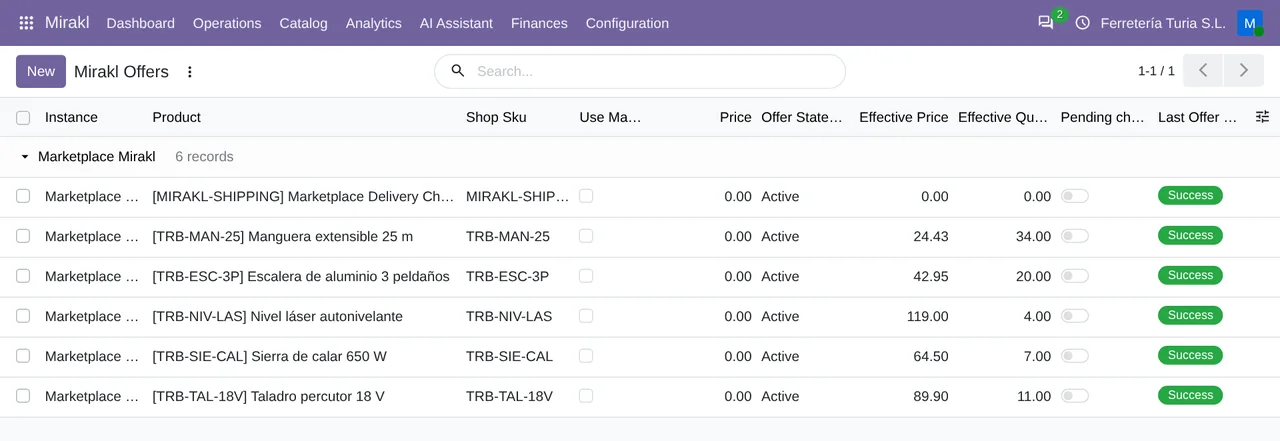
- Offers, prices and stock to MiraklOne offer per product and marketplace, created from the product form with «Publish to Mirakl». The price comes from the sales price or a pricelist, and the stock from what is free to use in the warehouse, unless you set a price or a quantity by hand on the offer. Offer validation can require an EAN, a category, a logistic class or a tax code. They go out with a button or, if you turn them on, by themselves: offers and prices with a 30-minute interval, and stock with a 15-minute one. Each offer keeps Mirakl's answer: accepted, or the error with its reason.
- The catalogue and its dictionaryIt brings the operator's categories, attributes and value lists from Mirakl, and you map each Odoo product category to its Mirakl one. The product catalogue goes out with «Export Catalog» or, if you turn it on, with a 120-minute interval, and the operator integrates it under its own rules. You check the status of each upload from Odoo with «Refresh Catalog Status».
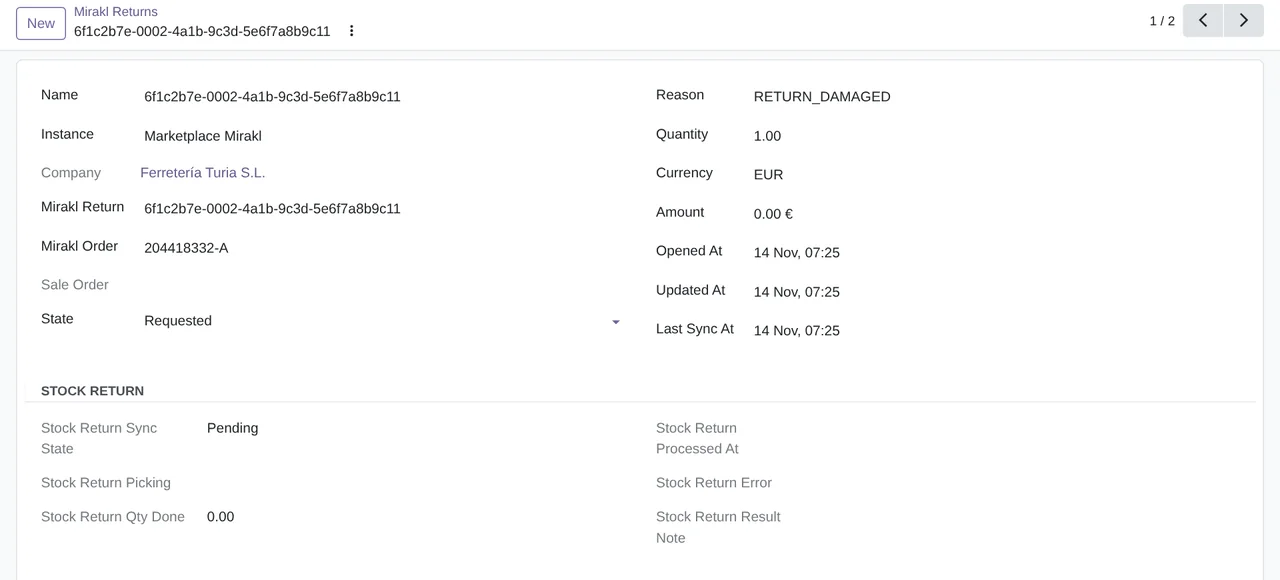
- Returns, with the stock backReturns come in with their reason, quantity and amount, with a button or, if you turn it on, every 30 minutes. When Mirakl marks one as received, the connector creates and validates the return transfer and the stock goes back to the warehouse. It counts what you have already received by hand, so nothing is received twice.
- Buyer messagesIt reads the Mirakl inbox: each conversation with its messages, linked to its order and its sales order. From the sales order, a manager answers the buyer, the marketplace or both with «Write on Mirakl», and the reply stays in the order history. If an operator does not have the new inbox yet, the connector reads the older message list.
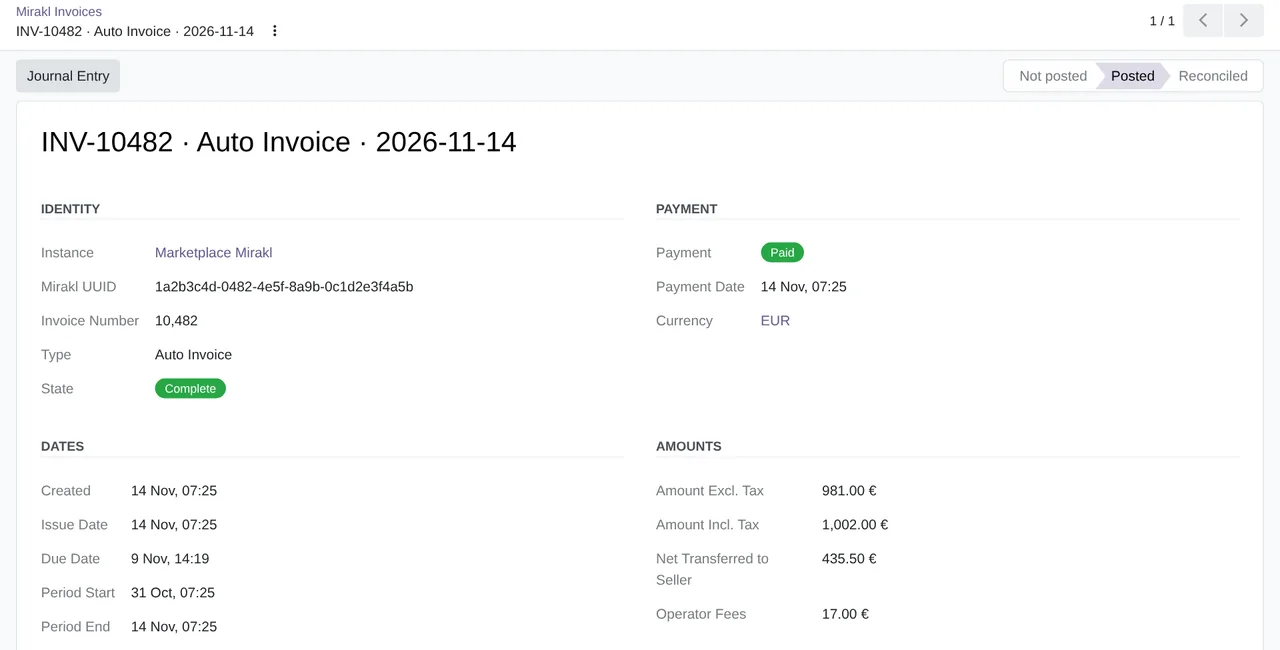
- Settlements, with their journal entryMirakl invoices and settlements come in with their breakdown: orders, commissions, refunds, other charges and the amount transferred. «Post to Accounting» creates a balanced entry in the settlements journal, with the accounts you choose, and the financial analysis shows commissions, net payout and variance. Your customer invoices are uploaded as PDF to the Mirakl order, with a button or when the delivery is validated.
- Dashboard and AI assistant, if you want themThe dashboard sums up each marketplace's figures: orders, sales, commission, net payout, returns and offers in error. The AI assistant starts switched off. If you turn it on, it writes a weekly summary and answers questions about those figures, but it receives nothing until a manager accepts what is sent, and it never receives buyer data.
What it does not do
- It syncs nothing until you turn it onWhen you create a marketplace, all its syncs start switched off: orders, order acceptance, returns, offers, prices, stock, catalogue, dictionary, invoices and messages. Each one is turned on in the marketplace tabs. The invoice and message jobs also start switched off when you install the module.
- It is not real timeWith everything on, orders come in at most every 10 minutes and returns every 30. Offers, prices and stock go out according to each marketplace's interval, 15 or 30 minutes when you create it.
- It does not decide what the operator acceptsThe operator integrates the catalogue you send under its own rules and timing. From Odoo you see the status of each upload.
- It does not include the marketplace accountYou need to be a seller with a Mirakl operator, with your API key, and you get both in Mirakl before connecting. If the operator vets your shop first, that also happens on its side.
What it looks like inside Odoo
Real screens of the module installed on Odoo 20, with the orders of a made-up hardware shop in Valencia that sells on a Mirakl marketplace.
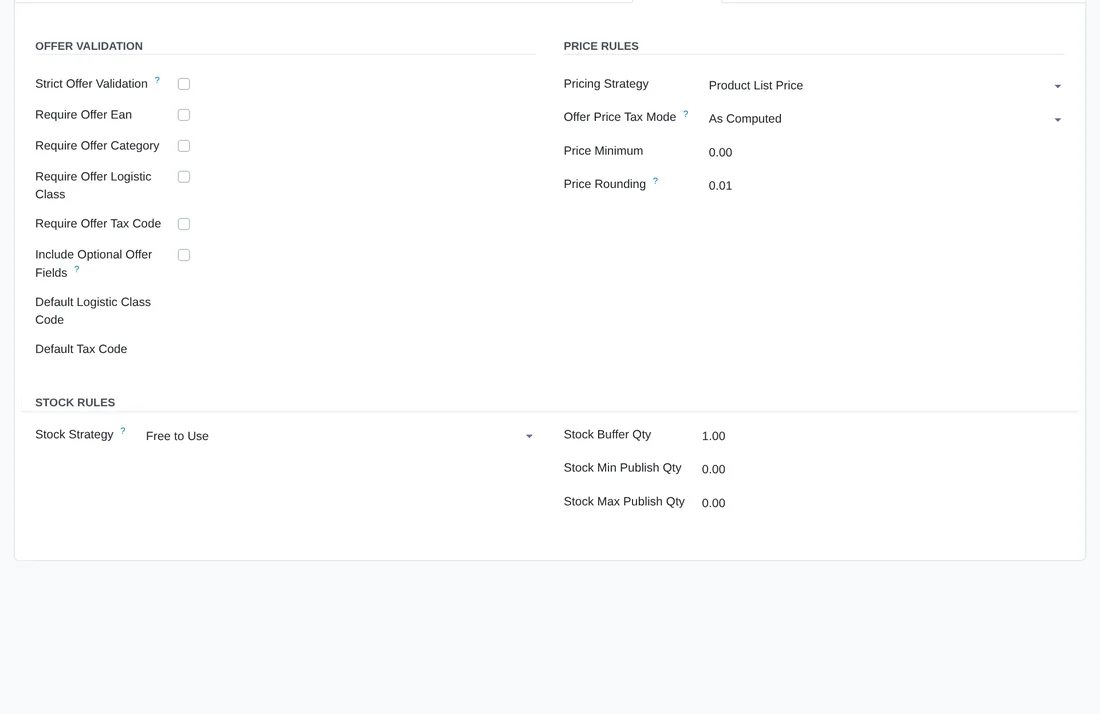
The rules for each offer
The marketplace's Offer Rules tab: what an offer must have before it is sent, where the price comes from and which stock is published, with a reserve and limits.
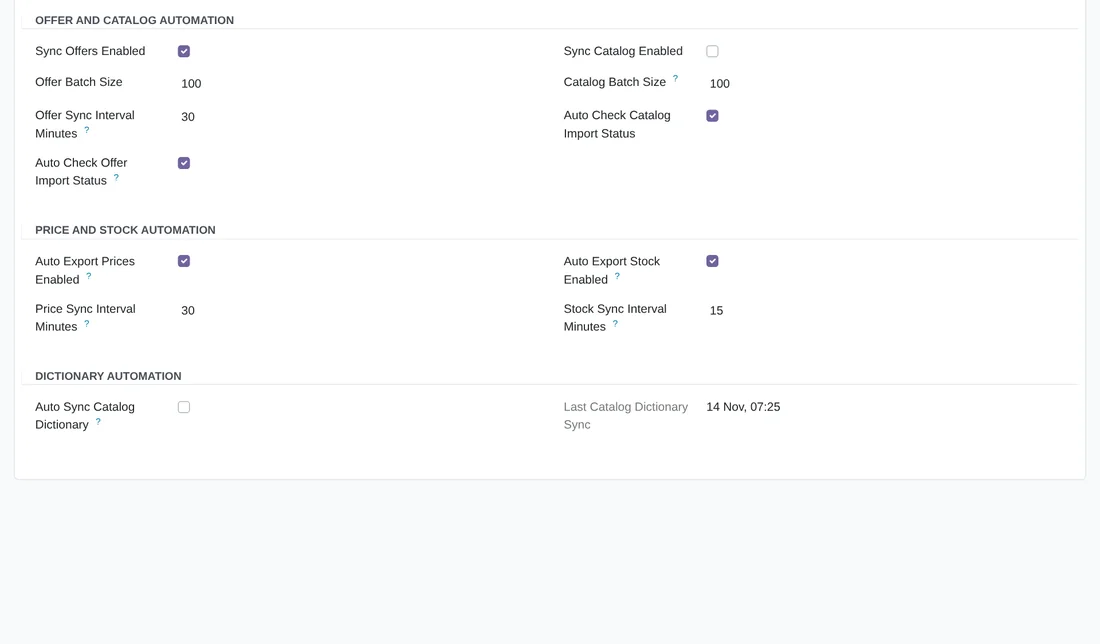
What goes out by itself and when
The Automation tab: offers, catalogue, prices, stock and dictionary, each with its switch and its interval. In the example, offers, prices and stock are on; in a new marketplace everything starts switched off.
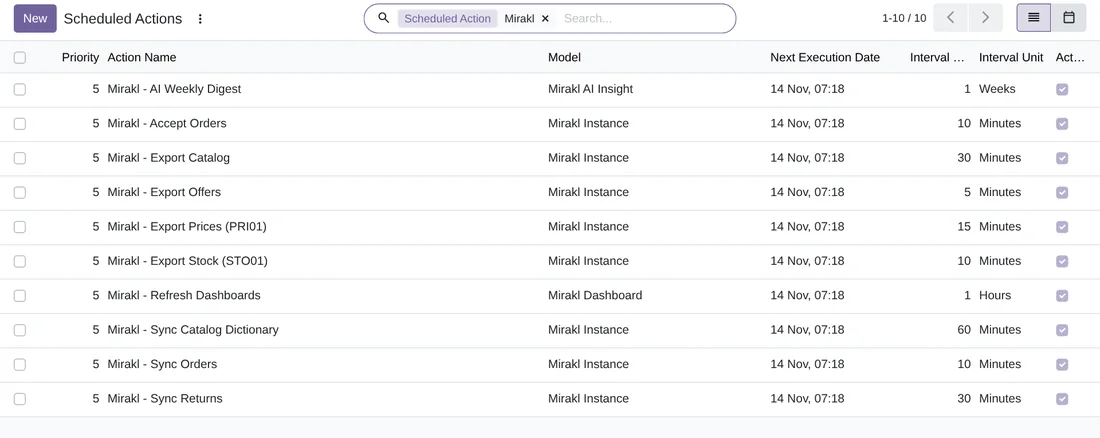
The scheduled jobs
The ten Mirakl scheduled actions that are active after installing, with how often each one wakes up. They only work with the marketplaces that have their sync turned on.
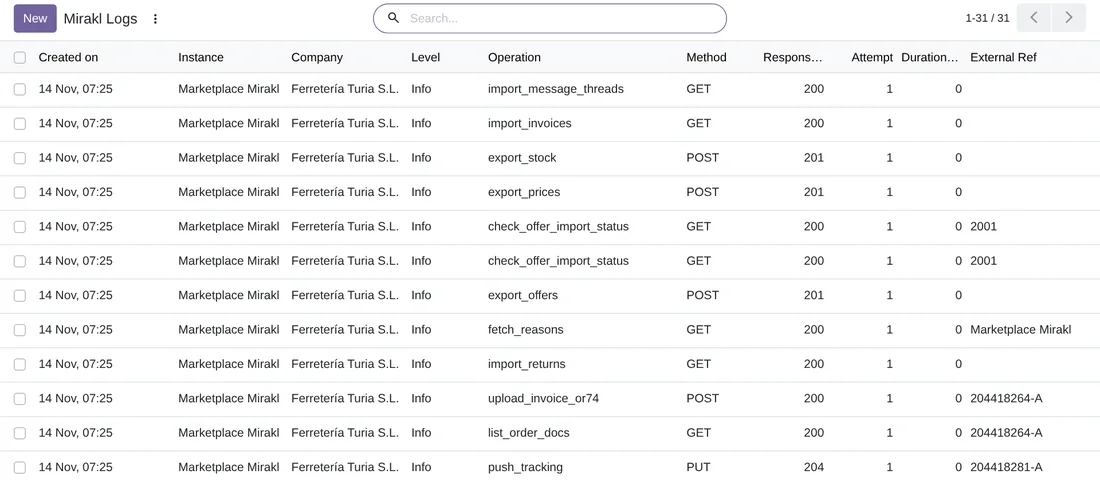
Every call, in the log
The operation, the method, the code Mirakl returned and its reference, such as the order number. Odoo deletes log entries older than 30 days by itself.
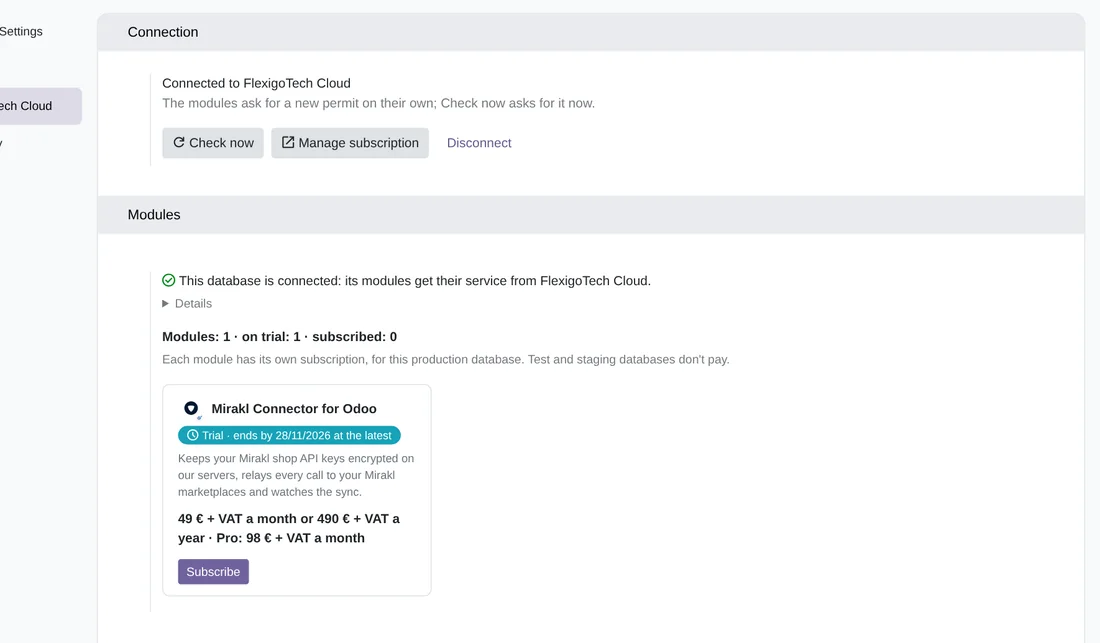
The FlexigoTech Cloud trial
Settings › FlexigoTech Cloud with the database connected and the connector on its 14-day trial, with no card. That is where you pick a plan and subscribe.
At a glance
Keep exploring
Questions before buying? Talk to the engineer.
We tell you whether the connector fits your Odoo and your Mirakl marketplace before you pay anything. No middlemen.
Related
Mirakl is a trademark of its owner. FlexigoTech publishes this connector on its own, with no endorsement or sponsorship from the trademark owner.
Mirakl guides
55 practical guides on this module: step-by-step guides, FAQs, use cases, comparisons, versions, glossaries and guides for sellers without an ERP.