

 Español
 Català
 Deutsch
 Français
 Português
 Italiano
 Nederlands
 Polski
What the module adds to your Odoo
The module's listing opens with the heading «HubSpot or Pipedrive contacts synced with Odoo». Once installed, you get a CRM Sync menu with these entries:
CRM Sync › Dashboard, the overview panel.CRM Sync › Sync Queue, the sync queue.CRM Sync › Conflicts, the conflicts.CRM Sync › Audit Log, the audit trail.
Underneath, the module defines, among others, the models crm.sync.dashboard (CRM Sync Dashboard), crm.sync.queue.item (CRM Sync Queue Item), crm.sync.conflict (CRM Sync Conflict), crm.sync.audit.log (CRM Sync Audit Log), crm.sync.connection (CRM Sync Connection Service) and crm.sync.engine (CRM Sync Engine). If you are a consultant looking for something in developer mode, those are the names to search for.
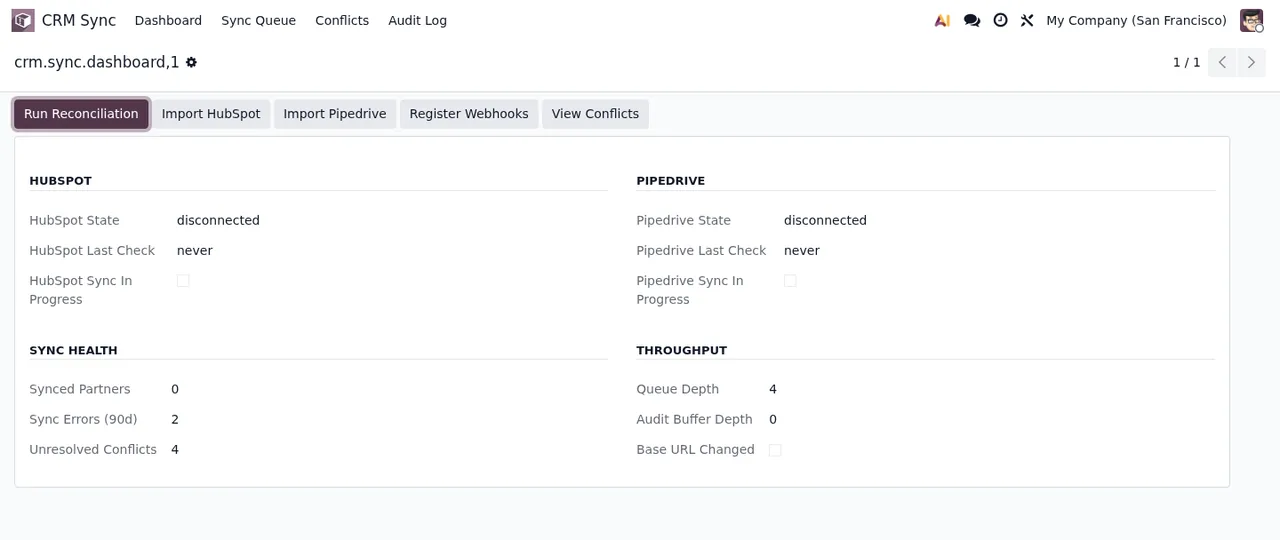
CRM Sync › Dashboard panel, with both CRMs disconnected, unresolved conflicts and sync errors.The dashboard is a form with action buttons at the top and sections for HubSpot, Pipedrive, Sync Health and Throughput. In the screenshot, both HubSpot and Pipedrive show as disconnected, and the panel itself counts the unresolved conflicts and the sync errors.
Timeline of the scheduled actions
Every scheduled action in the module carries the CRM Sync: prefix. All eight come disabled, so check their status in your database before relying on them. Ordered from most to least frequent, they look like this:
- Every minute
CRM Sync: Process Queue, scheduled every minute. It is the action named after the queue you see inCRM Sync › Sync Queue.
- Every minute
CRM Sync: Flush Audit Buffer, also every minute. Its name points to the audit trail, which you find underCRM Sync › Audit Log.
- Every 30 minutes
CRM Sync: Connection Health Check.
- Every 60 minutes
CRM Sync: Reconciliation Sweep.
- Every day
CRM Sync: Bulk Import, scheduled every day.
- Every day
CRM Sync: Purge Done Queue Items, also every day.
- Every day
CRM Sync: Purge Resolved Conflicts, every day.
- Every day
CRM Sync: Purge Old Audit Logs, every day.
There are three purge actions. Going by their names, they refer to done queue items, resolved conflicts and old audit logs.
How an entry moves through the queue
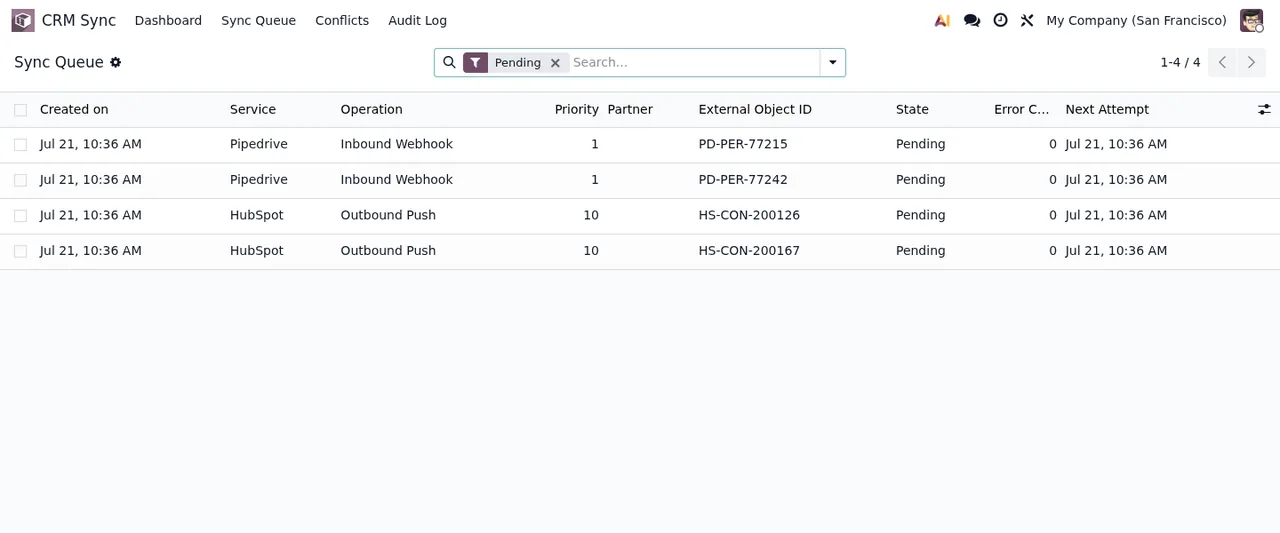
CRM Sync › Sync Queue list filtered by Pending: priority, external ID, state and next attempt for each entry.In CRM Sync › Sync Queue, with the Pending filter on, the list shows Pipedrive and HubSpot entries of two types: Inbound Webhook and Outbound Push. Each line shows the priority, the external ID, the Pending state and the next attempt. Following a single entry over time, this is what you can observe with what the module provides:
- In the queue The entry appears in
Sync Queuewith thePendingstate and a next attempt date.
- Every minute, if active The
CRM Sync: Process Queueaction is scheduled every minute; remember that it comes disabled.
- If a conflict appears Conflicts have their own list under
CRM Sync › Conflicts, and the module includes theCRM Sync Conflict Resolve Wizard(crm.sync.conflict.resolve.wizard).
- Every day, if active The
CRM Sync: Purge Done Queue ItemsandCRM Sync: Purge Resolved Conflictsactions, scheduled every day, carry done items and resolved conflicts in their names.
If you see errors in the queue or on the dashboard and want to know what each warning means, the detail is in the module's error messages.
The wizards that open dialogs
Alongside the lists, the module ships four wizards:
crm.sync.import.wizard(CRM Sync Import Wizard).crm.sync.conflict.resolve.wizard(CRM Sync Conflict Resolve Wizard).crm.sync.bulk.unlink.wizard(CRM Sync Bulk Unlink Wizard).crm.sync.transfer.disclosure.wizard(CRM Sync Transfer Disclosure Wizard).
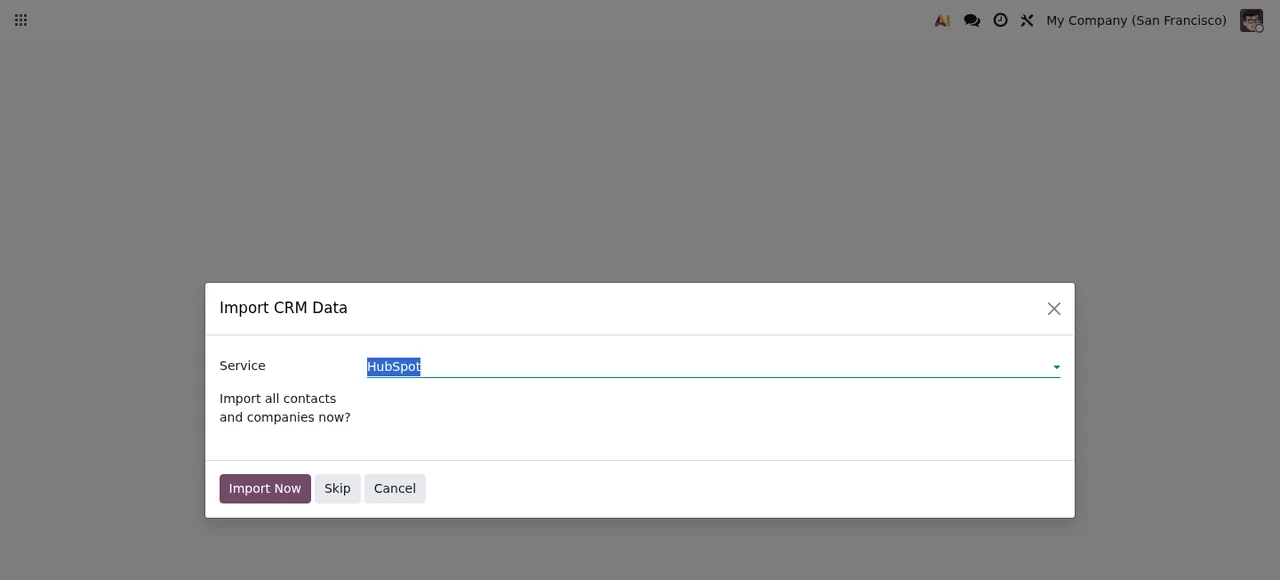
Import CRM Data wizard, with HubSpot chosen in Service and the question about importing all contacts and companies.The Import CRM Data dialog has a Service field (HubSpot selected in the screenshot), asks whether you want to import all contacts and companies, and offers three buttons: Import Now, Skip and Cancel. Separately from this wizard, the CRM Sync: Bulk Import action is scheduled every day.
I acknowledge and continue box unticked.The last dialog in the sequence, Cross-Border Transfer Disclosure, shows a text about transferring data to the US under the GDPR, an I acknowledge and continue checkbox and the Acknowledge & Continue and Cancel buttons. That is what the module displays on screen; the legal assessment of your own case is for you or your adviser.
The external service behind it
The listing flags this in its own section, «Before you buy: this app uses a paid external service», and it also has a «Privacy policy» section. The connection goes through FlexigoTech Cloud: it stores the credentials encrypted, monitors the sync and emails you if it fails; if the platform changes its API, both the module and the service are adapted. Without a subscription, or with the service suspended, whatever the subscription provides stops and your data stays in your Odoo.
The module costs €9 per Odoo version, one-off and excluding VAT, for 17, 18, 19 and 20; the Connector plan costs €49/month or €490/year excluding VAT, with up to 3 platform accounts (Pro: €98/month or €980/year, up to 10). With the subscription, the module for new Odoo versions is included if you bought it on flexigotech.com; on the Odoo App Store, each version is bought there, from the Odoo Apps listing.
How FlexigoTech can help
FlexigoTech implements Odoo 17, 18, 19 and 20 and builds bespoke connectors and integrations. If you already have the module and want to know what to fill in and what to watch in the first days, carry on with the step-by-step setup. If you need the sync to cover something this connector does not include, we can look at it as custom development.
Keep reading
Checked in the connector's source code (version 20.0) and the linked sources
Sources
- Module source code: flexigo_hubspot_pipedrive_two_way_crm_sync_lite 20.0 (c091502a): views/crm_sync_menus.xml
- Module source code: flexigo_hubspot_pipedrive_two_way_crm_sync_lite 20.0 (c091502a): data/crm_sync_crons.xml
- Module source code: flexigo_hubspot_pipedrive_two_way_crm_sync_lite 20.0 (c091502a): static/description/index.html
- Module source code: flexigo_hubspot_pipedrive_two_way_crm_sync_lite 20.0 (c091502a): models/crm_sync_audit_log.py
- Module source code: flexigo_hubspot_pipedrive_two_way_crm_sync_lite 20.0 (c091502a): models/crm_sync_conflict.py
- Module source code: flexigo_hubspot_pipedrive_two_way_crm_sync_lite 20.0 (c091502a): models/crm_sync_connection.py
- Module source code: flexigo_hubspot_pipedrive_two_way_crm_sync_lite 20.0 (c091502a): models/crm_sync_dashboard.py
- Module source code: flexigo_hubspot_pipedrive_two_way_crm_sync_lite 20.0 (c091502a): models/crm_sync_engine.py
- Module source code: flexigo_hubspot_pipedrive_two_way_crm_sync_lite 20.0 (c091502a): models/crm_sync_queue_item.py
- Module source code: flexigo_hubspot_pipedrive_two_way_crm_sync_lite 20.0 (c091502a): wizards/crm_sync_bulk_unlink_wizard.py
- Module source code: flexigo_hubspot_pipedrive_two_way_crm_sync_lite 20.0 (c091502a): wizards/crm_sync_conflict_resolve_wizard.py
- Module source code: flexigo_hubspot_pipedrive_two_way_crm_sync_lite 20.0 (c091502a): wizards/crm_sync_import_wizard.py
- Module source code: flexigo_hubspot_pipedrive_two_way_crm_sync_lite 20.0 (c091502a): wizards/crm_sync_transfer_disclosure_wizard.py
- apps.odoo.com/apps/modules/20.0/flexigo_hubspot_pipedrive_two_way_crm_sync_lite
- apps.odoo.com/apps/modules/17.0/flexigo_hubspot_pipedrive_two_way_crm_sync_lite
- apps.odoo.com/apps/modules/18.0/flexigo_hubspot_pipedrive_two_way_crm_sync_lite
- apps.odoo.com/apps/modules/19.0/flexigo_hubspot_pipedrive_two_way_crm_sync_lite
- flexigotech.com/en/services.html
- flexigotech.com/precios.html