

 Español
 Català
 Deutsch
 Français
 Português
 Italiano
 Nederlands
 Polski
What Dutch Informatieplicht adds to the Odoo menu
Once the module is installed, a top-level menu called Energie-informatieplicht appears. The Odoo Apps listing introduces it with the heading RVO energy-saving duty, ready for eLoket and has a section, How it works, describing how it operates. Inside Odoo, everything it does is split into four blocks:
Energie-informatieplicht › Reports: the energy reports.Energie-informatieplicht › Locations: the locations.Energie-informatieplicht › Meter data: meters, consumption, meter data import, the import log and anomalies.Energie-informatieplicht › Compliance: recognised measures (EML), the audit trail and GDPR requests.
Menu names are quoted here exactly as they appear in the module, so you will find them the same way in your Odoo.
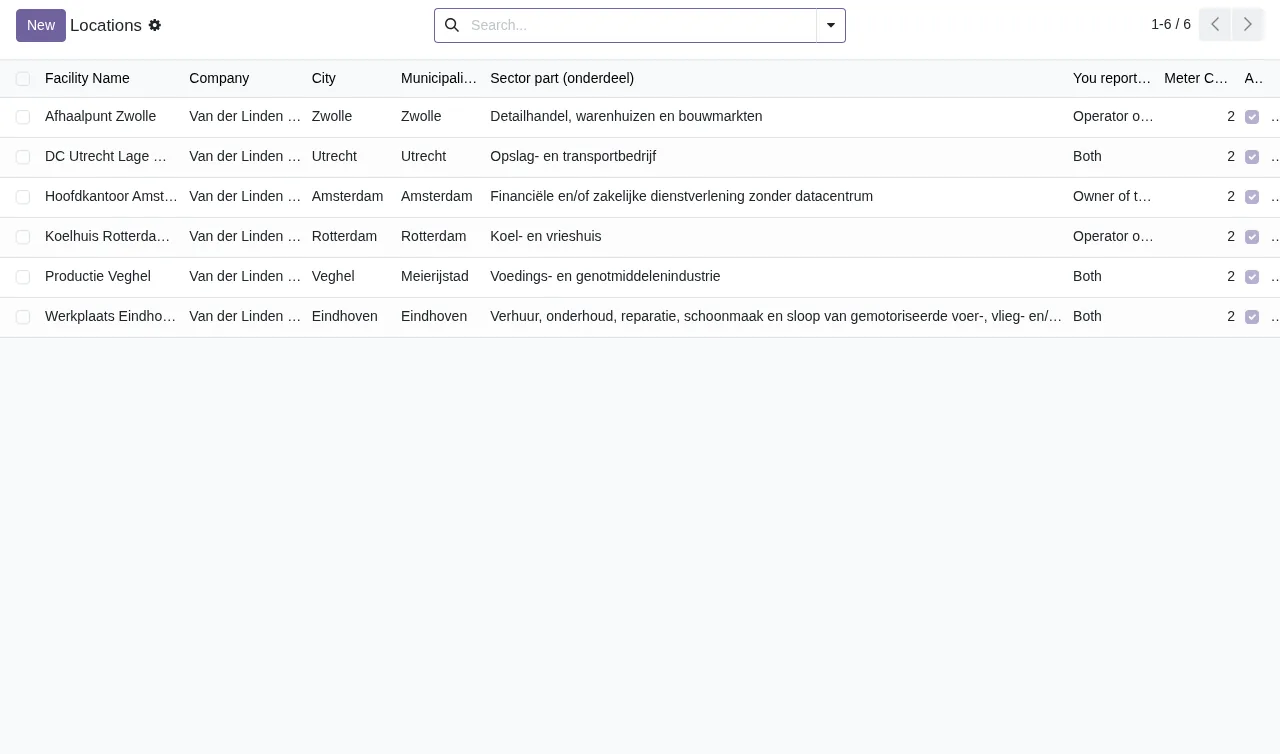
Locations list with six locations in Zwolle, Utrecht, Amsterdam, Rotterdam, Veghel and Eindhoven.Menu-by-menu walk-through
The steps follow the order in which the module places its entries in the menu. Each one gives you the path and the technical model behind it, as a reference if you are a consultant working on that data (access rights, views or integrations).
- Reports.
Energie-informatieplicht › Reportsholds the reports, stored in theenergie.reportmodel (Energy Report). Opening one shows its form with the locations tab, as in the screenshot in the next section. - Locations.
Energie-informatieplicht › Locationsopens the list of locations. The module's models includeenergie.facility(Energy Facility) andenergie.building(Building at a location, that is, a building within a location). - Meters.
Energie-informatieplicht › Meter data › Metersworks on theenergie.metermodel (Energy Meter). - Consumption.
Energie-informatieplicht › Meter data › Consumptionshows records from theenergie.consumptionmodel (Energy Consumption Record). - Import.
Energie-informatieplicht › Meter data › Import meter datais the entry for importing meter data, and just below it,Energie-informatieplicht › Meter data › Import logtakes you to the import log, in theenergie.import_logmodel (Energy Import Log). - Anomalies.
Energie-informatieplicht › Meter data › Anomaliesmaps to theenergie.data_anomalymodel (Energy Data Anomaly). - EML measures.
Energie-informatieplicht › Compliance › Recognised measures (EML)maps to theenergie.eml_measuremodel (Recognised energy-saving measure (EML)). Alongside it, the module hasenergie.eml_category(EML category),energie.eml_condition(Condition (randvoorwaarde) of an EML measure) andenergie.location_measure(EML measure at a location). - Audit.
Energie-informatieplicht › Compliance › Audit trailrelies onenergie.audit_log(Energy Audit Log); the module also includesenergie.audit.mixin(Energy audit trail). - GDPR requests.
Energie-informatieplicht › Compliance › GDPR requestslists the requests andEnergie-informatieplicht › Compliance › New GDPR requestopens a new one. The model isenergie.dsar_request(GDPR Data Subject Access Request).
Locations list to the report form and on to the consumption list with the columns Meter, Facility, Date, Period Type, Consumption, Unit and Source, showing electricity and gas rows for Afhaalpunt Zwolle in kWh and m³.What an energy report goes through inside
The report is the module's central record. It is stored in energie.report (Energy Report) and two other models sit around it:
energie.report_line(Location in an energy report): each location included in a report.energie.report_version(Energy Report Version): the versions of the report.
In practice, when you open a report from Energie-informatieplicht › Reports, the locations tab brings those lines together with their consumption and notes. The screenshot shows an IPEB 2025 report with the calculation and XML buttons and the status bar.
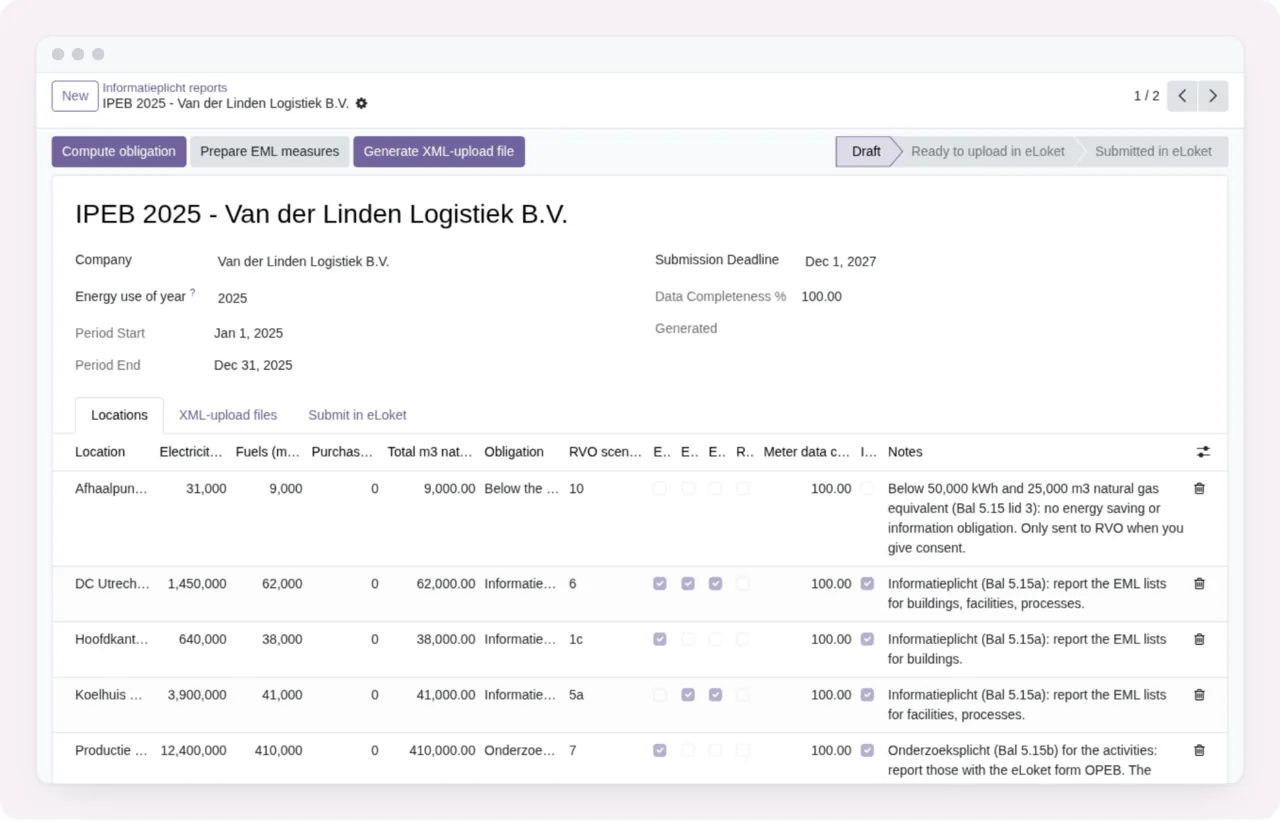
IPEB 2025 - Van der Linden Logistiek B.V. report, with the Draft, Ready and Submitted states and the table of locations, consumption and notes.The two scheduled actions that run on their own
As well as the screens, the module ships two scheduled actions, both active:
Energie: check meter data (gaps and spikes): runs every day and checks meter data for gaps and spikes.Energie: flag consumption older than 5 years as archived: runs every week and flags consumption older than 5 years as archived.
If you review the scheduled actions in your Odoo, search for them by those exact names. If a warning you do not understand comes up while you work with the data, the error messages and warnings in Dutch Informatieplicht gives each literal text and what to do.
Before you install: external service, price and versions
The listing has a section headed Before you buy: some features of this app use a paid external service and another called Privacy policy; read both before buying. This module works with the FlexigoTech Cloud local service.
The app costs €9 excluding VAT on Odoo Apps, a one-off payment per Odoo version, for 17, 18, 19 and 20. The local service costs €29/month or €290/year excluding VAT (Pro: €58/month or €580/year).
Without a subscription, or with the service suspended, whatever the subscription provides stops, but your data stays in your Odoo. With the subscription, the module for new Odoo versions is included if you bought it on flexigotech.com; on the Odoo App Store, each Odoo version is bought there. If you are still unsure whether it suits you, see whether Dutch Informatieplicht fits your business.
How FlexigoTech can help
FlexigoTech implements Odoo 17, 18, 19 and 20 and builds bespoke connectors and integrations. If you want to roll the module out alongside the rest of your Odoo or connect it to other systems, you will find the details on the module page at flexigotech.com and the full description on the Odoo Apps listing.
Keep reading
Checked in the module's source code (version 20.0) and the linked sources
Sources
- Module source code: flexigo_dutch_energie_informatieverplichting_module 20.0 (b13494b8): views/menus.xml
- Module source code: flexigo_dutch_energie_informatieverplichting_module 20.0 (b13494b8): data/energie_cron.xml
- Module source code: flexigo_dutch_energie_informatieverplichting_module 20.0 (b13494b8): static/description/index.html
- Module source code: flexigo_dutch_energie_informatieverplichting_module 20.0 (b13494b8): models/energie_audit_log.py
- Module source code: flexigo_dutch_energie_informatieverplichting_module 20.0 (b13494b8): models/energie_consumption.py
- Module source code: flexigo_dutch_energie_informatieverplichting_module 20.0 (b13494b8): models/energie_data_anomaly.py
- Module source code: flexigo_dutch_energie_informatieverplichting_module 20.0 (b13494b8): models/energie_dsar_request.py
- Module source code: flexigo_dutch_energie_informatieverplichting_module 20.0 (b13494b8): models/energie_eml.py
- Module source code: flexigo_dutch_energie_informatieverplichting_module 20.0 (b13494b8): models/energie_facility.py
- Module source code: flexigo_dutch_energie_informatieverplichting_module 20.0 (b13494b8): models/energie_import_log.py
- Module source code: flexigo_dutch_energie_informatieverplichting_module 20.0 (b13494b8): models/energie_meter.py
- Module source code: flexigo_dutch_energie_informatieverplichting_module 20.0 (b13494b8): models/energie_report.py
- Module source code: flexigo_dutch_energie_informatieverplichting_module 20.0 (b13494b8): models/energie_report_version.py
- apps.odoo.com/apps/modules/20.0/flexigo_dutch_energie_informatieverplichting_module
- apps.odoo.com/apps/modules/17.0/flexigo_dutch_energie_informatieverplichting_module
- apps.odoo.com/apps/modules/18.0/flexigo_dutch_energie_informatieverplichting_module
- apps.odoo.com/apps/modules/19.0/flexigo_dutch_energie_informatieverplichting_module
- flexigotech.com/en/services.html
- flexigotech.com/precios.html