

 Español
 Català
 Deutsch
 Français
 Português
 Italiano
 Nederlands
 Polski
Who it is for and who it isn't
Dutch Informatieplicht is an Odoo module that works with a local FlexigoTech Cloud service. Before you buy it, it pays to separate what it does from what it leaves out according to its listing, because there are things you might take for granted that it doesn't cover. If you are after the tour of menus and tasks, see how Dutch Informatieplicht works inside Odoo.
It fits if you want your facilities and consumption in Odoo and accept that the final step is yours, in eLoket. It doesn't fit if you need something to submit the report for you, download readings from portals, cover the OPEB form or glastuinbouw, or assess alternative measures instead of your environmental service.
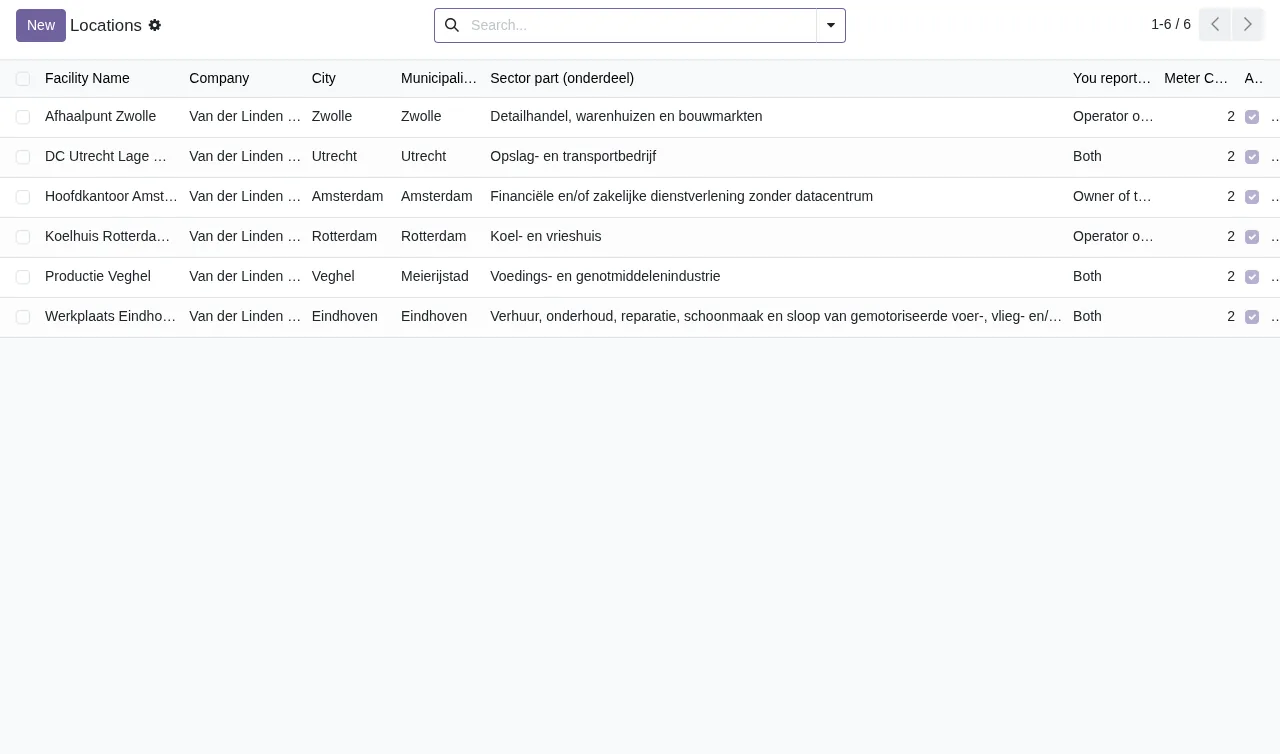
Locations list with facilities in Zwolle, Utrecht, Amsterdam, Rotterdam, Veghel and Eindhoven, showing company, city, municipality, sector, reporter type and metersMisconceptions about what the module covers
“The module files the informatieplicht with RVO for me”
No. According to its documentation, the module sends nothing to RVO. The reason it gives is that RVO publishes no API for the informatieplicht: you upload the file in eLoket, check it and sign it there. If your company expected nobody to have to log in to eLoket, this module won't change that. Decide beforehand who handles that step.
“It connects to the portals and pulls the meter readings”
No again. The module does not fetch meter data from portals: you import the files you download. Plan who downloads them and how often, because that work happens outside Odoo.
“It handles every Dutch energy obligation”
No. The listing says there is no OPEB form (onderzoeksplicht) and no glastuinbouw, because RVO has no XML route for either. If your case is one of those, you will need to deal with that part outside the module.
“The module decides which alternative measures are valid”
No. According to its listing, it does not replace the judgement of your environmental service on alternative measures. That assessment stays with your environmental service, not with the module.
Misconceptions about FlexigoTech Cloud
“If I stop paying for the subscription, I lose my data”
Your data stays in your Odoo. Without a subscription, or with the service suspended, what the subscription provides stops. According to the listing, that is: alerts when RVO rules change (which require a FlexigoTech Cloud subscription), monitoring of the module's sources with their alerts and the calendar of their deadlines, monitoring of the module's health in your database with alerts, and support with a first response within one working day. The local service costs €29/month or €290/year excluding VAT (Pro: €58/month or €580/year).
“The subscription sends my consumption data to an outside server”
The listing sets out what reaches FlexigoTech:
- The database identifier (uuid), its address (URL) and the Odoo version.
- The FlexigoTech modules installed, with their version, and whether the database is a neutralised copy (staging or test).
- The company name and the email of the person who accepts, with the date and version of the text accepted.
- A public code to check that requests come from that database, and a proof that it is that database, computed on your server without sending its secret.
- A request for its service permit every 6 hours and the module's health: counters and errors (type and code), without the content of your records.
- Its requests for alerts and the calendar, with the date of the last alert received: the database identifies itself and sends nothing else.
All connections are encrypted (HTTPS) and the servers are in Germany. For anything about your data: comercial@flexigobe.com or +34 616 809 504.
What to have ready before installing it
- Your Odoo version. The module is published on Odoo Apps for 17.0, 18.0, 19.0 and 20.0, at €9 per Odoo version, one-off payment, excluding VAT, on all four.
- Where you buy it. On the Odoo App Store, each Odoo version is bought there. With the subscription, the module for new Odoo versions is included if you bought it on flexigotech.com.
- Migration. If you are moving to another Odoo version, we do not take care of migrating your database.
- Your accounts. You contract and pay for your account on each platform, Odoo and your hosting yourself.
- The meter files. Be clear on where you download them from, because the module works with the files you import.
- Your eLoket person. Someone has to upload the file, check it and sign it there.
- Environmental judgement. Alternative measures are still assessed by your environmental service.
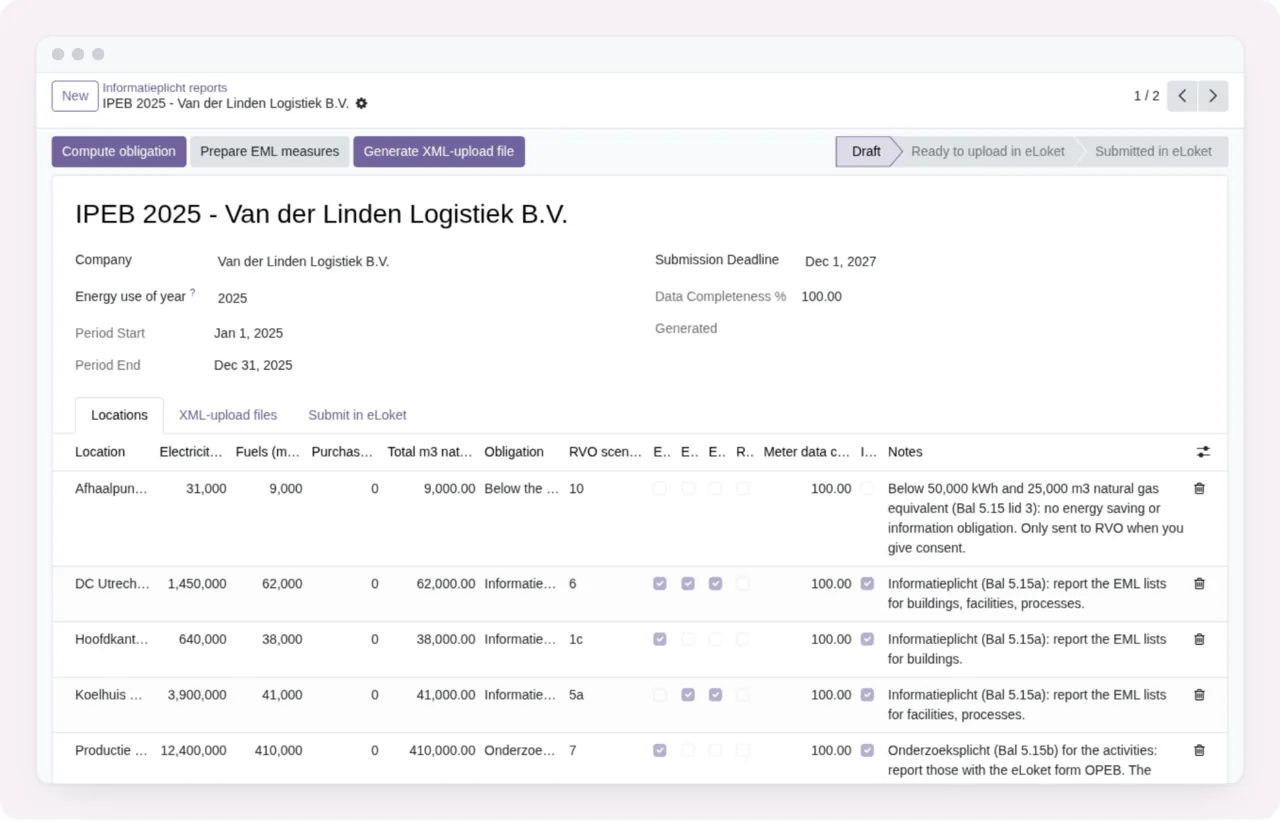
Draft, Ready and Submitted states, the company and period fields and the table of locations, consumption and notesIf you want to know in advance which warnings it can show you and what to do about each one, go through the error messages and warnings in Dutch Informatieplicht.
How FlexigoTech can help
FlexigoTech implements Odoo 17, 18, 19 and 20 and builds custom connectors and integrations. If, after reading this, the module fits, you can buy it and sign up for the service on the module page at flexigotech.com or look at its Odoo Apps listing. If what you need falls outside what it covers, tell us about your case and we will see whether a custom integration makes sense.
Keep reading
Checked in the module's source code (version 20.0) and the linked sources
Sources
- Module source code: flexigo_dutch_energie_informatieverplichting_module 20.0 (b13494b8): static/description/index.html
- apps.odoo.com/apps/modules/20.0/flexigo_dutch_energie_informatieverplichting_module
- apps.odoo.com/apps/modules/17.0/flexigo_dutch_energie_informatieverplichting_module
- apps.odoo.com/apps/modules/18.0/flexigo_dutch_energie_informatieverplichting_module
- apps.odoo.com/apps/modules/19.0/flexigo_dutch_energie_informatieverplichting_module
- flexigotech.com/en/services.html
- flexigotech.com/precios.html