

 Español
 Català
 Deutsch
 Français
 Português
 Italiano
 Nederlands
 Polski
What GoCardless says
| Reason | Type | GoCardless text |
|---|---|---|
access_token_revoked | invalid_api_usage | Token has been revoked by the user. |
access_token_not_active | invalid_api_usage | Token has been disabled. |
unauthorized | invalid_api_usage | Credentials not recognised. |
For Odoo, the three mean the same thing: the credential used to make requests no longer works. In its HTTP status code table, GoCardless reserves 401 for that case: “Missing or invalid Authorization header, or the user has been disabled.”. They are invalid_api_usage errors, those caused by how the request is made, and for those GoCardless asks you to “alert your dev team”.
When the token stops working
The connector connects to GoCardless in two ways, and the token dies differently in each:
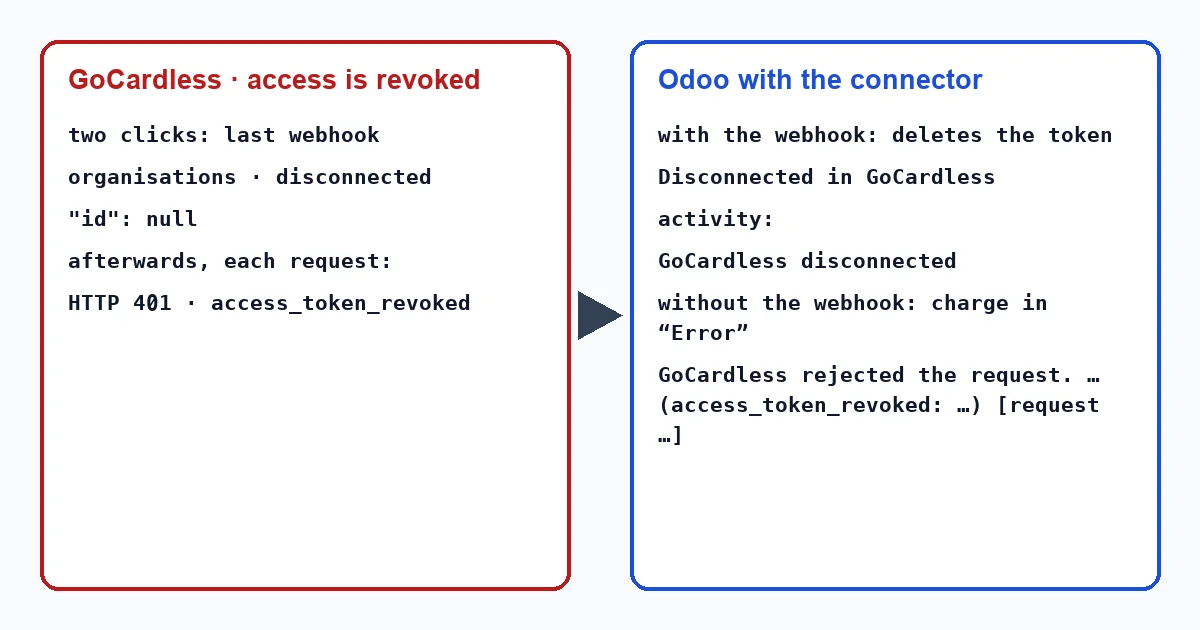
- “Connect my GoCardless account” is the two-click connection, through FlexigoTech: a partner integration. According to GoCardless's partner guide, the merchant can revoke that access from their Dashboard (“they can revoke your access from the GoCardless dashboard”) or close their account. GoCardless then sends a last webhook and the token stops working: “Your access token stops working, so you can't make any more API calls for that user.”.
- “Paste an access token (advanced)” is the mode in which you create the token yourself in the GoCardless Dashboard and paste it into Odoo. If you revoke or disable it there, Odoo finds out on the next request, when GoCardless rejects it.
What Odoo does with the connector
With the two-click connection, that last webhook arrives without an event id, as organisations · disconnected. The connector applies it like this:
- It deletes the token and the webhook secret, and the provider connection changes to “Disconnected in GoCardless”.
- It writes on your company contact “GoCardless reports that the account was disconnected from Odoo on … (…). No collection can be taken until it is connected again.”, with the date and the cause sent by GoCardless.
- It creates the activity “GoCardless disconnected”, so someone is notified without opening the provider.
From then on the connector no longer calls GoCardless with that provider: the hourly task skips it, and a collection with a customer's saved payment method goes to “Error” with “This provider is not connected to GoCardless any more: connect it again first.”.
Without that warning, the token stays stored and GoCardless rejects every request. In a collection, the transaction goes to “Error” with “GoCardless rejected the request.” and, below it, GoCardless's message with the reason (access_token_revoked, access_token_not_active or unauthorized) and the request_id in square brackets. The invoice remains pending collection, and the hourly task does not resend a transaction in error.
The connector writes the contact notice and the activity without anyone present, when applying the webhook. The connector writes these texts in English, so in an English-language Odoo they appear exactly as quoted here, whether a user or a scheduled action triggers them: “GoCardless reports that the account was disconnected from Odoo on … (…). No collection can be taken until it is connected again.” and “GoCardless disconnected”. Messages from a collection come out in the language of whoever launches it; if a scheduled action launches it, such as a subscription renewal, the same rule applies: “This provider is not connected to GoCardless any more: connect it again first.” and “GoCardless rejected the request.”.
What to do
- Open the transaction from the invoice, with the “Payment Transaction” button at the top; the transactions menu only appears in developer mode, and it does not exist in Odoo 20. If the message says the provider is no longer connected, or names one of the three reasons, the problem is the connection, not the customer or their mandate.
- With the two-click connection, open the GoCardless payment provider and connect again with “Connect my GoCardless account”.
- In advanced mode, create a new token in the GoCardless Dashboard, paste it into “GoCardless Access Token” and click “Test connection”. The connector asks GoCardless for the creditor of your account with that token: if GoCardless rejects it, you will see its error at that moment and not at the next collection.
- With the connection working again, retry the collection of the invoices that were left uncollected. Transactions in error are not resent automatically.
- If you need to contact GoCardless, keep the
request_idfrom the message: its documentation asks you to include it when contacting its support.
Why does the connector delete the token instead of continuing to try?
Because GoCardless says that token no longer works. That way, later collections explain what is happening (that the provider is no longer connected) instead of receiving one rejection after another, and the company contact records when and why it was disconnected.
Does a sandbox token work with the production account?
No. The help text of the token field says so: sandbox tokens start with sandbox_ and only work with the sandbox API. To collect for real you need a production token.
With our connector
In Odoo 17, 18, 19 and 20 the connector does not let a dead token turn into a chain of failed collections without explanation: if GoCardless warns of the disconnection, it says so in the company record and in an activity, and if it does not warn, each rejection carries GoCardless's reason and request_id.
Keep reading
Checked in the connector's source code (version 17.0, 18.0, 19.0 and 20.0) and the linked sources
Sources
- docs.gocardless.com/docs/api-reference/responses-and-errors
- docs.gocardless.com/docs/partner-integrations/connect-your-merchants
- docs.gocardless.com/docs/partner-integrations/webhooks-for-partners
- Module source code: flexigo_payment_gocardless: models/payment_provider.py, line 71 in 17.0 (d203ee6), 18.0 (e2ab18b), 19.0 (ce7f5a3) and 20.0 (688d86b)
- Module source code: flexigo_payment_gocardless: i18n/flexigo_payment_gocardless.pot, line 143 in 17.0 (d203ee6), line 143 in 18.0 (e2ab18b), line 143 in 19.0 (ce7f5a3) and line 145 in 20.0 (688d86b)
- Module source code: flexigo_payment_gocardless: i18n/flexigo_payment_gocardless.pot, line 888 in 17.0 (d203ee6), line 888 in 18.0 (e2ab18b), line 888 in 19.0 (ce7f5a3) and line 903 in 20.0 (688d86b)
- Module source code: flexigo_payment_gocardless: models/payment_provider.py, line 1237 in 17.0 (d203ee6), line 1237 in 18.0 (e2ab18b), line 1237 in 19.0 (ce7f5a3) and line 1234 in 20.0 (688d86b)
- Module source code: flexigo_payment_gocardless: models/payment_provider.py, line 1241 in 17.0 (d203ee6), line 1241 in 18.0 (e2ab18b), line 1241 in 19.0 (ce7f5a3) and line 1238 in 20.0 (688d86b)
- Module source code: flexigo_payment_gocardless: i18n/flexigo_payment_gocardless.pot, line 265 in 17.0 (d203ee6), line 265 in 18.0 (e2ab18b), line 265 in 19.0 (ce7f5a3) and line 267 in 20.0 (688d86b)
- Module source code: flexigo_payment_gocardless: i18n/flexigo_payment_gocardless.pot, line 545 in 17.0 (d203ee6), line 545 in 18.0 (e2ab18b), line 545 in 19.0 (ce7f5a3) and line 547 in 20.0 (688d86b)
- Module source code: flexigo_payment_gocardless: i18n/flexigo_payment_gocardless.pot, line 456 in 17.0 (d203ee6), line 456 in 18.0 (e2ab18b), line 456 in 19.0 (ce7f5a3) and line 458 in 20.0 (688d86b)
- Module source code: flexigo_payment_gocardless: models/payment_provider.py, line 732 in 17.0 (d203ee6), line 732 in 18.0 (e2ab18b), line 732 in 19.0 (ce7f5a3) and line 734 in 20.0 (688d86b)
- Module source code: flexigo_payment_gocardless: models/payment_provider.py, line 336 in 17.0 (d203ee6), 18.0 (e2ab18b), 19.0 (ce7f5a3) and 20.0 (688d86b)
- Module source code: flexigo_payment_gocardless: i18n/flexigo_payment_gocardless.pot, line 1740 in 17.0 (d203ee6), line 1740 in 18.0 (e2ab18b), line 1740 in 19.0 (ce7f5a3) and line 1745 in 20.0 (688d86b)
- Module source code: flexigo_payment_gocardless: models/payment_provider.py, line 397 in 17.0 (d203ee6), 18.0 (e2ab18b), 19.0 (ce7f5a3) and 20.0 (688d86b)
- Module source code: flexigo_payment_gocardless: models/payment_provider.py, line 462 in 17.0 (d203ee6), 18.0 (e2ab18b), 19.0 (ce7f5a3) and 20.0 (688d86b)
- Module source code: flexigo_payment_gocardless: i18n/flexigo_payment_gocardless.pot, line 521 in 17.0 (d203ee6), line 521 in 18.0 (e2ab18b), line 521 in 19.0 (ce7f5a3) and line 523 in 20.0 (688d86b)
- Module source code: flexigo_payment_gocardless: models/payment_transaction.py, line 281 in 17.0 (d203ee6), line 281 in 18.0 (e2ab18b), line 281 in 19.0 (ce7f5a3) and line 292 in 20.0 (688d86b)
- Module source code: flexigo_payment_gocardless: models/payment_transaction.py, line 247 in 17.0 (d203ee6), line 247 in 18.0 (e2ab18b), line 247 in 19.0 (ce7f5a3) and line 258 in 20.0 (688d86b)
- Module source code: flexigo_payment_gocardless: models/payment_provider.py, line 623 in 17.0 (d203ee6), line 623 in 18.0 (e2ab18b), line 623 in 19.0 (ce7f5a3) and line 625 in 20.0 (688d86b)
- Module source code: flexigo_payment_gocardless: models/payment_provider.py, line 742 in 17.0 (d203ee6), line 742 in 18.0 (e2ab18b), line 742 in 19.0 (ce7f5a3) and line 744 in 20.0 (688d86b)
- Module source code: flexigo_payment_gocardless: i18n/flexigo_payment_gocardless.pot, line 1100 in 17.0 (d203ee6), line 1100 in 18.0 (e2ab18b), line 1100 in 19.0 (ce7f5a3) and line 1107 in 20.0 (688d86b)
- Module source code: flexigo_payment_gocardless: i18n/flexigo_payment_gocardless.pot, line 346 in 17.0 (d203ee6), line 346 in 18.0 (e2ab18b), line 346 in 19.0 (ce7f5a3) and line 348 in 20.0 (688d86b)
- Module source code: flexigo_payment_gocardless: i18n/flexigo_payment_gocardless.pot, line 1167 in 17.0 (d203ee6), line 1167 in 18.0 (e2ab18b), line 1167 in 19.0 (ce7f5a3) and line 1174 in 20.0 (688d86b)
- github.com/odoo/odoo/blob/20.0/addons/payment/i18n/payment.pot
- github.com/odoo/odoo/blob/20.0/addons/account_payment/views/account_move_views.xml
- github.com/odoo/odoo/blob/17.0/odoo/http.py
- Module source code: flexigo_payment_gocardless: __manifest__.py, line 31 in 17.0 (d203ee6), 18.0 (e2ab18b), 19.0 (ce7f5a3) and 20.0 (688d86b)