

 Español
 Català
 Deutsch
 Français
 Português
 Italiano
 Nederlands
 Polski
What GoCardless says
| Reason | Type | GoCardless text |
|---|---|---|
internal_server_error | gocardless | An internal error occurred. Report to support with request_id. |
request_timed_out | gocardless | Request did not complete in time. Retry, report if persistent. |
GoCardless groups these reasons under the type gocardless, the one for errors that occur inside GoCardless: “These errors occurred within GoCardless while processing your request.”. Its HTTP status code table says this about the two codes:
| HTTP | GoCardless text |
|---|---|
| 500 | Server-side error. Retry, and report to support with the request_id if it persists. |
| 504 | Request timed out. Retry, and report with request_id if it persists. |
On its limits page, GoCardless also sets how long a request may take: 29 seconds (“Request timeout 29 seconds”).
Three cases the connector does not handle the same way
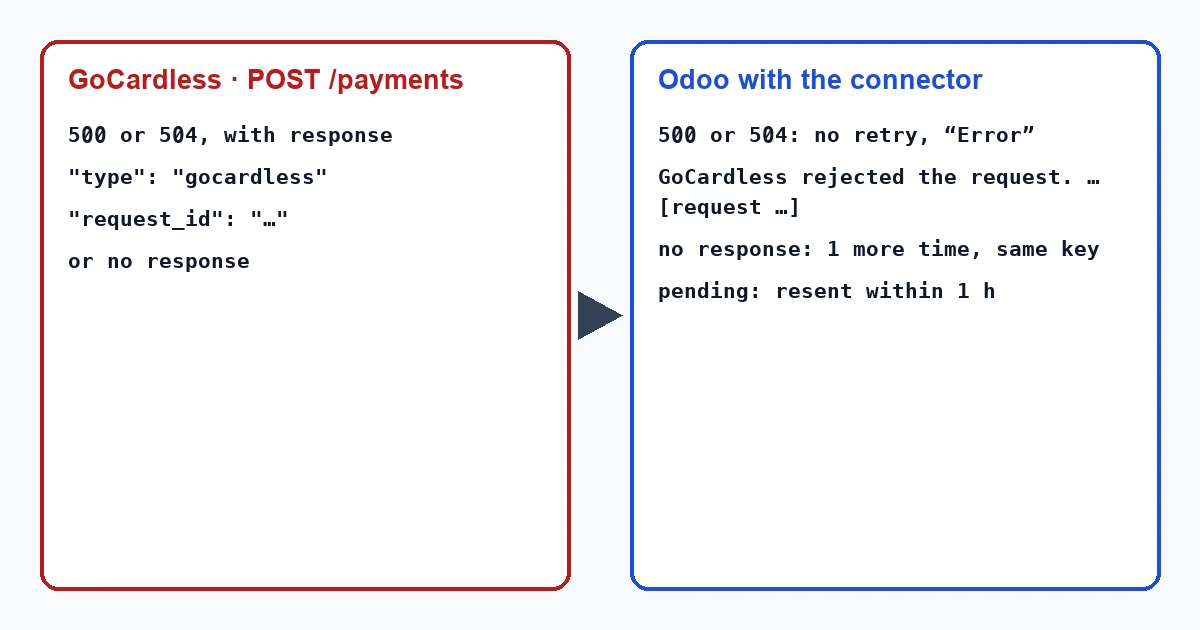
The connector waits up to 30 seconds for GoCardless's response on each request. With a charge, a refund or a retry, Odoo can run into three different situations:
- GoCardless answers with a
500or a504, with the reason in the response. - GoCardless does not answer: the connection drops or the 30 seconds run out.
- The failure comes when applying an event, when the connector asks GoCardless for the payment the event refers to.
What the connector does
With a 500 or a 504. The connector only repeats a request when it gets no answer or after a 429. With a 500 or a 504 there is an answer, so it treats it as a rejection. On a charge, the transaction moves to “Error” with “GoCardless rejected the request.” and, below it, GoCardless's message with the reason and the request_id in square brackets. The hourly task does not resend a transaction in error. If GoCardless did create the charge anyway, its first event links it: each charge carries the Odoo transaction reference in its metadata, the connector finds it with that reference and applies the payment status. A transaction in error thus goes back to “Pending” or moves to “Confirmed”.
No answer. The connector repeats the request once, with the same idempotency key. If nobody answers either, it does not give the charge up for lost: the transaction stays pending with “GoCardless did not answer, so it is not known yet whether it took the request. It will be sent again, safely, within the hour.”. The hourly task sends it again with the same key; if GoCardless had already created it, it answers 409 and the connector adopts what already exists.
When applying an event. With each event for a payment, the connector asks GoCardless for that payment. If that query fails, the webhook answers 500 so that GoCardless sends the delivery again, and the events already applied are not applied twice. The hourly recovery also does not leave behind an event that failed.
The connector writes these texts in English, so in an English-language Odoo they appear exactly as quoted here, whether a user or a scheduled action triggers them: “GoCardless rejected the request.” and “GoCardless did not answer, so it is not known yet whether it took the request. It will be sent again, safely, within the hour.”.
What to do
- Open the transaction from the invoice, with the “Payment Transaction” button at the top; the transactions menu only shows in developer mode, and it does not exist in Odoo 20. If the message names
internal_server_errororrequest_timed_out, the failure was on GoCardless's side, not the customer's or their mandate's. - Before charging the invoice again, look for the charge in the GoCardless Dashboard: the connector sets the reference of its Odoo transaction as the description of each charge. If it is there, do not charge again; its event will link the transaction.
- If it is not there, charge the invoice again with the customer's saved payment method. A new charge is another transaction, with another idempotency key: that is why it is worth checking first.
- If it keeps happening, write to GoCardless support with the
request_idfrom the message: their documentation asks you to include it when you contact their support.
Why doesn't the connector retry a 500 the way it does when there is no answer?
Because it only blindly repeats what can be repeated without risk: a request with no answer, with the same key, or one that received a 429 (according to GoCardless, those can be repeated without problem). A 500 or a 504 is an answer, and the connector treats it as a rejection.
Can a duplicate charge be created?
With the same key, no: GoCardless answers with a 409 and the connector adopts the charge that already exists. The risk lies in charging again from the invoice, because that creates another transaction with another key. That is why it is worth looking for the charge in the Dashboard first.
With our connector
In Odoo 17, 18, 19 and 20 the connector separates a GoCardless error from a request with no answer: the first stays in error with its request_id, the second stays pending and is resent with the same key, and in both cases the event of a charge that does exist links it to its transaction.
Keep reading
Checked in the connector's source code (version 17.0, 18.0, 19.0 and 20.0) and the linked sources
Sources
- docs.gocardless.com/docs/api-reference/responses-and-errors
- docs.gocardless.com/docs/api-reference/limits
- Module source code: flexigo_payment_gocardless: models/payment_provider.py, line 361 in 17.0 (d203ee6), 18.0 (e2ab18b), 19.0 (ce7f5a3) and 20.0 (688d86b)
- Module source code: flexigo_payment_gocardless: models/payment_provider.py, line 394 in 17.0 (d203ee6), 18.0 (e2ab18b), 19.0 (ce7f5a3) and 20.0 (688d86b)
- Module source code: flexigo_payment_gocardless: models/payment_provider.py, line 357 in 17.0 (d203ee6), 18.0 (e2ab18b), 19.0 (ce7f5a3) and 20.0 (688d86b)
- Module source code: flexigo_payment_gocardless: models/payment_provider.py, line 373 in 17.0 (d203ee6), 18.0 (e2ab18b), 19.0 (ce7f5a3) and 20.0 (688d86b)
- Module source code: flexigo_payment_gocardless: i18n/flexigo_payment_gocardless.pot, line 448 in 17.0 (d203ee6), line 448 in 18.0 (e2ab18b), line 448 in 19.0 (ce7f5a3) and line 450 in 20.0 (688d86b)
- Module source code: flexigo_payment_gocardless: i18n/flexigo_payment_gocardless.pot, line 29 in 17.0 (d203ee6), 18.0 (e2ab18b), 19.0 (ce7f5a3) and 20.0 (688d86b)
- Module source code: flexigo_payment_gocardless: models/payment_transaction.py, line 299 in 17.0 (d203ee6), line 299 in 18.0 (e2ab18b), line 299 in 19.0 (ce7f5a3) and line 310 in 20.0 (688d86b)
- Module source code: flexigo_payment_gocardless: models/payment_provider.py, line 391 in 17.0 (d203ee6), 18.0 (e2ab18b), 19.0 (ce7f5a3) and 20.0 (688d86b)
- Module source code: flexigo_payment_gocardless: models/payment_transaction.py, line 68 in 17.0 (d203ee6), 18.0 (e2ab18b), 19.0 (ce7f5a3) and 20.0 (688d86b)
- Module source code: flexigo_payment_gocardless: models/payment_provider.py, line 397 in 17.0 (d203ee6), 18.0 (e2ab18b), 19.0 (ce7f5a3) and 20.0 (688d86b)
- Module source code: flexigo_payment_gocardless: models/payment_provider.py, line 462 in 17.0 (d203ee6), 18.0 (e2ab18b), 19.0 (ce7f5a3) and 20.0 (688d86b)
- Module source code: flexigo_payment_gocardless: i18n/flexigo_payment_gocardless.pot, line 521 in 17.0 (d203ee6), line 521 in 18.0 (e2ab18b), line 521 in 19.0 (ce7f5a3) and line 523 in 20.0 (688d86b)
- Module source code: flexigo_payment_gocardless: models/payment_transaction.py, line 281 in 17.0 (d203ee6), line 281 in 18.0 (e2ab18b), line 281 in 19.0 (ce7f5a3) and line 292 in 20.0 (688d86b)
- Module source code: flexigo_payment_gocardless: models/payment_transaction.py, line 258 in 17.0 (d203ee6), line 258 in 18.0 (e2ab18b), line 258 in 19.0 (ce7f5a3) and line 269 in 20.0 (688d86b)
- Module source code: flexigo_payment_gocardless: models/payment_transaction.py, line 115 in 17.0 (d203ee6), line 115 in 18.0 (e2ab18b), line 115 in 19.0 (ce7f5a3) and line 118 in 20.0 (688d86b)
- Module source code: flexigo_payment_gocardless: models/payment_transaction.py, line 572 in 17.0 (d203ee6), line 572 in 18.0 (e2ab18b), line 571 in 19.0 (ce7f5a3) and line 590 in 20.0 (688d86b)
- Module source code: flexigo_payment_gocardless: models/payment_transaction.py, line 697 in 17.0 (d203ee6), line 697 in 18.0 (e2ab18b), line 696 in 19.0 (ce7f5a3) and line 720 in 20.0 (688d86b)
- Module source code: flexigo_payment_gocardless: models/payment_provider.py, line 623 in 17.0 (d203ee6), line 623 in 18.0 (e2ab18b), line 623 in 19.0 (ce7f5a3) and line 625 in 20.0 (688d86b)
- Module source code: flexigo_payment_gocardless: models/payment_transaction.py, line 589 in 17.0 (d203ee6), line 589 in 18.0 (e2ab18b), line 588 in 19.0 (ce7f5a3) and line 607 in 20.0 (688d86b)
- Module source code: flexigo_payment_gocardless: controllers/main.py, line 124 in 17.0 (d203ee6), line 124 in 18.0 (e2ab18b), line 124 in 19.0 (ce7f5a3) and line 127 in 20.0 (688d86b)
- Module source code: flexigo_payment_gocardless: models/payment_provider.py, line 603 in 17.0 (d203ee6), line 603 in 18.0 (e2ab18b), line 603 in 19.0 (ce7f5a3) and line 605 in 20.0 (688d86b)
- github.com/odoo/odoo/blob/20.0/addons/payment/i18n/payment.pot
- github.com/odoo/odoo/blob/20.0/addons/account_payment/views/account_move_views.xml
- github.com/odoo/odoo/blob/17.0/odoo/http.py
- Module source code: flexigo_payment_gocardless: __manifest__.py, line 31 in 17.0 (d203ee6), 18.0 (e2ab18b), 19.0 (ce7f5a3) and 20.0 (688d86b)