

 Español
 Català
 Deutsch
 Français
 Português
 Italiano
 Nederlands
 Polski
Before installing: version, certificate and where to buy
The module is published on Odoo Apps for 17.0, 18.0, 19.0 and 20.0. On Odoo Apps it costs €9 per Odoo version, one-off payment excluding VAT, for 17, 18, 19 and 20; the FlexigoTech Cloud local service is separate, at €29/month or €290/year excluding VAT (Pro: €58/month or €580/year).
- Check that your Odoo is 17, 18, 19 or 20: these are the versions with a published listing.
- Have the certificate ready as a
.p12or.pfxfile. If you hold the private key and the certificate in separate files, the field's own help text gives the command:openssl pkcs12 -export -inkey private.key -in certificate.crt -out arca.p12. - Have that file's password to hand.
- Identify the CUIT that owns the certificate: it goes in
Company CUIT. - Decide where to buy: with the subscription, the module for new Odoo versions is included if you bought it on flexigotech.com; on the Odoo App Store, each Odoo version is bought there.
If you are not yet sure the module covers what you need, read whether it fits your company before this checklist.
Creating the configuration: the fields you fill in
The configuration is a record with only a few fields. These are the ones to go through when you create it:
Configuration Name: a name to recognise the configuration.company_id: the Odoo company (a field linked tores.company).Company CUIT(represented_cuit): according to the field's help, it is the CUIT on whose behalf the padron is queried (cuitRepresentada), the CUIT that owns the certificate.PKCS#12 Certificate: upload the.p12or.pfxfile. Next to it isCertificate Filename, with the file's name.Certificate Password: enter the certificate password.Certificate Expiry Date: check the certificate's expiry date.
The password is stored encrypted, in the Certificate Password (Encrypted) field. When you edit the configuration again, leaving Certificate Password empty keeps the current one. The Password Set box tells you whether a password is stored.
The WSAA ticket fields: what to look at after configuring
The same configuration has a group of WSAA ticket fields that are worth reading:
WSAA Token (Encrypted)andWSAA Sign (Encrypted): the token and the signature, stored encrypted.Last Ticket Request: the date and time of the last ticket request.Last Ticket Request Error: if it contains text, that is the error from the last request. To make sense of it, see the module's error messages.Ticket Valid Until: how long the ticket is valid for.Ticket Expired: the box showing whether the ticket has expired.Configured: the box showing whether the configuration is recorded as configured.
The statuses you will see in the lists
The module defines several status fields. Whoever reviews invoices and suppliers should recognise these labels:
- A
statefield withDraft,FinalizedandSubmitted to ARCA. - Another
statewithQueued,Retry Success,Retry FailedandEscalated to Manual Review. - A
statusfield withActive (Activo),Suspended (Suspendido),Canceled (Cancelado),Not Registered (No registrado)andUnknown. - Another
statuswithSuspended,Cancelled,Not Registered,AFIP Debtor,FlaggedandApocryphal invoices (ARCA APOC base). - A
statewithNew,Verifying Identity,Gathering Data,Redacting Sensitive Info,CompletedandRejected. - A
verification_statusfield withPending,VerifiedandFailed. - A
statewithUpload,Validating,ResultsandError.
Which record uses each one and how it moves from one value to another is covered in the article on how the module works under the bonnet.
- Go over these labels with your team before working with real suppliers.
- Agree who reviews records in
Escalated to Manual Reviewand those withstatusset toAFIP Debtor,FlaggedorApocryphal invoices (ARCA APOC base).
The first week: what to check
With the configuration done, it is time to go over the tables the module ships with and the first records.
- Open the withholding matrix (
arca.withholding.matrix) and check every row: code, description, withholding percentage, applicable categories, active box and notes. - Open the perception matrix (
arca.perception.matrix) and check code, description, perception percentage, province code and transaction type. - Review the error code list (
arca.error.code): look at each code's severity and whether it is marked as retryable. - In the supplier list (
arca.supplier), look at each supplier's status and find those inUnknown. - In the supplier cache (
arca.supplier.cache), have a look at the hit and miss counters. - Come back on several days to
Ticket Valid Until,Ticket ExpiredandLast Ticket Request Errorin the configuration. - Put the
Certificate Expiry Datein your calendar.
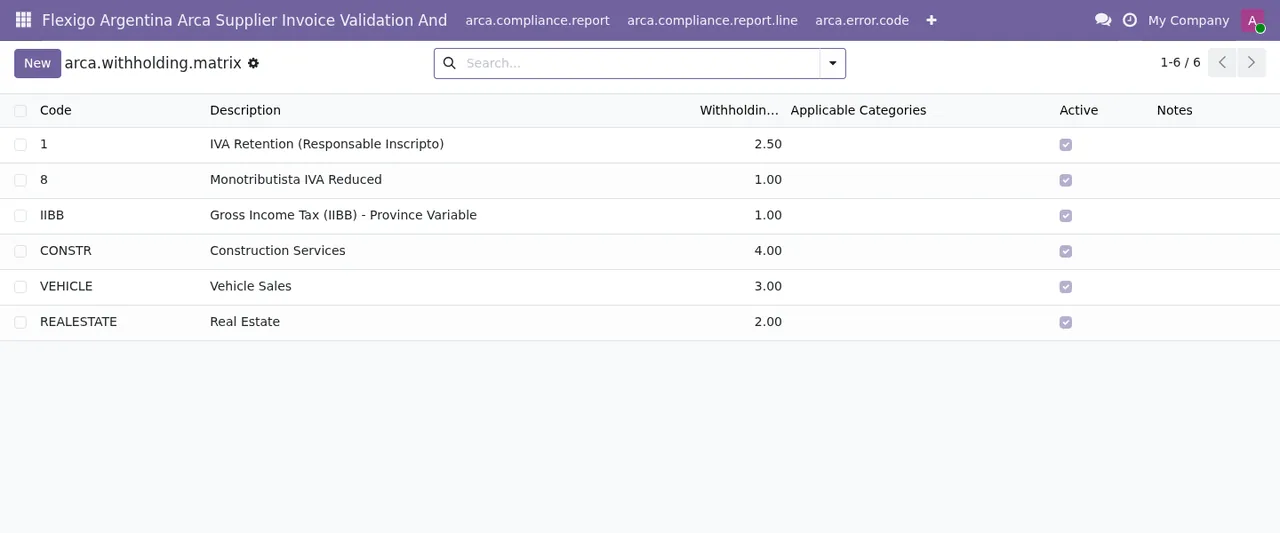
arca.withholding.matrix), with six rows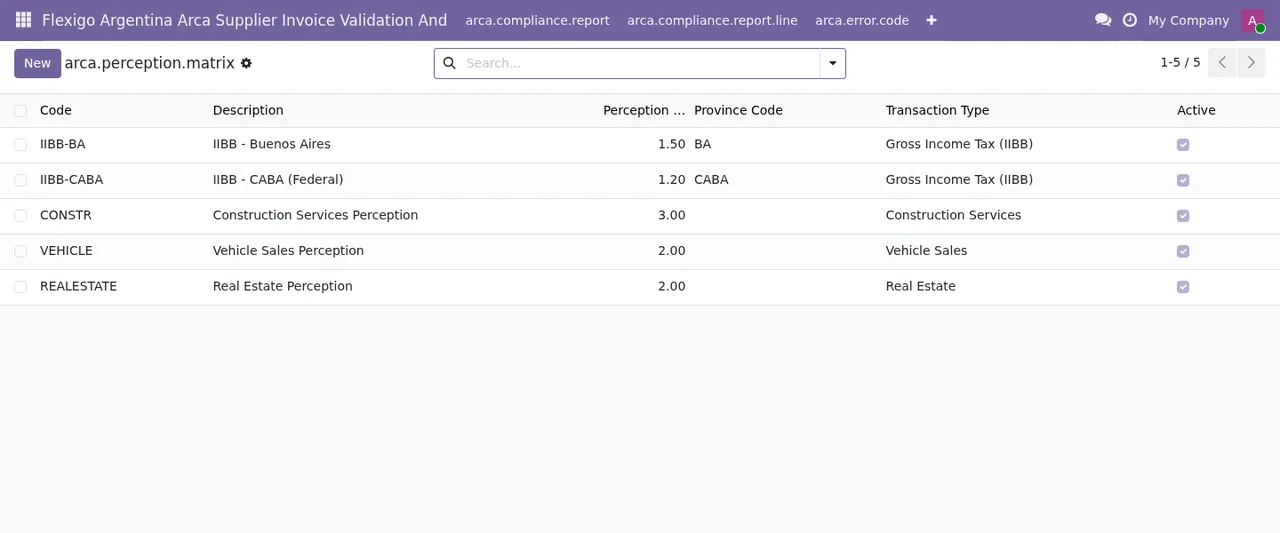
arca.perception.matrix), with five active records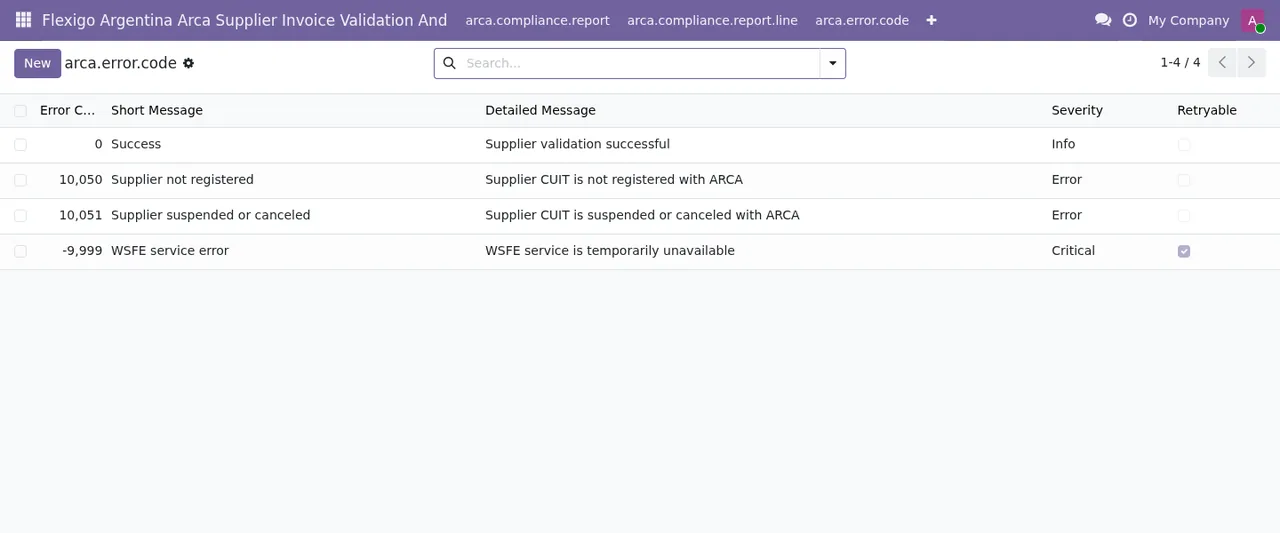
arca.error.code), with four recordsIf the subscription stops
The module works with a FlexigoTech Cloud local service. Without a subscription, or with the service suspended, whatever the subscription provides stops; your data stays in your Odoo.
- Keep the subscription renewal date alongside the certificate expiry date.
How FlexigoTech can help
FlexigoTech implements Odoo 17, 18, 19 and 20 and builds bespoke connectors and integrations. If you would like us to run this setup with you, or you need the module adapted to the way you work with suppliers, get in touch from the module page.
Keep reading
Checked in the module's source code (version 20.0) and the linked sources
Sources
- Module source code: flexigo_argentina_arca_supplier_invoice_validation_and 20.0 (8e403746): models/arca_wsfe_config.py
- Module source code: flexigo_argentina_arca_supplier_invoice_validation_and 20.0 (8e403746): models/arca_compliance_report.py
- Module source code: flexigo_argentina_arca_supplier_invoice_validation_and 20.0 (8e403746): models/arca_invoice_queue.py
- Module source code: flexigo_argentina_arca_supplier_invoice_validation_and 20.0 (8e403746): models/arca_supplier.py
- Module source code: flexigo_argentina_arca_supplier_invoice_validation_and 20.0 (8e403746): models/arca_supplier_exclusion.py
- Module source code: flexigo_argentina_arca_supplier_invoice_validation_and 20.0 (8e403746): models/dsar_request.py
- Module source code: flexigo_argentina_arca_supplier_invoice_validation_and 20.0 (8e403746): wizards/arca_batch_import_wizard.py
- apps.odoo.com/apps/modules/20.0/flexigo_argentina_arca_supplier_invoice_validation_and
- apps.odoo.com/apps/modules/17.0/flexigo_argentina_arca_supplier_invoice_validation_and
- apps.odoo.com/apps/modules/18.0/flexigo_argentina_arca_supplier_invoice_validation_and
- apps.odoo.com/apps/modules/19.0/flexigo_argentina_arca_supplier_invoice_validation_and
- flexigotech.com/en/services.html
- flexigotech.com/precios.html