
 Español
 Català
 Deutsch
 Français
 Português
 Italiano
 Nederlands
 Polski



ManoMano connector for Odoo
Sell on ManoMano from Odoo: orders arrive as sales orders, and your offers, shipments, invoices and refunds go out from Odoo.
€49/month14 days free, no card
Yearly and Pro
- Standard€49/month · €490/year
- Pro€98/month · €980/year
Reply within 1 working day; with Pro, 4 hours. FlexigoTech Cloud pricing
After you buy
- You pay for the license (€9 + VAT) and get an email with the link to download the module.
- You install it in your Odoo, on Odoo.sh or your own server.
- In Settings → FlexigoTech Cloud you accept the data list and press «Try free for 14 days». The trial doesn't ask for a card.
- To continue, you press «Subscribe», create your account on app.flexigotech.com and pay for the plan by card.
Every purchase includes 2 months of support: we help you install it, set it up and get it working, by email and video call.
- Tested on Odoo 17, 18, 19 and 20
- Odoo Learning Partner
 Every ManoMano order, with its statusReal Odoo screenshot
Get started in 3 steps
- Install the moduleFrom Odoo Apps, on Odoo.sh or your own server.
- Start the trialIn Settings › FlexigoTech Cloud, an administrator accepts the data list and starts the 14-day trial, no card needed.
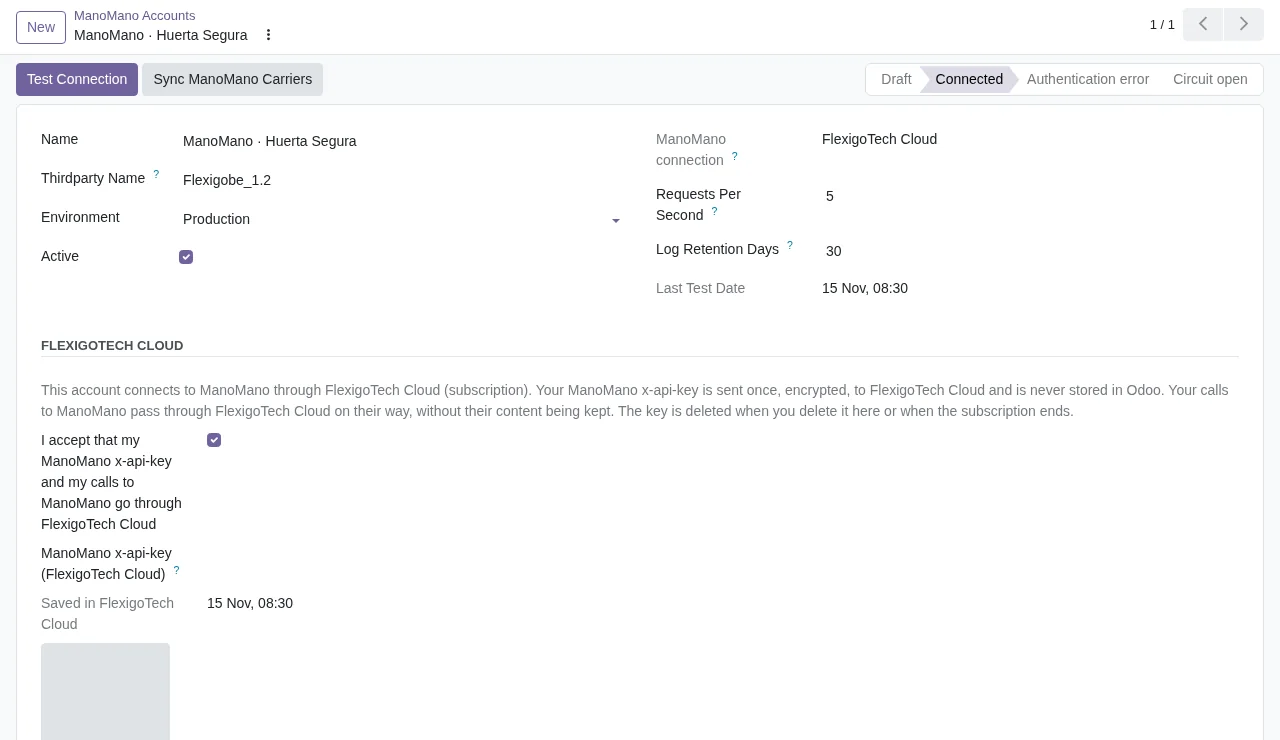
- Connect your accountIn ManoMano › Configuration › Accounts, accept the consent, paste your x-api-key and click «Test Connection».
Add your contracts One per country, with its seller contract number. Auto-accept comes switched off: you decide.
What you need Your ManoMano seller account and its API key (x-api-key). Odoo 17, 18, 19 or 20 on Odoo.sh or your own server, not Odoo Online.
What it does
- ManoMano orders in SalesEach order becomes an Odoo sales order.
- Offers with your price and stockAnd what ManoMano says about each one.
- Shipments and invoices, typed onceTracking and the PDF go up on their own.
- One contract per countryFrance, Spain, Italy and Germany.
How it works

From ManoMano
- Orders, business orders with their VAT number included
- Your offers' status and competitiveness
- Brands, categories and ManoFulfillment stock
FlexigoTech Cloud
From Odoo
- Price, stock and lead time of each offer
- Acceptance and tracking of each shipment
- Your invoices and refunds

Your ManoMano API key goes once, encrypted, to FlexigoTech Cloud, which adds it to every call. The key is never stored in your Odoo.
Where you see it in Odoo
- ManoMano menuorders, offers, shipments, invoices and refunds
 Saleseach ManoMano order becomes a sales order
 Inventorywhen you validate the delivery, the tracking goes to ManoMano
 Invoicingthe posted invoice goes up to ManoMano
Inside Odoo
Real Odoo screenshots.
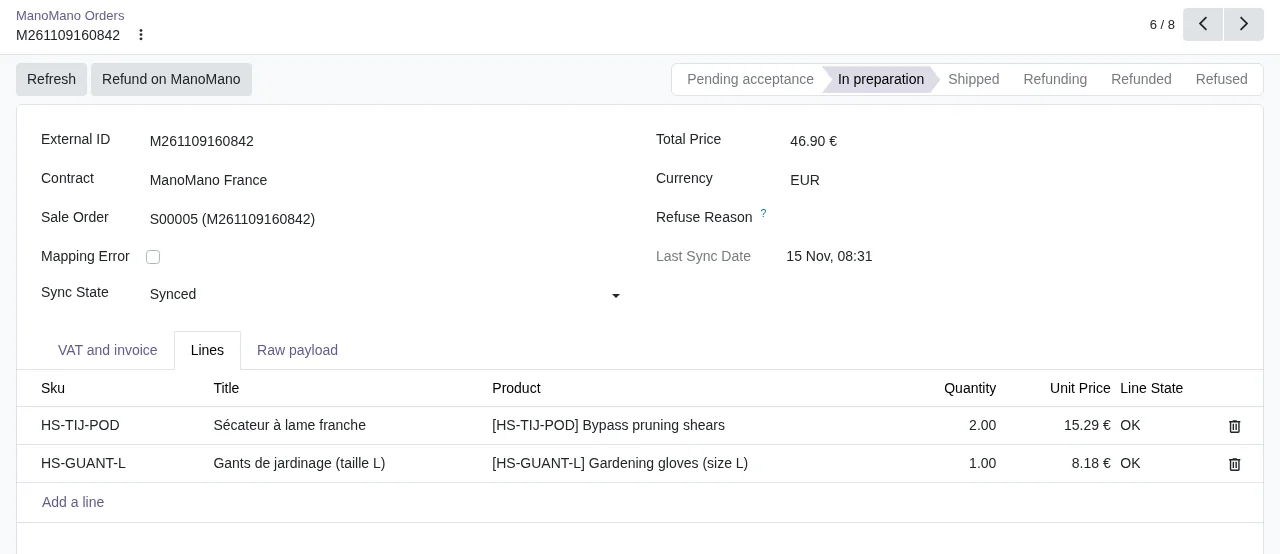


Price
Standard
€49a month + VAT
€490 a year + VAT 2 months free
- The connection runs on our servers
- We alert you if sync fails
- First response 1 working day
- Video call included for the first 2 months
- Accounts per connector Up to 3
Pro
€98a month + VAT
€980 a year + VAT 2 months free
- Everything in Standard
- First response 4 working hours
- Video call if needed
- Accounts per connector Up to 10
- + €9 for the module license, per Odoo version
- 14 days free, no card
- Cancel in two clicks
- Every purchase includes 2 months of support: we help you install it, set it up and get it working, by email and video call. While you're subscribed, support for the service stays included. Still integrating or testing? Extend your free trial.
If you cancel What the subscription gives stops. Your data stays in your Odoo.
- Support with response timesMonday to Friday, 9:00 to 18:00 (Barcelona), except public holidays.
- Maintenance and improvementsOdoo 17-20, on Odoo.sh or your own server
- We handle changes to their APIIf the platform changes its API, we adapt the module and the service.
- Servers in GermanyWe store your credentials encrypted
- Tested On Odoo 17, 18, 19 and 20. ManoMano's API: simulator built on the answers in its official documentation; a test with a live account is still pending.
- 7,398 lines of code · 15-11-2026
- Over 300 automated tests · 15-11-2026
- No reviews yet · leave yours
Frequently asked questions
How often do orders come in?
The «ManoMano: import orders» task brings the orders whose status changed every 15 minutes. The first time it also brings those waiting for acceptance or in preparation.
Does it accept orders on its own?
Only if you switch on auto-accept in the contract. Otherwise you accept or refuse them from the order or from its sales order, and accepting confirms the sales order.
What if a product is not in Odoo?
The order comes in anyway, with the missing line flagged, and auto-accept skips it. You see it in the order list.
Does it work with ManoFulfillment?
Yes. On a ManoFulfillment contract, the stock in its warehouses arrives every 6 hours.
Do I need Odoo Enterprise?
No. It uses Odoo Community's Sales, Inventory and Invoicing: it works on Community and Enterprise.
What about business orders?
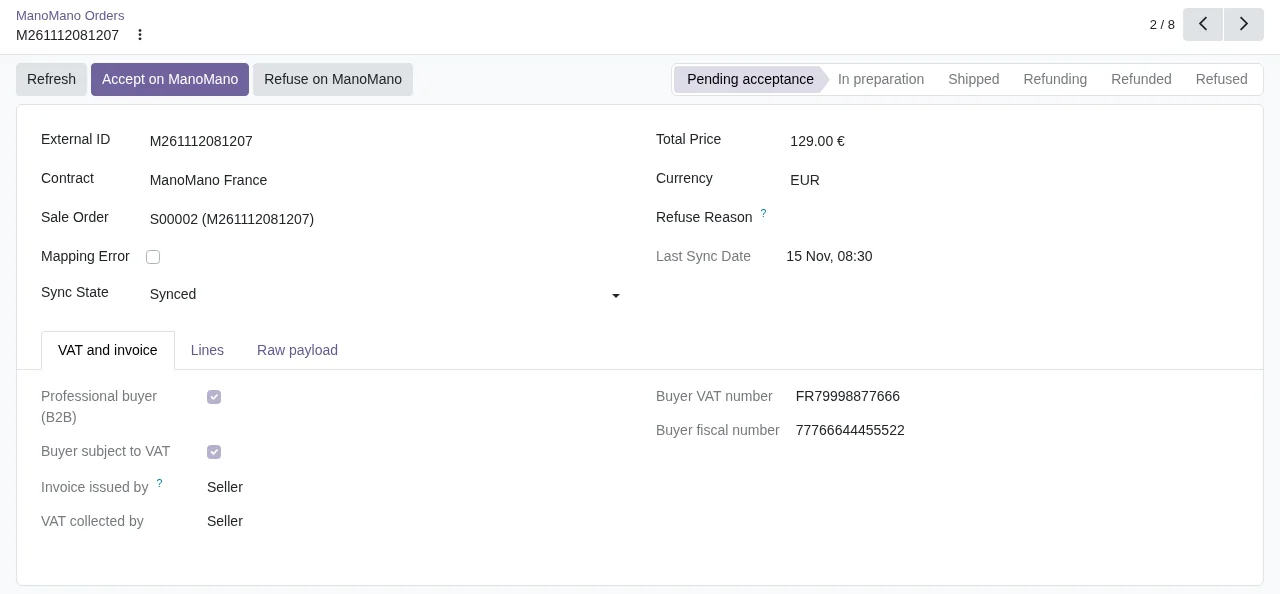
They arrive with their VAT number in the order's «VAT and invoice» tab, which also says who issues the invoice. If ManoMano issues it, the connector does not upload yours.
Does it work without FlexigoTech Cloud?
No. Calls to ManoMano go through FlexigoTech Cloud. Without the trial or the subscription, the connector does not talk to ManoMano.
What happens after you press «Buy now»?
1. You pay for the license (€9 + VAT) and get an email with the link to download the module. 2. You install it in your Odoo, on Odoo.sh or your own server. 3. In Settings → FlexigoTech Cloud you accept the data list and press «Try free for 14 days». The trial doesn't ask for a card. 4. To continue, you press «Subscribe», create your account on app.flexigotech.com and pay for the plan by card.
Does it work on Odoo Online?
No: Odoo Online does not allow third-party modules. It is for Odoo 17, 18, 19 and 20, on Odoo.sh or on your own server.
Who installs it?
You do: you buy it on flexigotech.com or on Odoo Apps and install it in your Odoo. We help you install it and set it up, by email and video call, during the 2 months of included support. Custom development and data migration are quoted separately.
What support is included?
Every purchase includes 2 months of support: we help you install it, set it up and get it working, by email and video call. While you're subscribed, support for the service stays included.
What if something fails?
We monitor the connection and email you if something fails. And support has response times: first response within 1 working day; with Pro, within 4 working hours.
What about my data? And if I cancel?
The connection goes through FlexigoTech Cloud, on our servers in Germany, with your credentials encrypted. You cancel in two clicks: if you don't subscribe when the trial ends, the service stops and nothing is charged. Your data stays in your Odoo, and you can always view and export it.
Using ManoMano but not Odoo yet?
We set up Odoo, connect it to ManoMano and stay on.
From €2,450 + VAT
Start with OdooMore about the ManoMano connector
What it does
ManoMano connector for Odoo 17, 18, 19 and 20, Community and Enterprise. It brings the orders of your ManoMano contracts into Sales and sends back the acceptance, shipments, invoices and refunds; it publishes your products as offers, with their price and stock. Every call to ManoMano goes through FlexigoTech Cloud, which keeps your x-api-key encrypted.
- ManoMano orders, in SalesEvery 15 minutes, the «ManoMano: import orders» task fetches the orders whose status has changed and creates one sales order for each, with the customer and its lines. The first time it also fetches the ones waiting for acceptance or being prepared. If a product is not in Odoo, the order comes in anyway, with the line flagged.
- Accept or refuse, from Sales too«Accept on ManoMano» and «Refuse on ManoMano» are on the ManoMano order and on its sales order, and accepting confirms the sales order. If you turn on automatic acceptance in the contract, Odoo accepts on every run the orders that have all their products.
- Business orders, with their VAT numberThe order's «VAT and invoice» tab shows whether the buyer is a business, its VAT number and fiscal number, whether it is subject to VAT and who issues the invoice. Every 2 hours, the «ManoMano: invoices asked for by buyers» task flags the orders whose buyer has asked for an invoice, and in Sales you find them with the «Invoice requested on ManoMano» filter.
- Offers with your price and stockThe «Publish on ManoMano» wizard in the product list creates a contract's offers. Every 15 minutes the price and stock that have changed go out, and every day each offer's status and competitiveness come in: whether yours is the best offer, the best price and how many offers the product has. «Search EAN on ManoMano» tells you whether the product is already in its catalogue.
- Shipments, invoices and refunds, back to ManoManoWhen you validate the delivery, the shipment goes to ManoMano with its carrier and tracking number, and the delivery order shows its status. When you post the invoice, its PDF is uploaded to ManoMano, unless ManoMano issues the invoice. Refunds go out from the order with «Refund on ManoMano» or, if you turn it on in the contract, when you post the credit note.
- Three fulfilment modesEach contract is seller-managed, ManoMano Fulfillment or mixed, product by product. For what ManoMano manages, stock does not come from your warehouse: the stock of the ManoFulfillment warehouses comes in every 6 hours.
- Every call, in the logEvery call to ManoMano is logged with its account, method, path and response code. What fails is retried every 30 minutes, and every day whatever is older than the retention days you set on the account is deleted.
What it does not do
- It does not create your seller accountYou need your ManoMano seller account and its x-api-key, which an account administrator creates in the ManoMano Toolbox.
- It is not real timeOrders come in every 15 minutes and price and stock go out every 15. Offer status and competitiveness come in once a day, and ManoFulfillment stock every 6 hours.
- It does not run on Odoo OnlineIt needs Odoo.sh or your own server: Odoo Online does not install third-party modules like this one.
What it looks like inside Odoo
Real screens of the module installed on Odoo 20, with the orders of a made-up DIY shop that sells on ManoMano France, Spain and Italy.
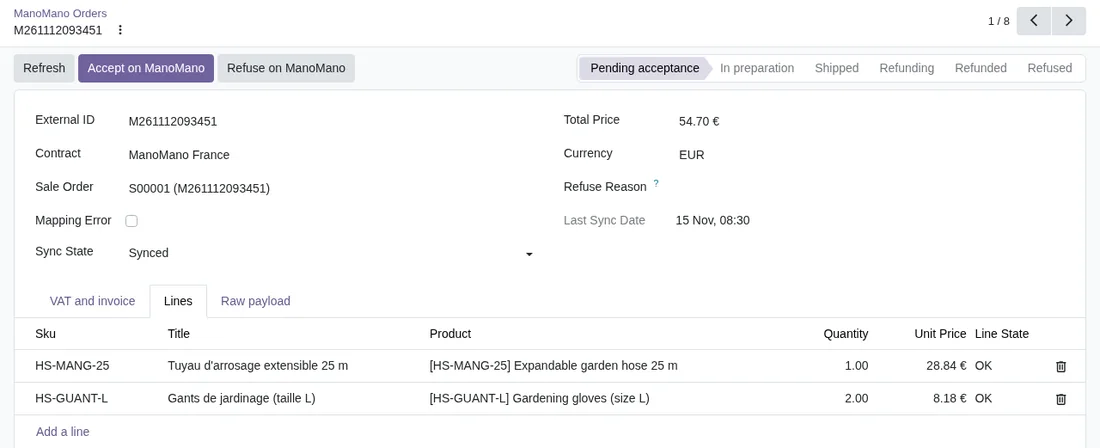
An order waiting for your answer
An order waiting for acceptance, with «Accept on ManoMano» and «Refuse on ManoMano» at the top and, in its lines, the Odoo product of each SKU.
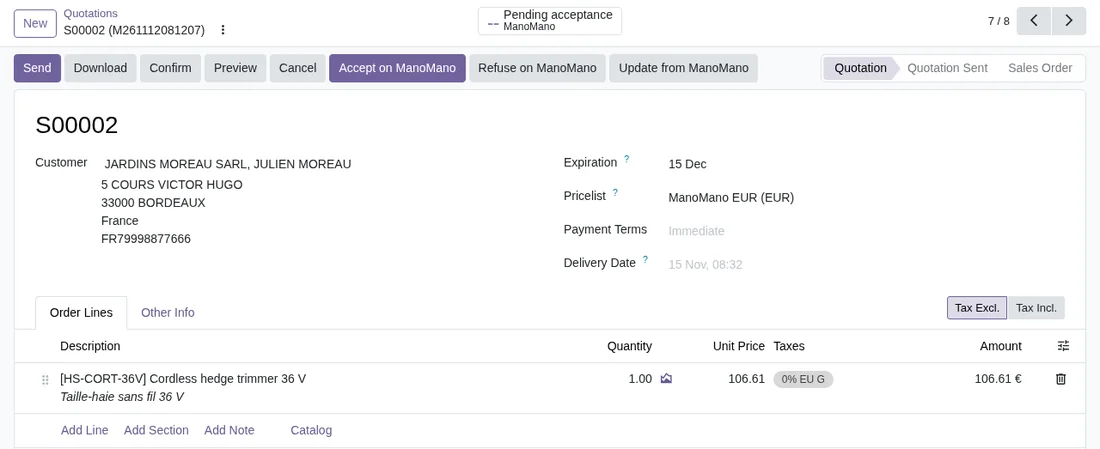
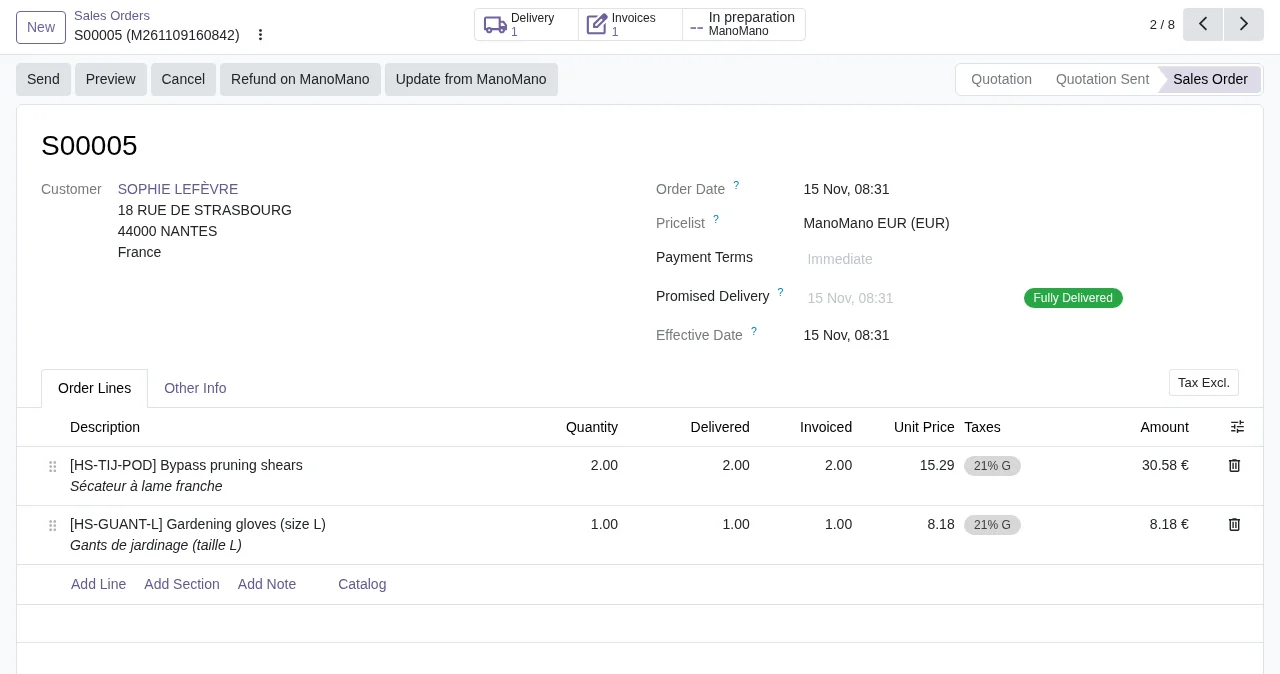
The same, from the sales order
The quotation the order creates carries the ManoMano buttons and, at the top, its ManoMano status: you accept or refuse it without leaving Sales.
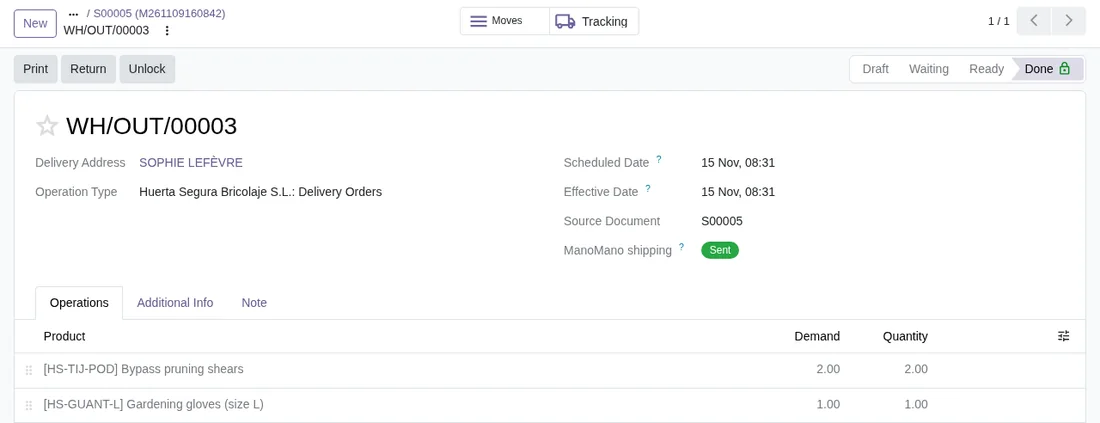
The shipment, on the delivery order
When you validate the delivery, the shipment goes to ManoMano, and the delivery order shows its status in «ManoMano shipping».
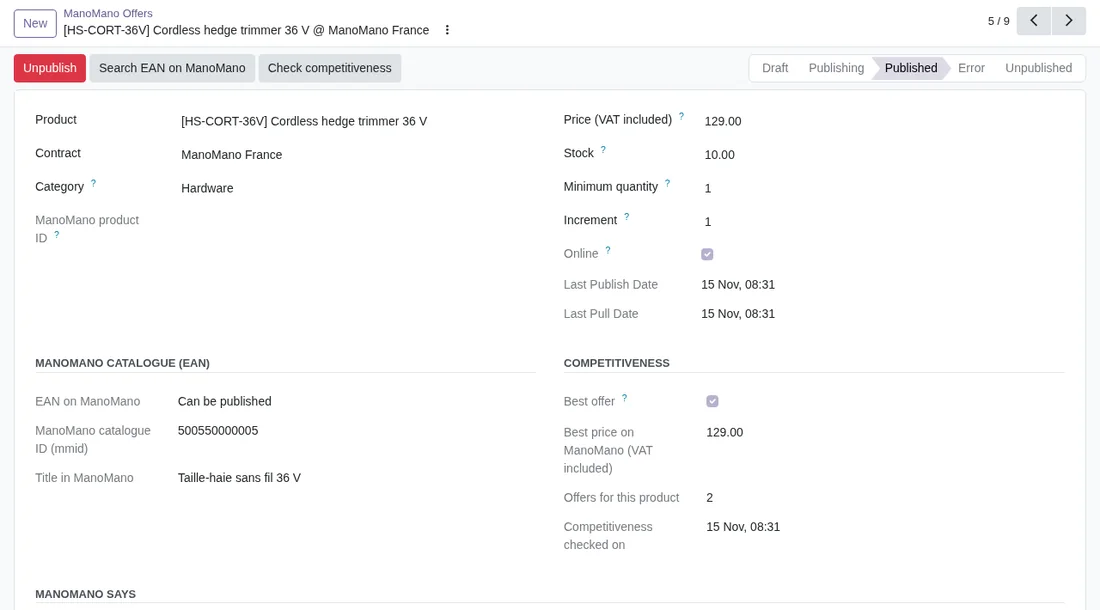
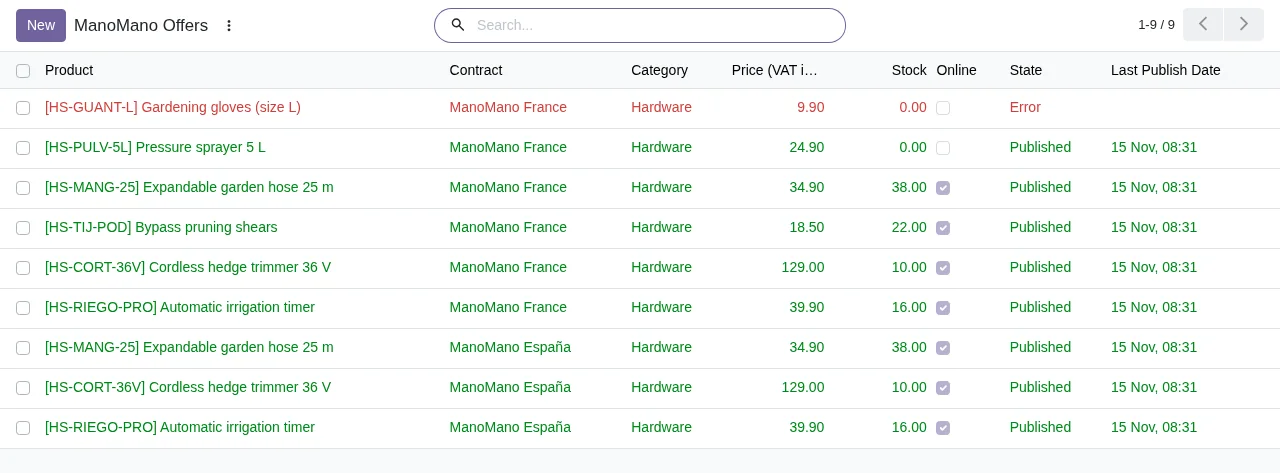
An offer, with its catalogue and its competition
The price, the stock and whether it is online; what ManoMano's catalogue says about its EAN; and whether yours is the best offer, the best price and how many offers the product has.
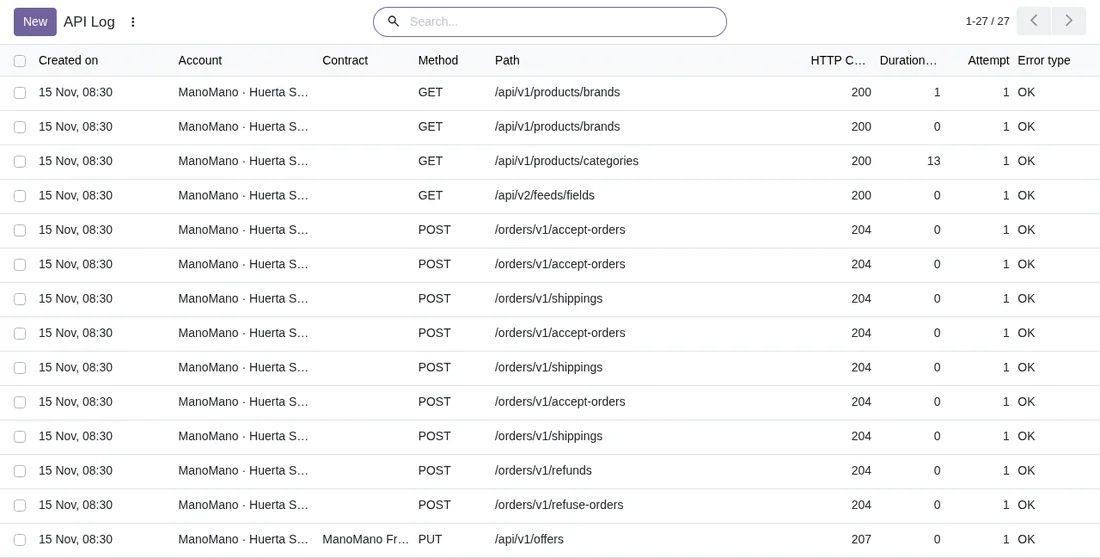
Every call, in the log
When, from which account, the method, the path, the response code and how long each call took.
At a glance
Questions before buying? Talk to the engineer.
We tell you whether the connector fits your Odoo and your ManoMano contracts before you pay anything. No middlemen.
Related
- ManoMano and Odoo: frequent errors and how to fix them
- ManoMano invoices from Odoo: questions and answers
- How to publish and unpublish ManoMano offers from Odoo
- Mirakl connector
- How FlexigoTech Cloud works
- Full module catalogue
ManoMano is a trademark of its owner. FlexigoTech publishes this connector on its own, with no endorsement or sponsorship from the trademark owner.
ManoMano guides
4 practical guides on this module: step-by-step guides, error guides, FAQs and guides for sellers without an ERP.