

 Español
An offer links an Odoo product to a ManoMano seller contract. There is one per product and contract. If you publish a product that already had an offer, the wizard updates it.
Before your first offer
There are three things no offer goes out without:
- The product's internal reference. It is the offer's SKU. If any product lacks one, the wizard stops without creating any offer and says so with
The following products have no Internal Reference (SKU) and cannot be published to ManoMano. Please set one first:and the list of those products. - The contract's carrier grid. Under ManoMano › Configuration › Contracts, the "Carrier grid" field holds the grid name exactly as it appears in the ManoMano Toolbox. It travels with every offer, along with "Delivery days (min)" and "Delivery days (max)", which come set to 2 and 5 days. The wizard does not check it: if it is missing, the offer is created and ends up in Error with the reason.
- A price above zero. If a product's price comes out at 0, the wizard stops with
Product '…' has a price of 0. ManoMano requires a positive price., with the product's name, and with a manual price of 0 it stops withManual price must be greater than zero.It does not create any offer either.
An offer that already exists goes through its own checks every time it is sent: if it later loses its reference or its price, it ends up in Error with The product has no Internal Reference: it is the SKU of the offer. or with ManoMano requires a price greater than zero.
If the product has a barcode, it goes out as the EAN, and the product's weight goes with the offer.
Publish step by step
- Open a list of product variants. In Odoo 17, 18, 19 and 20 there is Inventory › Reporting › Stock, which only Inventory administrators see; in 17, 18 and 19, also the "Product Variants" menus of Sales, Inventory and Purchase, if variants are turned on. The action does not show in the "Products" list of Sales or Inventory.
- Tick at least one product, so that the actions menu appears, and choose "Publish on ManoMano". The "Publish offers" wizard opens.
- In "Products", add the products you want to sell on ManoMano. The wizard does not pick up the ones you ticked in the list: if you leave it empty, publishing stops with
Select at least one product to publish. - Choose the contract and, if you like, the category. The category is for your reference: ManoMano takes it from its own catalogue, by EAN, or from the product feed you load in the Toolbox.
- Choose where the price comes from: "Sales price, plus the product taxes", which is how it comes, "Public price, plus the product taxes" or "Manual, VAT included". With the first two, the wizard adds the product's taxes for the contract's company, because ManoMano takes the price the customer pays.
- Click "Publish". Odoo creates or updates the offers, with each product's on-hand quantity as stock, and sends them to ManoMano 20 at a time.
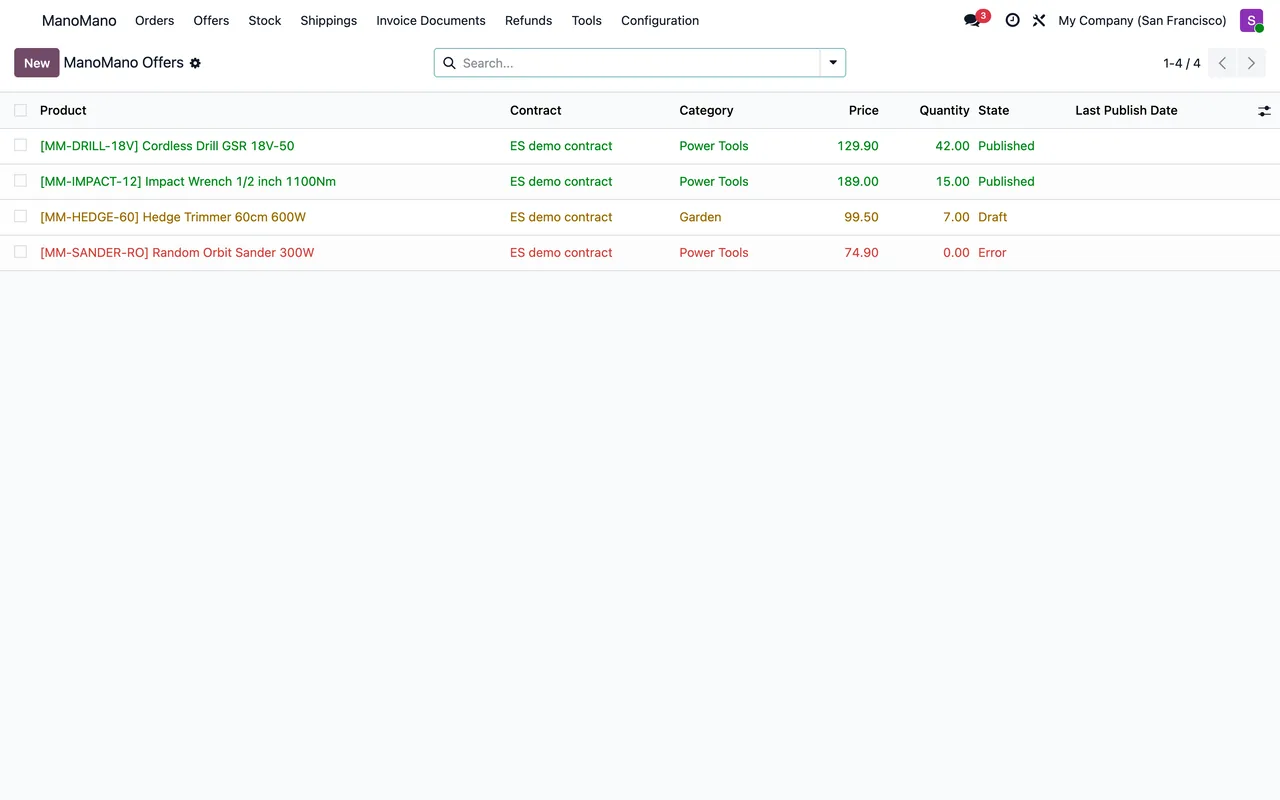
The state each offer ends up in
| State | What happened | What you do |
|---|---|---|
| Draft | Created, not sent yet | Nothing: the daily task sends it, or publish it yourself |
| Published | ManoMano accepted it | Check "Online" to see whether customers can see it |
| Error | A detail is missing or ManoMano turned it down | Read the message: ManoMano's reasons come after ManoMano refused it: |
| Unpublished | Taken off sale | Publish it again if you want to sell it again |
An accepted offer is not always visible: "Online" is what ManoMano reports, and the warnings it sends are kept in the offer's message. If a published offer has not changed since it was last sent, Odoo does not send it again.
Take an offer down
ManoMano has no call to delete an offer. When you click "Unpublish", Odoo sends the offer with stock 0 and only moves it to Unpublished once ManoMano answers that it is no longer online. If ManoMano still shows it, the offer keeps its state, with this message: ManoMano took the stock at 0 but still shows the offer online: it is not unpublished yet.
An offer that was never sent moves to Unpublished without calling ManoMano.
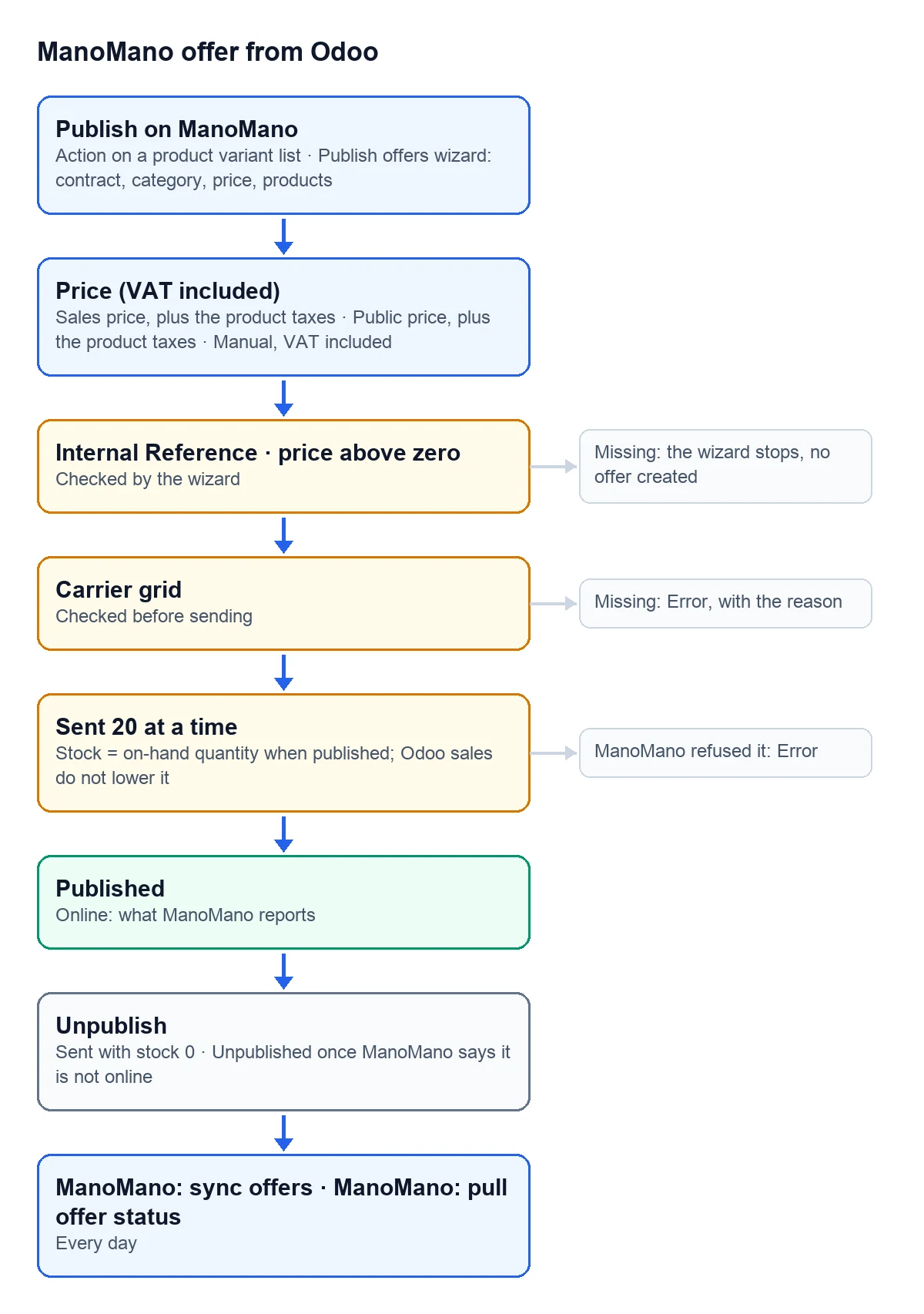
What happens on its own every day
- "ManoMano: sync offers" publishes the offers in Draft and resends the Published ones that changed since they were last sent. It sends the "Stock" saved on the offer, not today's quantity on hand. The ones in Error wait until you fix them and publish them yourself.
- "ManoMano: pull offer status" asks ManoMano about the offers sent, 50 references at a time. The ones ManoMano lists are marked "Online", with their "ManoMano product ID", and Published, unless their last update ended in error. The ones it does not list are marked as not online.
Where does the offer's stock come from?
It is the quantity the product had on hand when you published it with the wizard, and it does not change on its own: sales in Odoo, including those that come in from other channels, do not lower it. To send today's figure, run the product through the wizard again. You can also change "Stock" on the offer: if it is in Draft or Error, click "Publish"; if it is already published, that button is not shown and the daily task sends the change.
Can I sell the same product under two contracts?
Yes. There is one offer per product and contract, so each contract has its own, with its own price and grid.
Why doesn't a published offer show up on ManoMano?
Because accepted and visible are not the same thing. Check the "Online" box and the offer's message after the daily check: ManoMano's warnings and reasons end up there.
Keep reading
Checked in the connector's source code (version 17.0, 18.0, 19.0 and 20.0) and the linked sources
Sources
- Module source code: flexigobe_manomano_connector · 17.0 af39294 · 18.0 ace8d3a · 19.0 57d3f8e · 20.0 093b2e3: wizard/offer_publish_wizard.py, wizard/offer_publish_wizard_views.xml, models/manomano_offer.py, views/manomano_offer_views.xml
- Module source code: flexigobe_manomano_connector · 17.0 af39294 · 18.0 ace8d3a · 19.0 57d3f8e · 20.0 093b2e3: models/manomano_contract.py, models/manomano_offer.py (_build_payload), views/menu.xml
- Module source code: flexigobe_manomano_connector · 17.0 af39294 · 18.0 ace8d3a · 19.0 57d3f8e · 20.0 093b2e3: models/manomano_offer.py (_payload_problem, _put, _row_outcome, action_publish)
- Module source code: flexigobe_manomano_connector · 17.0 af39294 · 18.0 ace8d3a · 19.0 57d3f8e · 20.0 093b2e3: models/manomano_offer.py (action_unpublish)
- Module source code: flexigobe_manomano_connector · 17.0 af39294 · 18.0 ace8d3a · 19.0 57d3f8e · 20.0 093b2e3: data/manomano_cron.xml, models/manomano_offer.py (_cron_sync_offers, _pull_status)
- github.com/odoo/odoo/blob/20.0/addons/stock/views/product_views.xml