

 Español
 Català
 Deutsch
 Français
 Português
 Italiano
 Nederlands
 Polski
What Easy WMS is, in Mecalux's own words
Easy WMS is the program that runs the work inside the warehouse: where each item is stored, what gets picked and what ships. Its website adds how it is installed: «The solution can be deployed fully in the cloud or installed on-premise.» And how people use it: «It features an intuitive, user-friendly interface available in 14 languages and powered by artificial intelligence (AI).»
Mecalux also gives usage figures: «Every day, Easy WMS oversees the logistics operations of over 1,200 warehouses in 36 countries.»
Odoo has its own Inventory app too. When Easy WMS runs the warehouse, the split of work changes, and we explain it in Odoo WMS integration with Easy WMS.
How Easy WMS works: the pieces worth knowing
These are the Easy WMS ideas you meet when you connect it to Odoo.
- WMS
- Warehouse management system. In Spanish the same thing is called SGA, and Mecalux uses both terms on its websites.
- Multi-owner and multi-warehouse
- One Easy WMS can hold the stock of several owners and several warehouses. In Odoo, each connection links one Odoo warehouse to its
Easy WMS warehouse code.
- Cloud or on-premise
- Mecalux offers both. The solution can run fully in the cloud or on the customer's own servers.
- ERP integration
- Mecalux says that «Easy WMS integrates with the major ERP solutions in the market». The actual channel (the command API, SOAP, files or an exchange database) is agreed with Mecalux for each installation. We explain it in the Easy WMS API and Odoo.
- Documents
- What travels between Odoo and Easy WMS: the item master, the entry and exit orders, the confirmations and the stock snapshot. Each one is kept in Odoo as a message with its status.
- Stock snapshot
- The full stock count that Easy WMS returns when asked. Odoo compares it with its own stock.
Easy WMS with Odoo: what the connector sends, what it brings back and where you see it
The FlexigoTech connector is called Mecalux Easy WMS for Odoo. Odoo sends Easy WMS the items and, if you want, the customers and suppliers, the entry and exit orders, the cancellations and the stock snapshot request. From Easy WMS come the acknowledgements and the rejections, the entry and exit confirmations with lots and pallets, and the stock snapshot.
Easy WMS owns the physical stock. With the connection's default settings, receipts and deliveries of the warehouse that Easy WMS runs are validated with its confirmation. Internal transfers and manufacturing are not sent to Easy WMS, and nothing stops you from validating by hand. Every receipt and every delivery carries its Easy WMS status, from Not sent to Confirmed by Easy WMS. The full journey of a receipt and a delivery is in receipts and deliveries with Easy WMS.
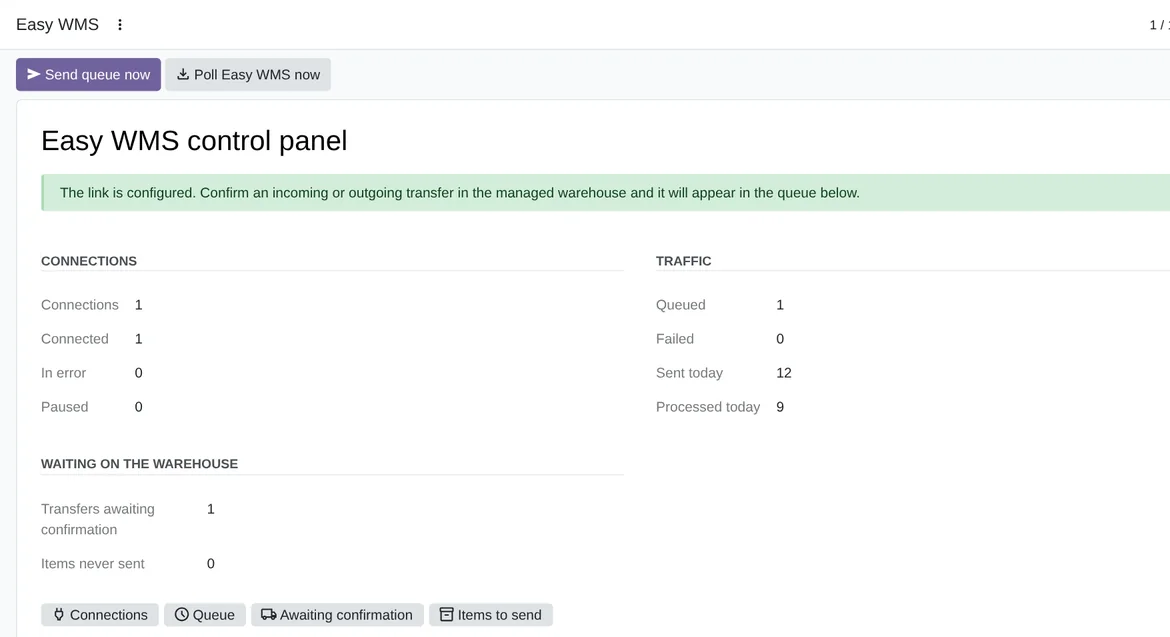
Easy WMS › Control panel: your connections, the traffic and what is pending in the warehouse, in Odoo 20 with demo data.Everything sits under the Easy WMS menu:
Control panel, with the summary of connections and traffic.
Operations, withMessages,ItemsandSync log.
Tools, withAnalyse a documentandSend master data.
Configuration, withEasy WMS connectionsandCommands and mappings.
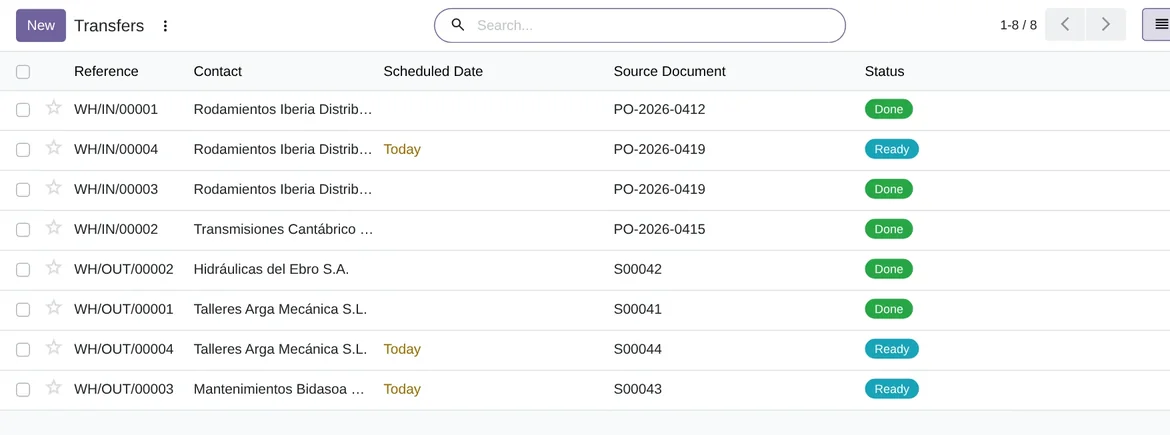
The connector runs on four scheduled actions:
Easy WMS: send queued documents, every 5 minutes.
Easy WMS: poll for answers, every 10 minutes.
Easy WMS: request stock snapshot, every day; it is switched off when you install the module.
Easy WMS: purge old successful log rows, every 7 days: it deletes the successful log rows older than 180 days.
If a message fails, Odoo retries it and, in the end, alerts a person. We cover that in Easy WMS messages and errors.
What you need to use Easy WMS with Odoo
- Your own Easy WMS, with the interface that Mecalux has enabled for you. The Easy WMS licence is not included.
- For the command API, SOAP and SFTP, a public https address. FlexigoTech adds that host to its list before the first call.
- Odoo 17, 18, 19 or 20 on Odoo.sh or on your own server, not on Odoo Online.
- The Odoo Inventory, Purchase and Sales apps, which the module depends on.
- The FlexigoTech Cloud subscription, Connector plan.
Frequently asked questions about Easy WMS and Odoo
Does it need the FlexigoTech Cloud subscription?
Yes. The command API, SOAP and SFTP go through FlexigoTech Cloud, which takes each call to your Easy WMS server with your credentials. You can get the connector on Odoo Apps and read every detail on the Mecalux Easy WMS connector page.
Has it been tested with a live Easy WMS?
Not yet. The automated tests (255 in the version for Odoo 20 and 252 in the versions for 17, 18 and 19) run against an Easy WMS simulator that follows the published screenshot of Mecalux's own connector. FlexigoTech has no Easy WMS installation to test with, and Mecalux does not publish the layout of its documents. The first real installation has to confirm the OAuth grant, the Tenant, the UriExecuteCommand path, SOAP and SFTP.
Is this a Mecalux connector?
No. Mecalux is a trademark of its owner. FlexigoTech publishes this connector on its own, with no endorsement or sponsorship from the trademark owner.
What happens if the stock snapshot does not match Odoo?
You choose what Odoo does: only log the difference, log it and create an activity, or post an inventory adjustment.
Keep reading
Checked in the connector's source code (version 20.0) and the linked sources
Sources
- www.mecalux.es/software/sga-software-gestion-almacenes
- www.mecalux.com/software/warehouse-management-system-wms
- flexigotech.com/en/mecalux-connector-odoo.html
- Module source code: flexigo_mecalux_connector 20.0 (05a27c9c): __manifest__.py
- Module source code: flexigo_mecalux_connector 20.0 (05a27c9c): views/menu.xml
- Module source code: flexigo_mecalux_connector 20.0 (05a27c9c): data/mecalux_data.xml
- Module source code: flexigo_mecalux_connector 20.0 (05a27c9c): models/mecalux_backend.py
- Module source code: flexigo_mecalux_connector 20.0 (05a27c9c): models/stock_picking.py
- Module source code: flexigo_mecalux_connector 20.0 (05a27c9c): static/description/index.html
- Module source code: flexigo_mecalux_connector 20.0 (05a27c9c): models/mecalux_sync_log.py
- Module source code: flexigo_mecalux_connector 20.0 (05a27c9c): models/mecalux_outbound.py