

 Español
 Català
 Deutsch
 Français
 Português
 Italiano
 Nederlands
 Polski
How Odoo and Easy WMS split the work
Odoo is still the ERP: purchases, sales, invoices and the transfers as documents. Easy WMS is the warehouse management system, the one that knows what is really on each shelf. The connector joins the two with one rule: Odoo sends Easy WMS the items and the entry and exit orders, and records on each transfer what the warehouse confirms.
| What | Who runs it | How it reaches the other side |
|---|---|---|
| Purchase and sales orders | Odoo | They do not travel: Odoo sends the receipts and deliveries they create |
| Receipts and deliveries | Odoo creates them | When you confirm them, their entry or exit order goes to Easy WMS |
| The work inside the warehouse | Easy WMS | Easy WMS confirms what was received or shipped |
| Real quantities, lots and pallets | Easy WMS | The confirmation writes them on the Odoo transfer |
| The physical stock | Easy WMS | Each confirmation validates the Odoo transfer if you leave validation on, and the stock snapshot is compared with Odoo stock |
The module depends on the Odoo Inventory, Purchase and Sales apps. It does not replace Inventory: the transfers stay in Odoo, with an Easy WMS status that tells you where each one stands.
When an external WMS next to Odoo pays off
Choosing a WMS like Easy WMS comes before the connector. Mecalux explains on its website which businesses need one, and among them it lists «businesses with operationally complex facilities (advanced slotting and replenishment strategies, yard and dock management, single- and multi-unit orders, kitting, cross-docking, etc.);». Its list also includes «companies for which logistics processes are crucial (logistics service providers, e-commerce retailers, etc.);» and businesses that need to integrate with other supply chain systems, the ERP among them.
On the ERP side, its answer to whether Easy WMS integrates with any ERP is this: «Yes, Easy WMS is designed for fast, easy and effective integration with the main ERP software solutions in the market.» The FlexigoTech connector is one way to do it with Odoo. If your warehouse does not run Easy WMS, this connector is not for you: the Easy WMS licence is not included and you need your own Easy WMS. If you do not know the product yet, start with what is Easy WMS.
With Easy WMS already in the warehouse, the connector fits when two conditions hold. Your Odoo has to be 17, 18, 19 or 20, on Odoo.sh or on your own server, not on Odoo Online. And the movements you want Easy WMS to run have to be receipts and deliveries, which is what the connector sends it: if your warehouse lives on internal transfers or manufacturing, that part stays in Odoo.
What you decide in Odoo when you connect them
The decisions about the split sit in the Behaviour tab of each connection. This is how they come when you create it:
| Option | When the connection is created | What it changes |
|---|---|---|
Send transfers automatically | On | When you confirm a receipt or a delivery, its order goes to the queue. Off, each transfer goes to the queue with Send to Easy WMS |
Validate transfers on WMS confirmation | On | The confirmation writes the quantities, lots and pallets and validates the transfer. Off, it leaves the transfer unvalidated for you to review |
Accept partial confirmations | On | If Easy WMS confirms less than ordered, it validates what moved and Odoo creates a backorder for the rest. Off, that confirmation ends in error. It only shows when validation is on |
Stock Discrepancy Action | Log and raise an activity | You can also choose Only log the discrepancy or Log and post an inventory adjustment |
The stock snapshot is never written straight into Odoo stock. It is compared, and the correction, if you choose it, is posted as an Odoo inventory adjustment. The Easy WMS: request stock snapshot scheduled action asks for that snapshot every day, but it is switched off when you install the module: you turn it on when you want to start comparing.
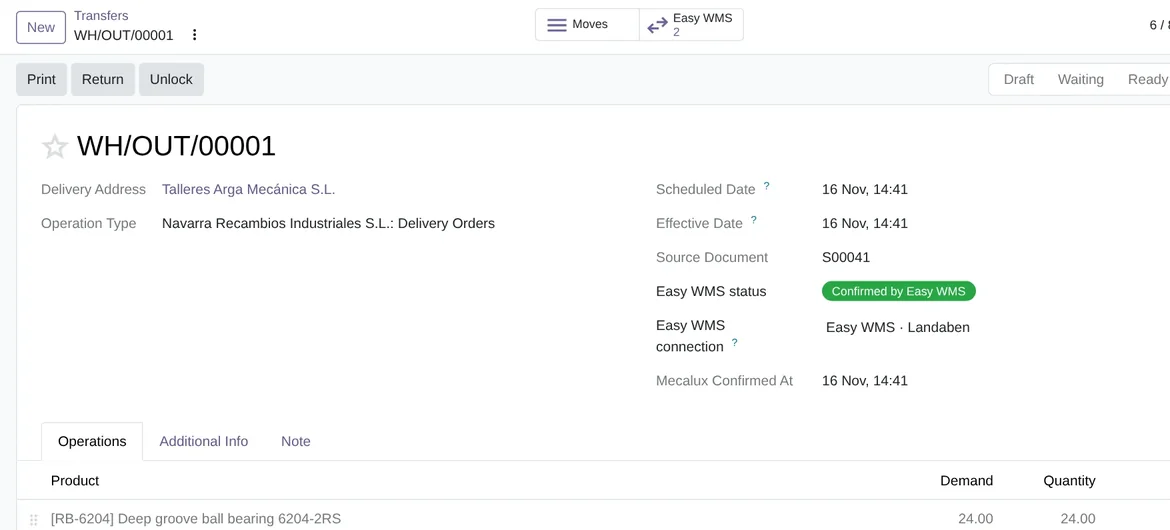
Easy WMS status, in Odoo 20 with demo data.Several warehouses with Easy WMS
Each connection links an Odoo warehouse to its Easy WMS warehouse code. If you have several warehouses on Easy WMS, each one gets its own connection and its own options. The Stock owner code is only needed if your installation uses the Mecalux module for logistics providers.
A transfer from a warehouse that no active connection manages is not sent, and the Send to Easy WMS button does not appear on it.
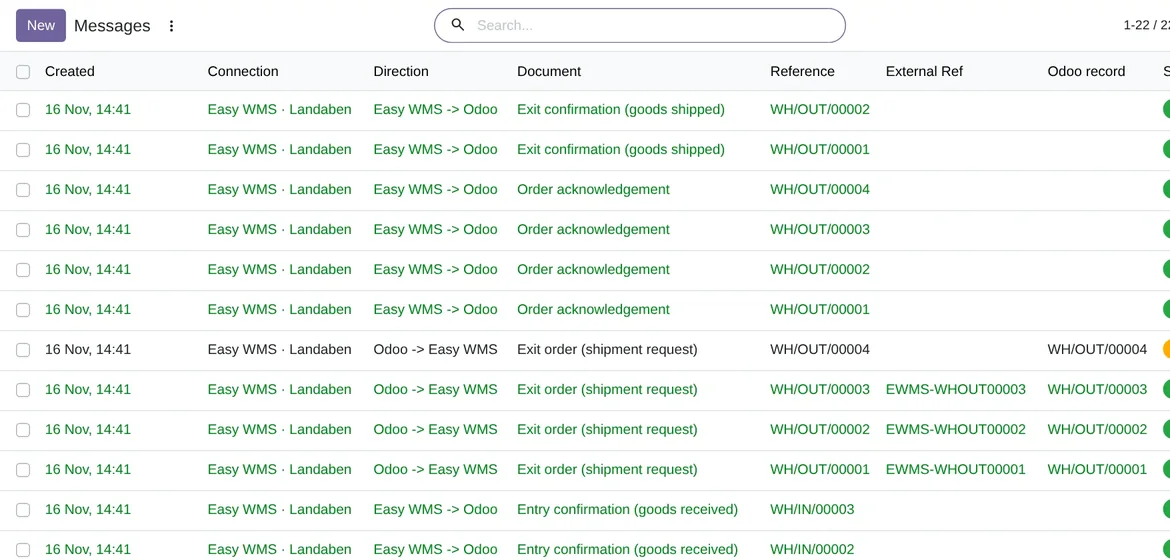
What happens to what you do by hand in Odoo
The connector does not stop you from validating a receipt or a delivery by hand. If the Easy WMS confirmation arrives afterwards, it leaves the transfer alone and records it in the log: «%s was already validated; confirmation ignored.», with the transfer name in place of %s. The step-by-step of a receipt and a delivery, with their statuses, is in receipts and deliveries with Easy WMS.
Frequently asked questions about Odoo and an external WMS
Does it need the FlexigoTech Cloud subscription?
Yes. The command API, SOAP and SFTP go through FlexigoTech Cloud. You can get the connector on Odoo Apps and read its details on the Mecalux Easy WMS connector page.
Who is right when Odoo and Easy WMS do not match?
Easy WMS, because it holds the physical stock. Odoo logs the difference and, depending on the option you choose, creates an activity or posts an inventory adjustment.
Has it been tested with a live Easy WMS?
Not yet. The tests run on Odoo 17, 18, 19 and 20 against an Easy WMS simulator that follows the published screenshot of Mecalux's own connector. The first real installation has to confirm, among other things, the OAuth grant and the exact UriExecuteCommand path.
Keep reading
Checked in the connector's source code (version 20.0) and the linked sources
Sources
- www.mecalux.es/software/sga-software-gestion-almacenes
- www.mecalux.com/software/warehouse-management-system-wms
- flexigotech.com/en/mecalux-connector-odoo.html
- Module source code: flexigo_mecalux_connector 20.0 (05a27c9c): __manifest__.py
- Module source code: flexigo_mecalux_connector 20.0 (05a27c9c): models/mecalux_backend.py
- Module source code: flexigo_mecalux_connector 20.0 (05a27c9c): data/mecalux_data.xml
- Module source code: flexigo_mecalux_connector 20.0 (05a27c9c): static/description/index.html
- Module source code: flexigo_mecalux_connector 20.0 (05a27c9c): models/mecalux_inbound.py
- Module source code: flexigo_mecalux_connector 20.0 (05a27c9c): models/mecalux_outbound.py
- Module source code: flexigo_mecalux_connector 20.0 (05a27c9c): models/stock_picking.py
- Module source code: flexigo_mecalux_connector 20.0 (05a27c9c): views/stock_picking_views.xml