

 Español
 Català
 Deutsch
 Français
 Português
 Italiano
 Nederlands
 Polski
Where the messages are and what each one keeps
The messages are under Easy WMS › Operations › Messages. Each one keeps what went out or came in, exactly as it travelled, and the answer from the other side. A message linked to a transfer opens from the transfer itself with the Easy WMS button, and from the message you go back to the transfer with Open Odoo record.
A repeated document is not processed twice. File transports sometimes drop a file again, polls overlap and retries duplicate. Each message carries a unique key made from the connection, the document, the reference and the content, and a second delivery of the same document lands on the same message.
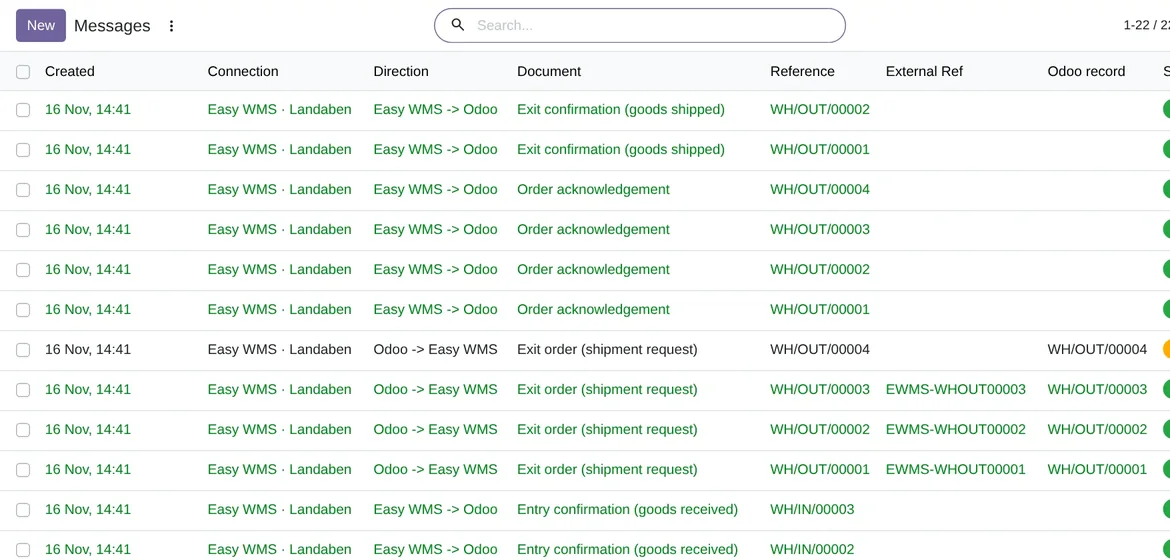
Easy WMS › Operations › Messages: every document with its status, in Odoo 20 with demo data.The statuses of a message
A message goes through Draft, Queued, Sending, Sent and Processed. It can also end in Error or Cancelled. A Processed message can no longer be cancelled: if you want to undo its effect, do it on the Odoo document.
What Odoo does on its own when a send fails
If an attempt fails, the message goes back to Queued with the reason written on it and waits before the next attempt. With the default Max Retries, which is 5, the waits are 1, 5, 15 and 60 minutes. Because the queue goes out every 5 minutes, the real wait can be slightly longer. If you raise the retries, the next ones wait 240 minutes.
When a message runs out of retries, it moves to Error and the Responsible of the connection gets an activity in Odoo. It stays like that until someone presses Retry now. The control panel counts the failed messages and opens their list.
The errors a confirmation can raise, and what to do
| What the message says | When it happens | What to do |
|---|---|---|
| Easy WMS confirmed an order with no matching transfer | The reference matches no transfer in the warehouse of the connection | Check the reference and the warehouse; fix it and press Retry now |
| An Easy WMS item does not map to any Odoo product | The item code is not in Odoo | Create the product or fix its code, and press Retry now |
| The transfer is cancelled in Odoo | Easy WMS confirmed a transfer you cancelled | Talk to the warehouse: in Odoo there is nothing left to move |
| Easy WMS confirmed products that are not on the transfer | The confirmation brings extra items | Check with the warehouse what really moved |
| The confirmation contained no usable line | Easy WMS sent an empty or unreadable confirmation | Look at the content of the message and check it with Mecalux |
| Easy WMS confirmed less than ordered and partials are disabled | Accept partial confirmations is off | Turn it on if you accept partials, or settle it with the warehouse |
For the errors of a confirmation, the reason is written on the message form. Fix the cause and press Retry now. Why a confirmation looks for its transfer the way it does is explained in receipts and deliveries with Easy WMS.
Connection warnings that are not your fault
Some warnings need no action from you. If Easy WMS limits the rate with an HTTP 429, the message stays queued and is retried. Over SFTP, if the previous file is still waiting in the outbound folder, it is not overwritten: the message is sent again once Easy WMS has taken it. On the other hand, if the token service rejects the saved credentials, you do have to act: check the credentials and the grant, as we explain in the Easy WMS API.
Test a document before applying it
In Easy WMS › Tools › Analyse a document you paste a document as Easy WMS produces it and press Analyse. The Reading tells you which document the connector recognised, which fields it read and what it would do. It changes nothing. If the reading is right, Apply for real processes it as if it had come from Easy WMS, and only for inbound documents.
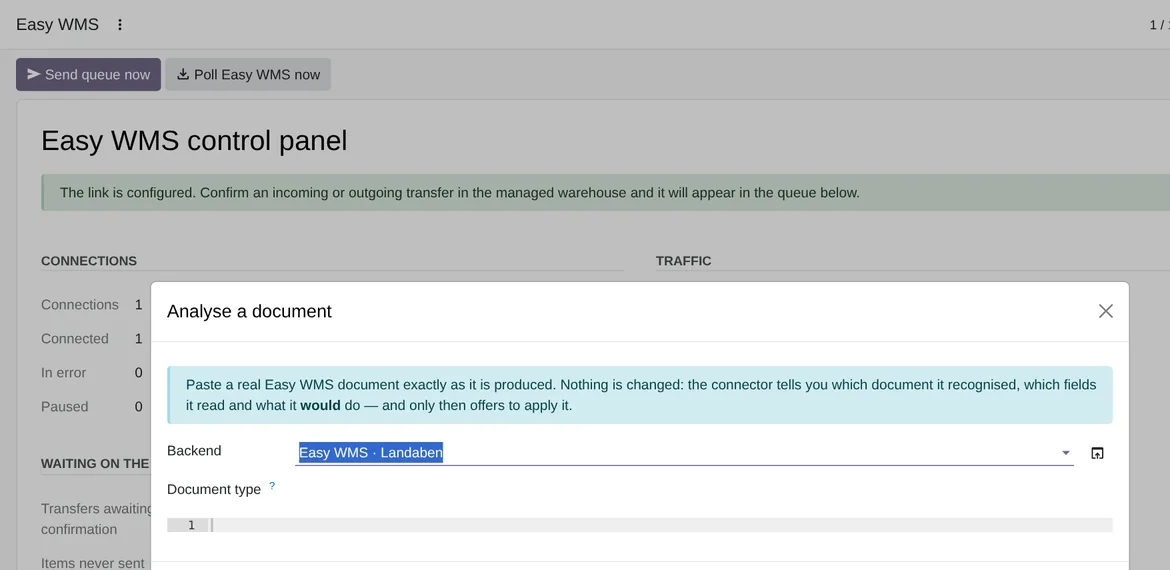
Analyse a document: paste an Easy WMS document and see what Odoo would do, without changing anything, in Odoo 20.The sync log
Easy WMS › Operations › Sync log keeps one row per exchange, with its details and its Result: Success or Error. The Easy WMS: purge old successful log rows scheduled action deletes, every 7 days, the successful rows older than 180 days. Rows with an error stay.
Frequently asked questions about Easy WMS messages
Does it need the FlexigoTech Cloud subscription?
Yes. The command API, SOAP and SFTP go through FlexigoTech Cloud. You can get the connector on Odoo Apps and read its details on the Mecalux Easy WMS connector page.
Can I send the queue without waiting for the scheduled action?
Yes. On the control panel, Send queue now sends what is queued and Poll Easy WMS now collects the answers right away.
Is a message lost if Easy WMS does not answer?
No. It stays in Odoo with its content and its status, and it is retried according to the Max Retries of the connection.
Has it been tested with a live Easy WMS?
Not yet. The automated tests run against an Easy WMS simulator that follows the published screenshot of Mecalux's own connector. FlexigoTech has no Easy WMS installation to test with, and Mecalux does not publish the layout of its documents.
Keep reading
Checked in the connector's source code (version 20.0) and the linked sources
Sources
- flexigotech.com/en/mecalux-connector-odoo.html
- Module source code: flexigo_mecalux_connector 20.0 (05a27c9c): views/menu.xml
- Module source code: flexigo_mecalux_connector 20.0 (05a27c9c): models/mecalux_message.py
- Module source code: flexigo_mecalux_connector 20.0 (05a27c9c): models/mecalux_backend.py
- Module source code: flexigo_mecalux_connector 20.0 (05a27c9c): models/mecalux_dashboard.py
- Module source code: flexigo_mecalux_connector 20.0 (05a27c9c): data/mecalux_data.xml
- Module source code: flexigo_mecalux_connector 20.0 (05a27c9c): models/mecalux_inbound.py
- Module source code: flexigo_mecalux_connector 20.0 (05a27c9c): models/mecalux_transport.py
- Module source code: flexigo_mecalux_connector 20.0 (05a27c9c): models/mecalux_sync_log.py
- Module source code: flexigo_mecalux_connector 20.0 (05a27c9c): views/mecalux_dashboard_views.xml
- Module source code: flexigo_mecalux_connector 20.0 (05a27c9c): static/description/index.html