
 Español
 Català
 Deutsch
 Français
 Português
 Italiano
 Nederlands
 Polski



Mecalux Easy WMS connector for Odoo
Odoo sends Easy WMS the items and the inbound and outbound orders, and records on each transfer what the warehouse confirms.
€49/month14 days free, no card
Yearly and Pro
- Standard€49/month · €490/year
- Pro€98/month · €980/year
Reply within 1 working day; with Pro, 4 hours. FlexigoTech Cloud pricing
After you buy
- You pay for the license (€9 + VAT) and get an email with the link to download the module.
- You install it in your Odoo, on Odoo.sh or your own server.
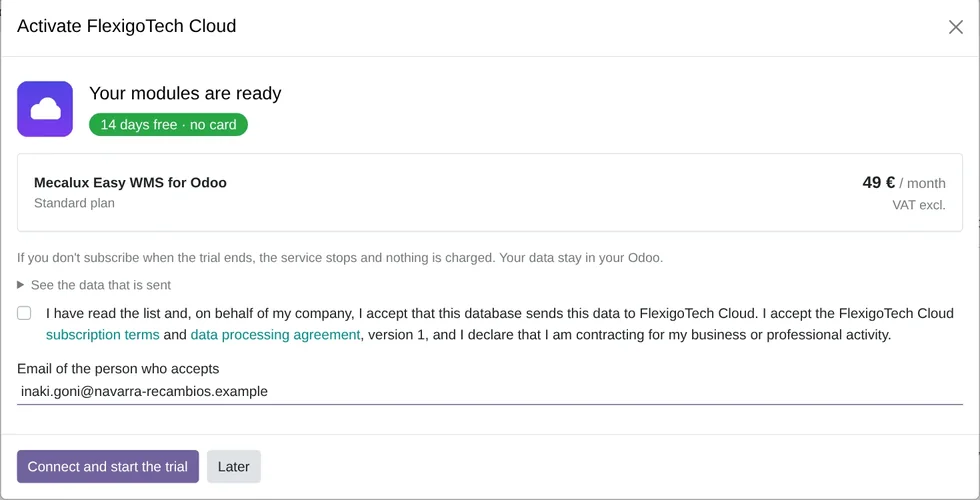
- In Settings → FlexigoTech Cloud you accept the data list and press «Try free for 14 days». The trial doesn't ask for a card.
- To continue, you press «Subscribe», create your account on app.flexigotech.com and pay for the plan by card.
Every purchase includes 2 months of support: we help you install it, set it up and get it working, by email and video call.
- Tested on Odoo 17, 18, 19 and 20
- Odoo Learning Partner
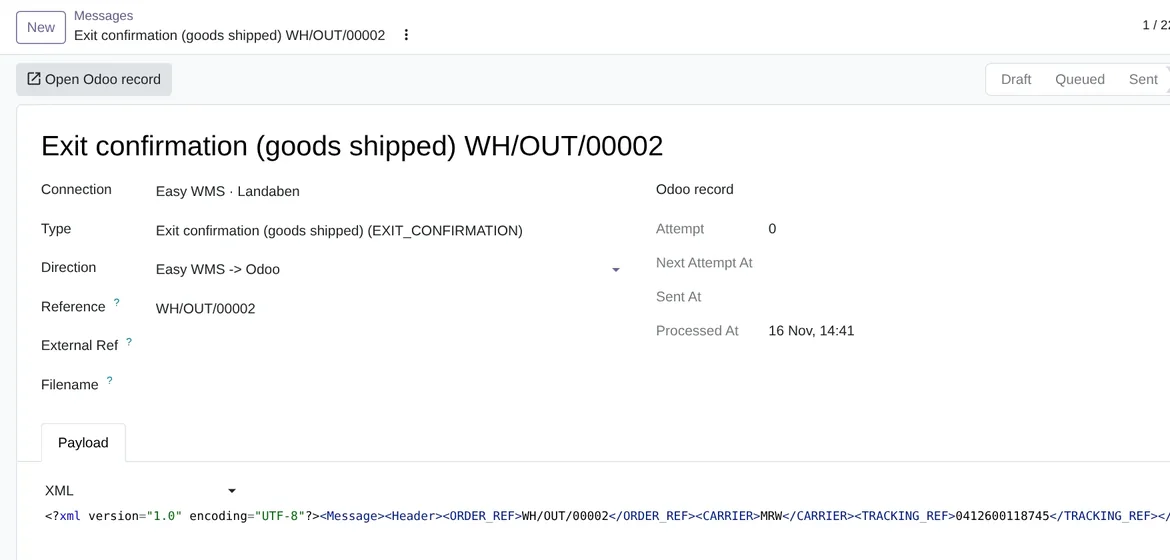
 Your messages with Easy WMSReal Odoo screenshot
Get started in 3 steps
- Install the moduleFrom Odoo Apps, on Odoo.sh or on your own server. It needs Inventory, Purchase and Sales.
- Start the trialIn Settings › FlexigoTech Cloud, an administrator accepts the data list and starts the 14-day trial, no card needed.
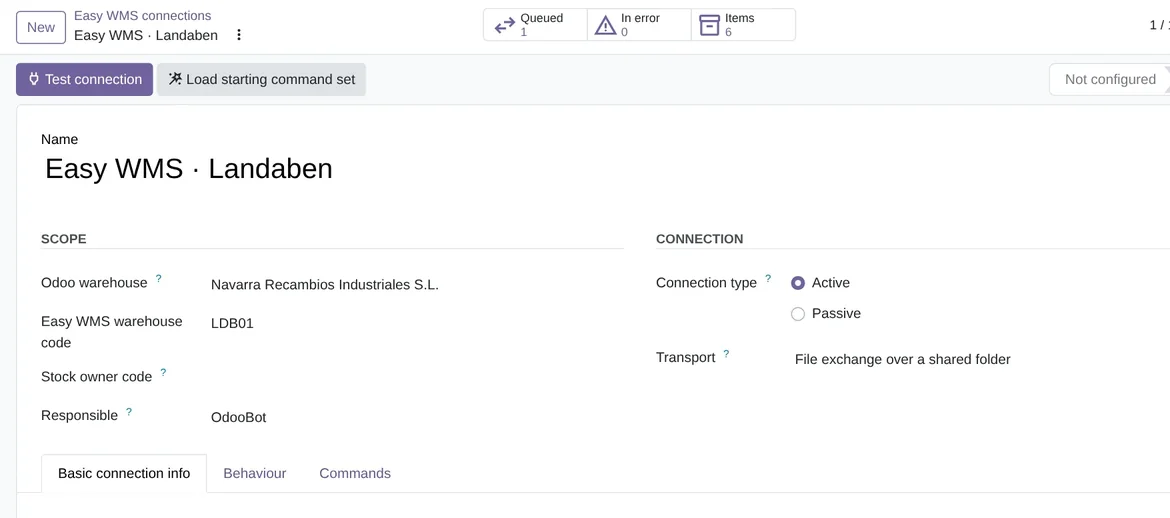
- Create the connectionIn Easy WMS › Configuration › Easy WMS connections: the warehouse, the type and the transport, the host and the credentials, then «Test connection».
Load the commands «Load starting command set» creates the starting profile, which you adjust to what you agreed with Mecalux.
What you need Your own Easy WMS, with the interface Mecalux has enabled for you. For the API, SOAP and SFTP, a public https address, which FlexigoTech adds to its list before the first call. Odoo 17, 18, 19 or 20 on Odoo.sh or your own server, not Odoo Online.
What it does
- Orders to the warehouse on confirmWhen you confirm a receipt or a delivery in Odoo, its order goes to Easy WMS, and the item goes first if Easy WMS does not have it yet.
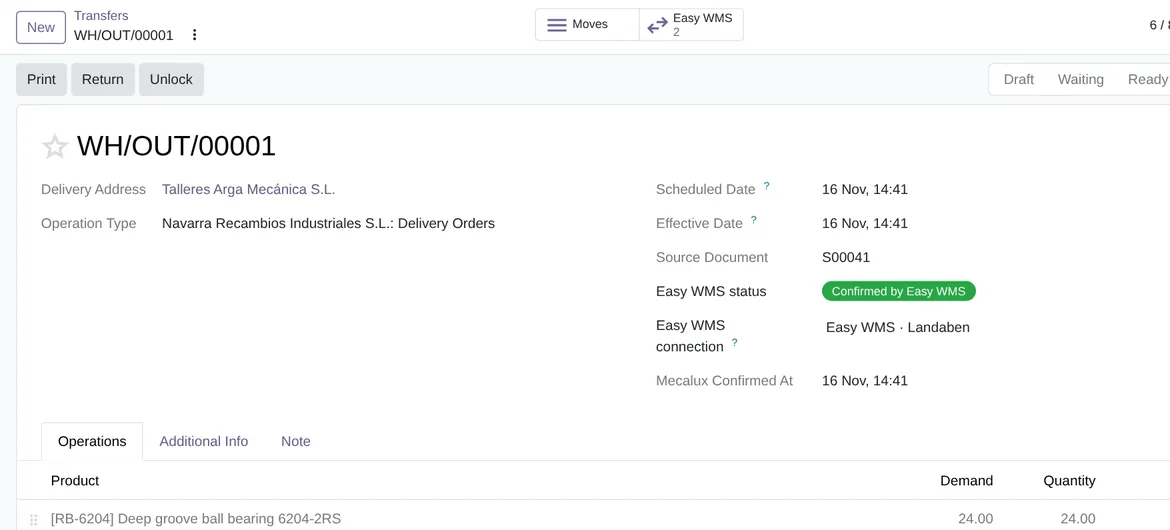
- What happened, on the transferEasy WMS confirmations write quantities, lots and pallets, and validate the transfer if you choose so.
- Every message in viewEach document is kept with its status, its content and its retries. If it fails, the connection's responsible user gets an activity.
- Over the interface you haveCommand API, SOAP, SFTP, shared folder or exchange database, in Active or Passive mode.
How it works

Leaves Odoo
- The items and, if you want, customers and suppliers
- Inbound and outbound orders
- Cancellations and the stock snapshot request
FlexigoTech Cloud
Comes from Easy WMS
- Acknowledgements and rejections
- Inbound and outbound confirmations, with lots and pallets
- The stock snapshot, which Odoo compares with its own

The Easy WMS command API, SOAP and SFTP go through FlexigoTech Cloud, which takes every call to your Easy WMS server with your credentials. It keeps them encrypted on its servers in Germany, and Odoo does not keep them.
Where you see it in Odoo
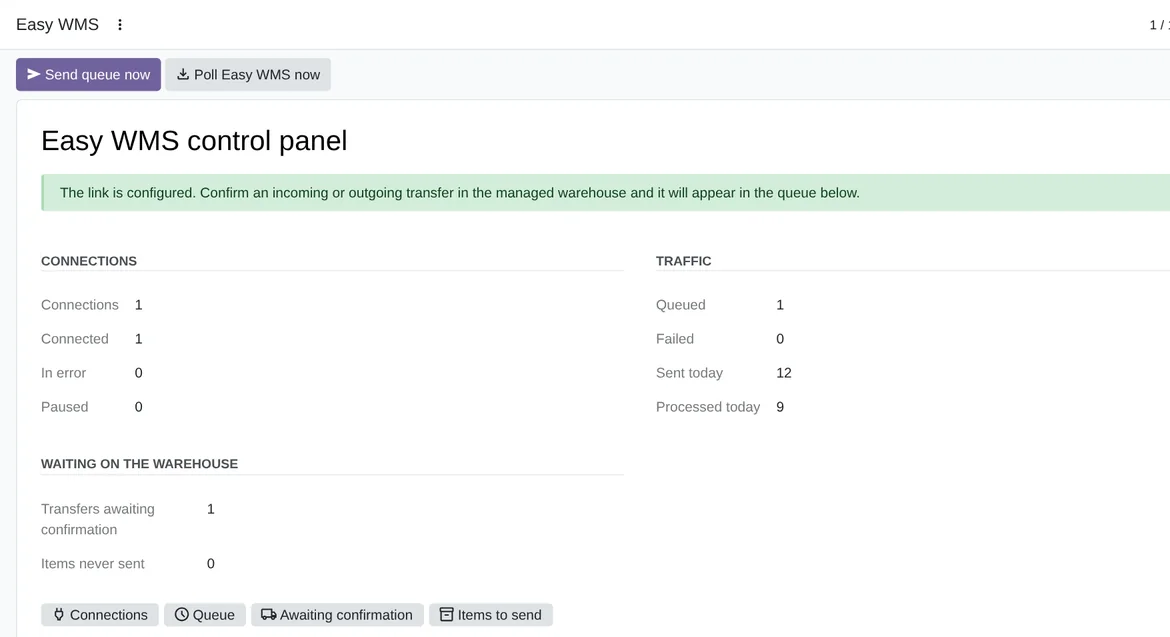
- Easy WMSthe control panel; under Operations, messages, items and the sync log; under Tools, Analyse a document and Send master data; under Configuration, your connections and their commands
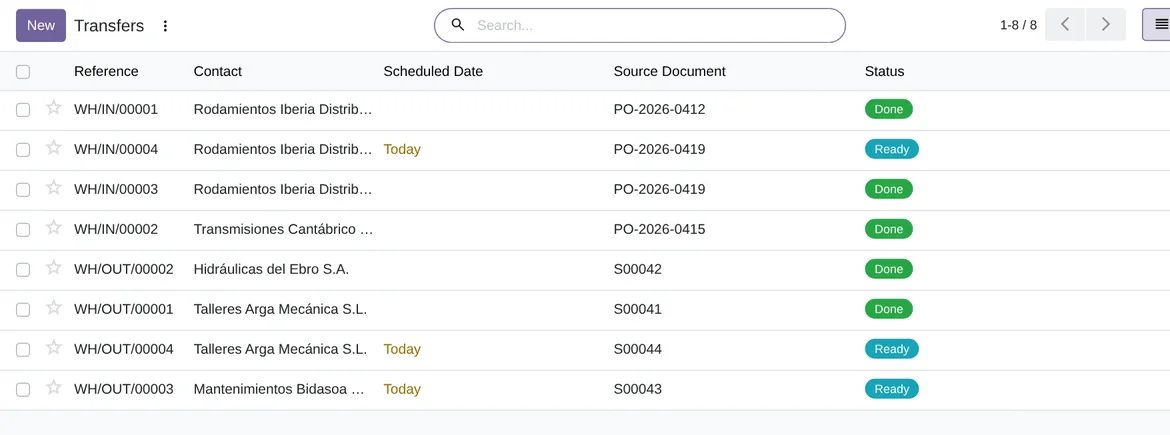
 Inventoryon every transfer, «Send to Easy WMS» and the Easy WMS button with its messages
- SettingsFlexigoTech Cloud, with the 14-day trial and the subscription
Inside Odoo
Real Odoo screenshots.
Price
Standard
€49a month + VAT
€490 a year + VAT 2 months free
- The connection runs on our servers
- We alert you if sync fails
- First response 1 working day
- Video call included for the first 2 months
- Accounts per connector Up to 3
Pro
€98a month + VAT
€980 a year + VAT 2 months free
- Everything in Standard
- First response 4 working hours
- Video call if needed
- Accounts per connector Up to 10
- + €9 for the module license, per Odoo version
- 14 days free, no card
- Cancel in two clicks
- Every purchase includes 2 months of support: we help you install it, set it up and get it working, by email and video call. While you're subscribed, support for the service stays included. Still integrating or testing? Extend your free trial.
If you cancel What the subscription gives stops. Your data stays in your Odoo.
- Support with response timesMonday to Friday, 9:00 to 18:00 (Barcelona), except public holidays.
- Maintenance and improvementsOdoo 17-20, on Odoo.sh or your own server
- We handle changes to their APIIf the platform changes its API, we adapt the module and the service.
- Servers in GermanyWe store your credentials encrypted
- Tested On Odoo 17, 18, 19 and 20. The automated tests (255 in the Odoo 20 version and 252 in the 17, 18 and 19 ones) run on Odoo 17, 18, 19 and 20 against an Easy WMS simulator that follows the published screenshot of Mecalux's own connector and the starting document profile. FlexigoTech has no Easy WMS installation to test with, and Mecalux does not publish its document layout, so the connector has not yet been tested with a live Easy WMS. The first real installation has to confirm which OAuth grant it asks for, where the Tenant travels, the exact UriExecuteCommand path, how the command carries the document, the SOAP service and the SFTP.
- 6,735 lines of code · 16-11-2026
- 255 automated tests · 16-11-2026
- No reviews yet · leave yours
Frequently asked questions
Which documents does it send and receive?
It sends the item master and, if you want, the customer and supplier master, inbound and outbound orders, cancellations and the stock snapshot request. It receives acknowledgements, rejections, inbound and outbound confirmations and the stock snapshot.
Who owns the stock figures?
Easy WMS. With the connection's default settings, receipts and deliveries of the warehouse that Easy WMS runs are validated with its confirmation. Internal transfers and manufacturing are not sent to Easy WMS, and nothing stops you from validating by hand. If the Easy WMS stock snapshot does not match Odoo's, you choose whether Odoo only logs it, also creates an activity or posts an inventory adjustment.
Will it work with my Easy WMS?
It talks to Easy WMS over the command API, SOAP, SFTP, a shared folder or an exchange database. Mecalux agrees the document layout with each installation and does not publish it, so the connector ships a starting profile that you adjust on screen, without touching code. It has not yet been tested with a live Easy WMS.
Can I test a document before applying it?
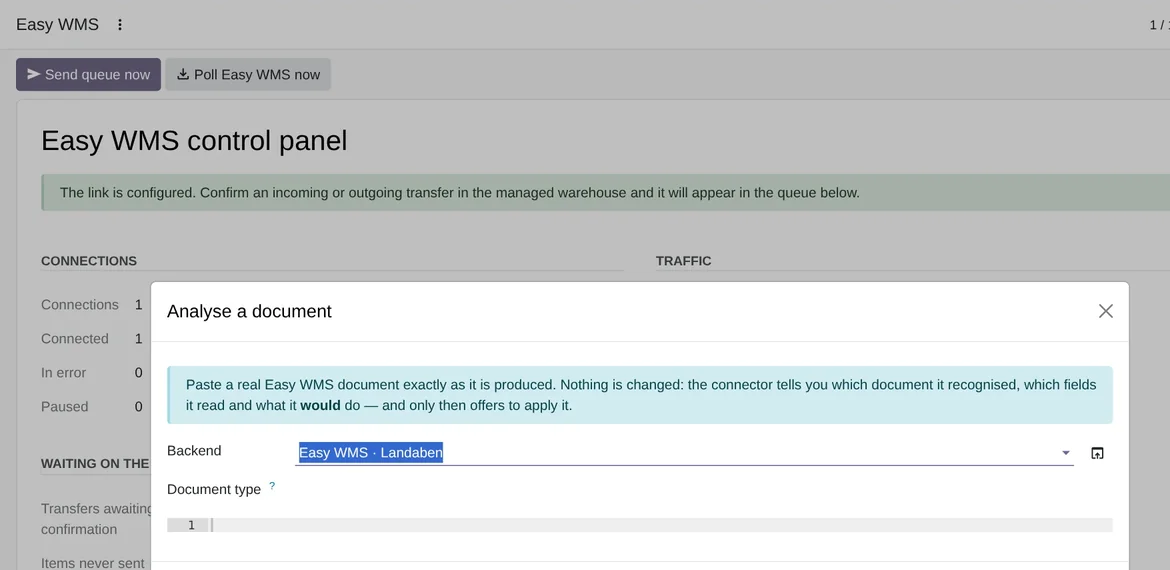
Yes. In Easy WMS › Tools › Analyse a document you paste a document and see what Odoo would do, without changing anything.
Is it real time?
No. Messages are queued and sent every 5 minutes, and Easy WMS answers are collected every 10, with retries. From the control panel you can send the queue or poll Easy WMS right away.
Does it work without FlexigoTech Cloud?
No.
Do I need Odoo Enterprise?
No. It works on Community and on Enterprise: it needs Inventory, Purchase and Sales, which are in Community, and FlexigoTech Cloud.
What happens after you press «Buy now»?
1. You pay for the license (€9 + VAT) and get an email with the link to download the module. 2. You install it in your Odoo, on Odoo.sh or your own server. 3. In Settings → FlexigoTech Cloud you accept the data list and press «Try free for 14 days». The trial doesn't ask for a card. 4. To continue, you press «Subscribe», create your account on app.flexigotech.com and pay for the plan by card.
Does it work on Odoo Online?
No: Odoo Online does not allow third-party modules. It is for Odoo 17, 18, 19 and 20, on Odoo.sh or on your own server.
Who installs it?
You do: you buy it on flexigotech.com or on Odoo Apps and install it in your Odoo. We help you install it and set it up, by email and video call, during the 2 months of included support. Custom development and data migration are quoted separately.
What support is included?
Every purchase includes 2 months of support: we help you install it, set it up and get it working, by email and video call. While you're subscribed, support for the service stays included.
What if something fails?
We monitor the connection and email you if something fails. And support has response times: first response within 1 working day; with Pro, within 4 working hours.
What about my data? And if I cancel?
The connection goes through FlexigoTech Cloud, on our servers in Germany, with your credentials encrypted. You cancel in two clicks: if you don't subscribe when the trial ends, the service stops and nothing is charged. Your data stays in your Odoo, and you can always view and export it.
Using Mecalux Easy WMS but not Odoo yet?
We set up Odoo, connect it to Mecalux Easy WMS and stay on.
From €2,450 + VAT
Start with OdooRelated
Mecalux is a trademark of its owner. FlexigoTech publishes this connector on its own, with no endorsement or sponsorship from the trademark owner.