

 Español
 Català
 Deutsch
 Français
 Português
 Italiano
 Nederlands
 Polski
Where the message appears
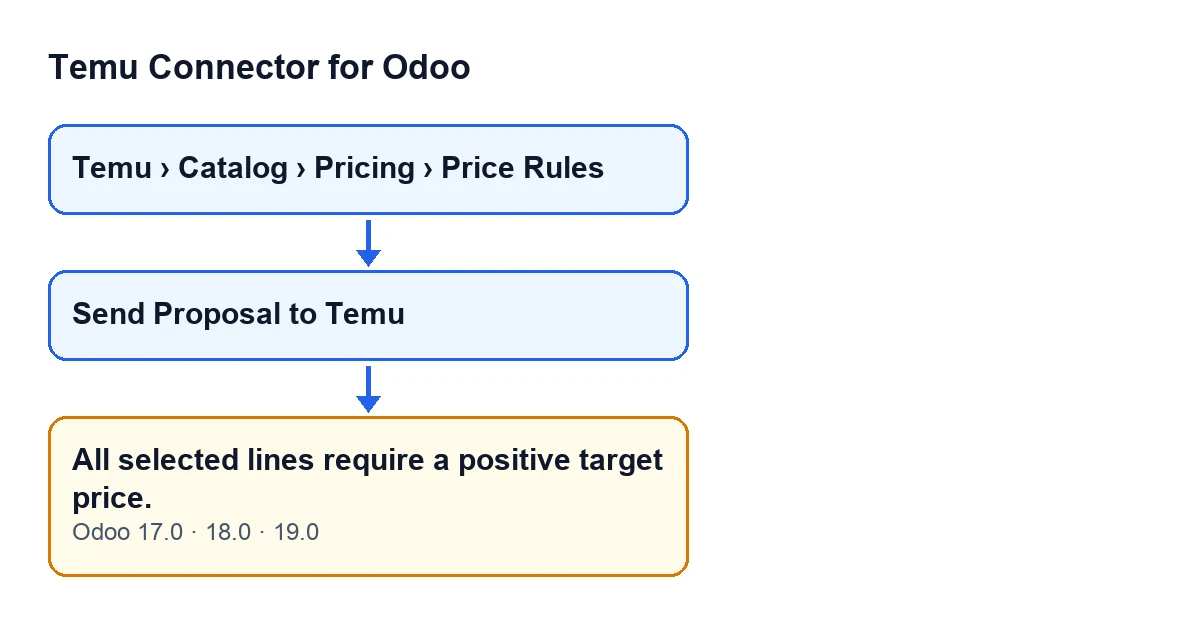
The forms that hold the button open from the menu Temu › Catalog › Pricing › Price Rules. There you will find Send Proposal to Temu, a button that in Odoo 17.0, 18.0 and 19.0 is always visible. When you press it and the condition explained below is met, Odoo stops the action and shows All selected lines require a positive target price.

The condition, in plain words
The message is raised by the action behind the Send Proposal to Temu button when, among the selected lines, there is at least one whose target price is empty, zero or below zero. A single line is enough to stop the whole submission. Lines that are not selected are left out of this check.
Two details are worth noting. First, an empty price and a price of zero are treated the same way: neither counts as positive. Second, the message does not say which line is at fault; it only says that one of the selected lines does not meet the requirement.
The order in which the button works
For each proposal, the button's action does the following, in this order:
- It runs the validation of the proposal's data.
- It separates the selected lines from the rest. Lines that are not selected are marked as skipped.
- If no selected line remains, it stops with a different notice.
- If any selected line is missing the Temu identifiers of its product, it stops with a different notice.
- It checks the target price of the selected lines. This is where
All selected lines require a positive target price.comes from. - Only if everything above passes does it group the lines by Temu product, send the price changes and read the response line by line.
Because the error is raised before anything is sent, nothing goes to Temu and nothing that the action was about to change is saved. It also means that if you see this message, the action has already got past the earlier checks: there are selected lines and they have their Temu identifiers.
An illustrative case
Example Illustrative case: the company and its figures are made up to explain the flow.
Casa Ribera is an invented homeware shop that wants to propose new prices to Temu from Odoo. Marta, who looks after the catalogue, opens the form from Temu › Catalog › Pricing › Price Rules. She selects every line because she wants to send them all at once and presses Send Proposal to Temu.
Odoo answers with All selected lines require a positive target price. and sends nothing. Marta goes through the lines and finds that one had its target price left blank and another had it set to zero. The message did not tell her which, so she had to walk through the selection.
She has two ways forward: give those lines a price above zero, or deselect them if she does not want to propose a price for them yet. She types a valid price into the blank line and takes the other one out of the selection. She presses the button again and this time the action carries on: it groups the lines by Temu product and sends them.
What the case teaches
- The error depends on the selection: an unselected line with an empty price does not trigger it.
- A price of zero counts as invalid, just like an empty one.
- It stops before anything is sent, so correcting and pressing again is what this message asks for.
How to fix it, step by step
- Open the form from
Temu › Catalog › Pricing › Price Rules. - Go through the lines you have selected and find those whose target price is empty, zero or negative.
- For each one, decide: enter a price above zero or deselect the line.
- Press
Send Proposal to Temuagain. - If a different notice appears, deal with that message: it may come from an earlier check (for example, no line being selected any more) or from a later one. A different notice on its own does not prove that the price check has been carried out: if no selected line is left, the action stops before it gets there.
A practical habit for long selections is to select only the lines you really want to send: whatever you leave unselected is skipped and not checked.
What happens once the check is passed
Once the check is passed, the action groups the selected lines by Temu product and sends the price changes for each group. It then records on each line whether it succeeded or failed; for the lines that fail it keeps the reason (the one Temu gives, or that its response does not include that SKU). If Temu's response contains no list of accepted or failed SKUs, the line is recorded as successful.
The proposal ends as done if every line goes through, as partial if some do and some do not, and as failed if none succeeds.
If you want to look at another button of the connector, there is a guide to what another of its buttons does, step by step.
Versions
The message is in the published code of the 17.0, 18.0 and 19.0 branches. The order of checks described here comes from the Odoo 19.0 code. The module is published on Odoo Apps for 17.0, 18.0, 19.0 and 20.0.
How FlexigoTech can help
FlexigoTech implements Odoo 17, 18, 19 and 20 and develops connectors and bespoke integrations. If you are setting up your Temu catalogue in Odoo and would like someone to go over the flow with you, you can start from the module page.
Keep reading
Checked in the connector's source code (version 19.0) and the linked sources
Sources
- Module source code: flexigobe_temu_connector 19.0 (455b3f0f): models/temu_price_update.py
- Module source code: flexigobe_temu_connector 19.0 (455b3f0f): views/temu_price_views.xml
- apps.odoo.com/apps/modules/19.0/flexigobe_temu_connector
- flexigotech.com/en/services.html