

 Español
 Català
 Deutsch
 Français
 Português
 Italiano
 Nederlands
 Polski
The normal way: the sync already runs by itself
The scheduled task Amazon SP-API - Sync suppressed listings report (opt-in) runs once a day and is active when the module is installed. It goes through the active accounts that have the suppressed listings sync switched on and starts, for each one, the same process as the button, with the source CRON and without leaving the summary in the account's chatter.
The button is the exception: it starts that same process by hand, without waiting for the task. Where the task goes through the accounts that have the sync switched on, the button acts on the account of the form where you press it.

Where it is and when it shows
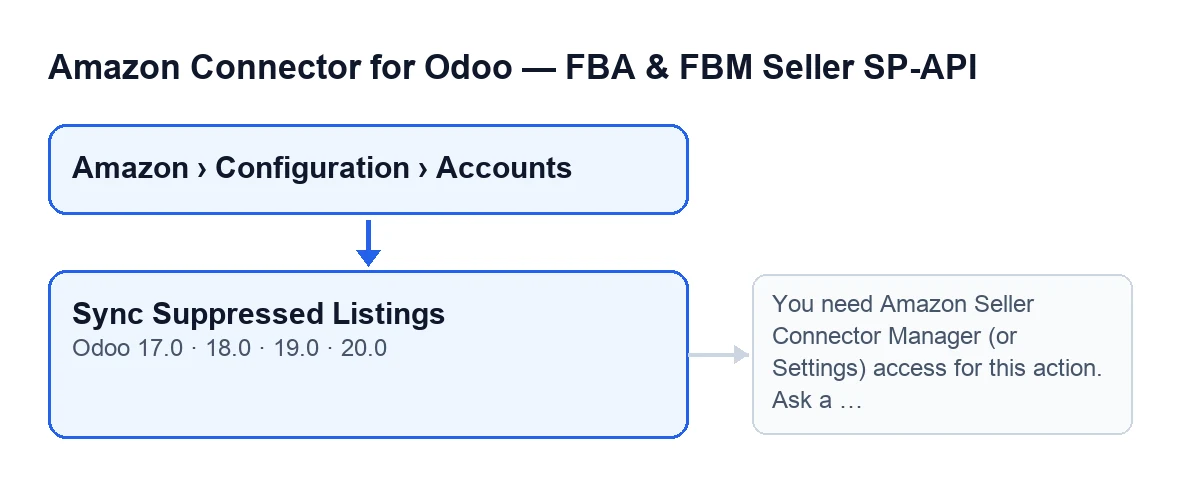
The path is Amazon › Configuration › Accounts. Each part of the menu asks for a permission and, if you do not have it, you do not see that part: Amazon asks for Viewer, while Configuration and Accounts ask for Manager.
The button is on the Accounts screen and is always visible, whatever the state. It exists in the published branches of the module, for Odoo 17, 18, 19 and 20.
A case: Marta at Hogar Norte
Example Illustrative case: the company and its figures are made up to explain the flow.
Hogar Norte is an invented shop that sells on Amazon and keeps its catalogue in Odoo. Marta, the catalogue manager, has the connector's Manager permission. One morning she wants to review the suppressed listings of one of her accounts straight away, without waiting for the daily task.
She opens Amazon › Configuration › Accounts, goes into the account form and presses Sync Suppressed Listings. Odoo checks her permission, asks Amazon for the report, waits until it is ready, downloads it and imports it. When it finishes, the summary appears in the account's chatter with Source: Manual.
Her colleague Pablo only has the Viewer permission: he sees the Amazon part of the menu but not Configuration. If someone who is neither a manager nor has Settings access did manage to trigger the action, they would meet the permissions message explained next.
What it checks before it starts
The first check is permission. If your user is in neither the connector managers group nor the Settings group, the action stops with this message:
You need Amazon Seller Connector Manager (or Settings) access for this action. Ask a manager to grant Manager access.
The fix is the one the message gives: ask a manager to grant you Manager access. Once the permission is in order, the module also checks that you can write to that account, because these actions read their records with elevated rights, past the per-company rule. After that it works on one account at a time.
What it does, in order
- It prepares the suppressed listings report request and sends it to Amazon, which answers with a report identifier.
- It checks the report status several times, with a pause between checks, until Amazon reports it as finished, cancelled or failed, or until the attempts run out. If the account has no values for this, the code uses twelve attempts with a ten-second pause.
- If the report did not finish properly, or finished without a document to download, it records the outcome and stops: nothing is imported.
- If there is a document, it downloads it and imports its rows, using the account's marketplace and a maximum of ten thousand rows per run unless the account has another value.
- It saves the run date and the result text on the account, and posts that summary in the account's chatter.
What changes in your Odoo
The account keeps the date of the last run and its result. In a manual run, that result is also posted as a message on the account form. It starts with Amazon suppressed listings sync finished., goes on with the account, the source and the report identifier and status (Report status: …), and, if the report was imported, with these counters:
Report rows: …Processed rows: …Created: …Updated: …Skipped: …With error: …
The summary stored on the account is cut to a maximum length, so a very long result may be truncated.
What to take from the case
- The usual case is to press nothing: the daily task does the same work for the active accounts that have the sync switched on.
- The button is for running one particular account by hand, and it runs for anyone with the
Managerpermission or Settings access. - The summary tells you through
Sourcewhether the run was manual or from the scheduled task.
Cost and help with the set-up
The module is a one-off payment per version and needs a FlexigoTech Cloud subscription, Connector plan: €49 a month or €490 a year, excluding VAT, for up to 3 Amazon accounts. The connection goes through FlexigoTech Cloud, which stores the credentials encrypted, watches the synchronisation and emails you if it fails. You can see it on the module page.
If you are implementing Odoo and want the connector and its permissions laid out properly, FlexigoTech implements Odoo 17, 18, 19 and 20 and builds custom connectors and integrations.
Keep reading
Checked in the connector's source code (version 20.0) and the linked sources
Sources
- Module source code: flexigobe_amazon_seller_connector 20.0 (8576afa5): views/amazon_spapi_account_views.xml
- Module source code: flexigobe_amazon_seller_connector 20.0 (8576afa5): models/amazon_spapi_account.py
- apps.odoo.com/apps/modules/20.0/flexigobe_amazon_seller_connector
- flexigotech.com/en/services.html
- flexigotech.com/precios.html