

 Español
 Català
 Deutsch
 Français
 Português
 Italiano
 Nederlands
 Polski
Where the button is and when it appears
Where do I find the button, and in which versions is it?
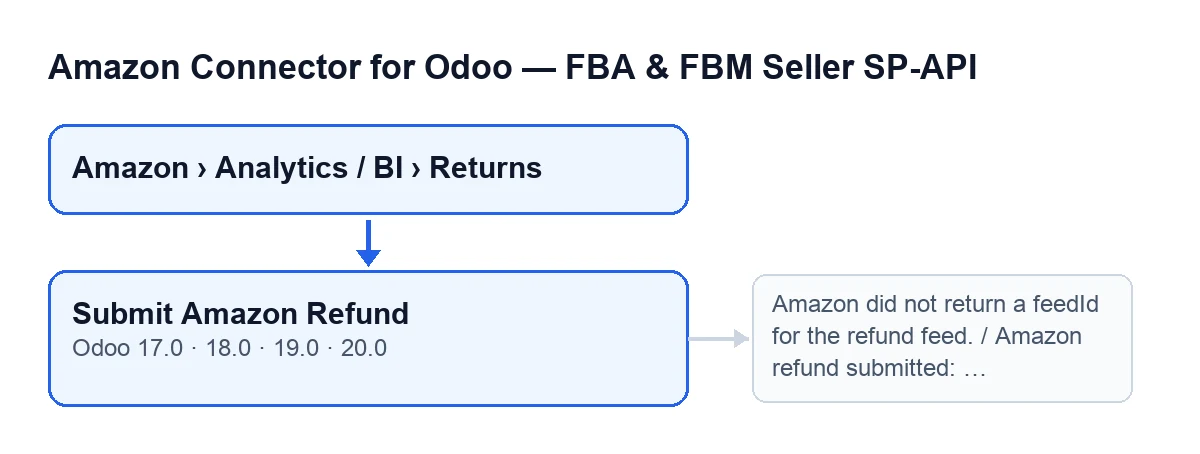
It is on the form of a return, in the Returns (BI) screen. You open that screen from the menu Amazon › Analytics / BI › Returns, and each part of the menu asks for the Viewer permission. The button exists in Odoo 17, 18, 19 and 20.
Why can't I see the button?
The view hides it when the field Amazon Refund Submission Ready is empty or switched off, the same in Odoo 17, 18, 19 and 20. That field is not shown in any view, so there is no checkbox on screen that makes the button appear. Separately, the Viewer permission gets you to the menu, but the action asks for more (see the next section).
What is the button called if my Odoo is in another language?
With Odoo in English it is Submit Amazon Refund; in Spanish, Submit Amazon Refund; in German, Amazon-Rückerstattung einreichen; in French, Soumettre le remboursement Amazon; in Italian, Invia rimborso Amazon; in Portuguese, Submeter Reembolso Amazon.
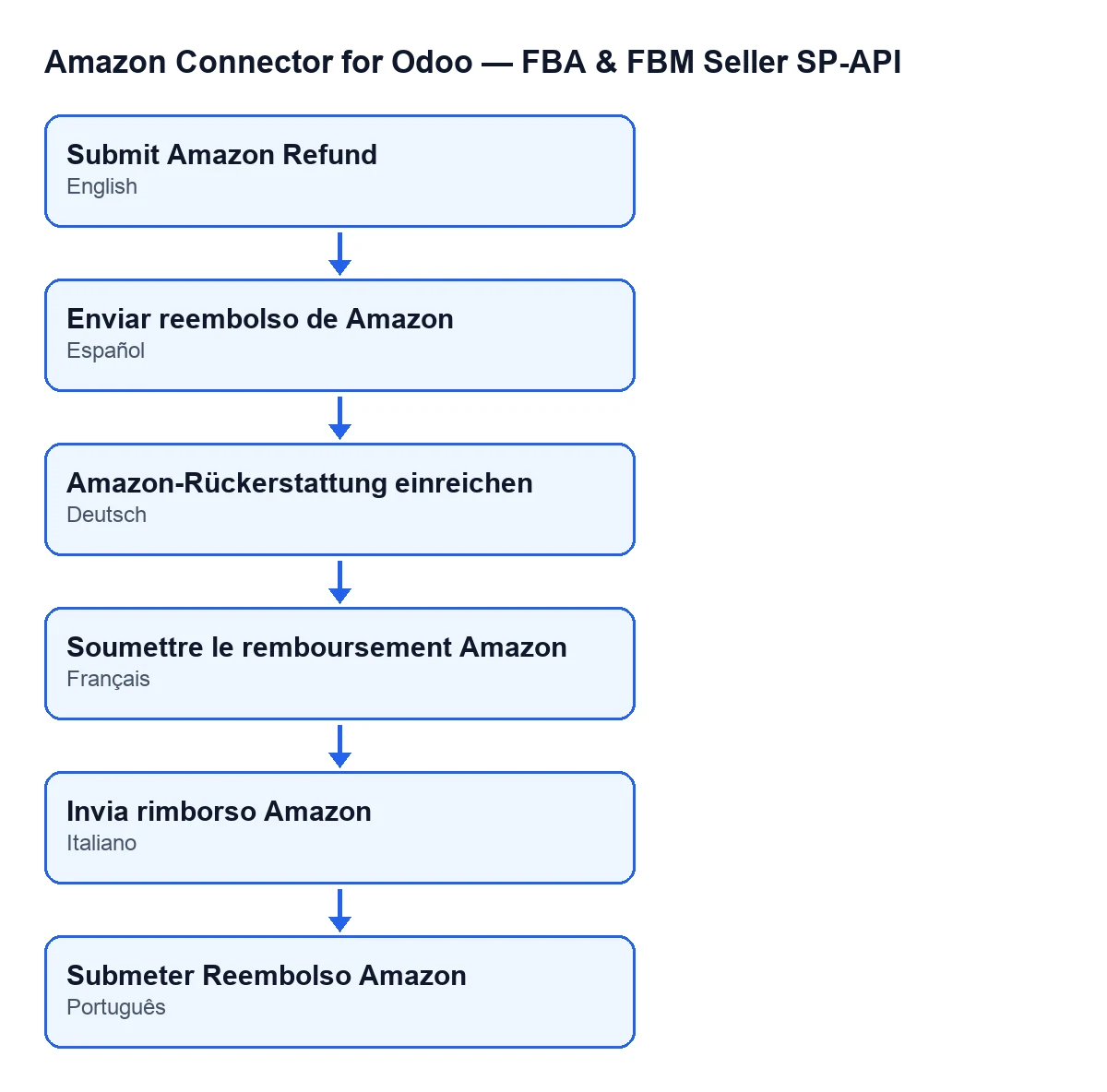
Submit Amazon Refund as the user sees it in Spanish, German, French, Italian and Portuguese.
What it checks, what it sends and what it saves
What does the button check before sending anything?
In Odoo 20, first your permission: you need at least Operator (or Manager) access to the connector, plus write access to the record. If you do not have it, the action stops with You need at least Amazon Seller Connector Operator access for this action. Ask a manager to grant Operator or Manager access. Then, for each line, it validates the submission in two passes: if either of them finds a reason that blocks it, the action stops and shows you that reason. Only if validation finishes with no block is the file built and sent.
What exactly does it send to Amazon?
A tab-separated text file with a header row and one data row for that return: the Amazon Order ID, the order line reference, the reason code, the amount adjustments (item, shipping, tax on both, and gift wrap with its tax), the cancelled quantity and the currency. The button asks Amazon for a feed document, uploads the text to the address Amazon gives it and creates a feed of type POST_FLAT_FILE_PAYMENT_ADJUSTMENT_DATA. It uses the value of the line's Marketplace field and, if that is empty, the account's marketplace.
These steps of creating the document, uploading it and creating the feed are also used, with other feed types, by the task Amazon SP-API - Upload VAT invoices to Amazon (every 30 minutes, active on install) and by the sending of cancellations when you cancel the Odoo sale order. Checkboxes on the Accounts form decide those: FBM: push cancellations to Amazon, in the Returns & Reviews tab, and Upload invoices to Amazon (VCS), in the Payments & Accounting tab. Both are off by default, and the second is not visible with the default values: it depends on another account checkbox that is also off by default. Once you switch on Upload invoices to Amazon (VCS), Upload only Amazon Business (B2B) invoices appears, on by default.
What does the line save when the submission works?
It saves the document and feed identifiers, marks the processing as submitted, records the submission date and keeps the request, Amazon's response and the text that was sent. At the same time it clears the result, the report, the last error and the last-checked date from any earlier submission. Then it copies the submission data to other related lines, if there are any.
Does the button check the feed status with Amazon?
Yes, at the end of each submission: it asks Amazon for the feed status and saves it with the time of the check, along with the result document if there is one. If that document exists and the status is a closing one (done, cancelled or fatal), it downloads Amazon's report and saves it. If the status is cancelled or fatal, it may record Amazon returned … for the refund feed. as the last error. Then it copies the data to the related lines again.
Messages and cost
Which messages can the button give?
If all goes well, a success notification that does not stay pinned, titled Amazon SP-API with the text Amazon refund submitted: …, followed by each order (or, if the line has no order ID, its Name) with the status Amazon gave in that check in brackets. Among the messages that stop it are the permissions one you have already seen; Amazon did not return a feedId for the refund feed., which comes up when the feed is created and before anything is saved on that line; and There is no Amazon refund feed to refresh on this return., which comes from the status check the button runs at the end.
What do I need to use it, and what does it cost?
The module is a one-off payment per Odoo version and is published for 17, 18, 19 and 20; the price for each version is on its Odoo Apps page. It also needs the FlexigoTech Cloud subscription, Connector plan: €49 a month or €490 a year, excluding VAT, with up to 3 accounts of the platform. The connection goes through FlexigoTech Cloud, which keeps the credentials encrypted, monitors synchronisation and emails you if it fails. Without a subscription, or with the service suspended, what the subscription provides stops; your data stays in your Odoo. FlexigoTech implements Odoo 17, 18, 19 and 20 and builds custom connectors and integrations; you can find the module on its page.
Keep reading
Checked in the connector's source code (version 20.0) and the linked sources
Sources
- Module source code: flexigobe_amazon_seller_connector 20.0 (8576afa5): views/amazon_spapi_return_line_views.xml
- Module source code: flexigobe_amazon_seller_connector 20.0 (8576afa5): models/amazon_spapi_return_line.py
- Module source code: flexigobe_amazon_seller_connector 20.0 (8576afa5): models/amazon_spapi_account.py
- apps.odoo.com/apps/modules/20.0/flexigobe_amazon_seller_connector
- flexigotech.com/precios.html
- flexigotech.com/en/services.html