

 Español
The case
A DIY shop sells on its own Shopify, on Leroy Merlin and on Cdiscount, and ships with Correos Express. It has no ERP: each channel has its own back office and parcels are booked on the carrier's website.
This is what any order looks like:
- The order comes into one of the three back offices.
- Someone copies the buyer's name, address and phone number into the Correos Express website and picks the service.
- They print the label and stick it on the box.
- They copy the tracking number the carrier gives them.
- They go back to the store's back office, find the order and paste the number.
- On Leroy Merlin, they also mark the order as shipped.
With a handful of orders it is bearable. The trouble starts when orders pile up late in the day, when the person packing is not the person invoicing, or when a number gets pasted into the wrong order.

What each store asks for
| Store | What it expects | Source |
|---|---|---|
| Shopify | That you mark items as fulfilled when they are ready to ship, with the tracking details and whether the customer is notified | Shopify API documentation (fulfillmentCreate) |
| Leroy Merlin and Decathlon (Mirakl) | The tracking as soon as you have the carrier's number, and the shipment validated each time you enter it | Mirakl API documentation (OR23 and OR24) |
| Cdiscount | A shipping confirmation carrying the tracking number | Cdiscount's terms for sellers |
On Cdiscount, shipping is also measured. The seller commits to a shipping rate of 97.5% or more, and if the seller does not report the shipment after the buyer validates the order, the order is cancelled automatically and that rate gets worse. A number that never gets pasted is not a small slip.
And underneath it all sits the deadline with the customer. Under the EU consumer rights directive, unless another date was agreed, the trader delivers without undue delay and within 30 days at the latest. If the goods don't arrive, the consumer can set an additional period and, if that passes too, terminate the contract and get back everything paid.
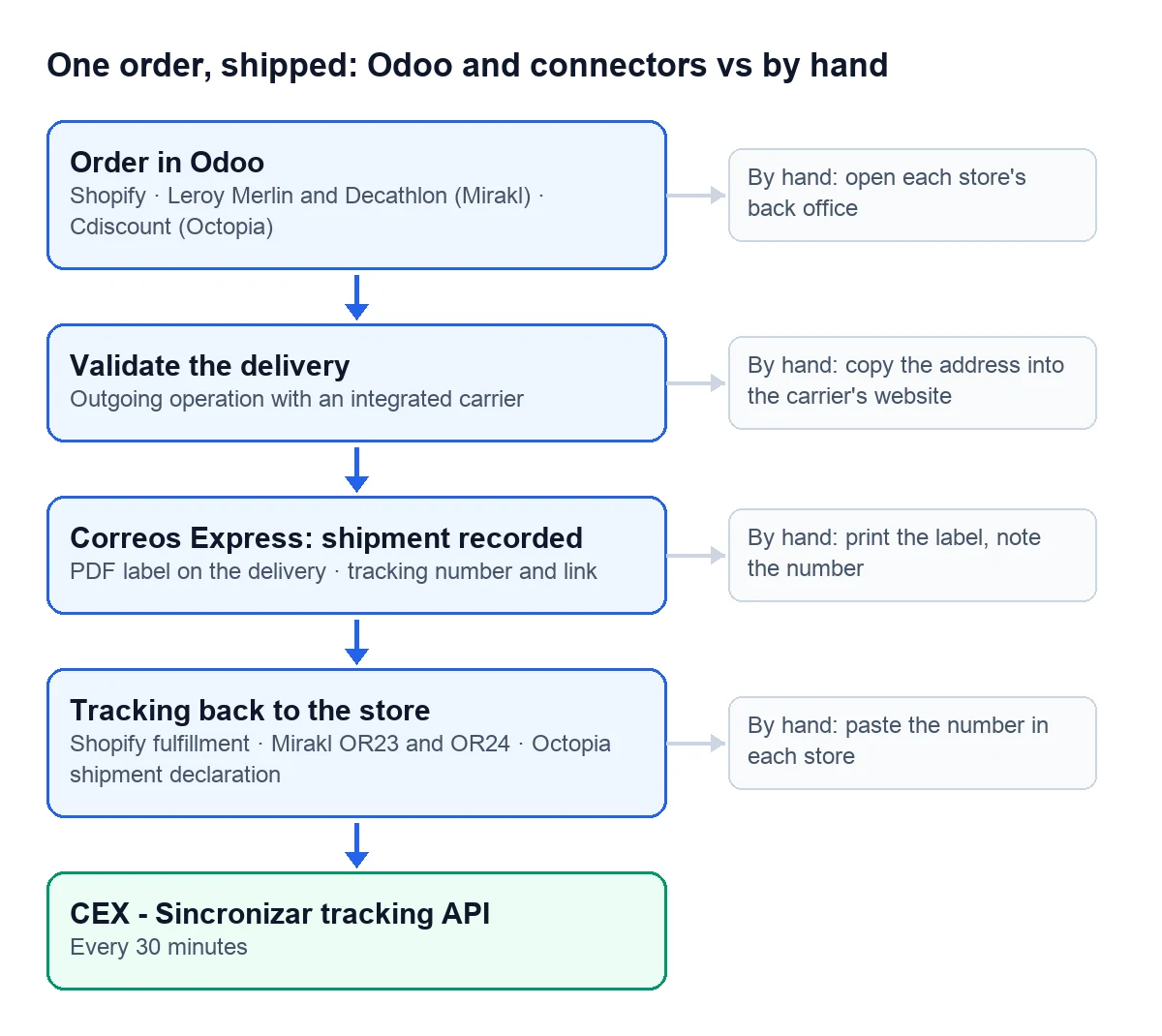
The same order with Odoo
In Odoo 17, 18, 19 and 20, when you validate an outgoing delivery with an integrated carrier, Odoo sends the shipment to the carrier. Outgoing operations come with this switched on.
With the Correos Express connector, that shipment is recorded with Correos Express and the connector leaves on the delivery:
- The PDF label, ready to print from there.
- The tracking number and Correos Express's public tracking link.
- The shipment status: Pendiente, Enviado, Etiqueta OK or Error CEX.
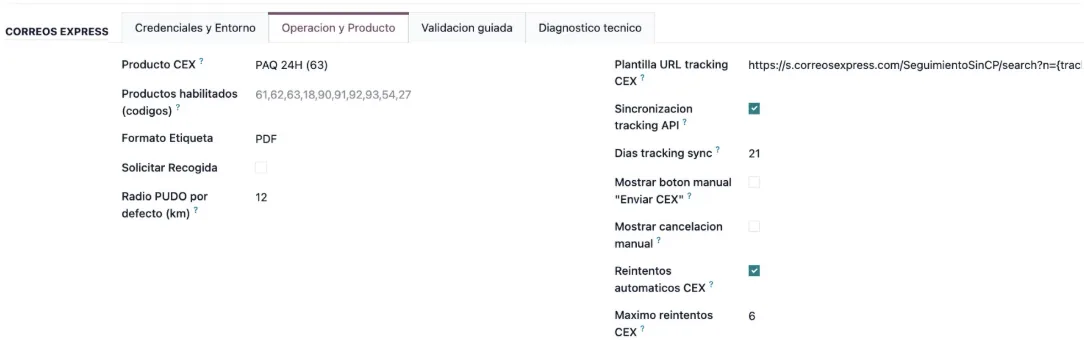
The "CEX - Sincronizar tracking API" task updates the tracking every 30 minutes.
What is left is the way back, from the delivery to the store. That is where each channel's connector comes in, and each has its own switch:
- Shopify: with the option to send the fulfillment on validation turned on for the store, Odoo sends it with its tracking. It comes unticked.
- Leroy Merlin and Decathlon: with the operator profile, validating the delivery makes Odoo send the tracking and mark the order as shipped in Mirakl, with no further settings.
- Cdiscount: with "Push Tracking on Delivery Validation" ticked on the Octopia account, Odoo declares the shipment on validation. It also comes unticked.
Each one is covered step by step in its own guide: Shopify tracking, Cdiscount's shipment declaration and the Leroy Merlin and Decathlon profile.
What changes in the warehouse
Whoever packs the order validates the delivery and prints the label from it. Nobody copies addresses or numbers any more, and the store gets the tracking without anyone opening its back office. If something fails, it is written on the delivery or in the connector's log, instead of turning up when the customer asks.
How we set it up
At FlexigoTech we implement Odoo 17, 18, 19 or 20 with our store and carrier connectors, so that your stores work connected. Odoo Online does not accept third-party modules, so we work on Odoo.sh or on your own server. Each connector can be tried for 14 days from Odoo, free and with no card, and the Connector plan starts at €49 a month, excluding VAT. Anything custom comes with a quote after a free scope analysis, and nothing goes on the invoice without your written approval.
Write to us at comercial@flexigobe.com, leave your details on the contact page or book a call and we'll look at it with a week of your shipments in front of us.
Keep reading
Checked in the connector's source code (version 17.0, 18.0, 19.0 and 20.0) and the linked sources
Sources
- developer.mirakl.com/content/product/mmp/rest/seller/openapi3/orders/or23.md
- developer.mirakl.com/content/product/mmp/rest/seller/openapi3/orders/or24.md
- shopify.dev/docs/api/admin-graphql/latest/mutations/fulfillmentCreate
- marketplace.cdiscount.com/wp-content/uploads/2025/08/2025.08.25-CGMAD-FR.pdf
- publications.europa.eu/resource/cellar/6c8e7593-7a75-4b58-b709-542f06ee7a28.0012.03/DOC_1
- github.com/odoo/odoo/blob/20.0/addons/stock_delivery/models/stock_picking.py
- Module source code: flexigobe_correos_express · 17.0 56f6f9f · 18.0 7fcdd81 · 19.0 edec9c0 · 20.0 24075e3: models/delivery_carrier.py (cex_send_shipping, _cex_create_shipment, _cex_fetch_and_store_label, cex_get_tracking_link), models/stock_picking.py, data/cex_cron_data.xml
- Module source code: flexigobe_shopify_seller_connector · 17.0 2c06264 · 18.0 0272d17 · 19.0 19422d4 · 20.0 2950bdc: models/stock_picking.py, models/shopify_instance.py, views/shopify_instance_views.xml
- Module source code: flexigobe_mirakl_connector · 17.0 f10058e · 18.0 0d42567 · 19.0 9939dcd · 20.0 5c53911: models/stock_picking.py (button_validate, _mirakl_sync_sale_shipping_contacts, action_mirakl_push_tracking), models/mirakl_instance.py (_mirakl_auto_push_tracking_on_validate), views/stock_picking_views.xml; proveedores Leroy Merlin y Decathlon: _mirakl_auto_push_tracking_on_validate y _mirakl_repair_shipping_before_validate devuelven True
- Module source code: flexigobe_octopia_connector · 17.0 6c9bfab · 18.0 aff6741 · 19.0 d15e273 · 20.0 27d9c64: models/octopia_account.py (auto_push_tracking), models/octopia_order_actions.py (button_validate, _declare_for_picking)
- flexigotech.com/precios.html
- flexigotech.com/services.html
- flexigotech.com/en/services.html
- flexigotech.com/services/desarrollo-a-medida.html