

 Español
 Català
 Deutsch
 Français
 Português
 Italiano
 Nederlands
 Polski
What to fill in before the first sync
What do I need to buy, and which Odoo versions is it for?
The module is published on Odoo Apps for Odoo 17.0, 18.0, 19.0 and 20.0 and costs €9 per Odoo version, one-off, excluding VAT; if you buy it on the Odoo App Store, each Odoo version is bought there. The connection to Leroy Merlin also needs the FlexigoTech Cloud Connector plan (€49/month or €490/year excluding VAT, up to 3 platform accounts; the Pro plan, €98/month or €980/year excluding VAT, goes up to 10). FlexigoTech Cloud stores the credentials encrypted, monitors the sync and sends an email if it fails.
Which configuration fields should I go through one by one?
These are the ones worth checking before you run anything, with their label and technical name so you can find them:
Create Sales Orders From(sale_order_start_date), a date and time field.Fallback Customer(default_partner_id), which points to an Odoo customer.Manual Text Language(text_language_code) andEffective Text Language(effective_text_language_code), two text fields about language.Mirakl Odoo Root Category(mirakl_category_root_id), which points to an Odoo category.
Bear in mind too that several of the module's records carry a field linking them to the instance (instance_id or leroy_mirakl_instance_id, both pointing to leroy.mirakl.instance). That is why the connector's lists show an instance column with the value Leroy Merlin.
What date should I put in Create Sales Orders From?
According to the field description, Mirakl orders created before that date are imported (under Orders) but never become sales orders. So, before connecting, decide from when you want Leroy Merlin orders to create sales orders in your Odoo and enter that date. Earlier orders will still come in as Mirakl orders, without a sales order.
What goes in Manual Text Language?
The field holds the Odoo language code used in manual mode, for example en_US, fr_FR or pt_PT. If you work in manual mode, enter the language code exactly as Odoo has it, in the same format as those examples. The module also has an Effective Text Language field; look at it alongside the first one when you review the configuration.
What is Mirakl Odoo Root Category for?
According to its description, it is the root Odoo category used to mirror Mirakl category paths for this instance. Pick or create the Odoo category you want as the root and set it on the instance before you bring in the catalogue.
Catalogue and mappings: categories, attributes and carriers
Where can I see the catalogue that comes from Leroy Merlin?
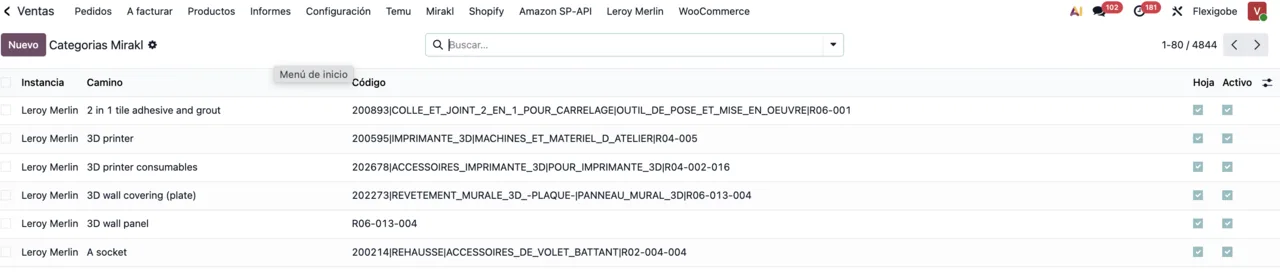
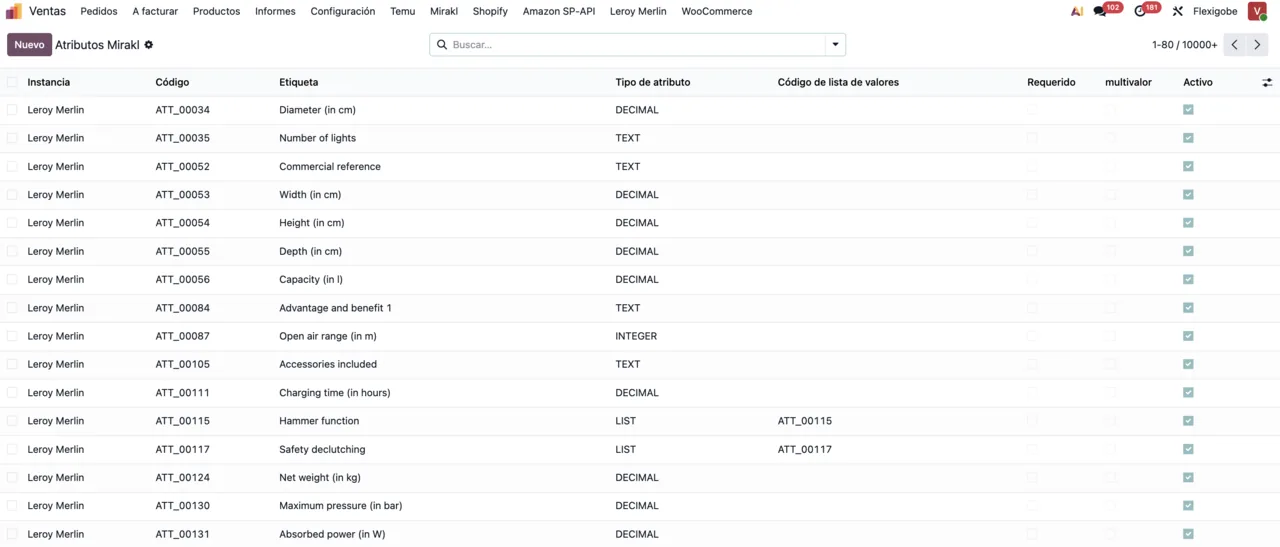
The module stores the Mirakl catalogue in three models of its own: categories (leroy.mirakl.catalog.category), attributes (leroy.mirakl.catalog.attribute) and values (leroy.mirakl.catalog.value). The category list shows each one's path, its code and whether it is a leaf; the attribute list shows code, label, type, value list code and whether it is required or multi-value. Take your time with the second list: the required and multi-value columns tell you which attributes Mirakl flags that way.
Which mappings do I need to prepare?
The module has two mapping models: one for categories (leroy.mirakl.category.map) and one for carriers (leroy.mirakl.carrier.map), plus a list of available carriers (leroy.mirakl.available.carrier). In the category mapping, each row links an Odoo product category to a Mirakl category code, its label and its path. In the carrier mapping, each row holds the carrier, the operator code and the carrier name. Check that the rows you are going to use have the Activo box ticked.
Your first week: states and orders
What tracking states are there, and which one should I watch?
The leroy_mirakl_tracking_state field takes only three values: pending (Pending), synced (Synced) and error (Error). During the first week, filter the records in Error every day and don't let them pile up; if the message attached to a failure isn't clear, the texts are explained in the Leroy Merlin Connector error messages.
What should I look at in an imported Mirakl order?
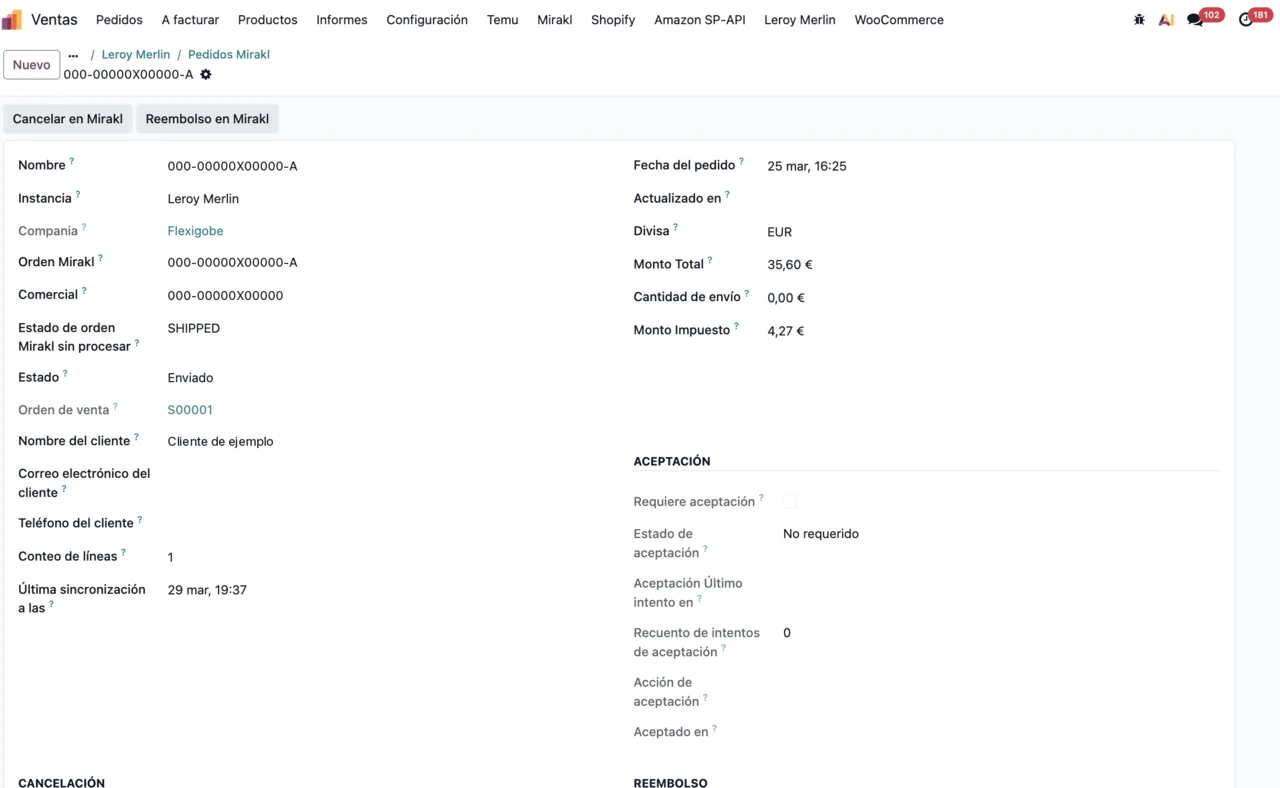
Open a few Mirakl orders from the first days and go through the whole form: order details, amounts, state, the linked sales order and the Aceptación section. At the top you'll see the Cancelar and Reembolso en Mirakl buttons. If an order predates the Create Sales Orders From date, remember it will have no sales order.
What happens if the sync fails or the subscription stops?
If the sync fails, FlexigoTech Cloud sends an email, and if Leroy Merlin changes its API, the module and the service are adapted. Without a subscription, or with the service suspended, whatever the subscription provides stops, but your data stays in your Odoo.
How FlexigoTech can help
If you'd rather not do the setup on your own, at FlexigoTech we implement Odoo 17, 18, 19 and 20 and build bespoke connectors and integrations. We can go through the configuration fields, the mappings and your first week of orders with you. If you'd like to understand first what the connector does under the bonnet, read how Leroy Merlin Connector works.
Keep reading
Checked in the connector's source code (version 20.0) and the linked sources
Sources
- Module source code: flexigobe_leroy_merlin_connector 20.0 (fb656d53): models/leroy_mirakl_carrier_map.py
- Module source code: flexigobe_leroy_merlin_connector 20.0 (fb656d53): models/leroy_mirakl_category_map.py
- Module source code: flexigobe_leroy_merlin_connector 20.0 (fb656d53): models/leroy_mirakl_instance.py
- Module source code: flexigobe_leroy_merlin_connector 20.0 (fb656d53): models/leroy_mirakl_instance_advanced.py
- Module source code: flexigobe_leroy_merlin_connector 20.0 (fb656d53): models/sale_order.py
- Module source code: flexigobe_leroy_merlin_connector 20.0 (fb656d53): models/stock_picking.py
- apps.odoo.com/apps/modules/20.0/flexigobe_leroy_merlin_connector
- apps.odoo.com/apps/modules/17.0/flexigobe_leroy_merlin_connector
- apps.odoo.com/apps/modules/18.0/flexigobe_leroy_merlin_connector
- apps.odoo.com/apps/modules/19.0/flexigobe_leroy_merlin_connector
- flexigotech.com/en/services.html
- flexigotech.com/precios.html