

 Español
 Català
 Deutsch
 Français
 Português
 Italiano
 Nederlands
 Polski
The manual work the Leroy Merlin channel takes today
What do you do by hand when selling on Leroy Merlin without a connected ERP?
Without a connected ERP, the routine can be a chain of copy and paste: check new orders and accept them, record them in your invoicing tool or a spreadsheet, prepare the shipment, go back to the marketplace panel to type in the tracking number and, when something is returned, remember to book the item back into the warehouse. On top of that, the price and stock of every offer has to be kept up to date whenever something changes in your shop or on another channel. Every step relies on someone doing it on time. If someone falls behind, stock may not match, an order may be left unaccepted or tracking may never reach the buyer.

What Odoo centralises with Leroy Merlin Connector
What moves into Odoo?
According to the module documentation, Leroy Merlin Connector connects a Leroy Merlin or ADEO operator from Odoo and from there lets you:
- publish offers, catalogue, prices and stock directly from Odoo;
- import marketplace orders and returns into Odoo sales operations;
- push shipment tracking back to Leroy Merlin when deliveries are validated;
- receive returned stock automatically when the returned item reaches the warehouse;
- keep categories, attributes, value lists and carrier mapping inside Odoo.
Operations for orders, returns, offers and catalogue can run on a schedule or be launched manually, and the module accepts pending marketplace orders automatically. For the menus and tasks in detail, see how Leroy Merlin Connector works inside Odoo.
How are the price and stock shown on Leroy Merlin decided?
The module includes pricing strategies based on list price, a pricelist or cost plus margin. For stock, it publishes quantities with a buffer and warehouse strategies. Offers are sent using the OF01 payload, which includes state, lead time and discounts. In other words, the price and stock you publish start from data you hold in Odoo.
What about orders, shipments and returns?
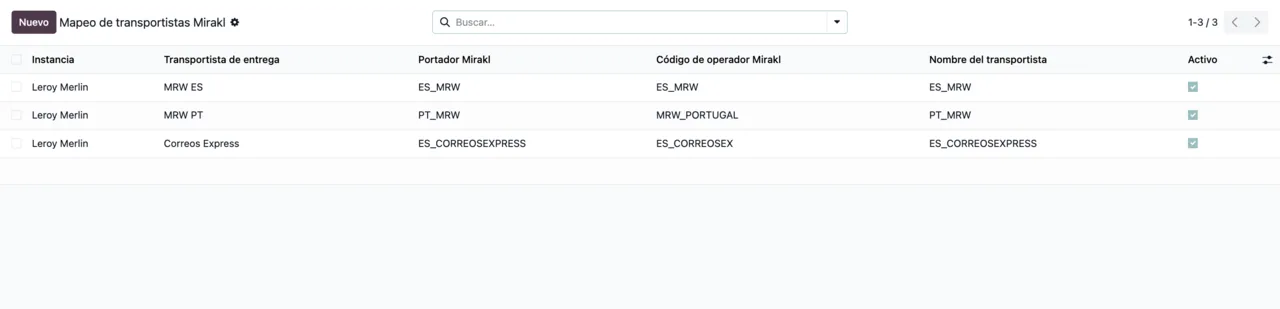
Marketplace orders are imported into Odoo sales operations and, when the delivery is validated in Odoo, tracking is pushed to Leroy Merlin, with retry support. Carriers are retrieved with SH21 and mapped by their code. Returns are imported too, and returned stock is received automatically when the returned item reaches the warehouse.
What happens to catalogue categories and attributes?
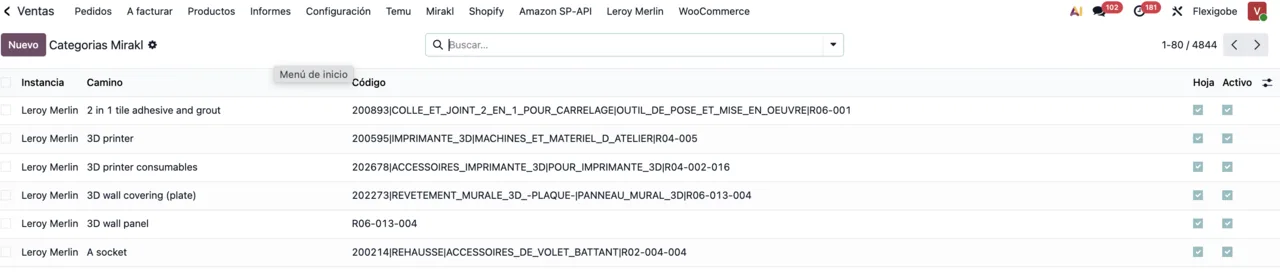
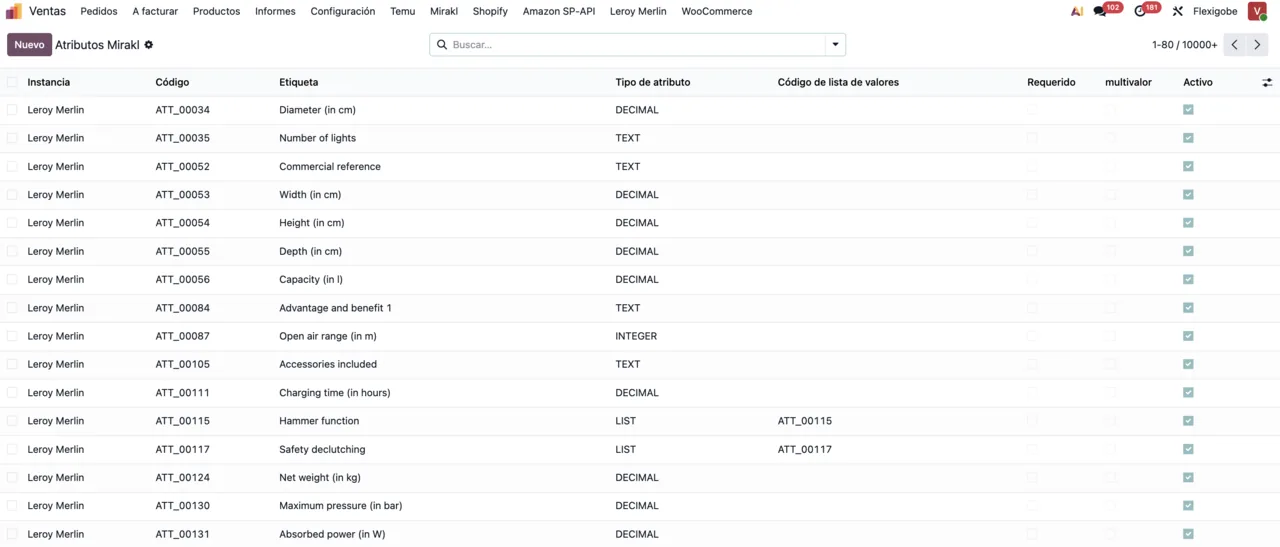
The module lets you search categories, map them and keep Leroy Merlin's catalogue structures synchronised in Odoo. Attributes and their value lists also live in Odoo, in a list that shows, among other columns, whether each attribute is required or multivalue. Catalogue and offer text is exported with automatic language detection and English as the default.
How do I find out when something has gone wrong?
The module keeps logs, alerts and operational traceability inside Odoo. The connection also runs through FlexigoTech Cloud, which monitors synchronisation and emails you if it fails. If the platform changes its API, both the module and the service are adapted. For the wording of each warning, see Leroy Merlin Connector error messages.
Where to start if you don't have Odoo yet
Do I need Odoo before installing the connector?
Yes. Leroy Merlin Connector is an Odoo module (its technical name is flexigobe_leroy_merlin_connector) and it is published on Odoo Apps for Odoo 17, 18, 19 and 20. As the price and stock strategies start from list price, pricelists, cost and warehouses, it makes sense to have that data defined in Odoo. The instance comes with Leroy Merlin ready defaults such as the base URL and API endpoints, plus a control centre with connection and operations kept separate. What to fill in during set-up is covered in the practical connector guide.
What does it cost and what do I pay for?
The module costs €9 per Odoo version, excluding VAT, as a one-off payment, for 17, 18, 19 and 20 on the Odoo Apps listing, where each Odoo version is bought separately. The connection needs the FlexigoTech Cloud Connector plan: €49/month or €490/year excluding VAT for up to 3 platform accounts, or the Pro plan at €98/month or €980/year excluding VAT for up to 10.
What data goes through FlexigoTech Cloud, and what if I stop paying?
FlexigoTech Cloud stores your Leroy Merlin key, encrypted. Every call to your seller account goes through the service: products and catalogue, offers, prices and stock, orders with your buyers' delivery details, shipments and tracking numbers, refunds and returns. It may include personal data of your customers or employees; the service passes it on and keeps it only for as long as needed to deliver it. Without a subscription, or with the service suspended, whatever the subscription provides stops, but your data stays in your Odoo.
How FlexigoTech helps you make the move
If you don't have Odoo yet, you can take it in order: implementation first (products, warehouses, pricelists and carriers defined) and the connector second, because the price and stock strategies the module publishes start from that data. At FlexigoTech we implement Odoo 17, 18, 19 and 20 and build bespoke connectors and integrations, so we can get your Odoo ready, connect your Leroy Merlin account and tune the price and stock strategies to the way you work today.
Keep reading
Checked in the connector's source code (version 20.0) and the linked sources
Sources
- Module source code: flexigobe_leroy_merlin_connector 20.0 (fb656d53): README.md
- Module source code: flexigobe_leroy_merlin_connector 20.0 (fb656d53): static/description/index.html
- apps.odoo.com/apps/modules/20.0/flexigobe_leroy_merlin_connector
- apps.odoo.com/apps/modules/17.0/flexigobe_leroy_merlin_connector
- apps.odoo.com/apps/modules/18.0/flexigobe_leroy_merlin_connector
- apps.odoo.com/apps/modules/19.0/flexigobe_leroy_merlin_connector
- flexigotech.com/en/services.html
- flexigotech.com/precios.html