

 Español
 Català
 Deutsch
 Français
 Português
 Italiano
 Nederlands
 Polski
What stays in GLOP and what reaches Odoo
Odoo receives one sales journal entry per terminal and per GLOP business day, not per calendar day. A sale paid at 00:40 goes to the business day in which it was made. By default, full invoices and corrective invoices with a customer go separately, each in its own journal entry.
Each payment on a receipt goes to the account that matches its payment method. Payment methods do not arrive as a list from GLOP: the connector learns them from the receipts, each one with its key, and none comes with an account already set.
Which account each GLOP payment method goes to
Type | Where the payment goes |
|---|---|
Cash | To a cash transit account, which must allow reconciliation. |
Card | To a card transit account, which must also allow reconciliation. |
Other payment | To the account you set for that payment, which must allow reconciliation and cannot be a receivable or payable account. |
Expense (invitation / internal consumption) | To an expense account: complimentary items and what the staff consume. |
Customer account (credit) | To the receivable account of the contact you set on that payment method (for example, a hotel or a house account). |
If a receipt is left with an amount pending, that amount goes to a customer's receivable account: the receipt's customer or, if it has none, the one you set for credit sales with no customer. It is reconciled when GLOP records the payment.
The connector does not let you save a combination that does not fit. If you put an invitation on an account that is not an expense account, the error says that an invitation or internal consumption needs an expense account. And there are no suspense accounts: the only automatic difference is the cent rounding of a receipt, within a limit you set.
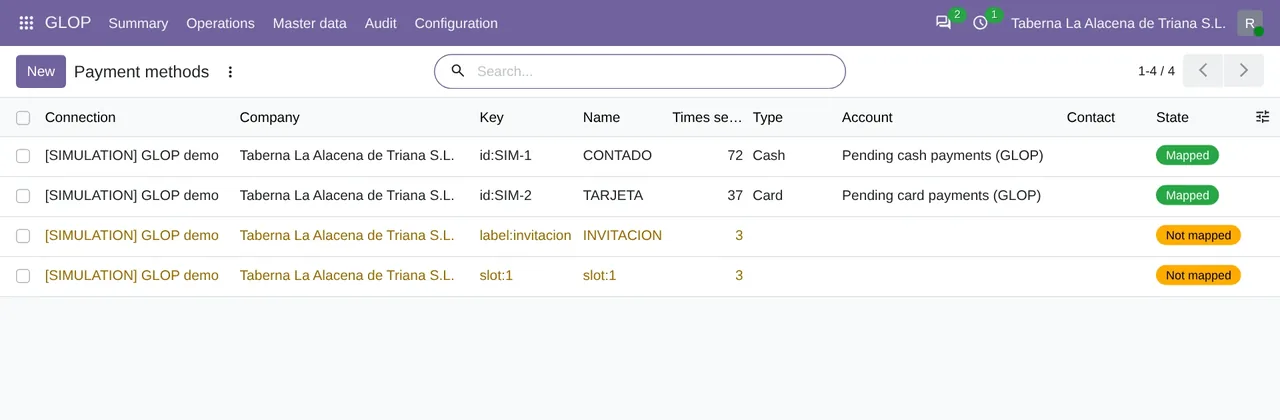
Payment methods of the simulation: cash and card already mapped, each with its account for pending payments, and two more still unmapped.When a business day is closed in Odoo
A business day is not posted while it is still open. Its Entry time is the business day at 00:00 local time plus the entry hours of the connection; before that time, the day keeps collecting receipts. The GLOP: business days and posting task checks the business days every 15 minutes. As Post automatically is off by default, a person decides when to post.
On each business day, the Difference field sums up what is missing: the difference between what GLOP recorded and what was posted. Held receipts, those pending mapping, open ones and excluded ones count in GLOP and not in the journal entry. Business days are in GLOP › Operations › Day to day › Business days.
How the connector checks each business day against GLOP
The GLOP: SAGE500 reconciliation task runs once a day and compares three sides for each terminal and business day:
- GLOP's SAGE500 accounting export, which the connector requests from the GLOP API: one row per receipt line, with its VAT rate, base and VAT amount.
- The finished receipts of the business day, including the held and the excluded ones.
- What is already posted in Odoo.
It balances when, for each VAT rate, and separately for sales and for refunds, the base, the VAT amount and the total match, within one cent. By default it warns about the differences, and it can block posting if you prefer. Each business day ends in one of these states: Pending, It balances, With differences, Not available or Off.
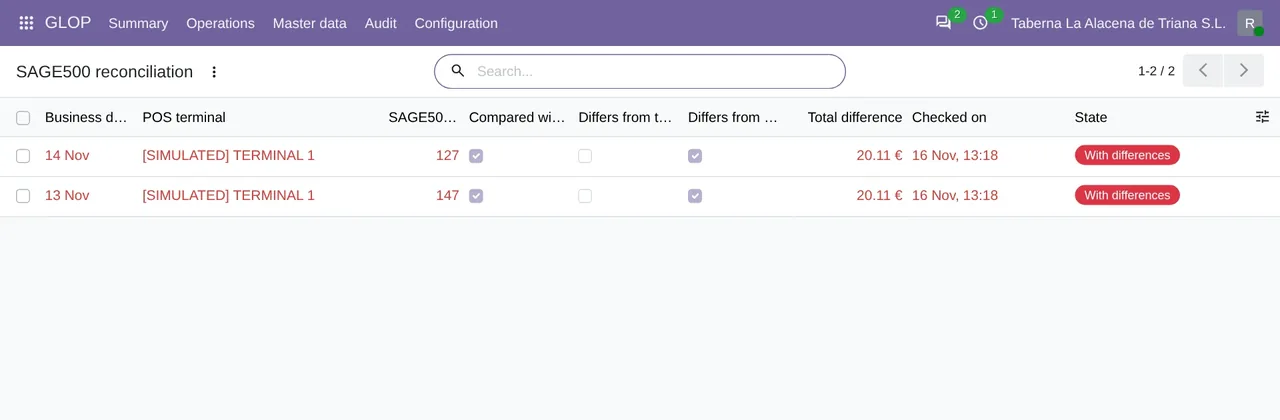
SAGE500 reconciliation of the simulation: two business days With differences, already compared with what was posted, with their total difference.There is a second check every night. The GLOP: integrity of the journal entries task derives each journal entry again from its receipts. If anything stops adding up, the business day goes to error and says which entry and which receipt.
How to review a business day that does not balance
- Open
GLOP › Operations › Outgoing to GLOP › SAGE500 reconciliationand filter byWith differences. - Open the business day and look at the
By VAT rateandBy sale typetabs. - Fix the cause you see in those tabs.
- Click
Check again.
Questions about GLOP cash closing and Odoo
Does the connector bring in GLOP's Z report?
No. The cash register closing and the Z report stay in GLOP. Odoo receives the payments of each business day, already split by payment method.
What happens with complimentary items and internal consumption?
They go with the Expense (invitation / internal consumption) payment method to an expense account. Which other documents arrive and how they are posted is explained in GLOP invoices in Odoo.
Does it need the FlexigoTech Cloud subscription?
Yes. The connector reads GLOP through FlexigoTech Cloud, Connector plan. The module is on Odoo Apps, and the GLOP connector page explains it.
Can it stop posting if GLOP and Odoo do not match?
Yes. The SAGE500 check warns by default and can be set to block. What GLOP is and how it works with Odoo is summed up in GLOP POS with Odoo.
Keep reading
Checked in the connector's source code (version 20.0)
Sources
- Module source code: flexigobe_glop_connector 20.0 (e888b59b): static/description/index.html
- Module source code: flexigobe_glop_connector 20.0 (e888b59b): models/glop_payment_method.py
- Module source code: flexigobe_glop_connector 20.0 (e888b59b): models/glop_day_flow.py
- Module source code: flexigobe_glop_connector 20.0 (e888b59b): views/glop_business_day_views.xml
- Module source code: flexigobe_glop_connector 20.0 (e888b59b): models/glop_reconciliation.py
- Module source code: flexigobe_glop_connector 20.0 (e888b59b): views/glop_mapping_views.xml
- Module source code: flexigobe_glop_connector 20.0 (e888b59b): views/glop_reconciliation_views.xml
- Module source code: flexigobe_glop_connector 20.0 (e888b59b): data/cron_reconcile.xml
- Module source code: flexigobe_glop_connector 20.0 (e888b59b): data/cron_booking.xml
- Module source code: flexigobe_glop_connector 20.0 (e888b59b): models/glop_backend.py
- Module source code: flexigobe_glop_connector 20.0 (e888b59b): views/glop_menus.xml
- Module source code: flexigobe_glop_connector 20.0 (e888b59b): models/glop_booking.py
- Module source code: flexigobe_glop_connector 20.0 (e888b59b): lib/sage500.py
- Module source code: flexigobe_glop_connector 20.0 (e888b59b): i18n/en_GB.po
- Connector guide (PDF)
- User manual (PDF)