
 Español
 Català
 Deutsch
 Français
 Português
 Italiano
 Nederlands
 Polski


GLOP point-of-sale connector for Odoo
Sales from your GLOP point of sale reach Odoo accounting per terminal and business day, with VAT exactly as GLOP recorded it and without issuing a second invoice.
€49/month14 days free, no card
Yearly and Pro
- Standard€49/month · €490/year
- Pro€98/month · €980/year
Reply within 1 working day; with Pro, 4 hours. FlexigoTech Cloud pricing
After you buy
- You pay for the license (€9 + VAT) and get an email with the link to download the module.
- You install it in your Odoo, on Odoo.sh or your own server.
- In Settings → FlexigoTech Cloud you accept the data list and press «Try free for 14 days». The trial doesn't ask for a card.
- To continue, you press «Subscribe», create your account on app.flexigotech.com and pay for the plan by card.
Every purchase includes 2 months of support: we help you install it, set it up and get it working, by email and video call.
- Tested on Odoo 17, 18, 19 and 20
- Odoo Learning Partner

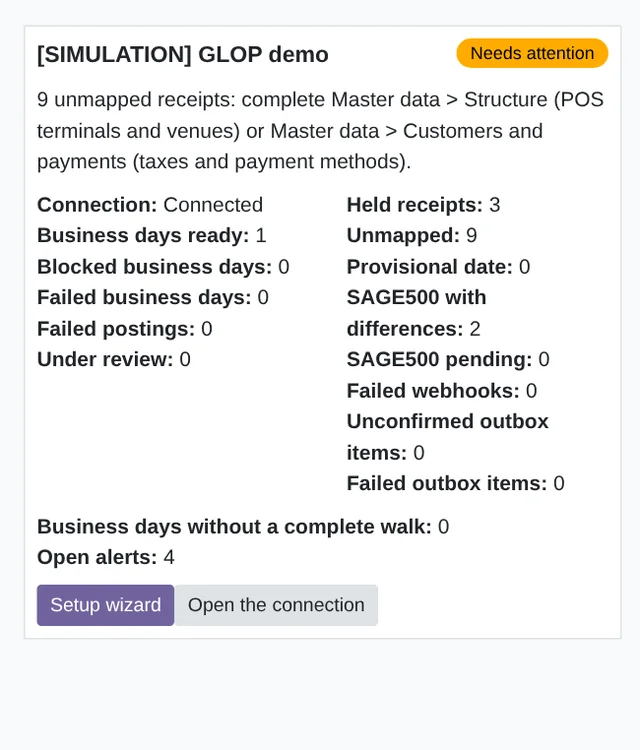 GLOP receipts, in OdooReal Odoo screenshot
Get started in 3 steps
- Install the moduleFrom Odoo Apps, on Odoo.sh or your own server.
- Start the trialIn Settings › FlexigoTech Cloud, an administrator accepts the data list and starts the 14-day trial, no card needed.
- Connect GLOPIn GLOP › Configuration › GLOP connections, the “Setup wizard” takes you through the credentials, the connection test, master data, establishments and taxes.
Review and post Set the account of each payment method and the go-live date. Each business day that is ready waits for you to click “Post”.
What you need Your GLOP point of sale and its API credentials, which GLOP gives you. Odoo 17, 18, 19 or 20, on Odoo.sh or your own server (not Odoo Online), with Invoicing, Inventory, Purchase and Spanish accounting, installed with the module. At go-live, GLOP support or your reseller runs a full dump from the point of sale: VAT rates and the earlier catalogue only reach GLOP's cloud that way.
What it does
- Sales, in your accountsPer GLOP terminal and business day, with the base and tax of each VAT rate exactly as the point of sale recorded them.
- Each payment method to its accountCash, card, other payments, invitations and credit sales, each with the account you choose.
- Nothing is posted blindlyA receipt that changes after posting leaves an adjustment for a person to review.
- Checked against GLOPEvery day, the receipts, GLOP's SAGE500 accounting export and your journal entries, compared per terminal and date.
- Your credentials, outside OdooEncrypted in FlexigoTech Cloud, which makes every call to the GLOP API.
How it works
Comes from GLOP
- Receipts per terminal and business day
- Products, families, price lists and customers
- The SAGE500 accounting export, for the check
FlexigoTech Cloud
Goes out from Odoo, off by default
- Customers, purchase orders and stock counts
- Recipes and table or delivery orders

FlexigoTech Cloud keeps the GLOP API credentials encrypted and calls GLOP on behalf of your Odoo. The credentials are not stored in your Odoo; receipts and journal entries are.
Where you see it in Odoo
- GLOP menuthe summary, receipts, business days and postings
 Accountingthe entries of each business day, with their VAT and payment methods
 Inventorya delivery with what was sold and a return with what was refunded, if you turn stock on
Inside Odoo
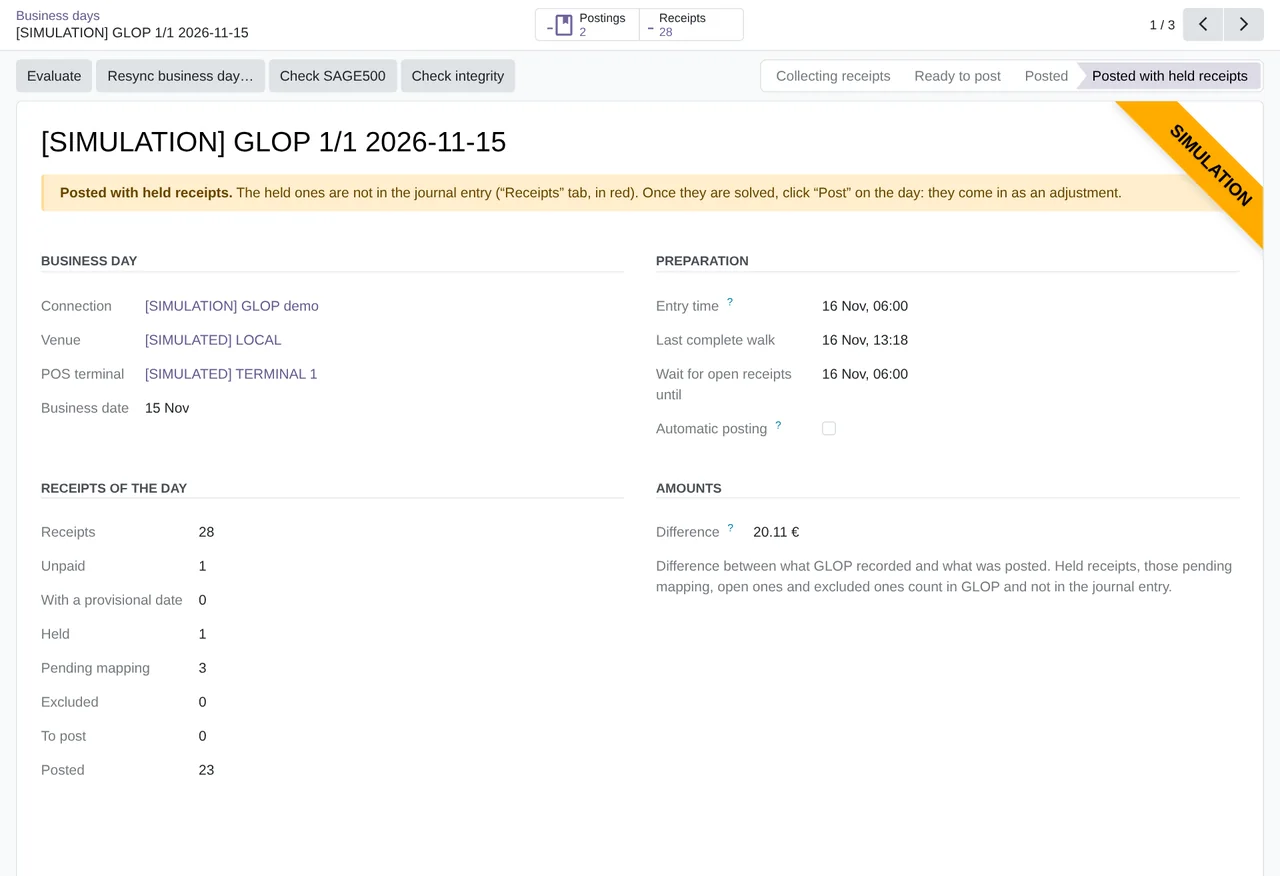
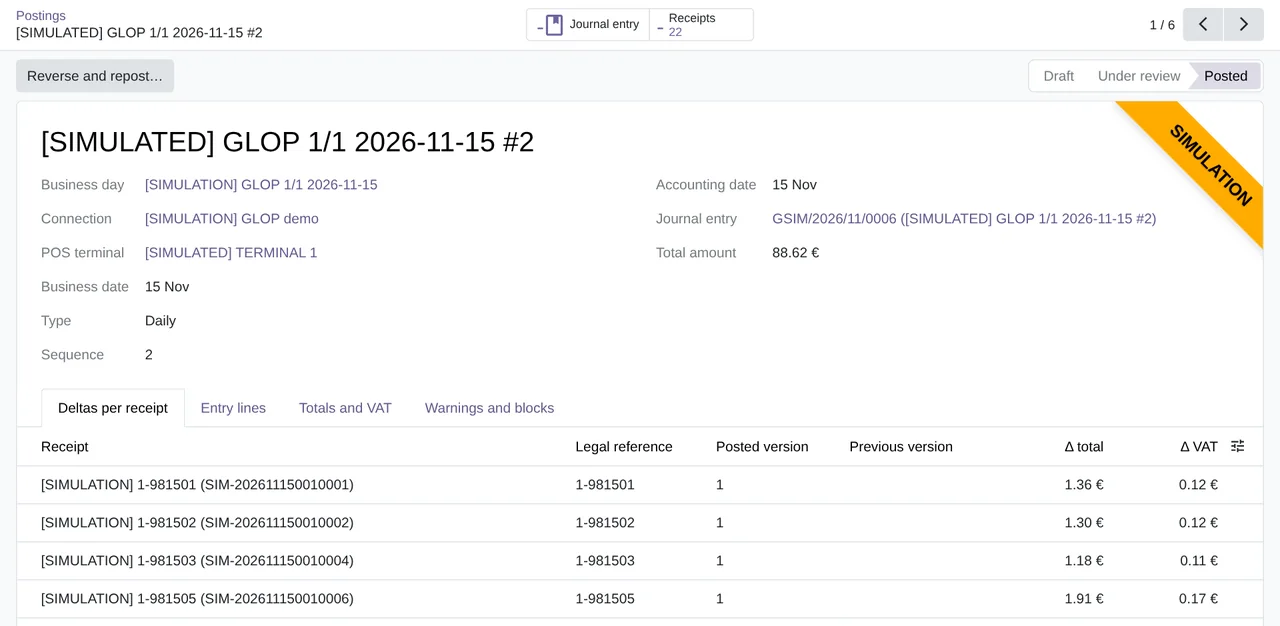
Real Odoo screenshots.
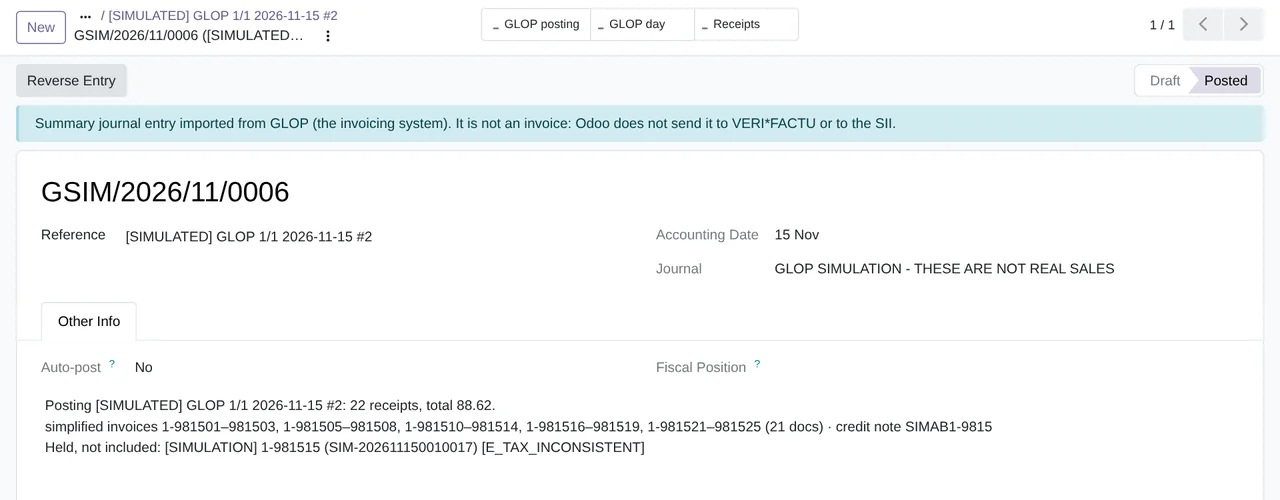
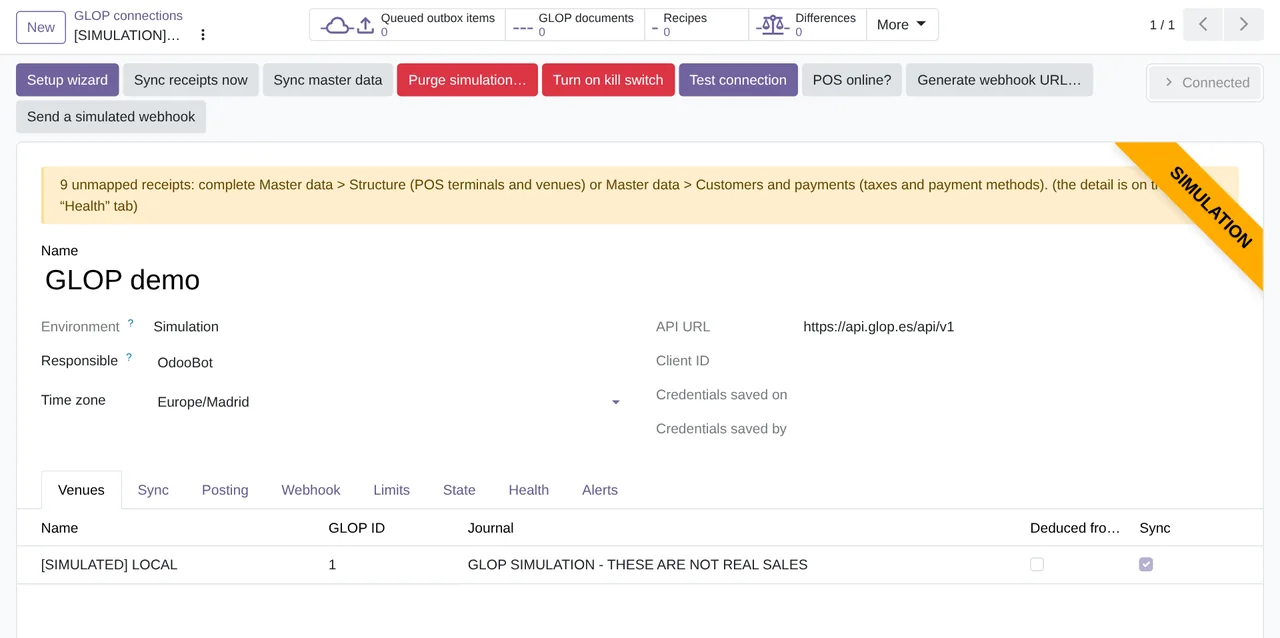
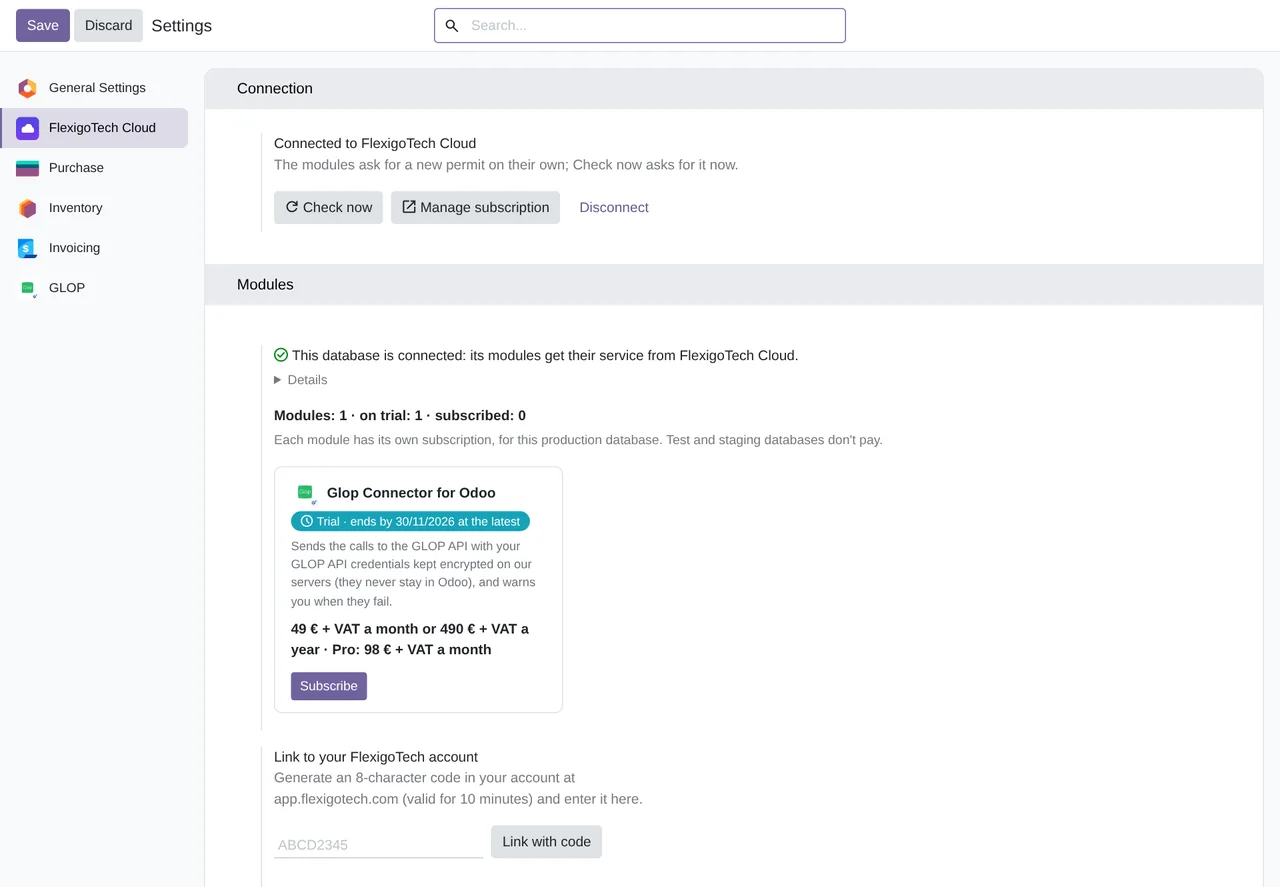
Price
Standard
€49a month + VAT
€490 a year + VAT 2 months free
- The connection runs on our servers
- We alert you if sync fails
- First response 1 working day
- Video call included for the first 2 months
Pro
€98a month + VAT
€980 a year + VAT 2 months free
- Everything in Standard
- First response 4 working hours
- Video call if needed
- + €9 for the module license, per Odoo version
- 14 days free, no card
- Cancel in two clicks
- Every purchase includes 2 months of support: we help you install it, set it up and get it working, by email and video call. While you're subscribed, support for the service stays included. Still integrating or testing? Extend your free trial.
If you cancel What the subscription gives stops. Your data stays in your Odoo.
- Support with response timesMonday to Friday, 9:00 to 18:00 (Barcelona), except public holidays.
- Maintenance and improvementsOdoo 17-20, on Odoo.sh or your own server
- We handle changes to their APIIf the platform changes its API, we adapt the module and the service.
- Servers in GermanyWe store your credentials encrypted
- Tested On Odoo 17, 18, 19 and 20. With a real GLOP point of sale on 19-09-2026 (Odoo 19, with the version of that time, before FlexigoTech Cloud) and with GLOP's real API through FlexigoTech Cloud's test environment on 14-11-2026 (version 1.2.0, on all four). The published 1.2.1 fixes the only failure of that test without repeating it. Writes to GLOP come switched off and, through FlexigoTech Cloud, have only been tested in simulation.
- 34,070 lines of code · 16-11-2026
- 662 automated tests · 16-11-2026
- No reviews yet · leave yours
Frequently asked questions
What do I need from GLOP?
Your GLOP point of sale and its API credentials (the Client ID and the secret), which GLOP gives you. At go-live, GLOP support or your reseller runs a full dump from the point of sale, because VAT rates only reach GLOP's cloud that way: it is a GLOP support tool and cannot be started from the API.
Does it issue invoices in Odoo?
No. It posts in Odoo the sales GLOP already recorded, without issuing a second invoice.
Does it post on its own?
Only if you turn on “Post automatically”, which comes switched off. By default, each business day ready to post waits for a person to click “Post”, and “Preview” shows the entry first.
What about a receipt that changes later?
The connector computes the difference and leaves it as an adjustment entry, for a person to review and approve.
Does it write anything to GLOP?
Not by default. Sending customers, purchase orders, stock counts, recipes or table and delivery orders is switched on separately, and through FlexigoTech Cloud it has only been tested in simulation.
Has it been tested with a real GLOP point of sale?
Yes. On 19-09-2026, the Odoo 19 version of that time, before FlexigoTech Cloud, was connected to a real GLOP Hostelería point of sale and posted 6 paid documents (3 simplified invoices, 1 full invoice, 1 invitation and 1 corrective invoice) in 2 journal entries, without issuing any invoice. On 14-11-2026, version 1.2.0 was tested on Odoo 17, 18, 19 and 20 with GLOP's real API through FlexigoTech Cloud's test environment; the published 1.2.1 fixes its only failure and has not repeated that test.
Does it work without FlexigoTech Cloud?
No. Every call to the GLOP API goes through FlexigoTech Cloud, which keeps your GLOP credentials.
What happens after you press «Buy now»?
1. You pay for the license (€9 + VAT) and get an email with the link to download the module. 2. You install it in your Odoo, on Odoo.sh or your own server. 3. In Settings → FlexigoTech Cloud you accept the data list and press «Try free for 14 days». The trial doesn't ask for a card. 4. To continue, you press «Subscribe», create your account on app.flexigotech.com and pay for the plan by card.
Does it work on Odoo Online?
No: Odoo Online does not allow third-party modules. It is for Odoo 17, 18, 19 and 20, on Odoo.sh or on your own server.
Who installs it?
You do: you buy it on flexigotech.com or on Odoo Apps and install it in your Odoo. We help you install it and set it up, by email and video call, during the 2 months of included support. Custom development and data migration are quoted separately.
What support is included?
Every purchase includes 2 months of support: we help you install it, set it up and get it working, by email and video call. While you're subscribed, support for the service stays included.
What if something fails?
We monitor the connection and email you if something fails. And support has response times: first response within 1 working day; with Pro, within 4 working hours.
What about my data? And if I cancel?
The connection goes through FlexigoTech Cloud, on our servers in Germany, with your credentials encrypted. You cancel in two clicks: if you don't subscribe when the trial ends, the service stops and nothing is charged. Your data stays in your Odoo, and you can always view and export it.
Using GLOP but not Odoo yet?
We set up Odoo, connect it to GLOP and stay on.
From €2,450 + VAT
Start with OdooMore about the GLOP connector
What it does
GLOP connector for Odoo 17, 18, 19 and 20, Community and Enterprise. It brings the receipts of your GLOP point of sale into Odoo and posts them per terminal and business day, with VAT exactly as GLOP recorded it and without issuing a second invoice. Every call to the GLOP API goes through FlexigoTech Cloud, which keeps your GLOP credentials: they are not stored in your Odoo.
- The receipts of each business dayA task reads the receipts of each GLOP business day every 10 minutes. If GLOP registers your webhook, its notifications reach Odoo directly and another task processes them every 5 minutes.
- One business day per terminal and dateEach business day gathers the receipts of one terminal on its GLOP date and goes through “Collecting receipts”, “Ready to post” and “Posted”.
- GLOP's VAT, not recalculatedThe entry carries the base and tax of each VAT rate exactly as GLOP recorded them. Odoo supplies the accounts and the tax tags. By default, a receipt with inconsistent VAT is held.
- Each payment method to its accountPayment methods are learned from the receipts. Each one is marked as cash, card, other payment, expense (invitation or internal consumption) or customer account (credit), with its account.
- Posting when you say soBy default, each business day gets one entry and each full invoice with a customer gets its own. “Post automatically” comes switched off: a day that is ready waits for you to click “Post”, and “Preview” shows the entry first.
- Changes go to reviewIf a receipt changes after it was posted, the connector computes the difference and leaves an adjustment entry for a person to review and approve.
- Checked against GLOP's exportOnce a day it compares, per terminal and date, GLOP's receipts, its SAGE500 accounting export and your journal entries. Another task checks the integrity of the entries again every night. By default, a difference with SAGE500 raises a warning; you can make it block.
- Stock, if you turn it onIt comes switched off. With stock on, each entry leaves a delivery with what was sold and a return with what was refunded.
What it does not do
- It does not issue invoicesSales are made in GLOP. Odoo posts what the point of sale recorded, without issuing a second invoice.
- It does not write to GLOP by defaultSending customers, purchase orders, stock counts, recipes or table and delivery orders is switched on separately. Through FlexigoTech Cloud it has only been tested in simulation.
- It does not run the point-of-sale full dumpIt is a GLOP support tool for go-live: GLOP support or your reseller runs it. It cannot be started from the API.
- It does not work on Odoo OnlineIt is a third-party module: it runs on Odoo.sh or on your own server.
- It does not include your GLOP accountYou need your GLOP point of sale and its API credentials, which GLOP gives you.
What it looks like inside Odoo
Real screens of the module installed on Odoo 20, with the demo connection that comes with the module itself, in a simulation environment: these are not real sales.
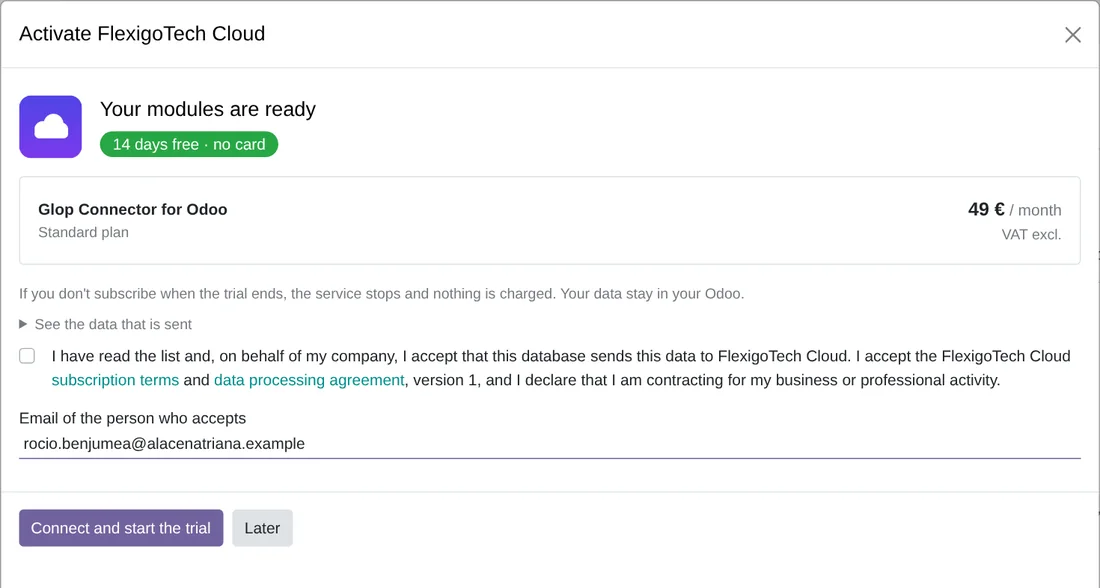
The trial, in two clicks
The FlexigoTech Cloud window: 14 days free, no card, and the connector plan with its price excluding VAT.
At a glance
Keep exploring
Questions before buying? Talk to the engineer.
We tell you whether the connector fits your Odoo and your GLOP terminals before you pay anything. No middlemen.
Related
GLOP is a trademark of its owner. FlexigoTech publishes this connector on its own, with no endorsement or sponsorship from the trademark owner.