

 Español
 Català
 Deutsch
 Français
 Português
 Italiano
 Nederlands
 Polski
How the connector knows what each GLOP receipt is
The connector classifies each receipt with its own rules, in this order:
- If it has no payment date, the receipt stays
Open. - If it carries the return flag, it is a corrective invoice:
Credit note (corrective). - If it carries an invoice number, it is a
Full invoice. - If it carries a receipt number, it is a
Simplified invoice. - If it carries neither, it is held with the code E_NO_FISCAL_NUMBER, whose message asks you to review it in GLOP, exclude it or wait for another version.
The series of corrective invoices, on the other hand, follows a rule that comes from GLOP. GLOP explained it on 24-09-2026: the series of a corrective invoice is always AB plus the terminal number, and it cannot be configured. If GLOP only sends the number, the connector completes the series with that rule. On the real POS of 19-09-2026, the corrective invoice was printed as AB1-1.
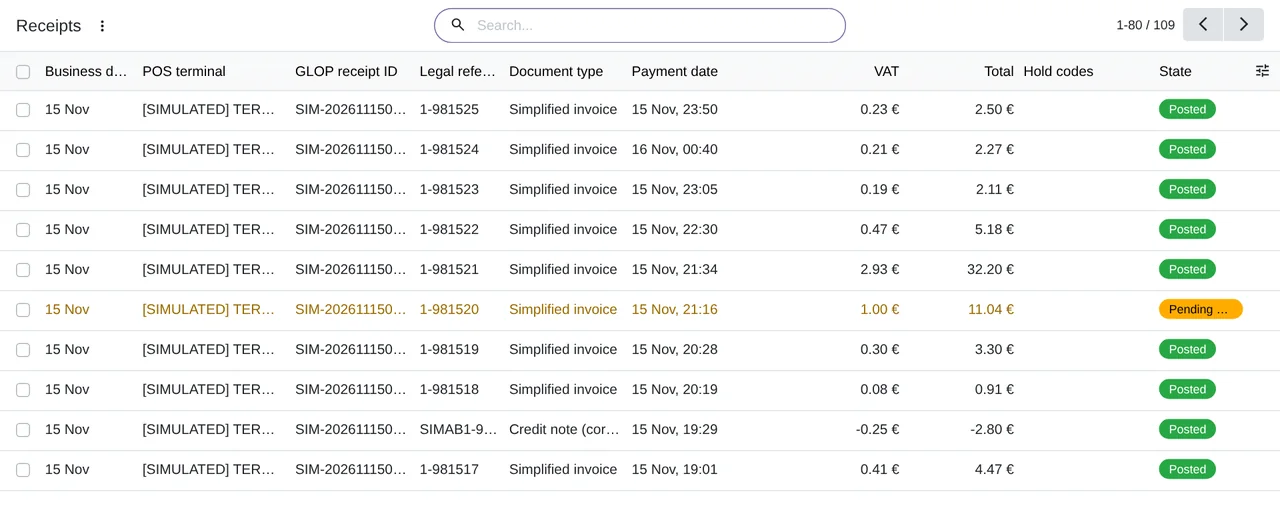
Receipts list of the module's simulation: simplified invoices, a credit note, an open receipt and a held one, each with its business date, its payment date, the VAT and the total.How each GLOP document is posted in Odoo
| GLOP document | How it reaches Odoo |
|---|---|
Simplified invoice | In the journal entry of its terminal and its business day, with the base and the VAT per VAT rate. |
Full invoice with a customer | In its own journal entry, with the customer on every line. |
Credit note (corrective) with a customer | Also in its own journal entry. By default it uses the refund boxes of the modelo 303 VAT return, and your accountant can choose the net alternative. |
Open receipt | It counts in GLOP and not in the journal entry while it has no payment date. |
By default the figures are GLOP's; they only change if your accountant accepts the recalculation. Odoo's tax engine only supplies the accounts and the boxes of the modelo 303 return.
In a credit sale, the amount due stays on the customer's account and is reconciled when GLOP records the payment, also for a full invoice with its own journal entry.
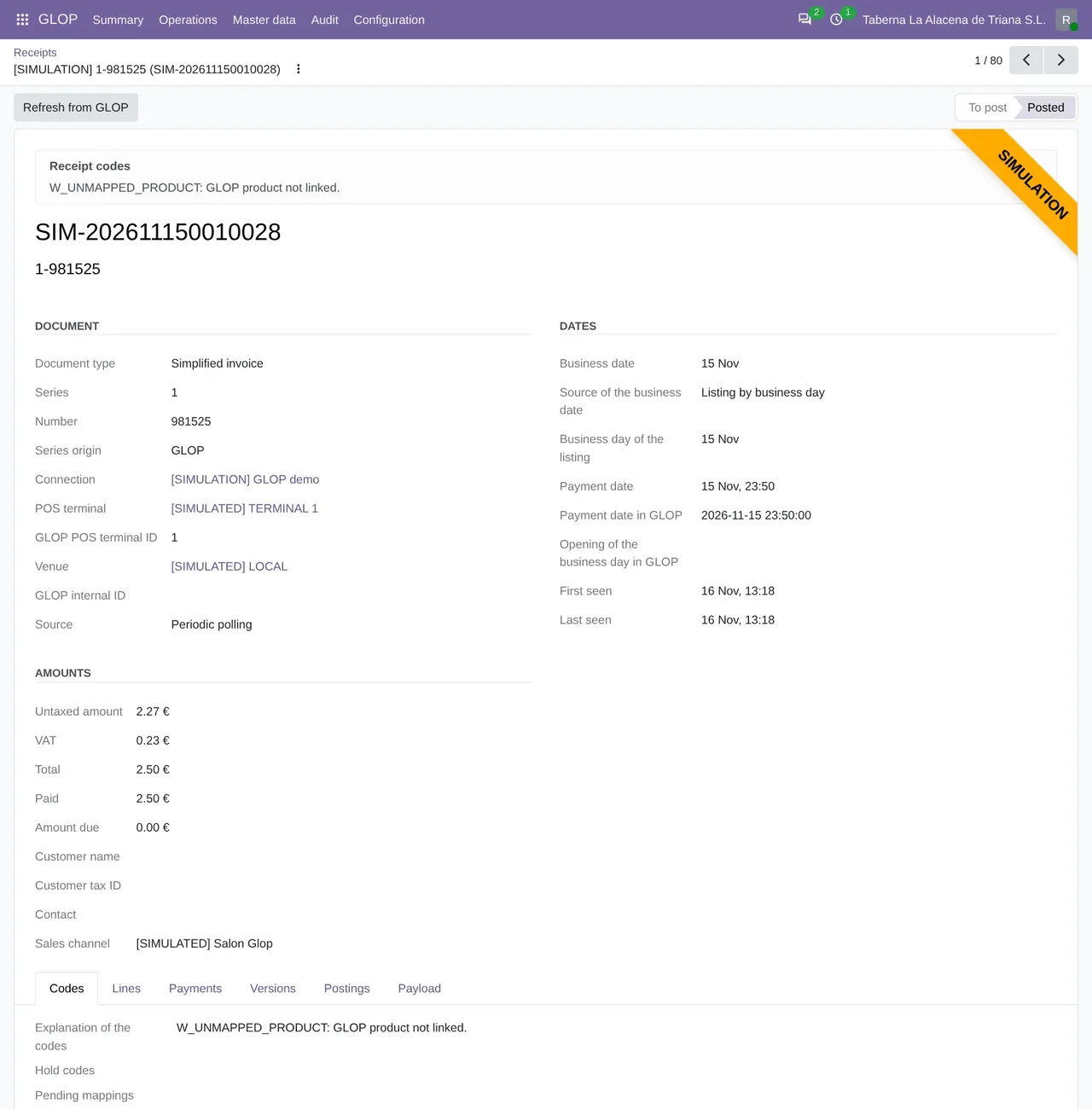
What happens when a receipt does not add up or changes later
- A receipt whose amounts do not add up is held with a code and an explanation. The rest of its business day is posted anyway.
- If base plus VAT does not match the total of a line, the code is E_TAX_INCONSISTENT, and your accountant decides with the
Accept the recalculationbutton. - There are no suspense accounts. The only automatic difference is the cent rounding of a receipt, within a limit you set.
- Every version of a receipt is kept exactly as it arrived and is never changed.
- If GLOP changes a receipt that is already posted, the connector calculates the difference and proposes it as an adjustment entry for a person to review. It says what changed: the amount, the units or the composition.
A payment that GLOP records later does not count as a change: it is posted and reconciled on its own. The receipts are in GLOP › Operations › Day to day › Receipts and their lines in Receipt lines. They arrive with the GLOP: sync receipts by business day task, every 10 minutes.
Questions about GLOP invoices in Odoo
Does the connector issue invoices in Odoo?
No. GLOP issues them and Odoo only receives journal entries. Who then sends the records to the Spanish tax agency is explained in GLOP and the invoicing records.
Has it been tested with invoices from a real POS?
Yes. On 19-09-2026, the Odoo 19 version of the time, prior to FlexigoTech Cloud, posted 6 paid documents from a real GLOP Hostelería POS: 3 simplified invoices, 1 full invoice, 1 invitation and 1 corrective invoice, in 2 journal entries and without issuing any invoice.
Does it need the FlexigoTech Cloud subscription?
Yes. Calls to GLOP go through FlexigoTech Cloud, Connector plan. The module is on Odoo Apps, and the GLOP connector page explains it.
What about the cash register closing?
It stays in GLOP: the connector does not bring in the cash register closing or the Z report. What arrives from each day's payments is explained in GLOP cash closing and Odoo.
Keep reading
Checked in the connector's source code (version 20.0) and the linked sources
Sources
- Module source code: flexigobe_glop_connector 20.0 (e888b59b): lib/tickets.py
- Module source code: flexigobe_glop_connector 20.0 (e888b59b): models/glop_ticket.py
- Module source code: flexigobe_glop_connector 20.0 (e888b59b): static/description/index.html
- Module source code: flexigobe_glop_connector 20.0 (e888b59b): views/glop_ticket_views.xml
- Module source code: flexigobe_glop_connector 20.0 (e888b59b): views/glop_booking_views.xml
- Module source code: flexigobe_glop_connector 20.0 (e888b59b): data/cron_sync.xml
- Module source code: flexigobe_glop_connector 20.0 (e888b59b): models/glop_product_link.py
- flexigotech.com/en/glop-connector-odoo.html
- Module source code: flexigobe_glop_connector 20.0 (e888b59b): views/glop_business_day_views.xml
- Module source code: flexigobe_glop_connector 20.0 (e888b59b): models/glop_backend.py
- Module source code: flexigobe_glop_connector 20.0 (e888b59b): i18n/en_GB.po
- Connector guide (PDF)
- User manual (PDF)