

 Español
 Català
 Deutsch
 Français
 Português
 Italiano
 Nederlands
 Polski
GLOP, Odoo and VERI*FACTU: who does what
| Piece | What it does with your sales |
|---|---|
| GLOP | Issues every receipt and every invoice and sends the VERI*FACTU records. |
| Odoo | Receives journal entries with the sales of each business day, with GLOP's base and VAT. |
| The connector | Reads the sales from GLOP, prepares the journal entries and checks that none of them creates a VERI*FACTU or SII document. |
GLOP also explains where it sends from: according to its home page, sales go to the Spanish Tax Agency (AEAT) directly from your own computer, without intermediate servers or external infrastructure. The connector is not on that path. It reads from GLOP the sales that are already paid and recorded.
The dates come from RDL 15/2025: businesses that file Corporate Income Tax must have their invoicing system adapted before 1 January 2027, and everyone else before 1 July 2027. On 5 October 2026, the Spanish Ministry of Finance announced that it plans to postpone those obligations until October 2028. With this connector, the system that issues the invoices is GLOP.
Why Odoo does not create a second record
The connector never creates invoices, receipts or POS orders in Odoo, because that would duplicate the invoicing record. The sales of each business day come in as journal entries in the GLOP journal. On the journal entry form, Odoo shows this notice: «Summary journal entry imported from GLOP (the invoicing system). It is not an invoice: Odoo does not send it to VERI*FACTU or to the SII.»
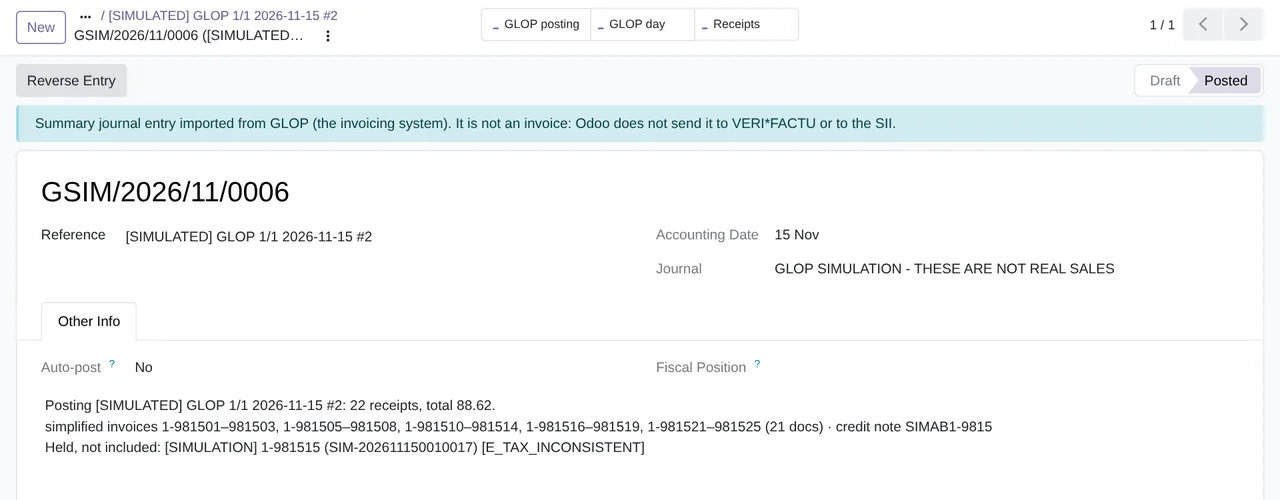
The connector also checks every journal entry when it is posted. It checks that it is a journal entry and not an invoice, that it goes to the GLOP journal and that it carries no VERI*FACTU, SII or e-invoicing document. If it carries one, the connector undoes the whole entry and the posting stays in error with the code LEGAL_GUARD. The message explains that, on posting, Odoo created a VERI*FACTU or SII document or moved the entry date, and that the entry was rolled back so that nothing was sent. Once the cause is fixed, a GLOP administrator clicks Retry.
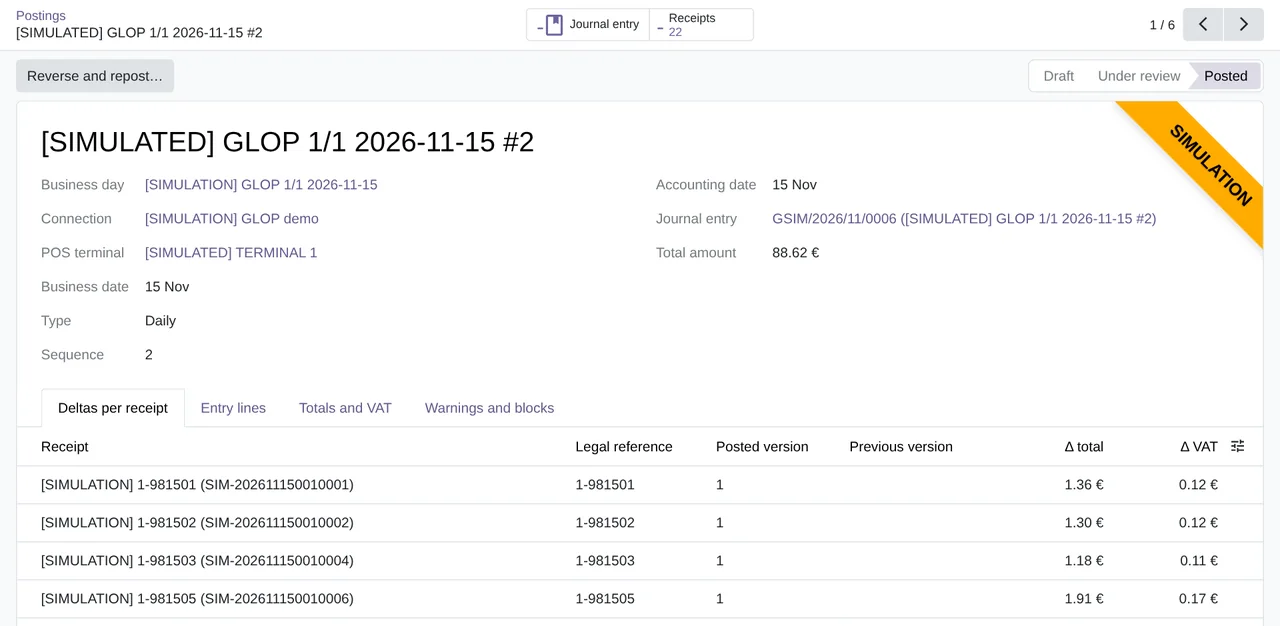
Posted, with the tabs Deltas per receipt, Entry lines, Totals and VAT and Warnings and blocks.What the connector cannot see of VERI*FACTU
The GLOP API does not provide the VERI*FACTU status, the hash or the QR code of each document, so the connector does not show them. It also never closes or changes a GLOP fiscal document: GLOP remains the issuer. How each type of document reaches the accounts, from the simplified invoice to the corrective one, is explained in GLOP invoices in Odoo.
What you do control from Odoo
- By default, Odoo uses the base and the VAT of each document and VAT rate exactly as GLOP recorded them; they only change if your accountant accepts the recalculation. Its tax engine only supplies the accounts and the boxes of the modelo 303 VAT return.
- If the period, the VAT or the fiscal year is locked on that date, nothing is posted.
Post automaticallyis off by default, and postings are reviewed inGLOP › Operations › Day to day › Postings.- Reversing and reposting a business day, or posting it on another date when the period is locked, is only done by a person and with a written reason.
Questions about GLOP, VeriFactu and Odoo
Can the connector live alongside Odoo's VERI*FACTU or SII modules?
The connector does not create invoices, so those modules have nothing to send for these sales. If a GLOP journal entry ever generated a VERI*FACTU or SII document, the connector would undo the whole entry and tell you.
Can I see the QR code of each receipt in Odoo?
No. The GLOP API does not provide the QR code, the hash or the VERI*FACTU status.
Does it need the FlexigoTech Cloud subscription?
Yes. The connector calls GLOP through FlexigoTech Cloud, Connector plan. The module is on Odoo Apps, and the GLOP connector page explains it.
Which Odoo versions is it available for?
Odoo 17, 18, 19 and 20, on Odoo.sh or on your own server. It is not compatible with Odoo Online. What GLOP is and how it works with Odoo is summed up in GLOP POS with Odoo.
Keep reading
Checked in the connector's source code (version 20.0) and the linked sources
Sources
- www.glop.es/verifactu/
- www.glop.es/
- Module source code: flexigobe_glop_connector 20.0 (e888b59b): static/description/index.html
- Module source code: flexigobe_glop_connector 20.0 (e888b59b): views/account_move_views.xml
- Module source code: flexigobe_glop_connector 20.0 (e888b59b): models/glop_booking_builder.py
- Module source code: flexigobe_glop_connector 20.0 (e888b59b): views/glop_booking_views.xml
- Module source code: flexigobe_glop_connector 20.0 (e888b59b): data/cron_booking.xml
- Module source code: flexigobe_glop_connector 20.0 (e888b59b): models/glop_backend.py
- sede.agenciatributaria.gob.es/Sede/iva/sistemas-informaticos-facturacion-verifactu/nota-in
- www.hacienda.gob.es/sgt/gabsehacienda/nota-informativa-verifactu.pdf
- sede.agenciatributaria.gob.es/Sede/iva/sistemas-informaticos-facturacion-verifactu.html
- Module source code: flexigobe_glop_connector 20.0 (e888b59b): __manifest__.py
- Module source code: flexigobe_glop_connector 20.0 (e888b59b): i18n/en_GB.po
- Connector guide (PDF)
- User manual (PDF)