

 Español
 Català
 Deutsch
 Français
 Português
 Italiano
 Nederlands
 Polski
What GLOP POS is, according to GLOP
GLOP is point-of-sale software. Its home page, read on 17-11-2026, gives three figures of its own: more than 25 years of experience, more than 20,000 customers and more than 250 resellers. For bars and restaurants, GLOP presents itself as a POS solution designed for the daily running of a hospitality business. For shops, it says it brings the management of your store into a single tool.
GLOP is sold in three versions, and its website describes them together: Glop MINI for your first steps, Glop PRO to drive daily management and Glop BUSINESS to connect the whole business in a digital ecosystem. It also says where the software lives: it is installed on your own computer, so the business can carry on quickly even when the internet connection fails.
How GLOP works with Odoo: who does what
GLOP is the POS and also the invoicing software: it issues every receipt and every invoice. Odoo keeps the accounts. The connector reads the paid sales from GLOP and posts them in Odoo without issuing any invoice. Who then sends the records of each sale to the Spanish tax agency is explained in GLOP and the invoicing records.
These are the pieces the connector works with:
- Business day
- Sales are grouped by GLOP business day, not by calendar day. A sale paid at 00:40 goes to the business day in which it was made.
- One entry per terminal
- Each business day of a terminal becomes one sales journal entry in Odoo, with GLOP's base and VAT per document and per VAT rate. By default, full invoices and corrective invoices with a customer go separately, each in its own entry.
- GLOP's figures
- By default, Odoo does not recalculate the amounts: they only change if your accountant accepts the recalculation. Its tax engine only supplies the accounts and the boxes of the Spanish VAT return (modelo 303).
- Who posts
- By default,
Post automaticallyis off: each business day waits for a person to clickPost.
Where you see GLOP POS in Odoo
The connector adds its own GLOP menu to Odoo, with five entries: Summary, Operations, Master data, Audit and Configuration. In GLOP › Summary there is one card per connection that tells you where you stand: the connection status, the business days that are ready, blocked or in error, the held or unmapped receipts and the open alerts. The card only calculates and writes nothing.
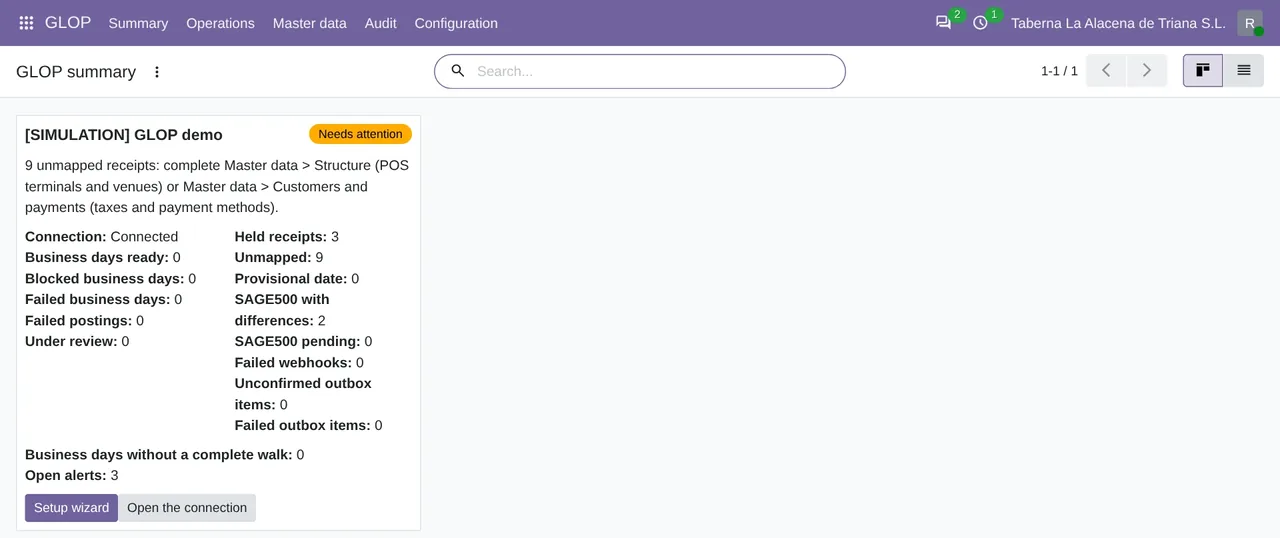
GLOP › Summary, with its status, the held and unmapped receipts and the open alerts. Data made up by the module's simulation.Business days are in GLOP › Operations › Day to day › Business days. Each one shows its receipts, the ones still unpaid or unmapped, and the difference between what GLOP recorded and what was posted.
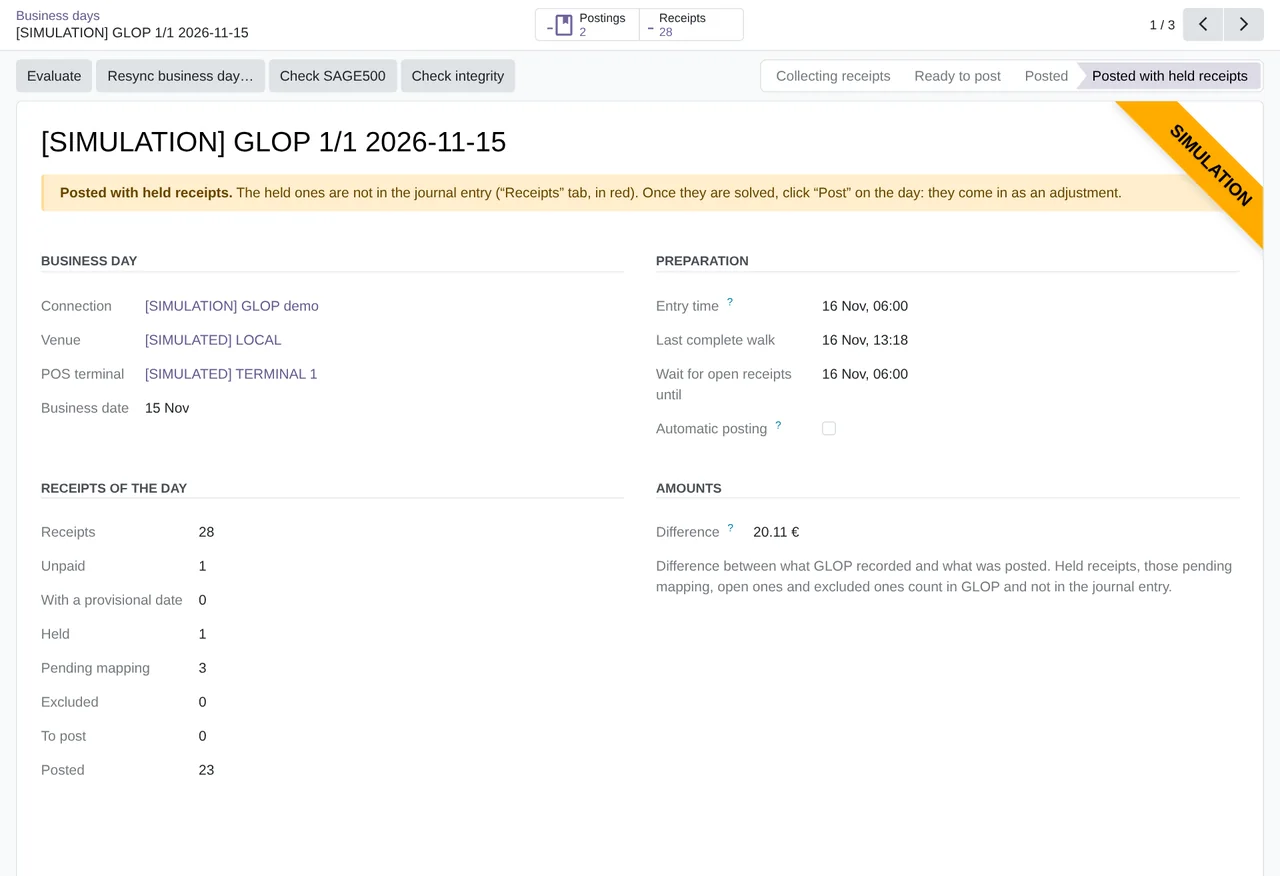
Posted with held receipts, with its Entry time, the count of its receipts and the Difference.The connector installs scheduled actions that run on their own:
GLOP: sync receipts by business day, every 10 minutes.GLOP: business days and posting, every 15 minutes.GLOP: master data, once a day.
A business day is not closed until its Entry time, which is the business day at 00:00 local time plus the entry hours of the connection. Until then it keeps collecting receipts.
What the connector does not do with your GLOP
- It never closes or changes a GLOP fiscal document. It does not touch pre-tickets, does not charge tables and does not add hotel charges.
- It does not bring in the cash register closing or the Z report. What does arrive from each day's payments is in GLOP cash closing and Odoo.
- It supports mainland Spanish VAT and euros only. Equivalence surcharge, IGIC and IPSI are not supported.
- It does not decide accounts or taxes. It proposes, marks what is missing and leaves the decision to your accountant.
What has been tested with a real GLOP
On 19-09-2026, the Odoo 19 version of the time, prior to FlexigoTech Cloud, connected to a real GLOP Hostelería POS and posted 6 paid documents in 2 journal entries, without issuing any invoice. On 14-11-2026, version 1.2.0 was tested on Odoo 17, 18, 19 and 20 against the real GLOP API, through the FlexigoTech Cloud test environment. The published 1.2.1 fixes the only failure of that test; the test has not been run again with 1.2.1. The screenshots on this page come from the simulation that ships with the module, with made-up data in a company marked as a demo.
Questions about GLOP POS and Odoo
What do I need from GLOP to connect it to Odoo?
The GLOP API credentials, the Client ID and the secret, which GLOP gives you. At go-live, GLOP support or your reseller also does a full data upload from the POS, because VAT rates only reach the GLOP cloud that way. We explain it in Glop Cloud and Odoo.
Does it need the FlexigoTech Cloud subscription?
Yes. The connector talks to GLOP through FlexigoTech Cloud, Connector plan. The module is on Odoo Apps, and the GLOP connector page explains it.
Which Odoo versions does it work on?
Odoo 17, 18, 19 and 20, on Odoo.sh or on your own server. It is not compatible with Odoo Online.
Does it create invoices in Odoo?
No. GLOP issues them and Odoo only receives journal entries. How each document type comes in is explained in GLOP invoices in Odoo.
Keep reading
Checked in the connector's source code (version 20.0) and the linked sources
Sources
- www.glop.es/
- Module source code: flexigobe_glop_connector 20.0 (e888b59b): static/description/index.html
- Module source code: flexigobe_glop_connector 20.0 (e888b59b): views/glop_menus.xml
- Module source code: flexigobe_glop_connector 20.0 (e888b59b): views/glop_business_day_views.xml
- Module source code: flexigobe_glop_connector 20.0 (e888b59b): data/cron_sync.xml
- Module source code: flexigobe_glop_connector 20.0 (e888b59b): data/cron_booking.xml
- Module source code: flexigobe_glop_connector 20.0 (e888b59b): data/cron_master.xml
- Module source code: flexigobe_glop_connector 20.0 (e888b59b): models/glop_backend.py
- Module source code: flexigobe_glop_connector 20.0 (e888b59b): models/glop_day_flow.py
- flexigotech.com/en/glop-connector-odoo.html
- Module source code: flexigobe_glop_connector 20.0 (e888b59b): models/glop_master_data.py
- Module source code: flexigobe_glop_connector 20.0 (e888b59b): __manifest__.py
- Module source code: flexigobe_glop_connector 20.0 (e888b59b): models/glop_booking.py
- Module source code: flexigobe_glop_connector 20.0 (e888b59b): i18n/en_GB.po
- Connector guide (PDF)
- User manual (PDF)