

 Español
 Català
 Deutsch
 Français
 Português
 Italiano
 Nederlands
 Polski
Glop Cloud is now Glop Business
GLOP says so in the questions on that same page: Glop Cloud is evolving and is now presented as Glop Business. It also says what changes: Glop is widening its offer to connect day-to-day management with digital channels, payments, reports, integrations and artificial intelligence tools. Glop Business is one of GLOP's three versions, which its home page lists side by side: Glop MINI for your first steps, Glop PRO to drive daily management and Glop BUSINESS to connect the whole business in a digital ecosystem.
Among the things GLOP lists for Glop Business are reports, comparisons, history, KPIs and statistics to follow how the business is doing. About the API, GLOP says that Glop BUSINESS has a connection API as an add-on for more advanced needs, such as connecting the data to in-house developments, external applications, dashboards or specific integrations.
What the connector reads from the GLOP cloud
The connector uses the GLOP REST API, at https://api.glop.es/api/v1, with your client credentials: the Client ID and the secret that GLOP gives you. This is what it brings in and how often:
- Receipts, by business day, with
GLOP: sync receipts by business day, every 10 minutes. - GLOP's master data, with
GLOP: master data, once a day. - GLOP's notifications (webhooks), if you have them, with
GLOP: process received webhooks, every 5 minutes.
The read by business day is the one that counts, and it checks that no receipt is missing. Webhooks only let the connector know sooner. Business days before the go-live date you set are never requested.
When the GLOP cloud lacks the VAT rates or the catalogue, the connector warns you that the GLOP cloud is incremental: VAT rates, and the catalogue created before the cloud was activated, are only uploaded with the full data upload from the POS. GLOP support or your reseller does that upload at go-live, with «Envío de datos» → «Enviar todo», and «Enviar ventas» for the receipt history. It cannot be launched from the API.
How to connect Glop Cloud to Odoo, step by step
- Go to
GLOP › Configuration › GLOP connectionsand create a connection. - Choose the
Environment:Productionfor your GLOP orSimulationto try it with made-up data. TheAPI URLalready comes filled in with GLOP's. - Click
Credentials…and type theClient IDand theClient secret. An Odoo administrator first ticksI accept that the GLOP credentials and the calls to GLOP go through FlexigoTech Cloud. - Click
Save and test the connection. If GLOP answers, the connection changes toConnected. - Set the
Go-live date. While it is missing, the connection warns that no receipts come in.
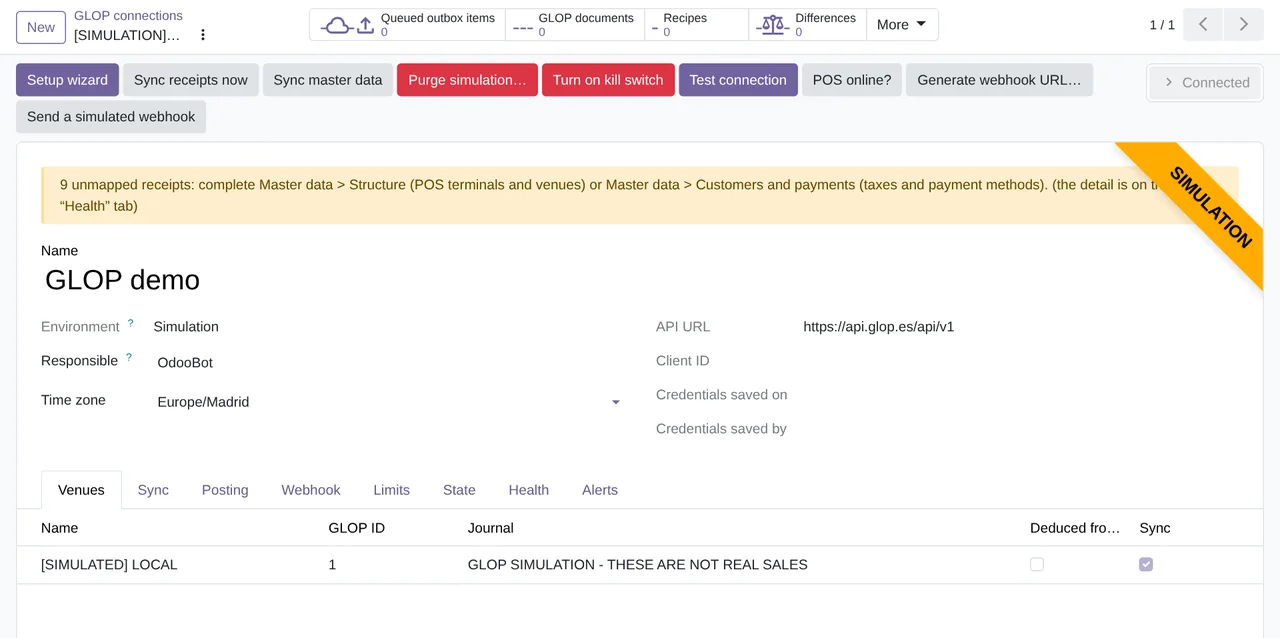
GLOP connections, with GLOP's API URL and the Sync receipts now, Sync master data and Test connection buttons.What FlexigoTech Cloud stores and what stays in your Odoo
FlexigoTech Cloud stores the GLOP API credentials encrypted and calls GLOP on behalf of your Odoo. On new connections, the credentials are not stored in your Odoo, and they are never shown or written to a log. A connection that already kept the secret in Odoo before FlexigoTech Cloud keeps it there when the module is updated: its Path is Direct (secret saved in Odoo), and that path does not change. The receipts and the journal entries do stay in your Odoo.
Every pass is logged. In GLOP › Audit › Sync › Runs you see each read with its source and its result, and failed calls are in API calls (errors).
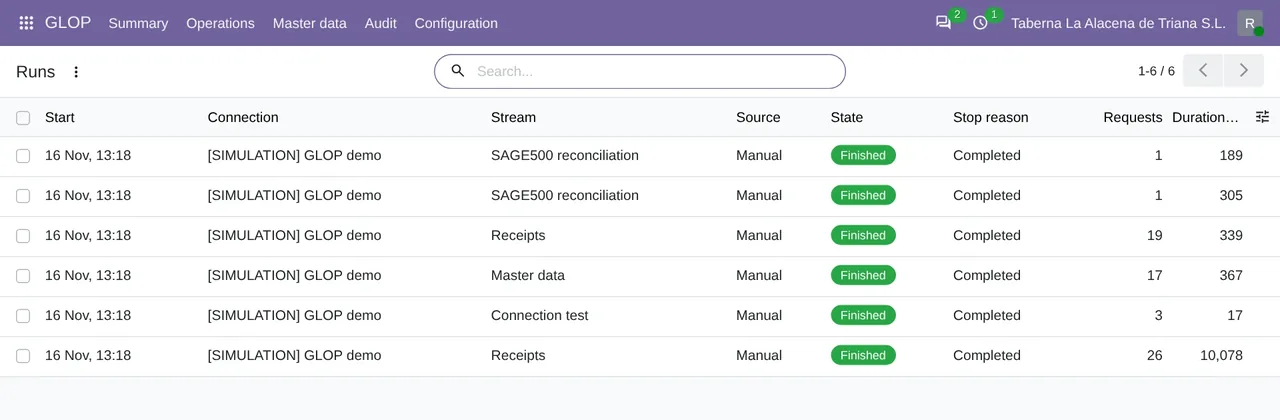
Runs of the simulation: receipts, master data, connection test and reconciliation, each with its source, its state and its stop reason.Questions about Glop Cloud, the API and Odoo
Are GLOP webhooks required?
No. The read by business day, every 10 minutes, brings in all the receipts. Webhooks, if GLOP turns them on for you, only bring the notice forward.
Does the connector write to the GLOP cloud?
Not by default. Sending customers, purchase orders, goods receipts, stock documents, recipes or orders each has its own switch on the connection, off at the start. While a switch is off, the attempt is refused before it reaches the network. Through FlexigoTech Cloud, those writes have only been tested in simulation.
Does it need the FlexigoTech Cloud subscription?
Yes. Every call to the GLOP API goes through FlexigoTech Cloud, Connector plan. The module is on Odoo Apps, and the GLOP connector page explains it.
Can I try it before connecting my real GLOP?
You can first create a simulation connection, with made-up data, only in a company marked as a demo and with its own journal. A wizard deletes it afterwards when you type DEMO. What GLOP does in your business is summed up in GLOP POS with Odoo.
Keep reading
Checked in the connector's source code (version 20.0) and the linked sources
Sources
- www.glop.es/glop-cloud/
- www.glop.es/api-integraciones/
- www.glop.es/
- Module source code: flexigobe_glop_connector 20.0 (e888b59b): lib/client.py
- Module source code: flexigobe_glop_connector 20.0 (e888b59b): models/glop_backend.py
- Module source code: flexigobe_glop_connector 20.0 (e888b59b): models/glop_master_data.py
- Module source code: flexigobe_glop_connector 20.0 (e888b59b): static/description/index.html
- Module source code: flexigobe_glop_connector 20.0 (e888b59b): views/glop_backend_views.xml
- Module source code: flexigobe_glop_connector 20.0 (e888b59b): views/glop_sync_run_views.xml
- Module source code: flexigobe_glop_connector 20.0 (e888b59b): views/glop_webhook_event_views.xml
- Module source code: flexigobe_glop_connector 20.0 (e888b59b): data/cron_sync.xml
- Module source code: flexigobe_glop_connector 20.0 (e888b59b): data/cron_master.xml
- Module source code: flexigobe_glop_connector 20.0 (e888b59b): models/glop_backend_runtime.py
- flexigotech.com/en/glop-connector-odoo.html
- Module source code: flexigobe_glop_connector 20.0 (e888b59b): __manifest__.py
- Module source code: flexigobe_glop_connector 20.0 (e888b59b): i18n/en_GB.po
- Connector guide (PDF)
- User manual (PDF)