

 Español
 Català
 Deutsch
 Français
 Português
 Italiano
 Nederlands
 Polski
What the module covers, according to its listing
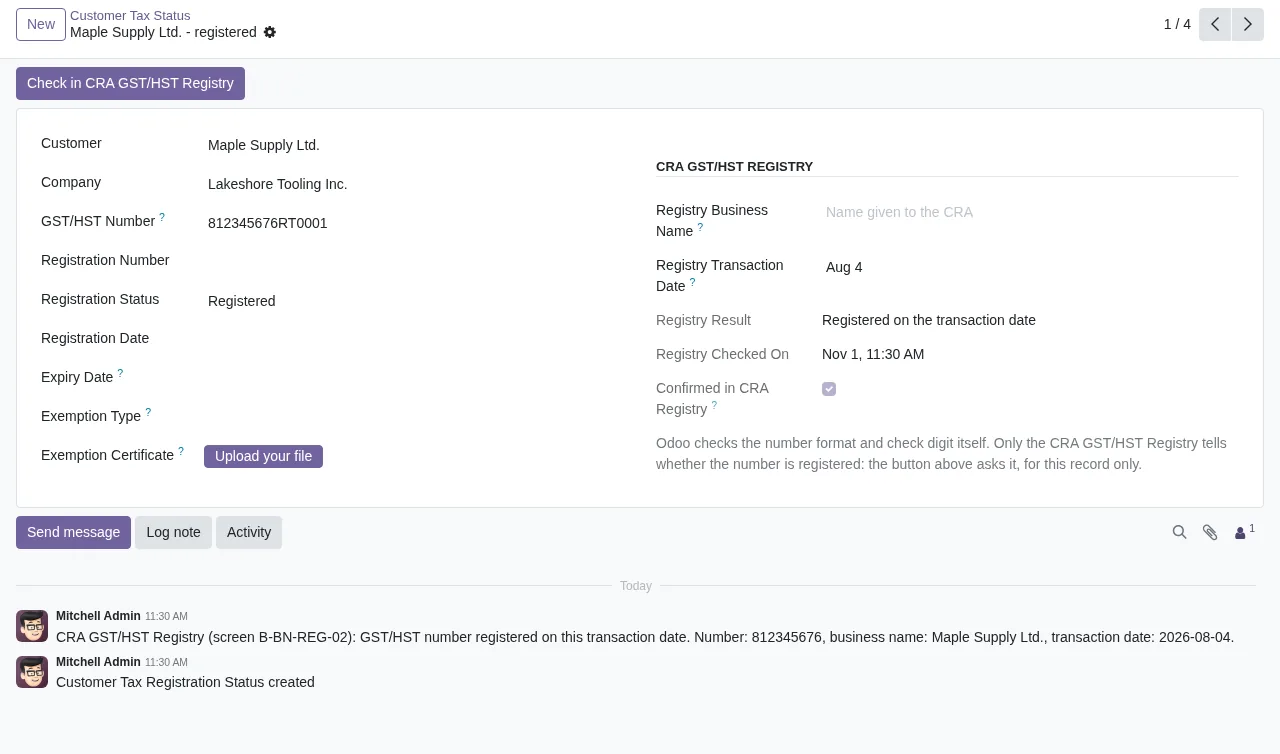
The listing screenshots show the module working in Odoo with three pieces: input tax credits (Input Tax Credits), filing deadlines (Filing Deadlines) and each customer's tax status (Customer Tax Status). On the return itself, the listing is clear: the module computes the lines but does not file. You copy the computed lines into GST/HST NETFILE or My Business Account and record the CRA confirmation number in Odoo.
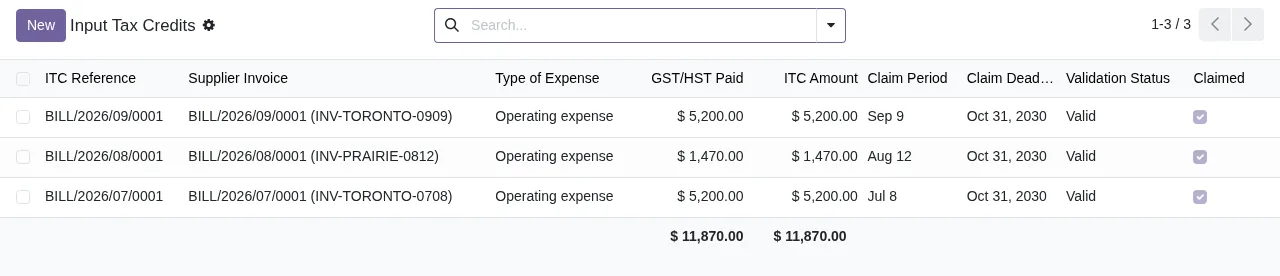
Claimed box ticked and totals at the bottomFor your customers' GST/HST numbers, the listing explains that the CRA has no GST/HST Registry API. So the check uses the public Registry form, one record at a time, when a user clicks the button and accepts the CRA terms of use.
If you want the menus and the path a record follows in detail, see how the module works under the hood.
What it leaves out
According to its listing, the module does not compute:
- Quebec QST.
- The quick method.
- Passenger vehicle and real property ITCs.
- The special rules for financial institutions and charities.
Nor does it generate GST/HST numbers or exemption certificates: those come from the CRA and from your customers. And, as above, it does not file the return for you.
Criteria to decide whether it fits
Go through this table against the way you actually file. Every row comes from what the module's listing says.
| If your business… | What suits you |
|---|---|
| Files GST/HST itself and wants to start from lines computed in Odoo | It fits: you copy the lines into GST/HST NETFILE or My Business Account and record the CRA confirmation number in Odoo |
| Needs the return to reach the CRA without anyone filing it | It does not fit: the module does not file the return |
| Files Quebec QST | That part is missing: QST is not computed |
| Uses the quick method | Not for that: it does not compute it |
| Claims passenger vehicle or real property ITCs | You will need to work those out outside the module |
| Is a financial institution or a charity | Their special rules are not computed |
| Wants to check customers' GST/HST numbers in the Registry | It fits: one record at a time, when a user clicks the button and accepts the CRA terms of use |
| Expects to check the whole customer base in one go | It does not fit: the check is one at a time |
| Wants to know when CRA GST/HST rules change | You need the FlexigoTech Cloud subscription |
| Wants the system to generate GST/HST numbers or exemption certificates | It does not fit: they come from the CRA and your customers |
If one of the rows that does not fit is the bulk of what you file, the module will only cover part of it. Keep that in front of you before buying.
What you need before installing it
- Odoo 17, 18, 19 or 20: these are the versions it is published for on Odoo Apps.
- Your account on each platform, your Odoo and your hosting: you contract and pay for them yourself.
- The GST/HST numbers and exemption certificates you will use, which come from the CRA and your customers, not from the module.
- Someone to file: a person on your team who copies the lines into GST/HST NETFILE or My Business Account and records the confirmation number in Odoo.
- Someone to run Registry checks: the user who clicks the button has to accept the CRA terms of use.
- A plan for changing Odoo version: FlexigoTech does not take care of migrating your database to a new Odoo version.
- A decision on FlexigoTech Cloud: with or without a subscription, depending on whether you want the alerts and monitoring.
What FlexigoTech Cloud adds and what your database sends
This is a module with a local FlexigoTech Cloud service. According to the listing, the subscription includes:
- Alerts when CRA GST/HST rules change.
- Monitoring of the module's sources, with their alerts and the calendar of their deadlines.
- Monitoring of the module's health in your database, with alerts.
- Support with a first response within 1 working day.
Without a subscription, or with the service suspended, whatever the subscription provides stops; your data stay in your Odoo.
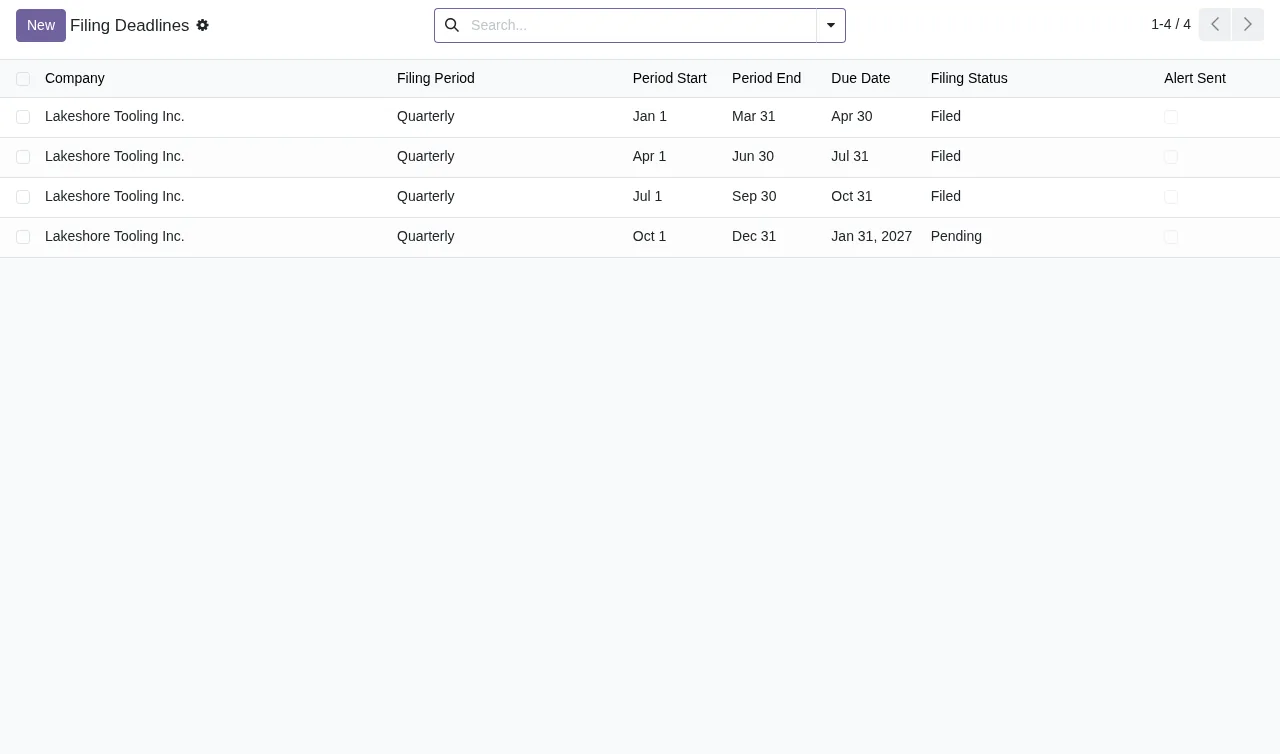
Filed and one PendingTo work, the service receives from your database:
- The database identifier (uuid), its address (URL) and the Odoo version.
- The FlexigoTech modules installed, with their version, and whether the database is a neutralised copy (staging or test).
- The company name and the email of the person who accepts, with the date and version of the text accepted.
- A public code to check that requests come from that database, and a proof that it is that database, computed on your server without sending its secret.
- A request for its service permit every 6 hours and the module's health: counters and errors (type and code), without the content of your records.
- Its requests for alerts and the calendar, with the date of the last alert received: the database identifies itself and sends nothing else.
All connections to FlexigoTech's servers are encrypted (HTTPS) and the servers are in Germany.
Odoo version and price
The module costs €9 excluding VAT, a one-off payment per Odoo version, for 17, 18, 19 and 20; the local FlexigoTech Cloud service is €29/month or €290/year excluding VAT (Pro: €58/month or €580/year). With the subscription, the module for new Odoo versions is included if you bought it on flexigotech.com; on the Odoo App Store, each version is bought there.
You can see the listing on Odoo Apps or on the module page at flexigotech.com. If you already have it installed and something does not add up, check the module's error messages and warnings.
How FlexigoTech can help
FlexigoTech implements Odoo 17, 18, 19 and 20 and builds bespoke connectors and integrations. If what the module leaves out (for example, one of the parts it does not compute) matters to your business, tell us before you buy and we will look together at what fits and what would need solving separately.
Keep reading
Checked in the module's source code (version 20.0) and the linked sources
Sources
- Module source code: flexigo_canadian_gst_hst_compliance_module 20.0 (bc461f60): static/description/index.html
- apps.odoo.com/apps/modules/20.0/flexigo_canadian_gst_hst_compliance_module
- apps.odoo.com/apps/modules/17.0/flexigo_canadian_gst_hst_compliance_module
- apps.odoo.com/apps/modules/18.0/flexigo_canadian_gst_hst_compliance_module
- apps.odoo.com/apps/modules/19.0/flexigo_canadian_gst_hst_compliance_module
- flexigotech.com/en/services.html
- flexigotech.com/precios.html