

 Español
 Català
 Deutsch
 Français
 Português
 Italiano
 Nederlands
 Polski
Where the module sits inside Invoicing
Which menus does the module add to Odoo?
Everything hangs off a single menu, Invoicing › GST/HST Compliance. The Odoo Apps listing introduces it with the heading «GST/HST number checks and returns in Odoo». When you open the menu you will find four blocks, each with its own submenus:
Tax Configuration:Tax RatesandPlace of Supply Rules.Transaction Processing:Tax Calculations,Customer Tax StatusandInput Tax Credits.Compliance Management:Registration Thresholds,Filing DeadlinesandAudit Trail.Reporting:GST/HST Returns.
The full paths are the ones you will see in the breadcrumb, for instance Invoicing › GST/HST Compliance › Transaction Processing › Input Tax Credits or Invoicing › GST/HST Compliance › Reporting › GST/HST Returns.
Which records does the module keep behind those menus?
The module defines its own data models. These are their technical names with the description they carry in the code; by name, they match the submenus above:
tax.rate:GST/HST Tax Rate Configuration.tax.place.supply.rule:Place of Supply Rules for GST/HST.tax.calculation:Tax Calculation Records.tax.customer.status:Customer Tax Registration Status.tax.input.tax.credit:Input Tax Credit Management.tax.registration.threshold:GST/HST Registration Threshold Monitoring.tax.filing.deadline:GST/HST Filing Deadline Management.tax.audit.log:Tax Audit Trail.tax.report:GST/HST Tax Reports.threshold.alert:GST/HST Registration Threshold Alert.
If you ask a consultant or developer to work on anything in this module, these technical names are what let them find each type of record in the database.
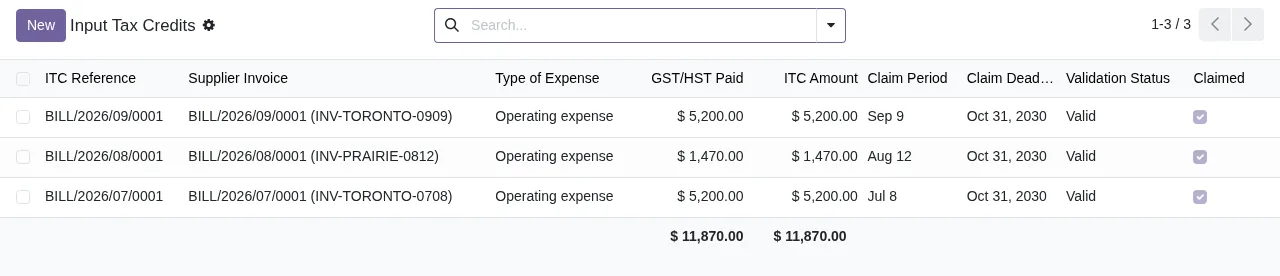
Input Tax Credits list: supplier bill, expense type, GST/HST paid, ITC amount, period, deadline, Valid status and the Claimed box ticked, with totals at the foot.The five scheduled actions it leaves switched on
Which scheduled actions does it install and how often do they run?
The module installs five scheduled actions, and all five come marked as active:
GST/HST Registration Threshold Monitoring: every day.GST/HST Filing Deadline Monitoring: every day.GST/HST Customer Registration Expiry Check: every week.GST/HST Monthly Report Preparation: every day.GST/HST Audit Retention Check: every month.
Why does GST/HST Monthly Report Preparation run every day if it is called monthly?
That is how it is configured: its frequency is daily even though the name says «Monthly». Do not assume it prepares a return every day. If you need that detail before going live, try it on a copy of your database and watch what changes from one day to the next.
For the warnings the module can show, you have the literal texts and what to do about each one in the module's error messages and warnings.
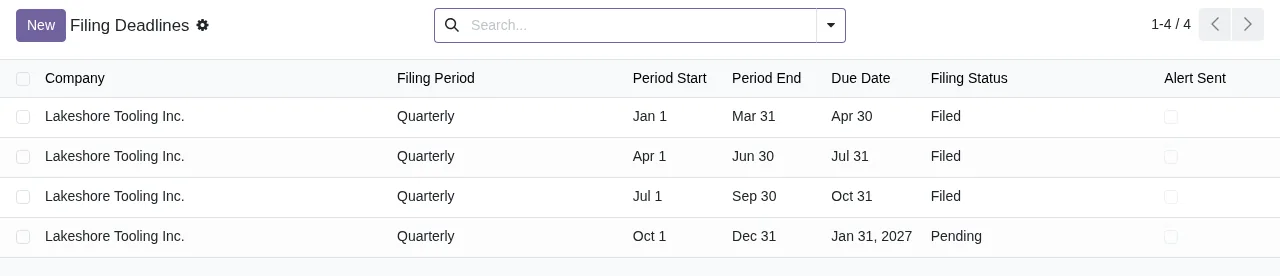
Filing Deadlines list: quarterly periods with start, end and due dates, filing status (Filed or Pending) and the Alert Sent box.What a record goes through and what relies on the service
What does a record go through inside the module?
The menus group the work into four blocks: setup (Tax Configuration), day-to-day transactions (Transaction Processing), control (Compliance Management) and reporting (Reporting). The screenshots show this: an input tax credit in Input Tax Credits appears with the Valid status and the Claimed box; a deadline in Filing Deadlines appears as Filed or Pending, with the Alert Sent box; and a return in GST/HST Returns appears in the Filed status, with its filing reference. Separately, the module has its own audit log, tax.audit.log (Tax Audit Trail), under Compliance Management › Audit Trail.
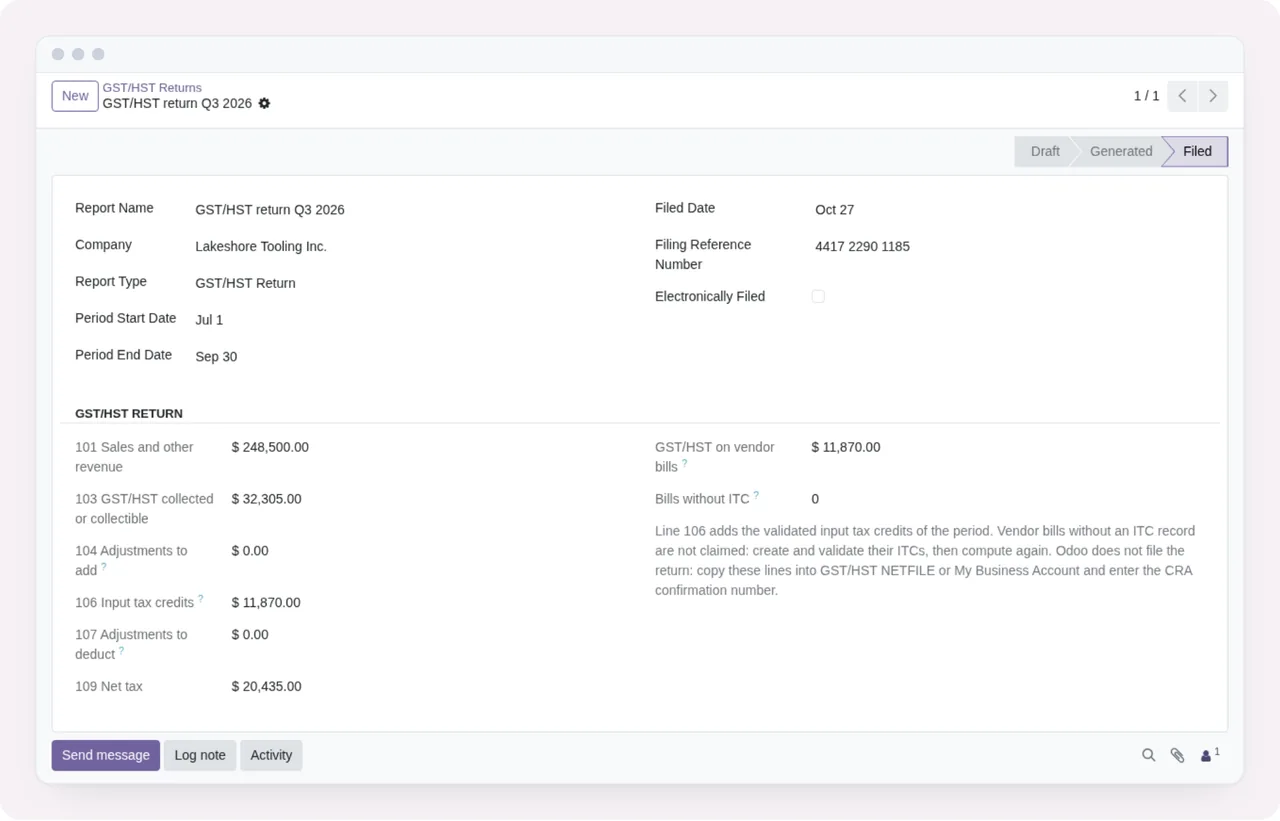
GST/HST Returns in the Filed status, with the period dates, filing reference, tax lines and the chatter buttons.
Input Tax Credits list to Filing Deadlines, then to a return in the Filed status and back to Input Tax Credits with its totals.What is flexigo.ca.company.guard?
It is a model in the module whose description reads GST/HST: company rule checked again after a change of company. The threshold alert model, threshold.alert (GST/HST Registration Threshold Alert), inherits from it. If you run several companies in the same Odoo database, it is worth testing before you start.
Which features rely on a paid service?
The listing has a section headed «Before you buy: some features of this app use a paid external service». For this module that service is FlexigoTech Cloud's local service, which costs €29/month or €290/year excluding VAT (Pro: €58/month or €580/year). Without a subscription, or with the service suspended, whatever the subscription provides stops and your data stays in your Odoo. Check that section of the listing for the specific features tied to the service, and read its «Privacy policy» section too.
Which Odoo versions is it available for and how much does the module cost?
It is published on Odoo Apps for Odoo 17, 18, 19 and 20, at €9 per Odoo version as a one-off payment, excluding VAT. With the subscription, the module for new Odoo versions is included if you bought it on flexigotech.com; on the Odoo App Store, each Odoo version is bought there. You have the Odoo Apps listing and the module page on flexigotech.com.
How FlexigoTech can help
FlexigoTech implements Odoo 17, 18, 19 and 20 and builds bespoke connectors and integrations. If you are rolling out Odoo and want to check how this module fits your invoicing, several companies or other systems, we can go through it with you. And if you are not yet sure it suits you, start with whether Canadian GST/HST Compliance Module fits your business.
Keep reading
Checked in the module's source code (version 20.0) and the linked sources
Sources
- Module source code: flexigo_canadian_gst_hst_compliance_module 20.0 (bc461f60): views/menus.xml
- Module source code: flexigo_canadian_gst_hst_compliance_module 20.0 (bc461f60): data/cron_jobs.xml
- Module source code: flexigo_canadian_gst_hst_compliance_module 20.0 (bc461f60): static/description/index.html
- Module source code: flexigo_canadian_gst_hst_compliance_module 20.0 (bc461f60): models/company_guard.py
- Module source code: flexigo_canadian_gst_hst_compliance_module 20.0 (bc461f60): models/tax_audit_log.py
- Module source code: flexigo_canadian_gst_hst_compliance_module 20.0 (bc461f60): models/tax_calculation.py
- Module source code: flexigo_canadian_gst_hst_compliance_module 20.0 (bc461f60): models/tax_customer_status.py
- Module source code: flexigo_canadian_gst_hst_compliance_module 20.0 (bc461f60): models/tax_filing_deadline.py
- Module source code: flexigo_canadian_gst_hst_compliance_module 20.0 (bc461f60): models/tax_input_tax_credit.py
- Module source code: flexigo_canadian_gst_hst_compliance_module 20.0 (bc461f60): models/tax_place_supply_rule.py
- Module source code: flexigo_canadian_gst_hst_compliance_module 20.0 (bc461f60): models/tax_rate.py
- Module source code: flexigo_canadian_gst_hst_compliance_module 20.0 (bc461f60): models/tax_registration_threshold.py
- Module source code: flexigo_canadian_gst_hst_compliance_module 20.0 (bc461f60): models/tax_report.py
- Module source code: flexigo_canadian_gst_hst_compliance_module 20.0 (bc461f60): models/threshold_alert.py
- apps.odoo.com/apps/modules/20.0/flexigo_canadian_gst_hst_compliance_module
- apps.odoo.com/apps/modules/17.0/flexigo_canadian_gst_hst_compliance_module
- apps.odoo.com/apps/modules/18.0/flexigo_canadian_gst_hst_compliance_module
- apps.odoo.com/apps/modules/19.0/flexigo_canadian_gst_hst_compliance_module
- flexigotech.com/en/services.html
- flexigotech.com/precios.html