

 Español
 Deutsch
Module for Odoo 17 · 18 · 19
Connect Decathlon Marketplace to Odoo: the operator profile for the Mirakl connector
Ships the host, defaults, auto-detection and tracking flow for Decathlon already configured: install, paste your API key and start importing orders. Requires the FlexigoTech Mirakl connector (sold separately).
Mirakl Connector: Requires the Mirakl Connector installed (sold separately).

What it does
- Pre-configured hostThe operator connection URL comes preloaded: pick Decathlon on the Mirakl instance and never type an endpoint.
- Marketplace defaultsOrders, returns and auto-acceptance with the typical Decathlon Marketplace defaults already set.
- Operator auto-detectionThe connector recognises the Decathlon host and platform name and applies the right profile, with no crossed connections when you run several operators.
- Tracking from the deliveryReuses the Mirakl connector's advanced shipment flow: validate the delivery and the tracking number and carrier reach Decathlon the way its API expects.
How the module works
Real screenshots of every screen, with what each one does.
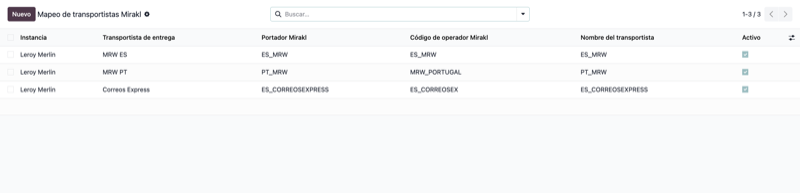
Carrier mapping
Links each Odoo carrier to its Mirakl operator code so shipments validate on the marketplace without errors.
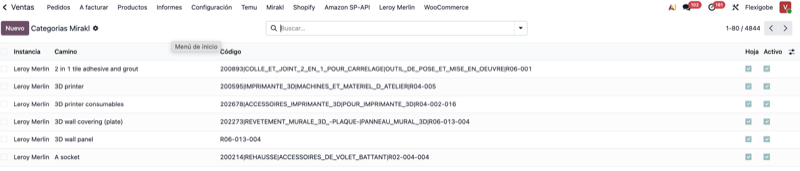
Mirakl category catalog
Imports the marketplace's full category tree (thousands of paths and codes), ready to classify your products.
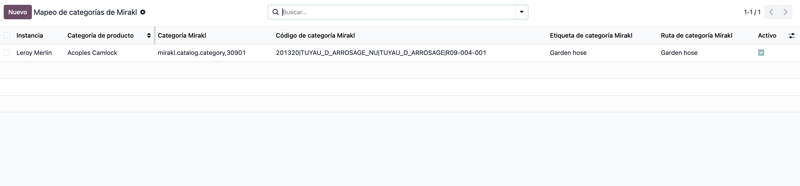
Product category mapping
Maps your Odoo categories to the marketplace ones so every offer is published in the right location.
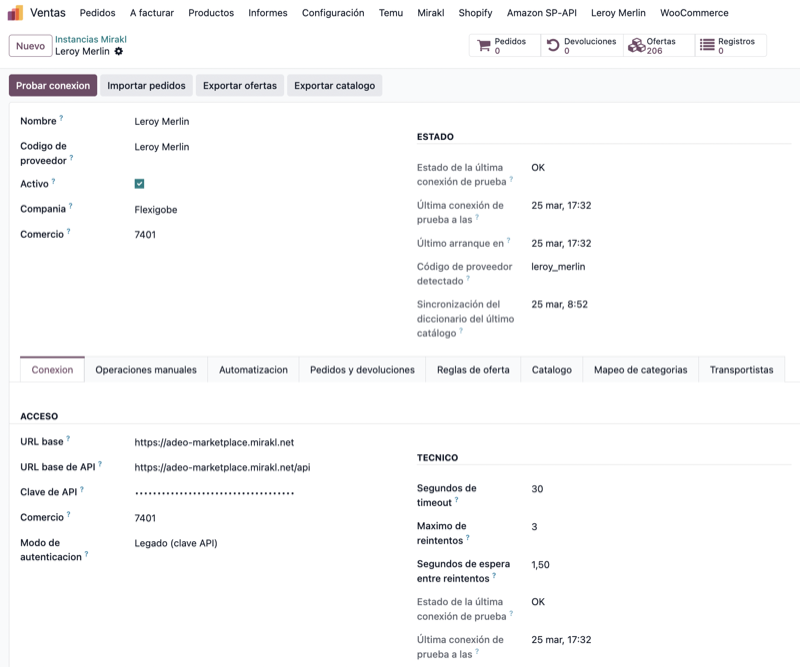
Instance and connection test
Set up the Mirakl connection and check status, orders, returns and offers from a single screen.
What this connector does
- Catalog: publishes and keeps your Odoo products and offers listed on the Decathlon Marketplace.
- Orders: automatically imports Decathlon orders into Odoo so you fulfil them from one place.
- Stock: pushes your Odoo stock levels to Decathlon to prevent overselling.
- Returns: handles marketplace returns natively inside Odoo.
- Shipment tracking: sends the carrier and tracking number back to Decathlon in the exact format Mirakl expects when you ship from Odoo.
- EAN offer mapping: matches your Odoo products to Decathlon listings by EAN, so offers line up without manual reconciliation.
What the Decathlon profile adds
The base Mirakl connector talks to any Mirakl marketplace. This profile layers the Decathlon-specific bits on top, so you go live without wiring the plumbing by hand.
Ships with the Mirakl order states, the carriers Decathlon accepts and EAN-based offer mapping already configured, so you're not starting from a blank sheet.
Recognises automatically that the connection is a Decathlon account and applies its profile: endpoints, catalog and shop rules, without picking the provider by hand on every instance.
Sends Decathlon the carrier and tracking number in the format Mirakl expects, and advances the order state automatically the moment you ship it from Odoo.
How it works: the Mirakl architecture
The mandatory base module that provides the generic connection to the Mirakl API. You install it first.
The provider add-on that adds Decathlon's configuration and specifics on top. It depends on the base connector, then you connect your API key and go live.
€100 one-time payment
Decathlon provider add-on. Full source code included, no recurring fees, works with Odoo 17, 18 and 19. Requires the base Mirakl connector installed.
Frequently asked questions
Do I need the base Mirakl connector?
Yes. Decathlon runs on Mirakl, so this module is a provider add-on that depends on FlexigoTech's base Mirakl connector. Without it, the Decathlon add-on doesn't operate.
What gets synced?
Catalog (products and offers), orders, stock and returns between Odoo and Decathlon through the Mirakl API.
Which Odoo versions does the Decathlon Odoo connector support?
Odoo 17, 18 and 19. The App Store download links to version 19.
Does it work with Odoo Community?
Yes. The connector and its base Mirakl module run on Odoo Community and Enterprise alike. You don't need Enterprise to sell on Decathlon from Odoo.
How much does it cost?
A one-time payment of €100 for the Decathlon add-on, with full source code included and no recurring fees. It also requires the base Mirakl connector.