
 Español
 Català
 Deutsch
 Français
 Português
 Italiano
 Nederlands
 Polski



Poland KSeF 2.0 Validator for Odoo
Get your invoices ready for KSeF 2.0: the FA(3) validated against the official schema in FlexigoTech Cloud, credentials with their expiry and offline deadlines in the queue.
€29/month14 days free, no card
Yearly and Pro
- Standard€29/month · €290/year
- Pro€58/month · €580/year
Reply within 1 working day; with Pro, 4 hours. FlexigoTech Cloud pricing
After you buy
- You pay for the license (€9 + VAT) and get an email with the link to download the module.
- You install it in your Odoo, on Odoo.sh or your own server.
- In Settings → FlexigoTech Cloud you accept the data list and press «Try free for 14 days». The trial doesn't ask for a card.
- To continue, you press «Subscribe», create your account on app.flexigotech.com and pay for the plan by card.
Every purchase includes 2 months of support: we help you install it, set it up and get it working, by email and video call.
- Tested on Odoo 17, 18, 19 and 20
- Odoo Learning Partner
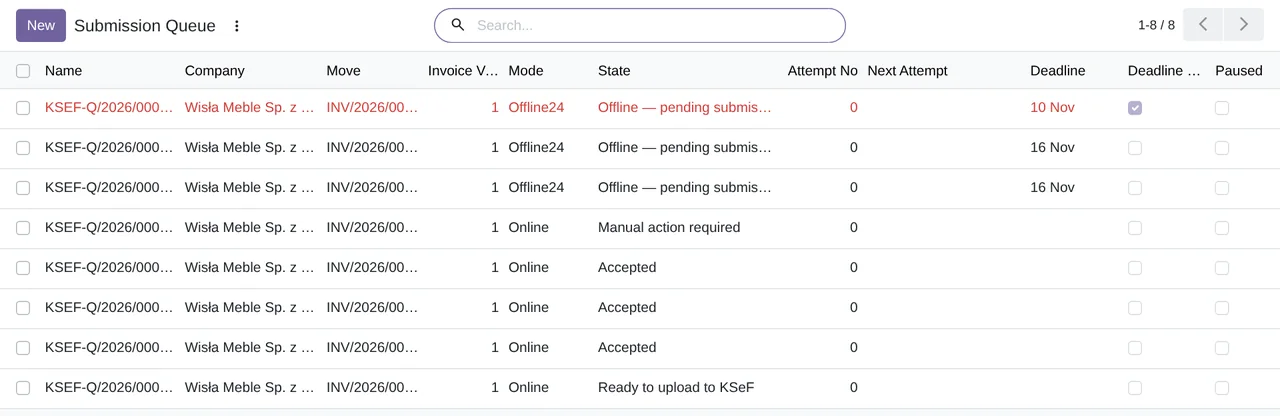
 An offline24 invoiceReal Odoo screenshot
Get started in 3 steps
- Install the moduleFrom Odoo Apps or flexigotech.com, on Odoo.sh or your own server.
- Start the trialIn Settings › FlexigoTech Cloud, an administrator connects the database and starts the 14-day trial, no card needed.
- Check your dataRun the migration validator from the KSeF menu and fix what it flags in customers and invoices.
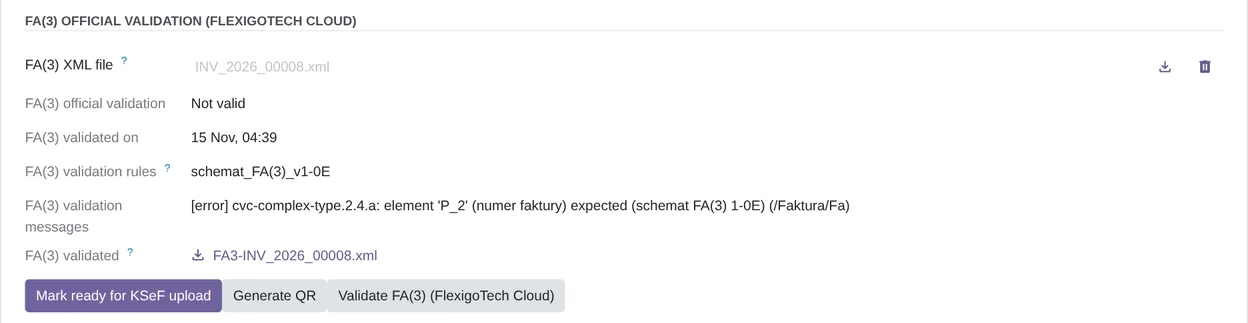
Validate and get each invoice ready In the KSeF tab, validate the FA(3) and press «Mark ready for KSeF upload». l10n_pl_edi does the sending, and the module follows what KSeF answers.
What you need Odoo 17, 18, 19 or 20 with Invoicing and the Polish localization, on Odoo.sh or your own server, not Odoo Online. To send to KSeF from Odoo, Odoo's l10n_pl_edi in Odoo 18, 19 or 20. The FlexigoTech Cloud subscription or its 14-day trial. The module's screens are in English.
What it does
- The FA(3), against the official schemaFlexigoTech Cloud validates the XML of each invoice and leaves on it the result, the messages and the rules version.
- Ready to upload, or not«Mark ready for KSeF upload» checks the invoice data and puts it in the queue. What KSeF accepted can no longer be edited.
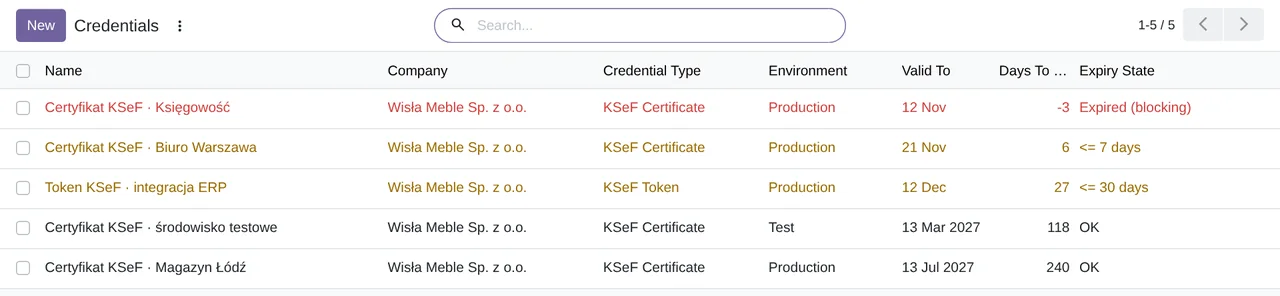
- Credentials with their expiryKSeF certificates and tokens in red and orange as they expire, with a reminder before they do.
- Offline, with its deadlineAn offline24 invoice carries its deadline, the next Polish business day, and turns red in the queue once it passes.
How it works
Sent from your Odoo
- The FA(3) XML of each invoice you validate, with the data it holds
Back from FlexigoTech Cloud
- Whether the FA(3) is valid, with the schema messages
- The date, the rules version and the signed report

FlexigoTech Cloud validates, on our servers in Germany, the FA(3) XML of each invoice against the official schema of the Polish Ministry of Finance and returns the result signed. It does not keep the file: it checks it in memory. Nothing leaves a company until a KSeF administrator of that company accepts it.
Where you see it in Odoo
- KSeF menudashboard, migration validator, queue, inbound invoices, credentials and authorizations
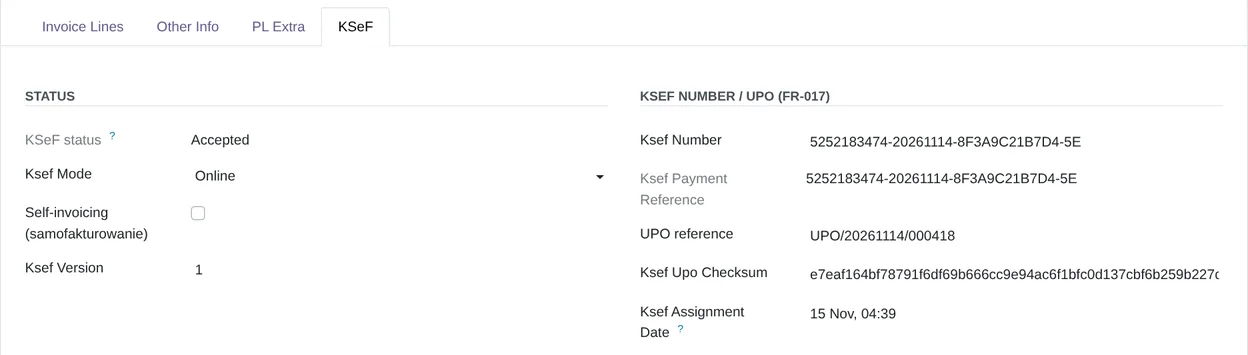
- KSeF tab of each invoicestatus, KSeF number, UPO reference and the FA(3) validation
- Invoice listvalidate the FA(3) or mark several invoices offline at once, from the actions menu
- Settings › FlexigoTech Cloudthe connection, the trial and the subscription
Inside Odoo
Real Odoo screenshots.

Price
Standard
€29a month + VAT
€290 a year + VAT 2 months free
- FA(3) validation against the official schema, in the cloud
- First response 1 working day
- Video call included for the first 2 months
Pro
€58a month + VAT
€580 a year + VAT 2 months free
- Everything in Standard
- First response 4 working hours
- Video call if needed
- + €9 for the module license, per Odoo version
- 14 days free, no card
- Cancel in two clicks
- Every purchase includes 2 months of support: we help you install it, set it up and get it working, by email and video call. While you're subscribed, support for the service stays included. Still integrating or testing? Extend your free trial.
If you cancel What the subscription gives stops. Your data stays in your Odoo.
- Support with response timesMonday to Friday, 9:00 to 18:00 (Barcelona), except public holidays.
- Maintenance and improvementsOdoo 17-20, on Odoo.sh or your own server
- Against the official schemaEach validation comes back signed from FlexigoTech Cloud, with the result, the messages and the rules version.
- Only the XML you validateChecked in memory, never stored in the cloud
- Tested On Odoo 17, 18, 19 and 20. With the module's 186 automated tests, and the screenshots on this page come from a real Odoo 20.
- 6,558 lines of code · 14-11-2026
- 186 automated tests · 14-11-2026
- No reviews yet · leave yours
Frequently asked questions
Does it send the invoices to KSeF?
No. Odoo's Polish e-invoicing, l10n_pl_edi, does the sending in Odoo 18, 19 and 20. The module checks the invoice first and follows what KSeF answers. Odoo 17 has no l10n_pl_edi: what you upload outside Odoo is marked with «Mark accepted by KSeF».
What does FlexigoTech Cloud check?
The FA(3) XML of each invoice, against the official schema of the Polish Ministry of Finance. It returns whether it is valid, the error messages and the rules version, and all of it stays on the invoice.
Does it connect to KSeF or download the UPO?
No. Credentials are an inventory with their expiry and reminders: the module does not use them to connect. It does not download the UPO either.
And offline mode?
You mark the invoice with «Mark Offline / Emergency». In offline24, the deadline is the next Polish business day and the queue turns it red once it passes. In unavailability or failure mode, do not go by the queue's deadline: it is not the legal one.
What leaves my Odoo?
Only the FA(3) XML of the invoices you validate, and only after a KSeF administrator of the company accepts it. The cloud does not keep the file. Credentials, authorizations, the queue and the audit log stay in your Odoo.
Which language are the screens in?
The module's screens are in English: it does not ship other languages yet, apart from a few texts in Polish. Odoo's and FlexigoTech Cloud's menus show in your language.
Does it work without FlexigoTech Cloud?
No. Poland KSeF 2.0 Validator works with an active subscription: the FA(3) validation against the official schema is done by FlexigoTech Cloud.
What happens after you press «Buy now»?
1. You pay for the license (€9 + VAT) and get an email with the link to download the module. 2. You install it in your Odoo, on Odoo.sh or your own server. 3. In Settings → FlexigoTech Cloud you accept the data list and press «Try free for 14 days». The trial doesn't ask for a card. 4. To continue, you press «Subscribe», create your account on app.flexigotech.com and pay for the plan by card.
Does it work on Odoo Online?
No: Odoo Online does not allow third-party modules. It is for Odoo 17, 18, 19 and 20, on Odoo.sh or on your own server.
Who installs it?
You do: you buy it on flexigotech.com or on Odoo Apps and install it in your Odoo. We help you install it and set it up, by email and video call, during the 2 months of included support. Custom development and data migration are quoted separately.
What support is included?
Every purchase includes 2 months of support: we help you install it, set it up and get it working, by email and video call. While you're subscribed, support for the service stays included.
What if something fails?
If FlexigoTech Cloud cannot validate an FA(3), Odoo tells you why and that invoice stays unvalidated. And support has a deadline: first reply within 1 working day; with Pro, within 4 working hours.
Where is my data?
In your Odoo: it stays there, and you can always view and export it. Only the FA(3) XML of the invoices you validate goes to FlexigoTech Cloud, on our servers in Germany. Credentials, authorizations, the queue and the audit log stay in your Odoo.
No Odoo yet?
We set up Odoo with sales, purchases, inventory and invoicing, and we stay with you.
From €2,450 + VAT
Start with OdooMore about KSeF 2.0
What it does
A FlexigoTech module for Odoo 17, 18, 19 and 20, Community and Enterprise. It gets your invoices ready for KSeF 2.0 and works alongside l10n_pl_edi, Odoo's Polish e-invoicing, which does the sending.
- The FA(3), validated against the official schemaFlexigoTech Cloud checks the FA(3) XML of each invoice against the schema of the Polish Ministry of Finance. The invoice keeps the result, the error messages, the date and the rules version. You can validate one invoice or several at once from the list.
- Ready to upload to KSeF«Mark ready for KSeF upload» checks the data the FA(3) needs and puts the invoice in the «Ready to upload to KSeF» queue. What KSeF answers to l10n_pl_edi goes to the invoice and its queue line, and an accepted invoice can no longer be edited.
- What was uploaded outside OdooIf an invoice reached KSeF some other way, you type its KSeF number and press «Mark accepted by KSeF».
- Credentials and authorizations up to dateAn inventory of KSeF certificates and tokens with their expiry: orange at 30 and 7 days, red once expired, and a reminder activity before they lapse. Next to it, the authorizations: to whom, for which NIP and until when.
- Offline24 invoices, with their deadlineYou mark the invoice with «Mark Offline / Emergency» and the queue gives it the offline24 deadline, the next Polish business day. If it passes while still pending, the line turns red.
- Your wave, a dry run and an audit trailEach company's profile shows its wave and go-live date. The migration validator goes through customers and invoices with a readiness score, and everything is kept in an audit log that cannot be edited.
What it does not do
- It does not send to KSeFOdoo's l10n_pl_edi does the sending in Odoo 18, 19 and 20. Odoo 17 does not have it: you upload the FA(3) some other way and mark it as accepted.
- It does not connect to KSeFCredentials are an inventory with their dates: the module does not use them to authenticate, and it does not download the UPO.
- It does not make the KSeF QR codesOffline invoices carry their deadline in the queue, but the module does not generate the KSeF QR codes.
- It does not send offline remindersThe queue shows the line in red when you open the list. It only computes the offline24 deadline: in unavailability or failure mode, the queue's deadline is not the legal one.
- It does not include the subscriptionFlexigoTech Cloud is paid separately, monthly or yearly, with a 14-day trial.
What it looks like inside Odoo
Real screens of the module installed on Odoo 20, with the data of a sample Polish company. The module's screens are in English; Odoo's menus, in your language.
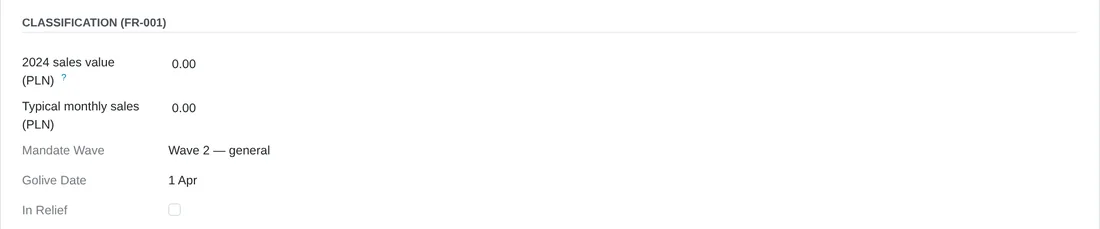
Your wave and your date
The company's compliance profile: its sales, the wave it belongs to and the date from which it is obliged.
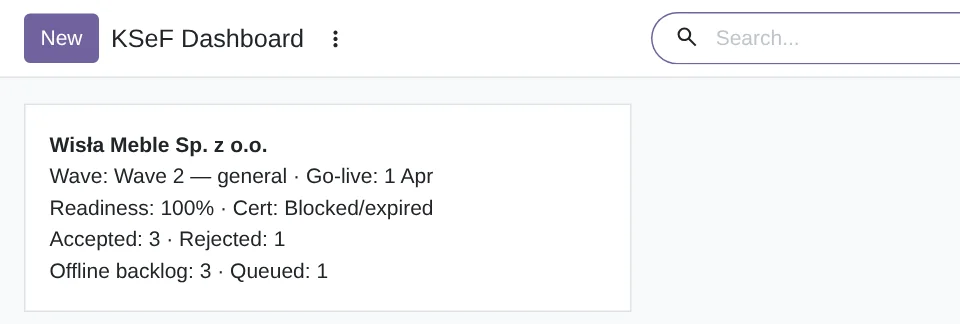
One dashboard card per company
Its wave and date, the readiness score, the state of its certificates and how many invoices are accepted, rejected, offline and queued.
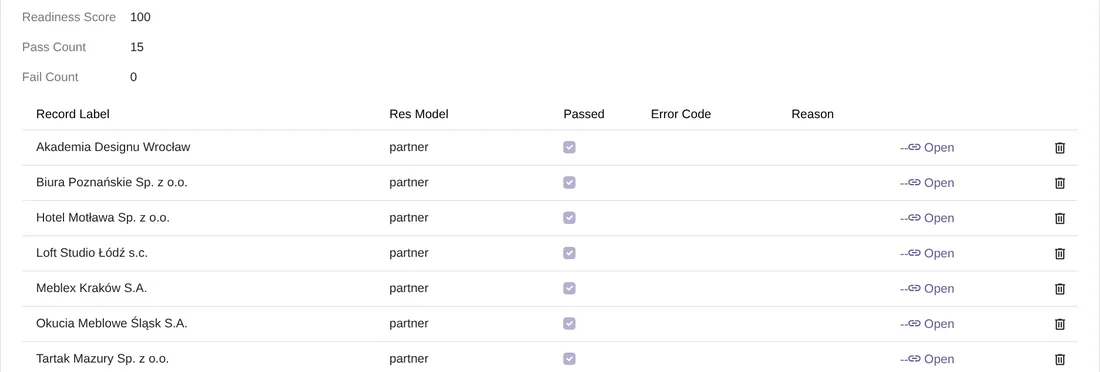
The dry run
A migration validator run: readiness score, passed and failed checks, and each customer checked, line by line.

Inbound invoices
The ones you record by hand, with their state against your vendor bills: matched, draft bill created or left for manual reconciliation.
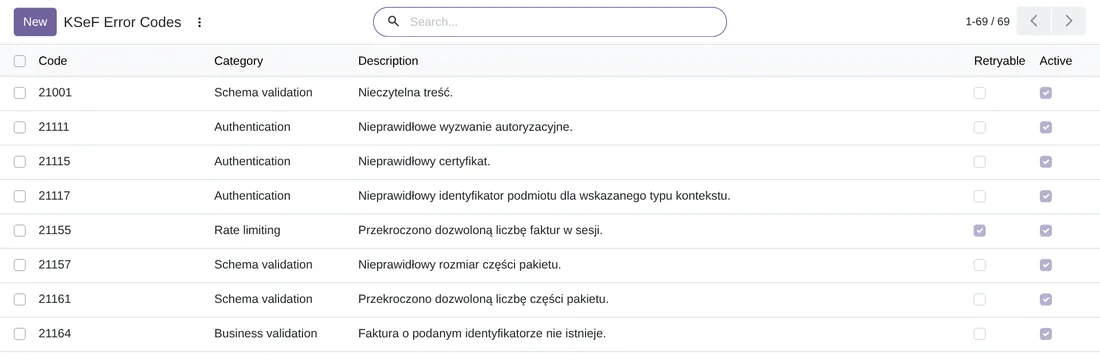
The official error codes
The 69 codes of the KSeF 2.0 API, with their category and their description in Polish, to understand what KSeF answers.
Technical sheet
Questions before buying? Talk to the engineer.
We tell you whether Poland KSeF 2.0 Validator fits your invoicing in Odoo, and we help you get it running with l10n_pl_edi.
Related
Poland KSeF 2.0 Validator is a FlexigoTech module for Odoo.
KSeF 2.0 guides
17 practical guides on this module: step-by-step guides, error guides, FAQs, comparisons and versions.