

 Español
 Català
 Deutsch
 Français
 Português
 Italiano
 Nederlands
 Polski
Who does each part of the KSeF work
The quickest way to decide whether the module fits is to separate what it does from what Odoo does, what you do and what sits outside the subscription. The table summarises its Odoo Apps listing and its README.
| Part of the work | Who does it | What the documentation says |
|---|---|---|
| Generating the FA(3) | l10n_pl_edi in Odoo 18, 19 and 20; outside Odoo in 17 | The FA(3) comes from l10n_pl_edi or a file you upload |
| Validating the FA(3) against the KSeF schema | The module, on FlexigoTech Cloud | With the subscription, and it keeps a signed report |
| Sending the invoice to KSeF | Odoo's l10n_pl_edi | The module has no HTTP client towards KSeF |
| Checking whether partners, company and invoices are ready | The module | Migration validator for partner, company and invoice readiness |
| Mandate-wave dates | The module | Per-company mandate-wave and legal-policy metadata, with configurable dates |
| Queue of invoices ready to upload | The module | Detects l10n_pl_edi and keeps that queue |
| KSeF number, UPO checksum, rejection reason, retries and rate limit | The module | Tracks the lifecycle of that data |
| Offline24 and awaria cases | The module | QR payloads and a next-working-day deadline |
| KSeF certificates and tokens | The module | Inventory, plus authorisation and delegation records |
| Audit log | The module | Immutable, with masking for NIP, PESEL and credentials |
| Configuring the module | You | Setup is outside the subscription |
| Migrating the database to another Odoo version | You or whoever you choose | FlexigoTech does not handle migrations |
| Importing historical data | You or whoever you choose | Outside the subscription |
| Accounts on each platform, Odoo and hosting | You | You contract and pay for them yourself |
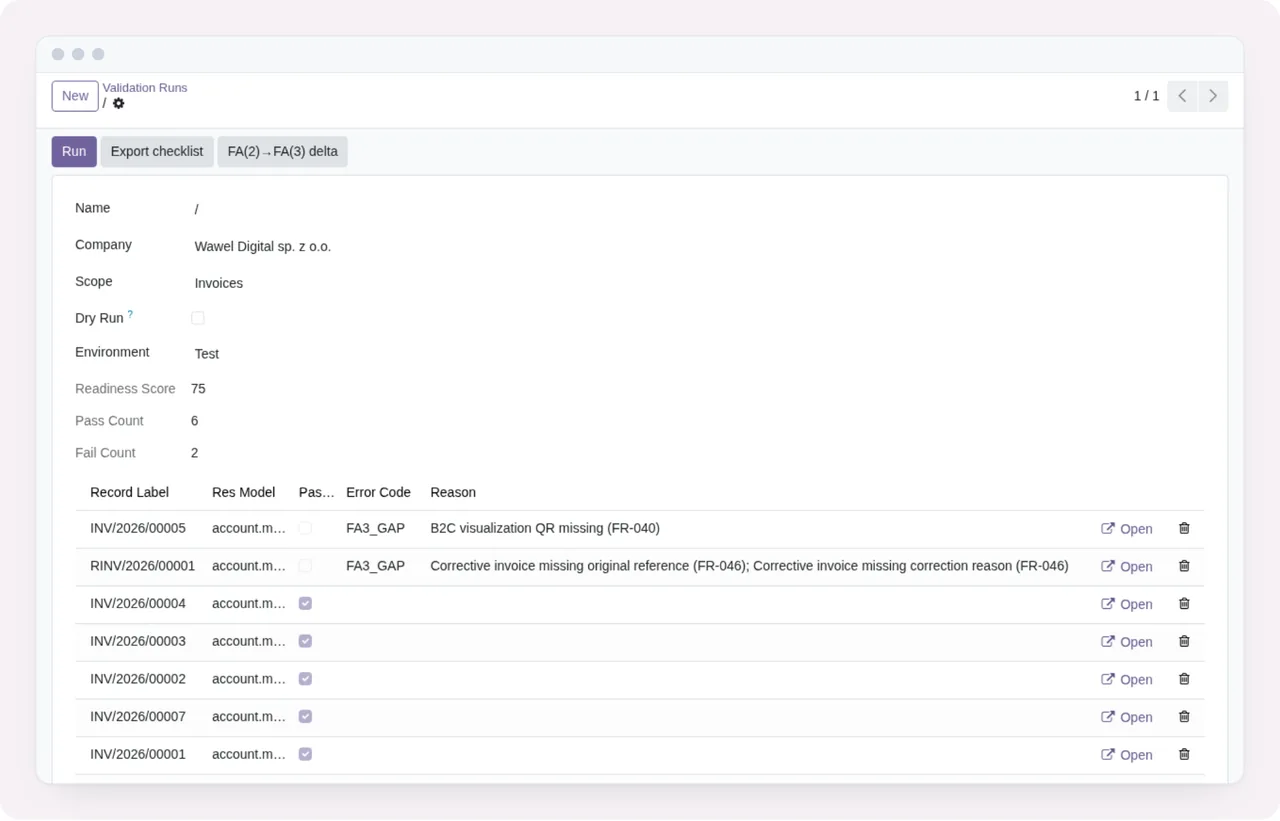
Reading the table for your situation
The table makes one thing clear: the module validates and prepares, but it does not send. The actual submission is done by Odoo's l10n_pl_edi. From there, these criteria help you decide.
- You are on Odoo 18, 19 or 20 and invoice with
l10n_pl_edi. The module validates the FA(3) thatl10n_pl_edigenerates or has already sent, and detects that module to build the queue of invoices ready to upload. - You are on Odoo 17. Odoo Community does not include
l10n_pl_ediin 17, so the FA(3) is uploaded ready-made from outside Odoo. It fits if you already have a source for that file. - You want something that sends invoices to KSeF on its own. This module has no HTTP client towards KSeF, so it does not cover that part.
- You need to handle Offline24 and awaria cases. The module handles them with QR payloads; in offline mode, the deadline runs to the next Polish working day, with a daily reminder.
- You run several companies in Odoo. The module stores per-company mandate-wave and legal-policy metadata, with configurable dates.
- You want it set up for you, a version migration or historical data loaded. Configuring the module, migrating the database, importing historical data and customisation or custom development are outside the subscription, as is support for modules that are not FlexigoTech's.
What changes with and without the subscription
FA(3) validation runs on FlexigoTech Cloud and depends on the subscription. Without it, the module does not validate the FA(3) and each invoice stays Not validated. With no subscription, or with the service suspended, whatever the subscription provides stops, but your data stays in your Odoo.
With the subscription you get KSeF FA(3) Validation with its maintenance and monitoring, module updates and support with a first response within 1 working day. Payment is made from Odoo, and there is a check of the service every 6 hours plus health reports.
The local service costs €29/month or €290/year excluding VAT (Pro: €58/month or €580/year). If you buy it on flexigotech.com, the module for new Odoo versions is included with the subscription; on the Odoo App Store, each Odoo version is bought there.
What to have ready before installing it
- A published Odoo version. The module is on Odoo Apps for 17, 18, 19 and 20.
- Where the FA(3) comes from. From
l10n_pl_ediin 18, 19 and 20, or from a file you upload; in 17, the FA(3) is uploaded ready-made from outside Odoo. - How you authenticate with KSeF. KSeF 2.0 offers the Trusted Profile (Podpis Zaufany), a qualified electronic signature, a KSeF token and a KSeF certificate. To request a KSeF certificate you must authenticate first, for example with Podpis Zaufany or a qualified electronic signature. In Odoo 19,
l10n_pl_edistores aKSeF Certificateon the company and uses it to authenticate with KSeF. The module keeps the inventory of certificates and tokens, plus authorisation and delegation records. - Third-party accounts. You contract and pay for your account on each platform, Odoo and your hosting yourself.
If you want to see which menus it adds and what each record goes through before deciding, we explain it in how the module works under the bonnet.
No data to display notice appears, with the Dashboard, Migration, Operations and Configuration menus at the top.What data leaves your Odoo for FlexigoTech Cloud
This is part of the decision, especially if you handle customers' tax data. According to the listing, the following is sent:
- The database identifier (uuid), its address (URL) and the Odoo version.
- The FlexigoTech modules installed, with their version, and whether the database is a neutralised copy (staging or test).
- The company name and the email of the person who accepts, with the date and version of the text accepted.
- A public code to check that requests come from this database, and a proof that it is this database, computed on your server without sending its secret.
- A request for its service permit every 6 hours, and the health of the service: counters and errors (type and code), without the content of your records.
- When you use KSeF FA(3) Validation: the FA(3) XML file of each invoice you ask it to check, with the names, tax numbers, addresses, bank accounts and amounts it contains.
- A notice when you uninstall the module.
Inside Odoo, the audit log is immutable and masks NIP, PESEL and credential payloads. For anything about your data: comercial@flexigobe.com or +34 616 809 504.
How FlexigoTech can help
FlexigoTech implements Odoo 17, 18, 19 and 20 and builds bespoke connectors and integrations. If, going through the table, you find you are missing the setup or something the module does not cover, you can approach it as an implementation or custom development project, which sits outside the module subscription. You will find the module details on its page at flexigotech.com and on the Odoo Apps listing.
Keep reading
Checked in the module's source code (version 20.0) and the linked sources
Sources
- Module source code: flexigo_poland_ksef_2_0_e_invoice_connector_and_migrati 20.0 (ba7c60f1): README.rst
- Module source code: flexigo_poland_ksef_2_0_e_invoice_connector_and_migrati 20.0 (ba7c60f1): static/description/index.html
- apps.odoo.com/apps/modules/20.0/flexigo_poland_ksef_2_0_e_invoice_connector_and_migrati
- github.com/odoo/odoo/tree/18.0/addons/l10n_pl_edi
- Module source code: flexigo_poland_ksef_2_0_e_invoice_connector_and_migrati (cbca26e): models/account_move.py
- Module source code: flexigo_poland_ksef_2_0_e_invoice_connector_and_migrati (cbca26e): models/ksef_session.py
- Module source code: flexigo_poland_ksef_2_0_e_invoice_connector_and_migrati (cbca26e): models/ksef_tools.py
- Module source code: flexigo_poland_ksef_2_0_e_invoice_connector_and_migrati (cbca26e): models/ksef_cloud.py
- ksef.podatki.gov.pl/media/cq3laefg/podrecznik-ksef-2-0-cz-i-rozpoczecie-korzystania-z-ksef
- ksef.podatki.gov.pl/informacje-ogolne-ksef-20/certyfikaty-ksef/
- github.com/odoo/odoo/blob/19.0/addons/l10n_pl_edi/models/res_company.py
- flexigotech.com/en/services.html
- flexigotech.com/precios.html