

 Español
 Català
 Deutsch
 Français
 Português
 Italiano
 Nederlands
 Polski
What GoCardless solves inside Odoo
GoCardless takes one-off payments or automated recurring payments. With the connector, that work moves into Odoo:
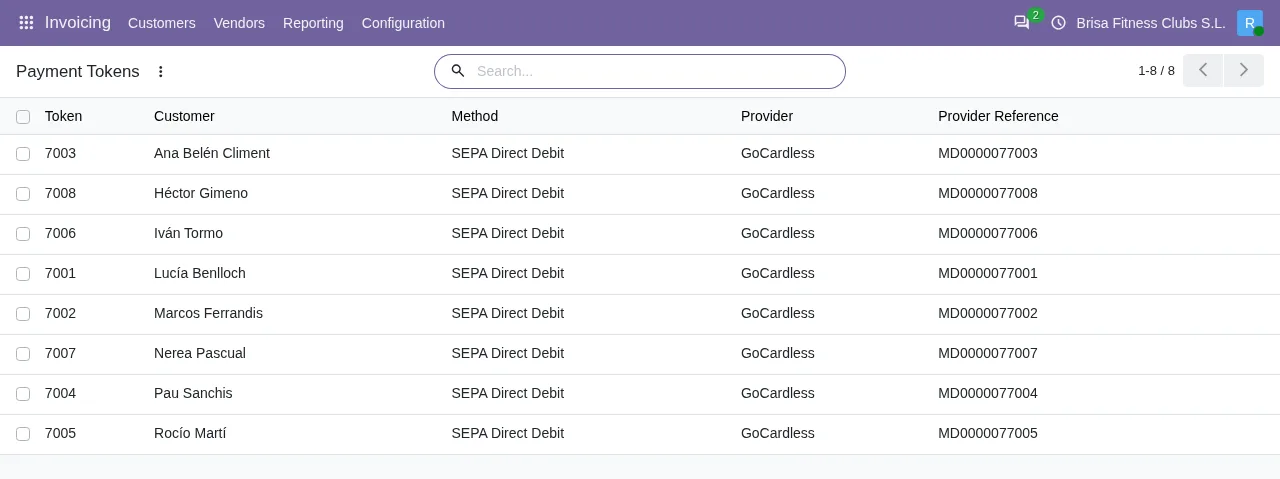
- The mandate: the customer signs it once on the GoCardless page, in their own language, and it is kept in Odoo as a payment method.
- The collection: each invoice is collected against the mandate when you register its payment with the customer's payment method, by SEPA Core and in euros.
- Failed payments: they can be retried by Success+ (Advanced plan, if the cause allows) or by hand; with a late failure or a chargeback, the payment is reversed and the invoice is outstanding again.
- Payouts: each one is imported with its breakdown and its fees, in a balanced entry that settles the collections.
It works on Odoo Community or Enterprise, on Odoo.sh or on your own server, but not on Odoo Online.
A SEPA collection in Odoo from start to finish
From mandate to invoice collection
With the mandate active, you use the invoice button that registers the payment: with an electronic payment method, its wizard shows the saved payment token field, and when you confirm with that token Odoo creates the payment transaction and processes it with the token. The connector also collects renewing subscriptions with the saved mandate, and on every collection it asks that Success+ may retry it if the cause allows.
The payment status in GoCardless
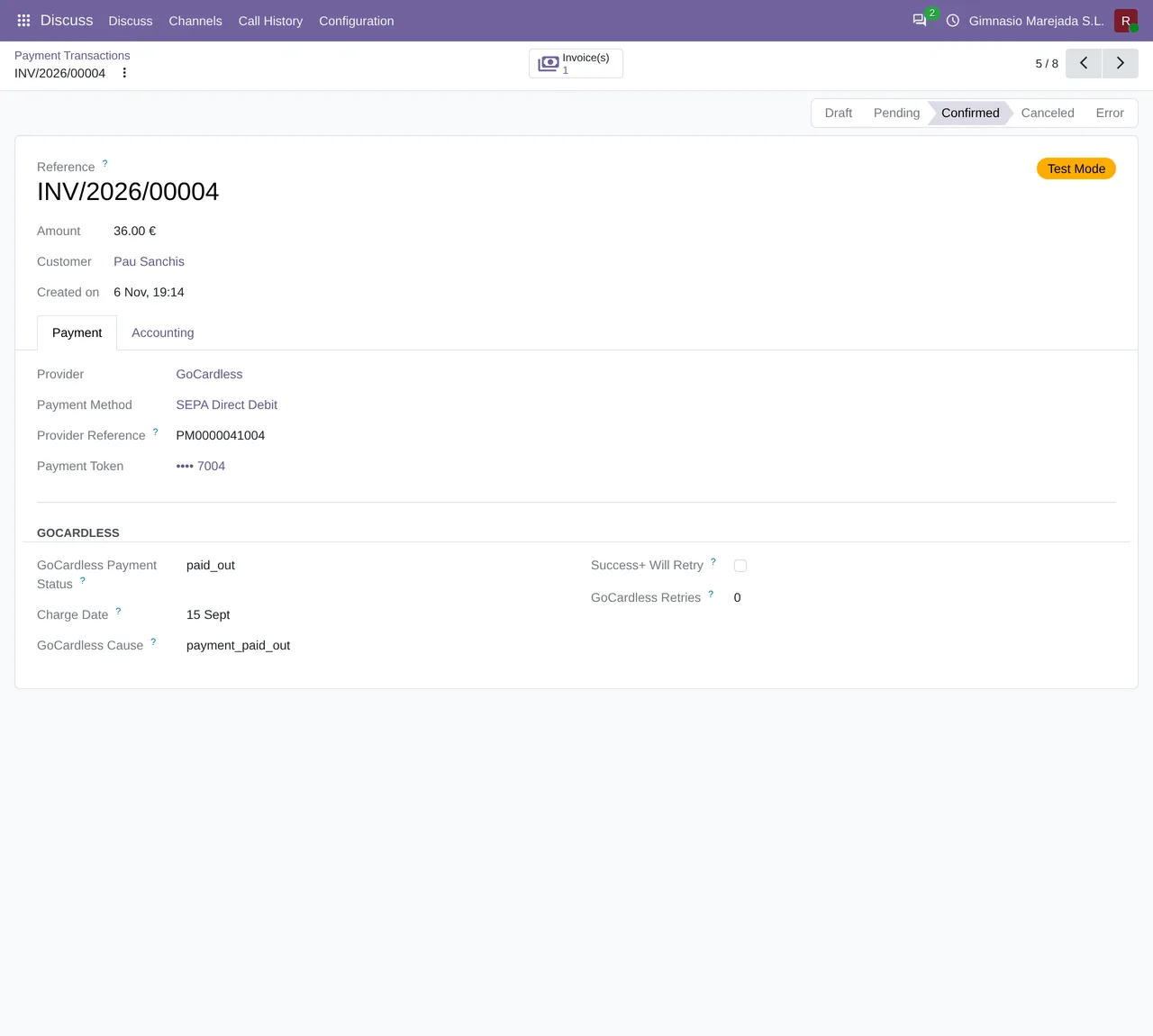
You open the transaction from the payment transaction button at the top of the invoice, shown when the invoice has transactions. On its form, the connector adds the GoCardless group before the transaction message, with GoCardless Payment Status and GoCardless Retries always on view. The transaction itself can be, for example, pending, in error or confirmed.
Failed collections: Success+ or a retry by hand
If GoCardless reports that Success+ will retry, the connector adds Success+ will retry it automatically; there is nothing to do. and leaves the transaction pending, not in error. According to GoCardless, Success+ only retries insufficient funds: in SEPA, codes AM04 and MS03 (the latter only in Austria, Belgium, Germany, Luxembourg and Slovakia).
Otherwise, the Retry collection button may appear on the form, asking you to confirm GoCardless will try to collect this payment again, which can cost a fee. Continue?. It does not show if Success+ is already going to retry, since that would only add a fee, nor once 3 retries have been counted. GoCardless sets the new charge date, and the transaction stays pending until it confirms it. If GoCardless answers retry_failed, here is what to do.
Chargebacks and where to refund
A late failure, a chargeback or a cancellation moves the transaction to error and, if it had already paid invoices, cancels its payment: the invoice is outstanding again. If you are the one returning the money, you go to the collection's payment and use its refund button, shown while there is an amount left to refund; afterwards, both the payment and the transaction show a refunds button.
Setting up Odoo SEPA Direct Debit with GoCardless, step by step
- Have your own GoCardless account, or create one when you connect: it is not included, you open it with GoCardless under its terms and fees.
- Connect the database to FlexigoTech Cloud, in Settings > FlexigoTech Cloud; before anything is sent, an administrator accepts the FlexigoTech Cloud data list.
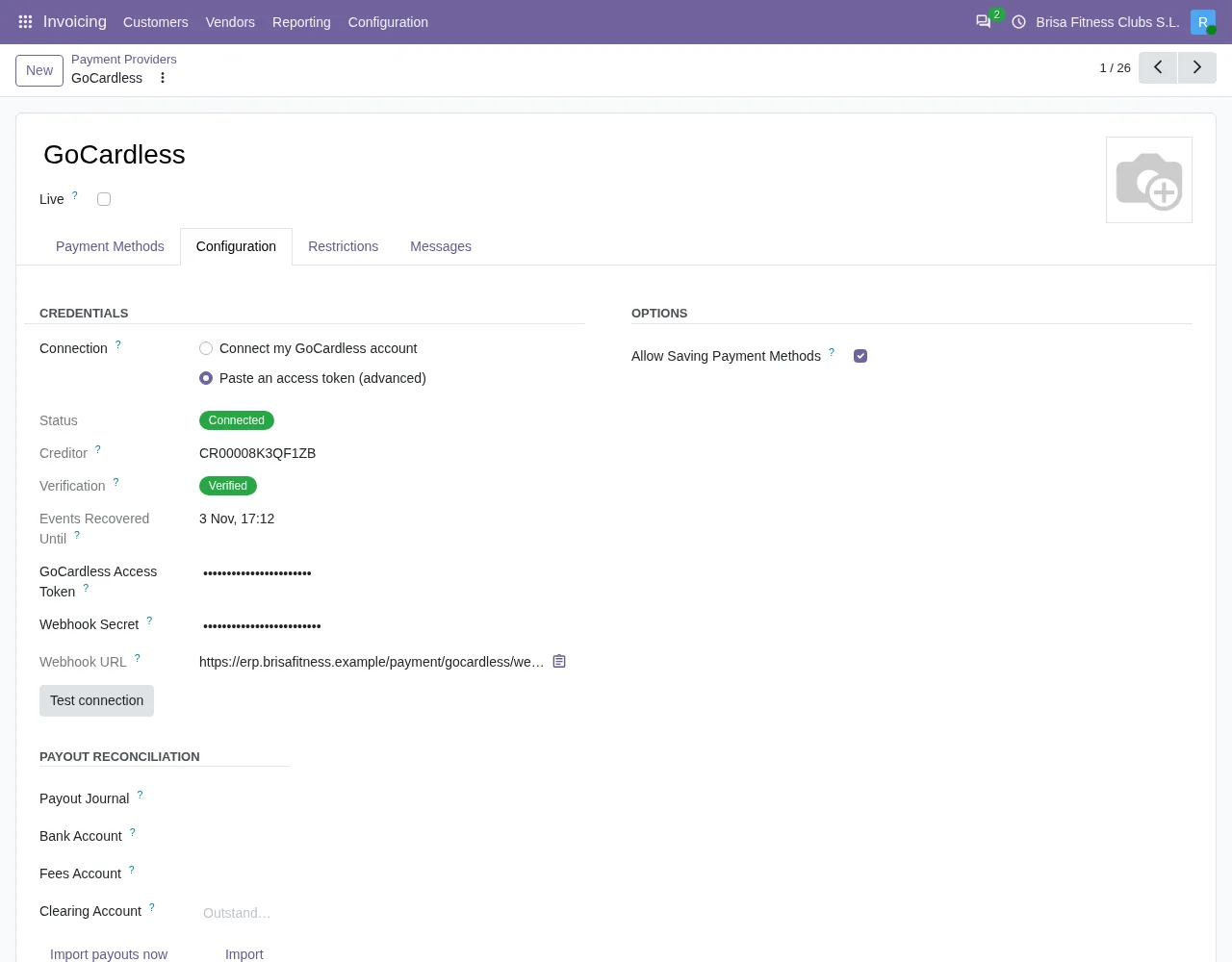
- On the GoCardless payment provider, keep the default option,
Connect my GoCardless account: its help text says that connecting through FlexigoTech sets up the account and its webhooks in two clicks. If the previous step is missing, you will seeConnect this database to FlexigoTech Cloud first, in Settings > FlexigoTech Cloud. - Press
Test connection. - The
GoCardless: import payoutstask runs every day, but it is switched off on installation. - If you already have mandates in GoCardless, import them: the connector matches them to your contacts by email, metadata or name and postcode, and you review them.
- Make the first collection: register the payment of an invoice with the saved payment token and open the transaction from the invoice.
What to watch in your first week of SEPA collections
On each collection, look at the GoCardless group on the transaction: GoCardless Payment Status and GoCardless Retries. The connector also brings the labels Charge Date, GoCardless Cause and Success+ Will Retry. A failed collection shows in Odoo with a message saying GoCardless could not collect it, with the cause in brackets. A pending transaction with the Success+ note needs nothing; one in error is the one you review and, if it appears, the one with the Retry collection button.
When a mandate can no longer be used, the connector archives it, notes it on the contact and creates a GoCardless mandate lost activity to ask for a new one.
The GoCardless: recover missed events task runs every hour and is active on installation: it asks GoCardless for the events that did not arrive and applies up to 100 per run. The connector stores each event it applies and, if one arrives again, does not apply it twice.
Each payout goes to accounting with Post to accounting: the collection, the GoCardless fee and the net to the bank, in one balanced entry. If it is not yet paid in GoCardless, the connector stops with This payout is …, not paid: the money has not reached the bank. Import the payouts again once GoCardless reports it paid.
If its breakdown does not add up to the amount paid out, it stops with The breakdown of this payout does not add up to the amount paid out (difference: …). Posting it would put a wrong figure in the books.
SEPA limits to know before you start
- It collects in euros by SEPA Core Direct Debit: no other currency, no other scheme and no Pay by Bank.
- It does not post payouts on its own: you press
Post to accountingon each one.
The connector will not refund a collection if less than 2 days have passed since the last state change of its transaction (or since it was created, if there is none), and it stops with GoCardless cannot refund a collection until it has settled. This one was charged … day(s) ago; refunds are possible after … days.
On top of that, GoCardless only accepts a refund outside its safer refund period, 7 calendar days from the charge date; before that, its API returns an error. That period can be disabled by asking GoCardless.
Below the minimum amount, the connector does not even call GoCardless and warns GoCardless does not collect amounts below 1.0. This one is ….
What Odoo SEPA collection with GoCardless costs, and how to start
GoCardless charges per transaction; its euro-area pricing, VAT excluded: Standard plan «1% + €0.20 per transaction, capped at €2»; Advanced plan «1.25% + €0.20 per transaction, capped at €2.50». Success+ comes with the Advanced plan, not Standard.
The module costs €9 excluding VAT, the licence per Odoo version, for 17, 18, 19 and 20, and it works with the FlexigoTech Cloud subscription, Connector plan: €49/month or €490/year excluding VAT, with up to 3 GoCardless accounts (Pro: €98/month or €980/year, up to 10). It is taken out per production database, with a 14-day trial and no card. Your GoCardless account, Odoo and hosting are paid by you.
The connector is on its page on flexigotech.com. If you want help getting it live, FlexigoTech implements Odoo 17, 18, 19 and 20 and builds custom connectors and integrations. If the business that will collect is not on Odoo yet, read the GoCardless guide written for it first.
Odoo SEPA with GoCardless: frequently asked questions
Which Odoo versions does it work on?
Odoo 17, 18, 19 and 20, with version 1.1.6 of the module on all four.
What happens if the customer charges back a collection that had paid an invoice?
The transaction moves to error, the connector cancels its payment and the invoice is outstanding again.
How many times can I retry a collection?
GoCardless documents that «Payments can be retried up to 3 times.», and once 3 retries are counted the connector no longer shows Retry collection.
Can I connect several GoCardless accounts?
Yes: the Connector plan covers up to 3 accounts and Pro up to 10.
Keep reading
Checked in the connector's source code (version 17.0, 18.0, 19.0 and 20.0) and the linked sources
Sources
- flexigotech.com/en/gocardless-connector-odoo.html
- apps.odoo.com/apps/modules/20.0/flexigo_payment_gocardless
- apps.odoo.com/apps/modules/17.0/flexigo_payment_gocardless
- apps.odoo.com/apps/modules/18.0/flexigo_payment_gocardless
- apps.odoo.com/apps/modules/19.0/flexigo_payment_gocardless
- Module source code: flexigo_payment_gocardless 20.0 (94b33cf9): static/description/index.html
- Module source code: flexigo_payment_gocardless: __manifest__.py, line 31 in 17.0 (e0af273), 18.0 (9085180), 19.0 (4b06513) and 20.0 (94b33cf)
- flexigotech.com/en/services.html
- gocardless.com/es-es/
- Module source code: flexigo_payment_gocardless 20.0 (94b33cf9): data/ir_cron_data.xml
- Module source code: flexigo_payment_gocardless 20.0 (94b33cf9): models/gocardless_payout.py
- Module source code: flexigo_payment_gocardless 20.0 (94b33cf9): models/payment_transaction.py
- Module source code: flexigo_payment_gocardless: i18n/flexigo_payment_gocardless.pot, line 143 in 17.0 (e0af273), line 143 in 18.0 (9085180), line 143 in 19.0 (4b06513) and line 145 in 20.0 (94b33cf)
- Module source code: flexigo_payment_gocardless: i18n/flexigo_payment_gocardless.pot, line 1100 in 17.0 (e0af273), line 1100 in 18.0 (9085180), line 1100 in 19.0 (4b06513) and line 1107 in 20.0 (94b33cf)
- Module source code: flexigo_payment_gocardless: i18n/flexigo_payment_gocardless.pot, line 1016 in 17.0 (e0af273), line 1016 in 18.0 (9085180), line 1016 in 19.0 (4b06513) and line 1031 in 20.0 (94b33cf)
- Module source code: flexigo_payment_gocardless: i18n/flexigo_payment_gocardless.pot, line 567 in 17.0 (e0af273), line 567 in 18.0 (9085180), line 567 in 19.0 (4b06513) and line 569 in 20.0 (94b33cf)
- Module source code: flexigo_payment_gocardless: i18n/flexigo_payment_gocardless.pot, line 387 in 17.0 (e0af273), line 387 in 18.0 (9085180), line 387 in 19.0 (4b06513) and line 389 in 20.0 (94b33cf)
- Module source code: flexigo_payment_gocardless: i18n/flexigo_payment_gocardless.pot, line 99 in 17.0 (e0af273), line 99 in 18.0 (9085180), line 99 in 19.0 (4b06513) and line 98 in 20.0 (94b33cf)
- Module source code: flexigo_payment_gocardless: i18n/flexigo_payment_gocardless.pot, line 356 in 17.0 (e0af273), line 356 in 18.0 (9085180), line 356 in 19.0 (4b06513) and line 358 in 20.0 (94b33cf)
- Module source code: flexigo_payment_gocardless: i18n/flexigo_payment_gocardless.pot, line 1063 in 17.0 (e0af273), line 1063 in 18.0 (9085180), line 1063 in 19.0 (4b06513) and line 1070 in 20.0 (94b33cf)
- Module source code: flexigo_payment_gocardless: i18n/flexigo_payment_gocardless.pot, line 408 in 17.0 (e0af273), line 408 in 18.0 (9085180), line 408 in 19.0 (4b06513) and line 410 in 20.0 (94b33cf)
- Module source code: flexigo_payment_gocardless: views/payment_transaction_views.xml, line 18 in 17.0 (e0af273), 18.0 (9085180), 19.0 (4b06513) and 20.0 (94b33cf)
- Module source code: flexigo_payment_gocardless: views/payment_transaction_views.xml, line 13 in 17.0 (e0af273), 18.0 (9085180), 19.0 (4b06513) and 20.0 (94b33cf)
- Module source code: flexigo_payment_gocardless: views/payment_transaction_views.xml, line 20 in 17.0 (e0af273), 18.0 (9085180), 19.0 (4b06513) and 20.0 (94b33cf)
- Module source code: flexigo_payment_gocardless: views/payment_transaction_views.xml, line 28 in 17.0 (e0af273), 18.0 (9085180), 19.0 (4b06513) and 20.0 (94b33cf)
- Module source code: flexigo_payment_gocardless: models/payment_transaction.py, line 437 in 17.0 (e0af273), line 437 in 18.0 (9085180), line 436 in 19.0 (4b06513) and line 451 in 20.0 (94b33cf)
- Module source code: flexigo_payment_gocardless: models/payment_transaction.py, line 430 in 17.0 (e0af273), line 430 in 18.0 (9085180), line 429 in 19.0 (4b06513) and line 444 in 20.0 (94b33cf)
- Module source code: flexigo_payment_gocardless: models/payment_transaction.py, line 484 in 17.0 (e0af273), line 484 in 18.0 (9085180), line 483 in 19.0 (4b06513) and line 502 in 20.0 (94b33cf)
- Module source code: flexigo_payment_gocardless: models/payment_transaction.py, line 461 in 17.0 (e0af273), line 461 in 18.0 (9085180), line 460 in 19.0 (4b06513) and line 479 in 20.0 (94b33cf)
- Module source code: flexigo_payment_gocardless: models/payment_transaction.py, line 260 in 17.0 (e0af273), line 260 in 18.0 (9085180), line 260 in 19.0 (4b06513) and line 271 in 20.0 (94b33cf)
- Module source code: flexigo_payment_gocardless: models/payment_transaction.py, line 729 in 17.0 (e0af273), line 729 in 18.0 (9085180), line 728 in 19.0 (4b06513) and line 752 in 20.0 (94b33cf)
- Module source code: flexigo_payment_gocardless: models/payment_transaction.py, line 754 in 17.0 (e0af273), line 754 in 18.0 (9085180), line 753 in 19.0 (4b06513) and line 777 in 20.0 (94b33cf)
- Module source code: flexigo_payment_gocardless: models/payment_transaction.py, line 725 in 17.0 (e0af273), line 725 in 18.0 (9085180), line 724 in 19.0 (4b06513) and line 748 in 20.0 (94b33cf)
- Module source code: flexigo_payment_gocardless: models/payment_token.py, line 131 in 17.0 (e0af273), line 131 in 18.0 (9085180), line 131 in 19.0 (4b06513) and line 130 in 20.0 (94b33cf)
- Module source code: flexigo_payment_gocardless: const.py, line 117 in 17.0 (e0af273), 18.0 (9085180), 19.0 (4b06513) and 20.0 (94b33cf)
- Module source code: flexigo_payment_gocardless: models/gocardless_webhook_event.py, line 7 in 17.0 (e0af273), 18.0 (9085180), 19.0 (4b06513) and 20.0 (94b33cf)
- docs.gocardless.com/docs/api-reference/payment
- docs.gocardless.com/docs/optimise/reduced-failed-payments-with-success-plus
- docs.gocardless.com/docs/api-reference/refund
- github.com/odoo/odoo/blob/20.0/addons/account_payment/views/account_move_views.xml
- github.com/odoo/odoo/blob/20.0/addons/account_payment/views/account_payment_views.xml
- github.com/odoo/odoo/blob/20.0/addons/payment/i18n/payment.pot
- gocardless.com/es-es/tarifas/
- gocardless.com/pricing-eu
- Module source code: flexigo_payment_gocardless 20.0 (94b33cf9): models/payment_provider.py, lines 70, 74, 856 and 875
- flexigotech.com/en/precios.html
- Module source code: flexigo_payment_gocardless: models/payment_transaction.py, line 333 in 17.0 (e0af273), line 333 in 18.0 (9085180), line 333 in 19.0 (4b06513) and line 344 in 20.0 (94b33cf)
- github.com/odoo/odoo/blob/20.0/addons/account_payment/models/account_payment.py
- Module source code: flexigo_payment_gocardless: models/payment_transaction.py, line 247 in 17.0 (e0af273), line 247 in 18.0 (9085180), line 247 in 19.0 (4b06513) and line 258 in 20.0 (94b33cf)
- gocardless.com/de-de/preise/
- gocardless.com/fr-fr/tarifs/
- gocardless.com/nl/handleidingen/sepa/bescherming/