

 Español
 Català
 Deutsch
 Français
 Português
 Italiano
 Nederlands
 Polski
What changes when GoCardless runs inside Odoo
GoCardless says you can use its online dashboard or connect it to the software you already use for your business, so you can manage everything in one place. It lists integrations such as Chargebee, Holded and Salesforce, and its integrations page names Xero, QuickBooks, Zuora and Sage («Sync with Xero, QuickBooks, Zuora and more»).
With Odoo and the GoCardless: SEPA Direct Debit connector, that place becomes Odoo. This is how it works:
- The customer signs the mandate once, on the GoCardless page and in their own language.
- The mandate becomes active in Odoo, stored as a payment method.
- Odoo collects each invoice against the mandate, from the customer portal or from the invoice itself.
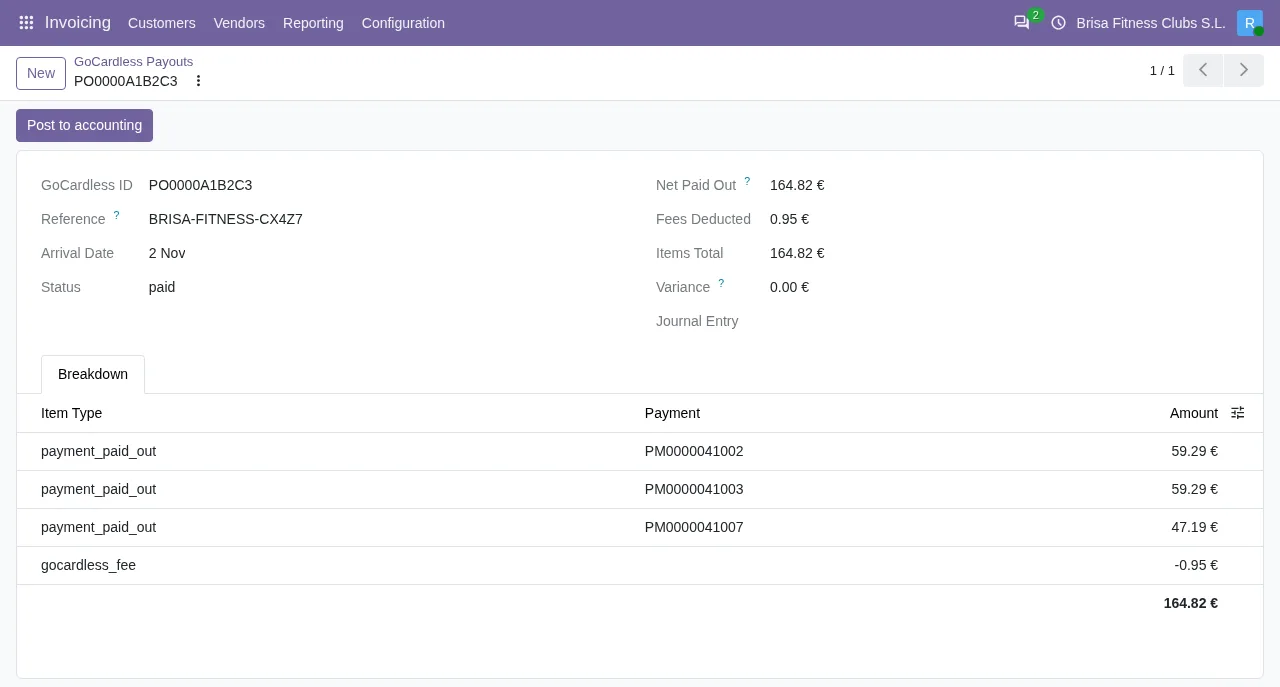
- Each payout reaches accounting: the collection, the GoCardless fee and the net amount to the bank, in one balanced entry per payout.
Your account does not change: you need your own, opened with GoCardless under its terms and fees. The connector collects in euros by SEPA Core Direct Debit only, with no other currency or scheme and no Pay by Bank. It works on Odoo Community, without Enterprise. If you already work with Odoo, the guide for existing Odoo users fits you better.

GoCardless dashboard versus GoCardless in Odoo
Row by row, what you do with GoCardless today and what happens with Odoo and the connector:
| What | Today, in the GoCardless dashboard or your connected software | With Odoo and the connector |
|---|---|---|
| Mandate | You manage it in GoCardless's online dashboard or in the software you connect to GoCardless | The customer signs it once on the GoCardless page, in their language, and it is stored in Odoo as a payment method |
| Collecting each invoice | One-off payments or automated recurring payments from GoCardless | Each invoice is collected against the mandate, from the customer portal or the invoice; renewing subscriptions too |
| Failures and chargebacks | Success+ automatically recovers failed payments; a late failure arrives with the payment already marked as confirmed | The payment is reversed and the invoice is outstanding again |
| Mandates you already have | You manage them in the GoCardless dashboard or your connected software | They are imported and matched to your contacts by email, metadata or name and postcode; you review them |
Late failures and chargebacks: the invoice is due again
GoCardless's help centre says that in almost all cases the payer's bank reports a failure one working day after the charge date; «In rare cases, the payer's bank sends us a payment failure report more than one business day after the charge date», and by then the payment is already marked as 'confirmed'. A chargeback arrives another way: reason code MD06 means the customer's bank charged the payment back at the customer's request within the 8 week cool-off period (what to do with MD06).
In Odoo, the connector handles a late failure, a chargeback or a cancellation the same way: it moves the transaction to error and, if it had already paid invoices, cancels their payment so the invoice is outstanding again.
Success+ and mandates that stop working
Every collection the connector sends asks GoCardless to retry it if possible: Success+ can retry it if the cause allows. For that, Success+ has to be enabled in the GoCardless dashboard, and it comes with the Advanced plan. When GoCardless says it will retry the payment, the connector adds Success+ will retry it automatically; there is nothing to do. and leaves the transaction pending, not in error. A lack of funds in the customer's account has its own code: GoCardless AM04.
When a mandate can no longer be used, the connector archives it, notes it on the contact and creates a GoCardless mandate lost activity so you can ask for a new mandate.
What you need before connecting GoCardless to Odoo
- Odoo 17, 18, 19 or 20, Community or Enterprise, on Odoo.sh or your own server. Not Odoo Online.
- A GoCardless account: the one you already use, or a new one created when you connect.
- An administrator who accepts the FlexigoTech Cloud data list before anything is sent.
- The FlexigoTech Cloud subscription (Connector plan), with which your GoCardless account connects in two clicks from Odoo.
- Collections in euros by SEPA Core Direct Debit, which is what the connector collects.
Third-party costs are yours: you contract and pay for your account on each platform, Odoo and your hosting.
Your first month with GoCardless and Odoo, step by step
- Implement Odoo. FlexigoTech implements Odoo 17, 18, 19 and 20 and builds bespoke connectors and integrations: you can start with the implementation.
- Install the GoCardless: SEPA Direct Debit module, published on Odoo Apps for 17, 18, 19 and 20.
- Connect the database to FlexigoTech Cloud, in Settings under FlexigoTech Cloud: the GoCardless connection asks for this first. The administrator accepts the data list before anything is sent.
- Connect your account with the
Connect my GoCardless accountoption, which is the default; its help text says that connecting through FlexigoTech sets up the account and its webhooks in two clicks. - Import the mandates you already have and review how they have been matched to your contacts.
- Run the first collections from the invoice, with the button that registers the payment: in its wizard, with an electronic payment method, the saved payment token field appears. When you confirm the payment with that token, Odoo creates the payment transaction and processes it. Customers can also pay from their portal.
- Post your first payout: the connector does not post it on its own, you press
Post to accountingon each one.
Once the invoice has transactions, the payment transaction button at the top opens the one for the collection. In Odoo 17, 18 and 19 there is also a payment transactions menu, in developer mode only; Odoo 20 has no menu. Every hour, the connector asks GoCardless for the events it did not receive and applies up to 100 per run.
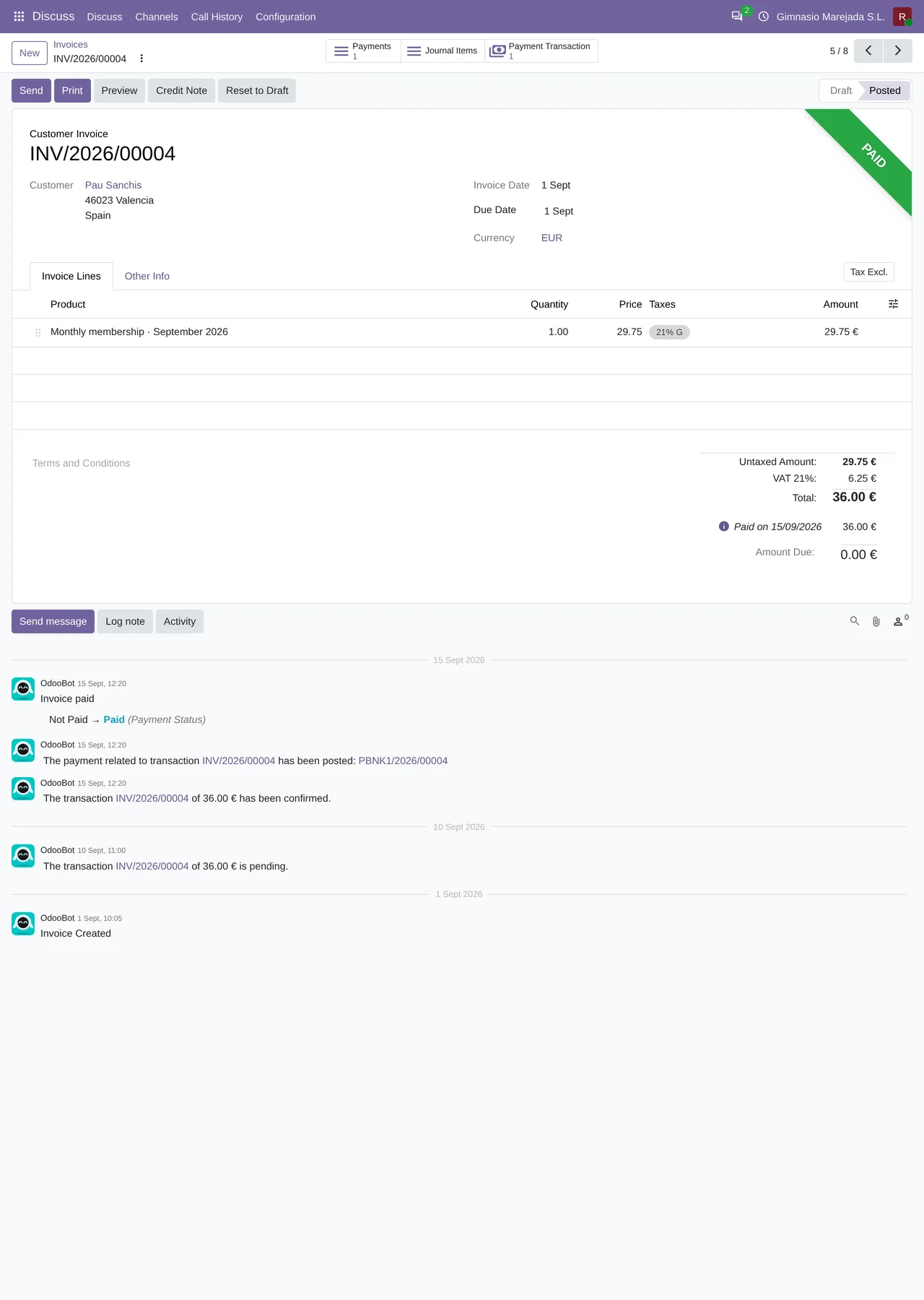
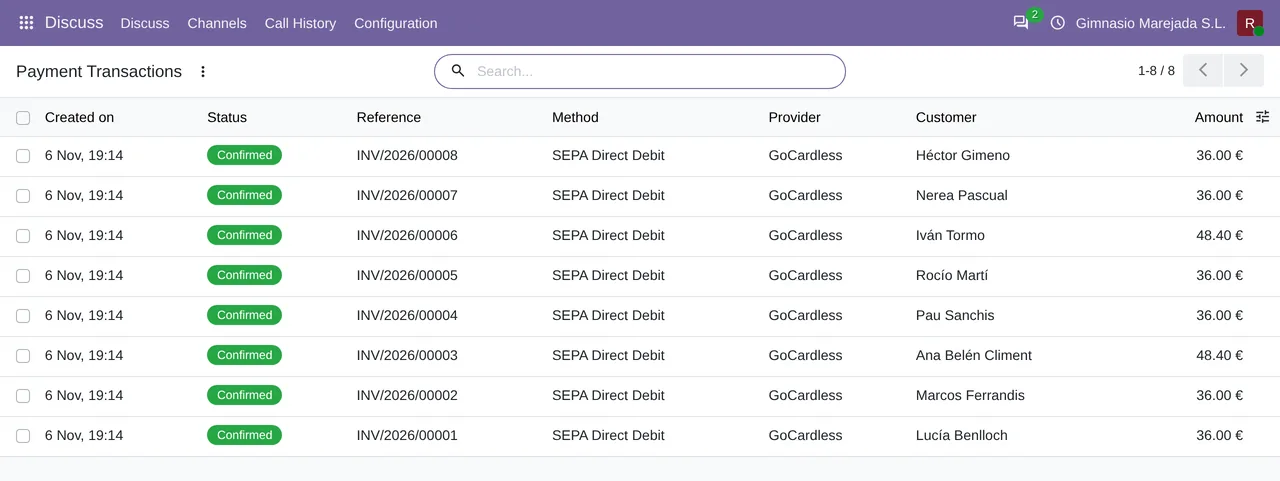
If you need to give money back, a collection is refunded from its payment with the Refund button, shown while there is an amount left to refund; afterwards, the payment and the transaction show a Refunds button with the refund transactions. The payout is imported with its breakdown and fees, in a balanced entry that settles the collections.
What GoCardless with Odoo costs
GoCardless charges per transaction. Its pricing for the euro area, VAT excluded: Standard plan, «1% + €0.20 per transaction, capped at €2»; Advanced plan, «1.25% + €0.20 per transaction, capped at €2.50». Success+ comes with Advanced, not Standard («All the benefits of Standard, plus: Reduce failed payments through intelligent retries (with Success+)»), and is also listed among its add-ons.
The module costs €9 excluding VAT, the licence per Odoo version, for 17, 18, 19 and 20. It works with the FlexigoTech Cloud subscription: the Connector plan costs €49/month or €490/year excluding VAT and covers up to 3 GoCardless accounts (Pro: €98/month or €980/year, up to 10). It is taken out per production database, with a 14-day trial and no card required. Your GoCardless account, Odoo and hosting are paid separately. All the details are on the GoCardless connector page.
GoCardless and Odoo: frequently asked questions
Do I need to open another GoCardless account?
No: you connect yours or create one when you connect. The account is yours, under GoCardless's terms and fees.
What happens to the mandates my customers have already signed?
The connector imports your GoCardless mandates and matches them to your contacts by email, metadata or name and postcode. You review them.
Does it work with Odoo Community?
Yes, without Enterprise, on Odoo.sh or on your own server. Not on Odoo Online.
What if Odoo misses a GoCardless notification?
Every hour, the connector asks GoCardless for the events it did not receive and applies up to 100 per run.
Where do I start if I don't have Odoo yet?
With an Odoo implementation by FlexigoTech and, once Odoo is running, with the connector and the 14-day FlexigoTech Cloud trial.
Keep reading
Checked in the connector's source code (version 17.0, 18.0, 19.0 and 20.0) and the linked sources
Sources
- flexigotech.com/en/gocardless-connector-odoo.html
- apps.odoo.com/apps/modules/20.0/flexigo_payment_gocardless
- apps.odoo.com/apps/modules/17.0/flexigo_payment_gocardless
- apps.odoo.com/apps/modules/18.0/flexigo_payment_gocardless
- apps.odoo.com/apps/modules/19.0/flexigo_payment_gocardless
- Module source code: flexigo_payment_gocardless 20.0 (94b33cf9): static/description/index.html
- Module source code: flexigo_payment_gocardless: __manifest__.py, line 31 in 17.0 (e0af273), 18.0 (9085180), 19.0 (4b06513) and 20.0 (94b33cf)
- flexigotech.com/en/services.html
- gocardless.com/es-es/
- gocardless.com/integrations/
- Module source code: flexigo_payment_gocardless: models/payment_transaction.py, line 754 in 17.0 (e0af273), line 754 in 18.0 (9085180), line 753 in 19.0 (4b06513) and line 777 in 20.0 (94b33cf)
- Module source code: flexigo_payment_gocardless: models/payment_token.py, line 131 in 17.0 (e0af273), line 131 in 18.0 (9085180), line 131 in 19.0 (4b06513) and line 130 in 20.0 (94b33cf)
- Module source code: flexigo_payment_gocardless: models/payment_transaction.py, line 260 in 17.0 (e0af273), line 260 in 18.0 (9085180), line 260 in 19.0 (4b06513) and line 271 in 20.0 (94b33cf)
- Module source code: flexigo_payment_gocardless: models/payment_transaction.py, line 729 in 17.0 (e0af273), line 729 in 18.0 (9085180), line 728 in 19.0 (4b06513) and line 752 in 20.0 (94b33cf)
- Module source code: flexigo_payment_gocardless: const.py, line 117 in 17.0 (e0af273), 18.0 (9085180), 19.0 (4b06513) and 20.0 (94b33cf)
- github.com/odoo/odoo/blob/20.0/addons/account_payment/views/account_move_views.xml
- support.gocardless.com/hc/en-gb/articles/360001467265
- docs.gocardless.com/docs/api-reference/payment
- Module source code: flexigo_payment_gocardless: i18n/flexigo_payment_gocardless.pot, line 143 in 17.0 (e0af273), line 143 in 18.0 (9085180), line 143 in 19.0 (4b06513) and line 145 in 20.0 (94b33cf)
- docs.gocardless.com/docs/api-reference/events/payment
- gocardless.com/es-es/tarifas/
- gocardless.com/pricing-eu
- Module source code: flexigo_payment_gocardless 20.0 (94b33cf9): models/payment_provider.py, lines 70, 74, 856 and 875
- flexigotech.com/en/precios.html
- github.com/odoo/odoo/blob/20.0/addons/account_payment/views/account_payment_views.xml
- github.com/odoo/odoo/blob/20.0/addons/account_payment/models/account_payment.py
- Module source code: flexigo_payment_gocardless: models/payment_transaction.py, line 247 in 17.0 (e0af273), line 247 in 18.0 (9085180), line 247 in 19.0 (4b06513) and line 258 in 20.0 (94b33cf)
- gocardless.com/de-de/preise/
- gocardless.com/fr-fr/tarifs/
- gocardless.com/nl/handleidingen/sepa/bescherming/