

 Español
 Català
 Deutsch
 Français
 Português
 Italiano
 Nederlands
 Polski
How to read the module's messages
Some messages end in %s. That gap is where the message puts the specific detail: the cache key, the template's industry or the instruction's language. Look at that detail, because it tells you which record to check.
We have grouped them by when you are likely to meet them: while configuring providers, templates and caching; while generating instructions for a work order; while approving and comparing versions; when trying to change records the module protects; and when running GDPR actions. If you are still setting the module up, the setup guide is a useful map before you get here.
Configuration: AI providers, templates and caching
| Message | When it appears | What to do |
|---|---|---|
Duplicate cache key %s | When another entry already has the same cache key | Check the key shown in the message: the module does not accept two identical ones |
Cost ceiling cannot be negative. | When the cost ceiling has a negative value | Enter zero or a positive value |
Timeout must be positive. | When the timeout is zero or negative | Enter a value greater than zero |
Non-Ollama providers must use an HTTPS API URL. | When a provider that is not of Ollama type has an API URL that is not HTTPS | Change the URL to an HTTPS address or, if the provider really is Ollama, choose that type |
There is already a default template for industry %s. | When you mark a second template as default for the industry named in the message | Keep a single default template per industry |
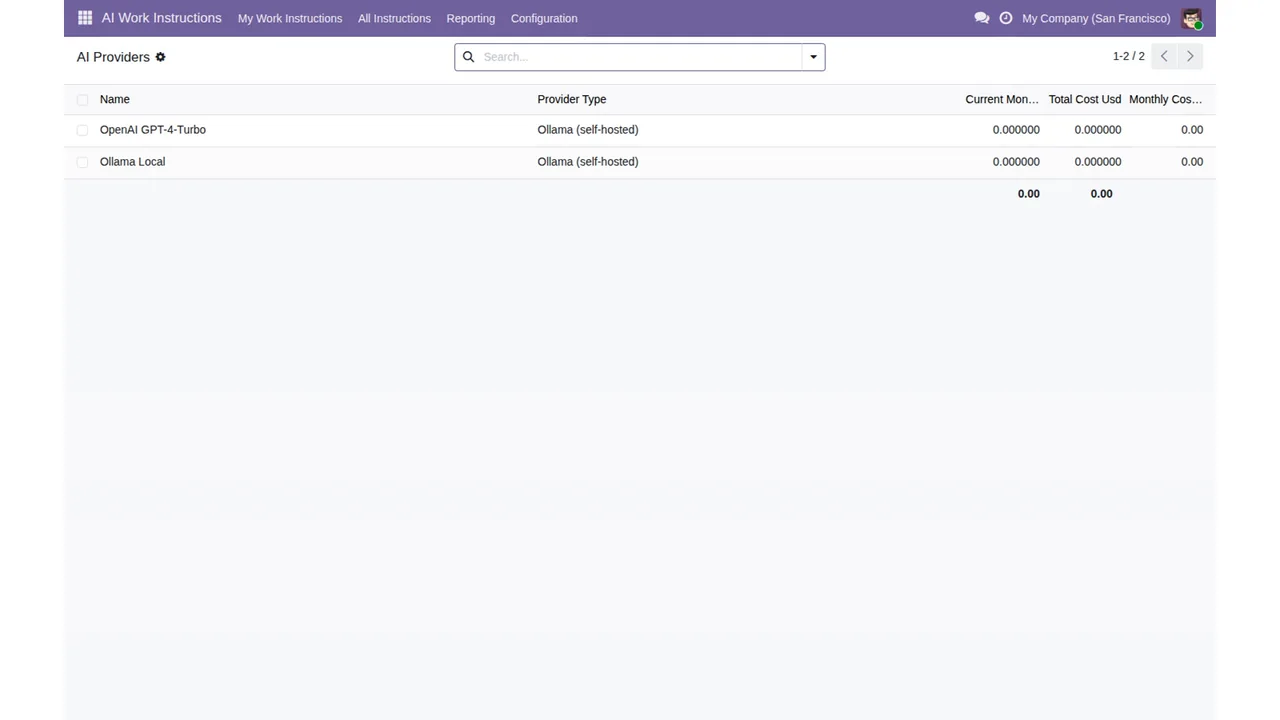
AI Work Instructions › AI Providers list, with the Ollama (self-hosted) type and the monthly and total cost columns at zero.The HTTPS message only refers to providers that are not of Ollama type. In the AI Provider Setup dialogue shown in the sequence below, the chosen type is Ollama (self-hosted) and the Api Url points to localhost. If you switch a provider to a type other than Ollama, the message requires an API URL with HTTPS.
AI Provider Setup dialogue with Ollama (self-hosted) type and Api Url on localhost, settings with the Generation & Caching and Data & Privacy sections, the Prompt Templates list and the AI Providers list.Templates work in a similar way: the module accepts only one default per industry. The template list has a default column, which is the one to check when the message naming an industry appears.
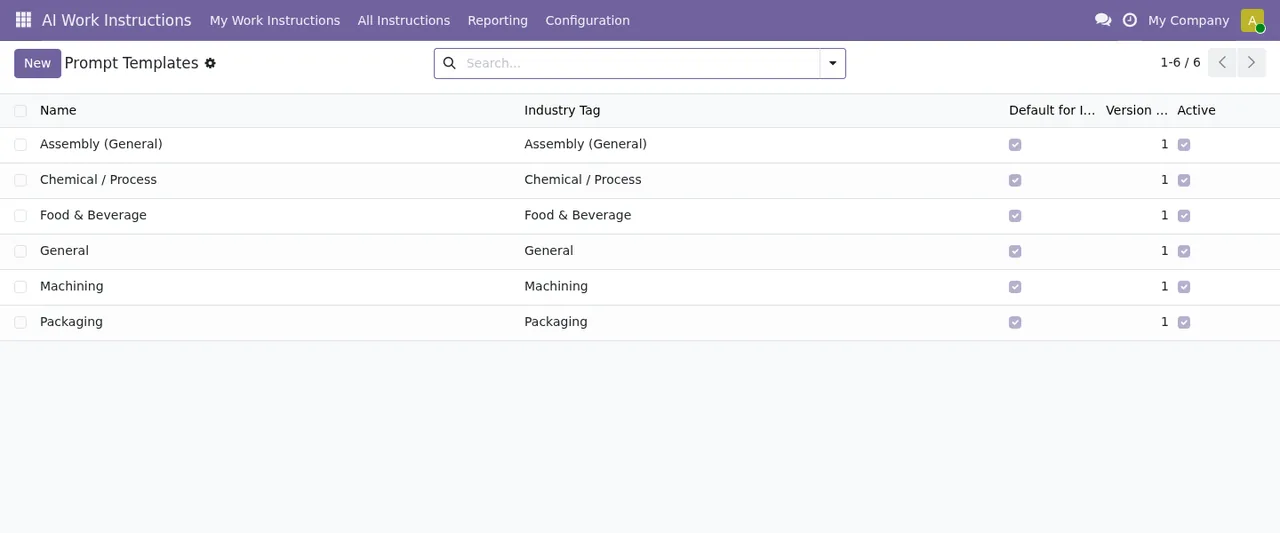
AI Work Instructions › Prompt Templates: six industry templates with label, default, version and active columns.Generating instructions for a work order
| Message | When it appears | What to do |
|---|---|---|
AI instructions are disabled for this work center. | When you request instructions on a work centre that has them disabled | Review that work centre's configuration with whoever manages it |
Cannot generate instructions: the manufacturing order has no Bill of Materials / components. Add a BOM first. | When the manufacturing order has no bill of materials or components | Add the bill of materials and generate again |
An active instruction already exists for this work order in language %s. | When there is already an active instruction for that work order in the language shown | Work on the active instruction or generate in another language |
Instruction is locked (an operator has started work). | When regenerating an instruction after an operator has started work | Ask a supervisor to force the lock to be released before regenerating |
A work order cannot depend on itself. | When a work order is listed as a dependency of itself | Remove that dependency |
Circular dependency detected. | When the dependencies between work orders form a loop | Review the dependency chain and break the loop |
The locking message goes on with a second sentence: it says a supervisor has to force the lock to be released before the instruction can be regenerated. In other words, the operator who is already working cannot regenerate it on their own.
Before regenerating a locked instruction, talk to the operator who has started: the message makes clear the lock exists because of their work in progress.
Approving, numbering and comparing versions
| Message | When it appears | What to do |
|---|---|---|
Only pending instructions can be approved. | When approving an instruction that is not pending | Check its status: only pending instructions can be approved |
Duplicate version number. | When two versions share a number | Check the version number before saving |
Select two different versions. | When comparing a version with itself | Choose two different versions |
Records the module will not let you edit or delete
These messages do not point to a fault: they describe limits the module places on certain records. If you see one, the record stays as it is.
| Message | When it appears | What to do |
|---|---|---|
Instruction versions are immutable and cannot be edited. | When trying to edit an instruction version | Nothing: the module does not allow versions to be changed |
Instruction versions cannot be deleted. | When trying to delete an instruction version | Nothing: versions are not deleted |
Q&A log entries are append-only. | When trying to modify an entry in the Q&A log | You can only add new entries |
Q&A log entries cannot be deleted. | When trying to delete an entry from that log | Nothing: entries are not deleted |
Safety acknowledgements are immutable. | When trying to change a safety acknowledgement | Nothing: the module does not allow them to be changed |
Work order is closed; steps are read-only. | When editing the steps of a closed work order | The steps are read-only |
Permissions for GDPR actions
| Message | When it appears | What to do |
|---|---|---|
Only MRP Managers may run GDPR actions. | When a user who is not an MRP Manager runs a GDPR action | Ask a user with that role to run it |
If you want to see where each part of the module fits (providers, templates, instructions and versions), the detail is in how it works under the bonnet.
Where FlexigoTech can help
Manufacturing AI Work-Instruction Copilot is published on Odoo Apps for Odoo 17, 18 and 19, at €49 excluding VAT on each of those versions, as a one-off payment per version. You will find the Odoo Apps listing and the module page with the purchase option.
If what is holding you back is the Odoo implementation itself, or you need to connect the module with other systems on your shop floor, at FlexigoTech we implement Odoo and build bespoke connectors and integrations.
Keep reading
Checked in the module's source code (version 19.0) and the linked sources
Sources
- Module source code: flexigo_manufacturing_ai_work_instruction_copilot 19.0 (40c663bd): models/mrp_ai_cache.py
- Module source code: flexigo_manufacturing_ai_work_instruction_copilot 19.0 (40c663bd): models/mrp_ai_provider.py
- Module source code: flexigo_manufacturing_ai_work_instruction_copilot 19.0 (40c663bd): models/mrp_workinstruction_template.py
- Module source code: flexigo_manufacturing_ai_work_instruction_copilot 19.0 (40c663bd): models/mrp_workorder.py
- Module source code: flexigo_manufacturing_ai_work_instruction_copilot 19.0 (40c663bd): models/mrp_workorder_dependency.py
- Module source code: flexigo_manufacturing_ai_work_instruction_copilot 19.0 (40c663bd): models/mrp_workorder_instruction.py
- Module source code: flexigo_manufacturing_ai_work_instruction_copilot 19.0 (40c663bd): models/mrp_workorder_instruction_version.py
- Module source code: flexigo_manufacturing_ai_work_instruction_copilot 19.0 (40c663bd): models/mrp_workorder_qa_log.py
- Module source code: flexigo_manufacturing_ai_work_instruction_copilot 19.0 (40c663bd): models/mrp_workorder_safety_ack.py
- Module source code: flexigo_manufacturing_ai_work_instruction_copilot 19.0 (40c663bd): models/mrp_workorder_step.py
- Module source code: flexigo_manufacturing_ai_work_instruction_copilot 19.0 (40c663bd): wizard/gdpr_wizard.py
- Module source code: flexigo_manufacturing_ai_work_instruction_copilot 19.0 (40c663bd): wizard/instruction_diff_wizard.py
- apps.odoo.com/apps/modules/19.0/flexigo_manufacturing_ai_work_instruction_copilot
- apps.odoo.com/apps/modules/17.0/flexigo_manufacturing_ai_work_instruction_copilot
- apps.odoo.com/apps/modules/18.0/flexigo_manufacturing_ai_work_instruction_copilot
- flexigotech.com/en/services.html