

 Español
 Català
 Deutsch
 Français
 Português
 Italiano
 Nederlands
 Polski
Which menus USA Digital Services Tax Compliance adds
Where does the module appear once installed?
In a top-level menu called Digital Services Tax. The first item inside is Digital Services Tax › Dashboard, and the remaining options are split into three sections: Configuration, Compliance & Filing and Analysis & Reports (the last two in Odoo 19 and 20). The Odoo Apps listing introduces the module with the heading US digital services tax by state in Odoo and has a How it works section on how it operates.
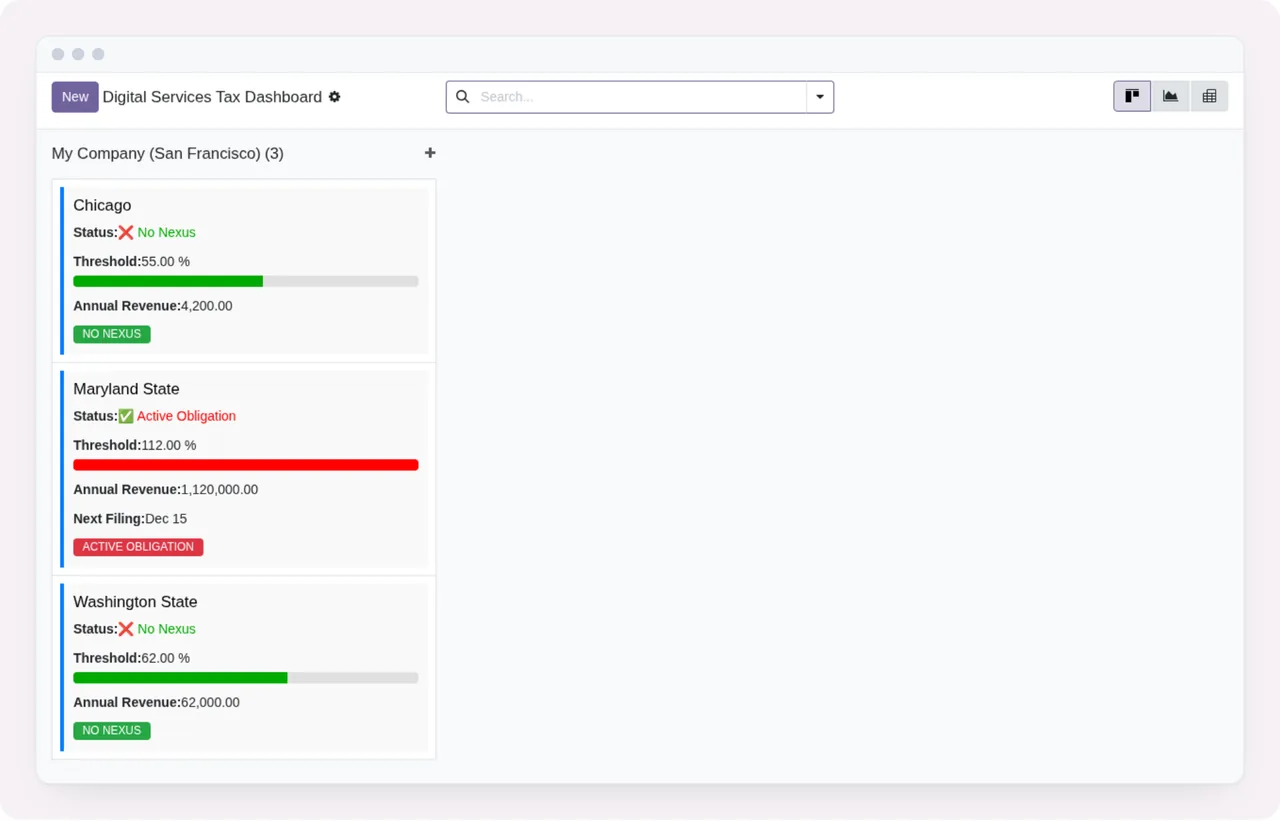
Dashboard grouped by company: each card shows status, threshold with a progress bar, annual revenue and an obligation tagWhat do you set up under Configuration?
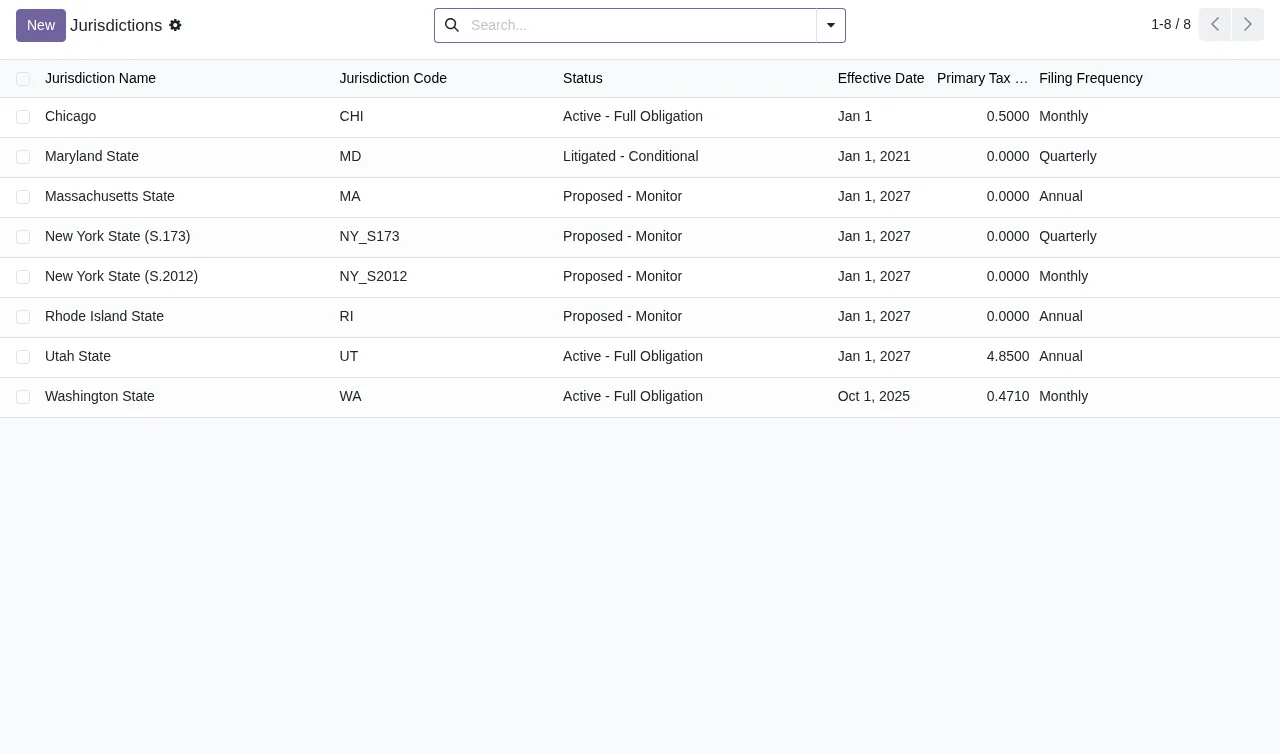
This section has two menus: Digital Services Tax › Configuration › Jurisdictions and Digital Services Tax › Configuration › Service Categories. Jurisdictions are records of the dst.jurisdiction model, which the code describes as Digital Services Tax Jurisdiction. In the list you can search, page through records and create a new one with the button at the top.
What is in Compliance & Filing?
Only in Odoo 19 and 20. This is the section with the most options. It holds six menus:
Digital Services Tax › Compliance & Filing › Nexus StatusDigital Services Tax › Compliance & Filing › Filing RecordsDigital Services Tax › Compliance & Filing › ExemptionsDigital Services Tax › Compliance & Filing › Filing CalendarDigital Services Tax › Compliance & Filing › Create FilingDigital Services Tax › Compliance & Filing › Claim Exemption
And in Analysis & Reports?
Only in Odoo 19 and 20. Three menus: Digital Services Tax › Analysis & Reports › Scenario Models, Digital Services Tax › Analysis & Reports › Regulatory Updates and Digital Services Tax › Analysis & Reports › Alerts & Updates. These are the three items under this section.
Which records the module stores under the hood
Which models does it create in the database?
If you look at the code, these are the models and their descriptions, grouped by the topic their names point to:
- Jurisdictions and nexus:
dst.jurisdiction(Digital Services Tax Jurisdiction) anddst.nexus_status(Nexus Status per Jurisdiction). - Revenue:
dst.revenue_stream(Digital Services Tax Revenue Stream) anddst.revenue_entry(Digital Services Tax Revenue Entry). - Filings:
dst.filing_record(DST Compliance Filing Record) anddst.filing_submission(Digital Services Tax Filing Submission). - Exemptions:
dst.exemption_record(DST Exemption Claim Audit Trail). - Audit:
dst.audit_log_entry(Digital Services Tax Audit Log Entry). - Dashboard:
dst.dashboard_kpi(Digital Services Tax Dashboard KPI) anddst.dashboard.overview(Digital Services Tax Dashboard Overview). - Analysis:
dst.scenario_model(Digital Services Tax Scenario Model) anddst.regulatory_update(DST Regulatory Change Tracking), which inherits frommail.thread.
This is the data structure the module keeps in your Odoo, as its code defines it.
Which kinds of alert does it distinguish?
The code separates three alert models: dst.nexus_alert (Nexus Threshold Alert), dst.legal_alert (Digital Services Tax Legal Alert) and dst.litigation_alert (DST Litigation Tracking). Separately, there is dst.regulatory_update for tracking regulatory changes. In the Odoo 19 and 20 menus, the related options sit under Analysis & Reports, with Regulatory Updates and Alerts & Updates.
What does a record look like when you open it?
The animated walkthrough goes through the main screens, from the jurisdictions list to a filing form. If you want the detail of what to fill in on each one and what to check when you start, it is in the module set-up guide.
Jurisdictions list, the Dashboard with three cards, the jurisdictions list and the Maryland State filing form in status Draft - Not Filed, with the tax calculation and an unpaid payment sectionWhat depends on the external service and what it costs
Does everything run inside Odoo?
Not entirely. The listing flags it in its own section: Before you buy: some features of this app use a paid external service. That service is the FlexigoTech Cloud local service. Without a subscription, or with the service suspended, whatever the subscription provides stops; your data stays in your Odoo. The listing also has a Privacy policy section worth reading before you connect the service.
How much does it cost and which versions is it on?
The module is published on Odoo Apps for Odoo 17, 18, 19 and 20, at €9 per Odoo version (one-off payment, excluding VAT), and the local service costs €29/month or €290/year excluding VAT (Pro: €58/month or €580/year). With the subscription, the module for new Odoo versions is included if you bought it on flexigotech.com; on the Odoo App Store, each version is bought there.
How FlexigoTech can help
If you already run Odoo or are rolling it out, at FlexigoTech we implement Odoo 17, 18, 19 and 20 and build bespoke connectors and integrations, for instance to bring data you currently keep in another system into this module. If a message you do not understand pops up while you test it, go through the module's error messages and warnings. And if you want to read the full listing before deciding, it is on Odoo Apps.
Keep reading
Checked in the module's source code (version 20.0) and the linked sources
Sources
- Module source code: flexigo_usa_digital_services_tax_compliance 20.0 (5c0ad1e2): views/dst_menu.xml
- Module source code: flexigo_usa_digital_services_tax_compliance 20.0 (5c0ad1e2): static/description/index.html
- Module source code: flexigo_usa_digital_services_tax_compliance 20.0 (5c0ad1e2): models/dst_audit_log_entry.py
- Module source code: flexigo_usa_digital_services_tax_compliance 20.0 (5c0ad1e2): models/dst_dashboard_kpi.py
- Module source code: flexigo_usa_digital_services_tax_compliance 20.0 (5c0ad1e2): models/dst_exemption_record.py
- Module source code: flexigo_usa_digital_services_tax_compliance 20.0 (5c0ad1e2): models/dst_filing_record.py
- Module source code: flexigo_usa_digital_services_tax_compliance 20.0 (5c0ad1e2): models/dst_filing_submission.py
- Module source code: flexigo_usa_digital_services_tax_compliance 20.0 (5c0ad1e2): models/dst_jurisdiction.py
- Module source code: flexigo_usa_digital_services_tax_compliance 20.0 (5c0ad1e2): models/dst_legal_alert.py
- Module source code: flexigo_usa_digital_services_tax_compliance 20.0 (5c0ad1e2): models/dst_nexus_status.py
- Module source code: flexigo_usa_digital_services_tax_compliance 20.0 (5c0ad1e2): models/dst_regulatory_update.py
- Module source code: flexigo_usa_digital_services_tax_compliance 20.0 (5c0ad1e2): models/dst_revenue_entry.py
- Module source code: flexigo_usa_digital_services_tax_compliance 20.0 (5c0ad1e2): models/dst_revenue_stream.py
- Module source code: flexigo_usa_digital_services_tax_compliance 20.0 (5c0ad1e2): models/dst_scenario_model.py
- apps.odoo.com/apps/modules/20.0/flexigo_usa_digital_services_tax_compliance
- apps.odoo.com/apps/modules/17.0/flexigo_usa_digital_services_tax_compliance
- apps.odoo.com/apps/modules/18.0/flexigo_usa_digital_services_tax_compliance
- apps.odoo.com/apps/modules/19.0/flexigo_usa_digital_services_tax_compliance
- flexigotech.com/en/services.html
- flexigotech.com/precios.html