

 Español
 Català
 Deutsch
 Français
 Português
 Italiano
 Nederlands
 Polski
The short answer before the glossary
MRW Shipping Connector installs like any other Odoo module and relies on FlexigoTech Cloud, the service the MRW connection runs through. Inside your Odoo it leaves two kinds of parts: models, which are the data structures the module creates, and scheduled tasks, which Odoo runs on its own at a set interval. Outside your Odoo sits the cloud service, which stores the credentials and monitors synchronisation.
The scheduled tasks that run by themselves
The module registers two scheduled tasks. Both are listed as active, so they run at their interval without you clicking anything.
MRW - Reintentar envios pendientes- Scheduled task with an interval of 5 minutes. It is listed as active and is the more frequent of the two. Its name refers to retrying pending shipments.
MRW - Purgar XML auditoria- Scheduled task with an interval of 1 day, also active. Its name refers to purging the audit XML.
- Active
- Both tasks are listed in the module as active, that is, switched on. If you check your Odoo and find one of them switched off, it is not in the state the module ships it in.
To check them, search for them by their exact name among your Odoo scheduled tasks. Note that the names have no Spanish accents ('envios', 'auditoria') and a hyphen between 'MRW' and the rest; if you type 'envíos' with an accent in the search box, they may not come up.
The models the connector adds
An Odoo model has a technical name, with dots, and a readable description. These are the two listed in the module.
mrw.service- Technical name of the model described as
Catalogo de Servicios MRW: the catalogue of MRW services stored inside Odoo.
mrw.send.shipment.wizard- Technical name of the model described as
Asistente de Envio MRW. 'Wizard' is the word Odoo uses for its assistants.
These names are mainly useful if you are a consultant or have someone technical reviewing the database: with them you can pinpoint exactly what the module has created and tell it apart from what Odoo already had.
Day to day, the connector shows up in the Odoo shipping method with MRW as the provider, as in this screenshot.
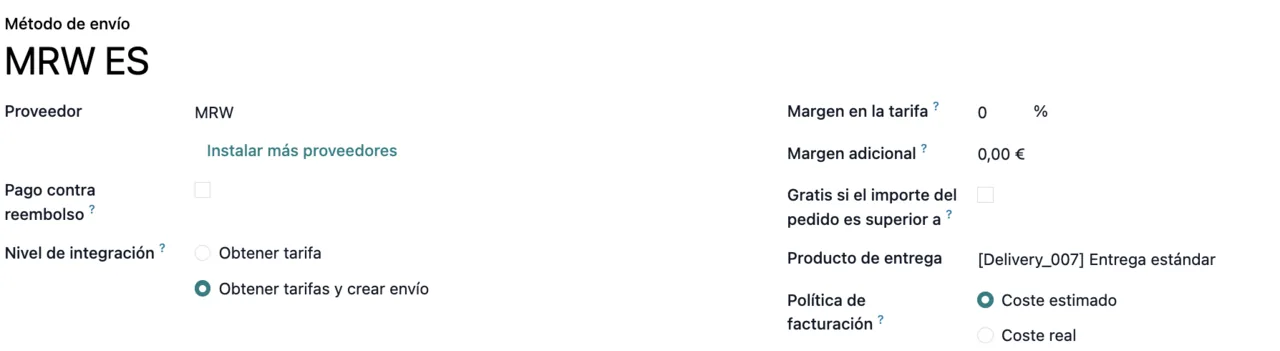
MRW ES shipping method: provider MRW, integration level Obtener tarifas y crear envío, margins, delivery product and an invoicing policy based on estimated cost.What the Odoo Apps listing tells you before you buy
The module's listing on Odoo Apps is in English. These are the sections worth reading before you install.
MRW labels and tracking from Odoo- Main heading of the listing: MRW labels and tracking from within Odoo.
How it works- Section of the listing devoted to how the module works.
Before you buy: this app uses a paid external service- Warning on the listing: the app uses a paid external service. For this connector, that service is FlexigoTech Cloud on the Connector plan.
Privacy policy- Section of the listing containing the privacy policy.
The before-you-buy warning is the one that matters most if you are budgeting: it separates what you pay for the module from what you pay for the service that connects it.
FlexigoTech Cloud and what you pay for each part
- FlexigoTech Cloud
- The service the MRW connection runs through. It stores credentials encrypted, monitors synchronisation and sends an email alert if it fails. If MRW changes its API, both the module and the service are adapted.
- Connector plan
- The subscription that powers the service: €49/month or €490/year excluding VAT, with up to 3 platform accounts. The Pro tier costs €98/month or €980/year excluding VAT and allows up to 10 accounts.
- One-off payment per version
- The module on Odoo Apps costs €9 excluding VAT per Odoo version, for 17, 18, 19 and 20.
- New Odoo versions
- With the subscription, the module for new Odoo versions is included if you bought it on flexigotech.com. If you bought it on the Odoo App Store, each Odoo version is purchased there.
- Without a subscription
- If you have no subscription or the service is suspended, whatever the subscription provides stops. Your data stays in your Odoo.
MRW credentials are entered in the connector configuration, on a tab of their own.
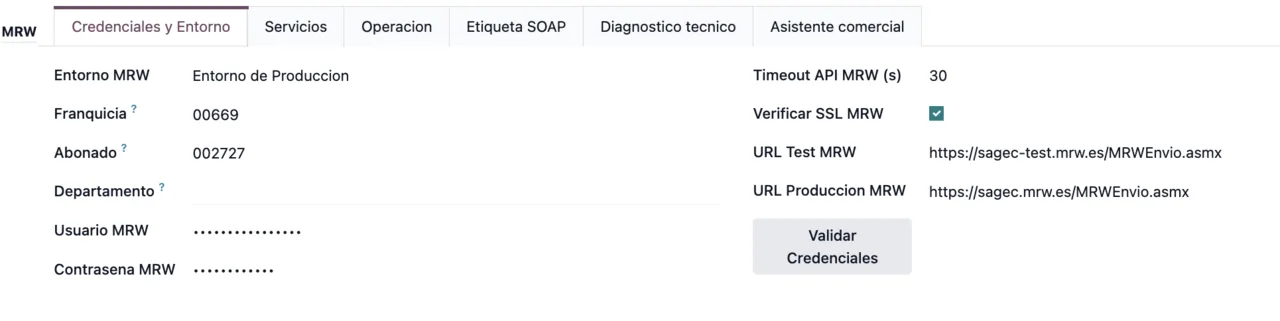
Credenciales y Entorno tab: production environment, franchise, subscriber, hidden user and password, timeout, SSL verification, test and production URLs and the Validar Credenciales button.Where these parts appear when you set up a shipment
When setting up the connector you have in front of you the shipping method with MRW as provider, the credentials tab of the configuration, the two models and the two scheduled tasks described above.
If what you need is to know what the module tells you when something does not add up, the literal texts are in the error messages and warnings of MRW Shipping Connector. And if you work with more than one carrier, how Advanced Shipping Carrier Integration works inside Odoo follows the same format and helps you compare.
How FlexigoTech can help
FlexigoTech implements Odoo 17, 18, 19 and 20 and builds bespoke connectors and integrations. If you are rolling out Odoo and want MRW to be part of the project from the start, or you need something this connector does not cover, we can look at it with you. You can buy the module and the plan on the module page, and the full listing is on Odoo Apps.
Keep reading
Checked in the connector's source code (version 20.0) and the linked sources
Sources
- Module source code: flexigobe_mrw 20.0 (a4cc198a): data/mrw_cron_data.xml
- Module source code: flexigobe_mrw 20.0 (a4cc198a): models/mrw_service.py
- Module source code: flexigobe_mrw 20.0 (a4cc198a): wizard/mrw_send_shipment.py
- Module source code: flexigobe_mrw 20.0 (a4cc198a): static/description/index.html
- apps.odoo.com/apps/modules/20.0/flexigobe_mrw
- apps.odoo.com/apps/modules/17.0/flexigobe_mrw
- apps.odoo.com/apps/modules/18.0/flexigobe_mrw
- apps.odoo.com/apps/modules/19.0/flexigobe_mrw
- flexigotech.com/en/services.html
- flexigotech.com/precios.html