

 Español
 Català
 Deutsch
 Français
 Português
 Italiano
 Nederlands
 Polski
The three groups of the CBAM menu, side by side
The Odoo Apps listing presents the module as CBAM import tracking and annual declaration in Odoo. Inside Odoo that becomes a menu of its own with three groups: CBAM › Operations, CBAM › Declarations and CBAM › Configuration. The table compares the submenus in each group and the models, named after those submenus, that hold the data in your database.
| Group | Submenus | Models with matching names |
|---|---|---|
CBAM › Operations | Import Events, Supplier Data Requests, Certificate Ledger, Deadlines, Backfill Import Events | cbam.import.event, cbam.supplier.data.request, cbam.certificate.transaction, cbam.deadline |
CBAM › Declarations | Annual Declaration Periods, Vendor Cost Comparison | cbam.declaration.period |
CBAM › Configuration | CN Code Library, Default Values, CBAM Factor, Certificate Prices, Carbon Price Deductions, Declarant Authorization | cbam.cn.code, cbam.default.value, cbam.factor, cbam.certificate.price, cbam.carbon.price.deduction |
The quick reading: Operations and Declarations gather records that get created over time (imports, requests, certificate movements, deadlines and periods), while Configuration gathers reference tables by code, country, year or period.
What each Configuration table holds
The module's code describes each configuration model in a short phrase. These are the module's own descriptions, not a summary of the CBAM regulation:
CBAM › Configuration › CN Code Library: thecbam.cn.codemodel is described asCBAM CN Code (Annex I).CBAM › Configuration › Default Values: thecbam.default.valuemodel holds, according to its description,Commission default emissions per CN code / country.CBAM › Configuration › CBAM Factor: thecbam.factormodel holds thefree-allocation adjustment factor per year.CBAM › Configuration › Certificate Prices: thecbam.certificate.pricemodel holds theETS-based certificate price per period.CBAM › Configuration › Carbon Price Deductions: thecbam.carbon.price.deductionmodel holds thedocumented carbon price per country.
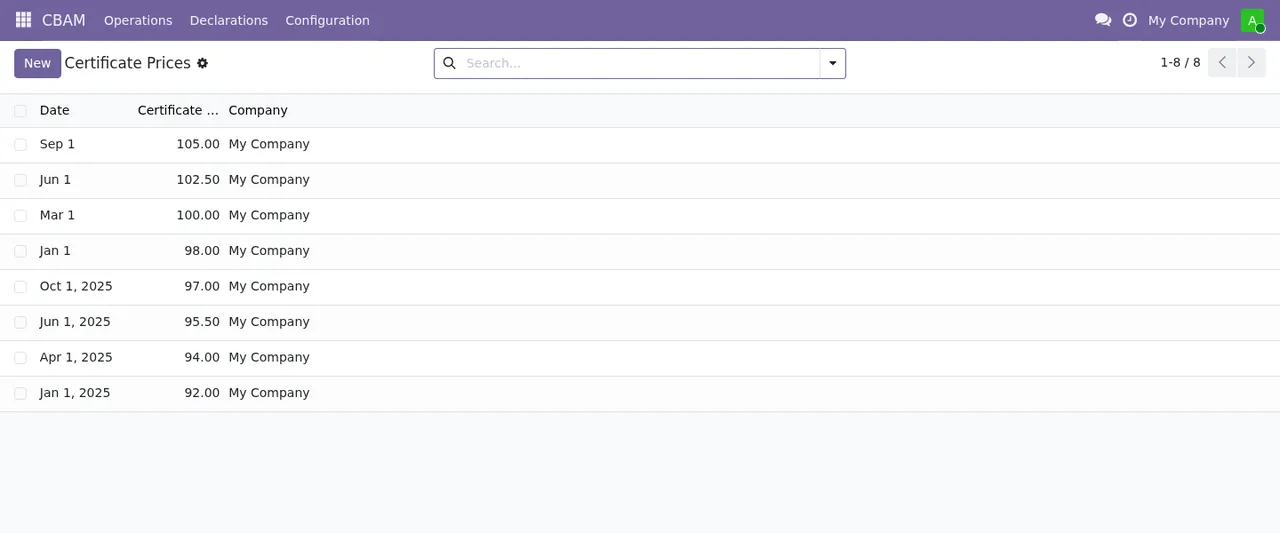
Certificate Prices list, with eight records by date, certificate price and the company My Company.Where each day-to-day record lives
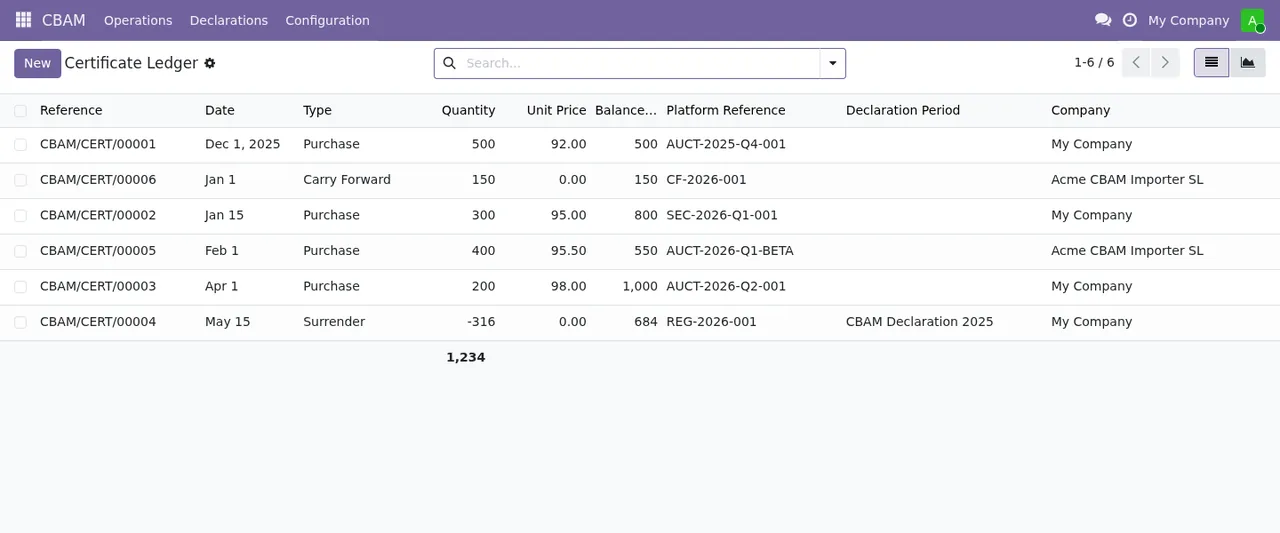
CBAM › Operations holds the operational records. Import Events matches the cbam.import.event model (CBAM Import Event). Supplier Data Requests matches cbam.supplier.data.request (CBAM Supplier Data Request). Deadlines matches cbam.deadline, described as CBAM Compliance Deadline. And Certificate Ledger matches cbam.certificate.transaction, which the module describes as CBAM Certificate Transaction (ledger): a ledger of certificate movements.
CBAM › Declarations › Annual Declaration Periods holds the cbam.declaration.period model (CBAM Annual Declaration Period). The ledger screenshot shows that every movement carries a declaration period column, so from the list you can read which period each purchase, transfer or surrender belongs to.
If you hit a warning while working with them, it is covered in the module's error messages and warnings.
Six scheduled actions: daily versus monthly
The module ships six scheduled actions, all of them active. This table compares them by frequency:
| Action | How often | Active |
|---|---|---|
| Table update from FlexigoTech Cloud | Every day | Yes |
CBAM: Threshold Sweep | Every day | Yes |
CBAM: Deadline Alerts | Every day | Yes |
CBAM: Pending Data Escalation | Every day | Yes |
CBAM: Quarterly Holding Check | Every month | Yes |
CBAM: Annual Deadline Seeding | Every month | Yes |
The difference the table shows is one of rhythm: four actions run daily and two run once a month. The names are in English exactly as they appear in Odoo, and they are what you will look for if you want to check when each one last ran.
The part that relies on FlexigoTech Cloud
This is a module with a FlexigoTech Cloud local service. Under configuration there is a Data tables (FlexigoTech Cloud) menu, hanging from CBAM › Configuration, and one of the daily actions is the one that updates tables from FlexigoTech Cloud. The listing itself flags this in its Before you buy: some features of this app use a paid external service section, and it also includes a Privacy policy section.
Without a subscription, or with the service suspended, whatever the subscription provides stops, and your data stays in your Odoo.
Odoo versions and what it costs
The module is published on Odoo Apps for Odoo 17, 18, 19 and 20, at €9 per Odoo version, a one-off payment excluding VAT on each of them; the local service is separate, at €29/month or €290/year excluding VAT (Pro: €58/month or €580/year). With the subscription, the module for new Odoo versions is included if you bought it on the module page at flexigotech.com; on the Odoo App Store, each Odoo version is bought there, from its Odoo Apps listing.
How FlexigoTech can help
At FlexigoTech we implement Odoo 17, 18, 19 and 20 and build bespoke connectors and integrations. If you are still weighing up whether this module suits you, start with whether EU CBAM Compliance Manager fits your business; if you already have it installed and want to connect it to the rest of your Odoo or to other systems, we can help with the implementation or with custom development.
Keep reading
Checked in the module's source code (version 20.0) and the linked sources
Sources
- Module source code: flexigo_cbam_compliance 20.0 (e3003203): views/cbam_menus.xml
- Module source code: flexigo_cbam_compliance 20.0 (e3003203): views/fgt_paquete_views.xml
- Module source code: flexigo_cbam_compliance 20.0 (e3003203): data/fgt_paquete_cron.xml
- Module source code: flexigo_cbam_compliance 20.0 (e3003203): data/ir_cron_data.xml
- Module source code: flexigo_cbam_compliance 20.0 (e3003203): static/description/index.html
- Module source code: flexigo_cbam_compliance 20.0 (e3003203): models/cbam_carbon_price_deduction.py
- Module source code: flexigo_cbam_compliance 20.0 (e3003203): models/cbam_certificate_price.py
- Module source code: flexigo_cbam_compliance 20.0 (e3003203): models/cbam_certificate_transaction.py
- Module source code: flexigo_cbam_compliance 20.0 (e3003203): models/cbam_cn_code.py
- Module source code: flexigo_cbam_compliance 20.0 (e3003203): models/cbam_deadline.py
- Module source code: flexigo_cbam_compliance 20.0 (e3003203): models/cbam_declaration_period.py
- Module source code: flexigo_cbam_compliance 20.0 (e3003203): models/cbam_default_value.py
- Module source code: flexigo_cbam_compliance 20.0 (e3003203): models/cbam_factor.py
- Module source code: flexigo_cbam_compliance 20.0 (e3003203): models/cbam_import_event.py
- Module source code: flexigo_cbam_compliance 20.0 (e3003203): models/cbam_supplier_data_request.py
- apps.odoo.com/apps/modules/20.0/flexigo_cbam_compliance
- apps.odoo.com/apps/modules/17.0/flexigo_cbam_compliance
- apps.odoo.com/apps/modules/18.0/flexigo_cbam_compliance
- apps.odoo.com/apps/modules/19.0/flexigo_cbam_compliance
- flexigotech.com/en/services.html
- flexigotech.com/precios.html