

 Español
 Català
 Deutsch
 Français
 Português
 Italiano
 Nederlands
 Polski
CBAM compliance software for Odoo: keep your annual declaration and carbon certificates under control inside your ERP
The CBAM transitional period and its quarterly report ended on 31 December 2025. Since 1 January 2026 the definitive regime applies: authorised declarant status, CBAM certificates and an annual declaration of the emissions embedded in your imports. Piecing all of that together by hand is a headache. This module tracks your affected imports inside Odoo, calculates the embedded emissions, keeps the ledger and quarterly check of the certificates you hold, and leaves the annual declaration data ready for you to review and file.
€9 + €29/month + VAT
Support within 4 working hours and video calls? Pro: €58/month + VAT. Your subscription keeps the module working. Pro support is optional: if you drop it, the module carries on the same with standard support.
What's included
- On FlexigoTech Cloud: signed official tables, always current
- Module updates
- Support with a first response within 1 working day
- Your data stays yours: view and export it anytime.
- 14-day trial, no card needed
What the cloud does for you
Terms, data sent and fine print
FlexigoTech Cloud
CBAM Data Feed needs a FlexigoTech Cloud subscription
CBAM Data Feed works through FlexigoTech Cloud, an external service of FlexigoTech (Flexibles y Accesorios Gobe, S.L., Spain) that runs on our servers, outside your Odoo.
Price
- Module: 9 €.
- The module license is bought separately, at the same price on the Odoo App Store and on flexigotech.com. With the subscription, the module for new Odoo versions is included if you bought it on flexigotech.com; on the Odoo App Store, each Odoo version is bought there. If you have a partner discount, it applies only to subscriptions of single modules, never to packs or to the module price.
- The subscription is separate and is billed by FlexigoTech, not by Odoo: 29 € a month or 290 € a year.
- Pro, with the first response within 4 working hours and a video call if needed: 58 € a month or 580 € a year.
- Per production database, VAT excluded. The staging and test copies of that database are included.
- You see the final amount, with taxes, on the payment screen before confirming.
- You can try each module for 14 days from your Odoo, at no cost and without giving a card: the 14 days count from the first synchronisation, up to 30 days from when you start the trial, and there is one trial per account and module. If you have not subscribed when it ends, the service stops and nothing is charged.
- You pay in advance, every month or every year. The subscription renews automatically at the end of each period until you cancel it, in two clicks and without talking to anyone, from your account at app.flexigotech.com or from your Odoo. Cancellation takes effect at the end of the period you have already paid; there is no pro rata, the part of the period you do not use is not refunded, unless the law requires it, and there is no penalty.
How to activate it
Your database connects from your Odoo, in Settings → FlexigoTech Cloud, with the free FlexigoTech Cloud base module; then you subscribe there or in your account.
An administrator first reads and accepts the list of data below: nothing is sent before that. Then you can start the trial or subscribe; you accept the subscription terms there, and payment is made outside Odoo.
You need Odoo.sh or your own server: Odoo Online does not accept third-party modules.
You accept the Subscription Terms when you start the trial in your Odoo or when you subscribe.
What the subscription includes
- If you bought the module on flexigotech.com: the new versions we publish, including for new Odoo versions, at no extra cost, and their download from your account (not during the trial).
- CBAM Data Feed, with its maintenance and monitoring.
- Support: whoever buys a module always gets help to configure it and fixes for its bugs, with or without a subscription. The subscription adds times for the first response, in Barcelona working days and hours (Standard, 1 working day; Pro, 4 working hours, and a video call if needed). Resolving each case takes the time it needs.
- The service on the staging and test copies of your database.
What it does not include
- The customisation of the module or custom development.
- Migrations: we give you the module for each new Odoo version, but we do not take care of migrating your database to that version.
- Configuring the module for you (the setup).
- Importing historical data.
- Support for modules that are not ours.
- Third-party costs: you contract and pay for your account on each platform, Odoo and your hosting yourself.
What your Odoo sends to FlexigoTech Cloud
- The identifier (uuid) of the database, its address (URL) and the Odoo version.
- The FlexigoTech modules installed, with their version, and whether the database is a neutralized copy (staging or test).
- The company name, and the email of the person who accepts, with the date and version of the text accepted.
- A request for its service permit every 6 hours, and the health of the service: counters and errors (type and code), without the content of your records.
- When you use CBAM Data Feed: the name of the data tables your Odoo asks for and the version it already has, and nothing from your records.
What happens if you do not pay
If a payment fails, you have a 7-day grace period with the service. On day 7 the service is suspended; if you pay before day 21, it comes back at once. On day 21, if it is still unpaid, the subscription ends and a later payment does not reactivate it: to come back, you take out a new one.
Without a subscription, or with the service suspended, what the subscription gives stops: the cloud, the module for other Odoo versions and its download, and the subscription's support, with its response times. What the purchase of the module includes does not change: you always have help to configure it and fixes for its bugs and, if you bought it on flexigotech.com, the download of that Odoo version with its updates. The installed module stays in your Odoo with the version you have, and all your data stay there: we never delete anything in your Odoo and we do not block Odoo.
Without the service, CBAM Data Feed stops, unless this page says otherwise. Your data is still yours, and you can always view and export it.
The data tables that CBAM Data Feed sends you are signed data, never code. You keep the last ones you received, with their date, even if the service stops.
Configuration help and bug fixes are always provided to buyers, with or without the subscription.
What it does
Carbon Border Adjustment Mechanism: import tracking, emissions calculation, certificates and annual declaration
- Affected imports and CN codesIdentifies and gathers in Odoo the purchase lines of goods subject to CBAM (iron and steel, aluminium, cement, fertilisers, electricity and hydrogen), with their quantities and origin, backed by a CN code library.
- Embedded emissions calculationRecords and links the emissions declared for each imported product and calculates the embedded emissions for the period, so your declaration matches what your supplier reports.
- Certificates: ledger, prices and quarterly checkKeeps the CBAM certificate ledger (purchases and surrenders) along with certificate prices, and checks at the end of each quarter that your holdings cover the year's accumulated emissions, flagging any shortfall.
- Annual declaration and declarant authorisationManages the annual declaration periods with their draft and export, and records the status of your CBAM declarant authorisation together with its deadlines.
- CN code library out of the boxShips with a library of the Combined Nomenclature codes covered by CBAM, so you can tag which of your products are affected without hunting through the regulation's annexes yourself.
- Native inside Odoo, source includedEverything runs inside your own Odoo (17, 18, 19 or 20), with no separate SaaS to log into and no extra subscription. The full source code is included, so your team or ours can adapt it to how you work.
What it looks like inside Odoo
Real screens of the installed module, not mockups. Each one with what it does.
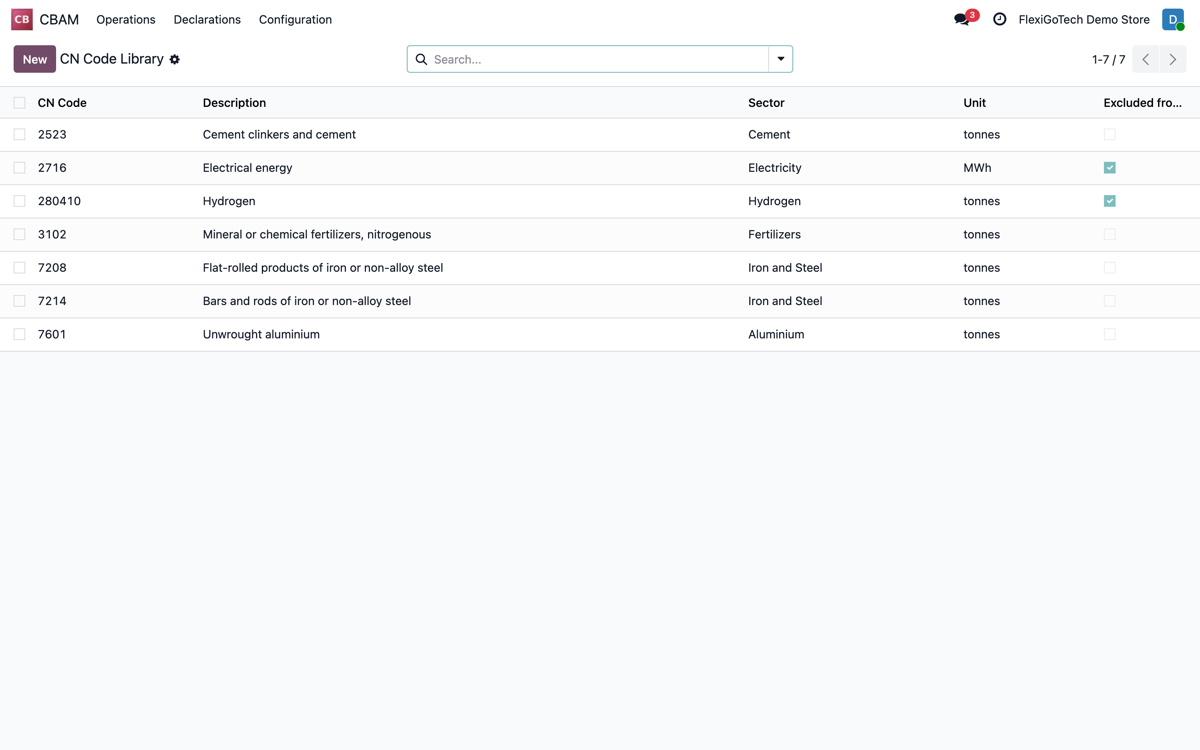
CN Code Library
CBAM-covered goods (cement, steel, aluminium, hydrogen...) with sector, unit and exclusions.
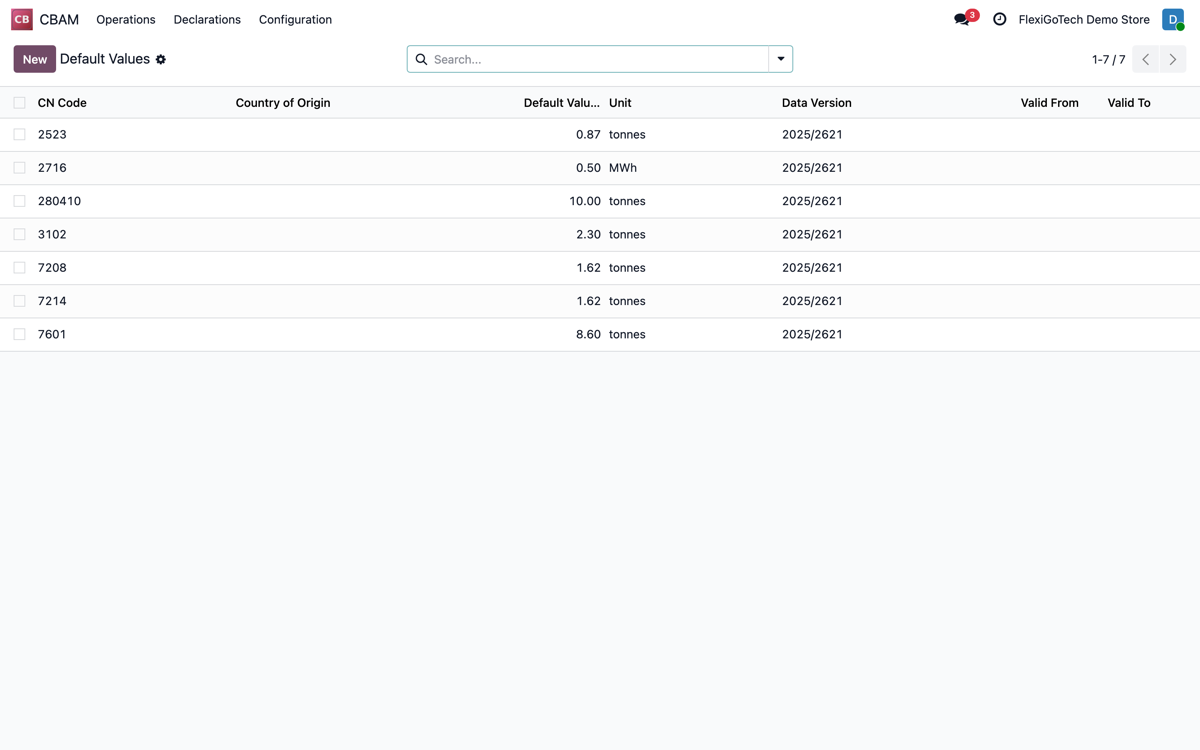
Default Values
Default emissions per CN code and official data version, for imports lacking supplier data.
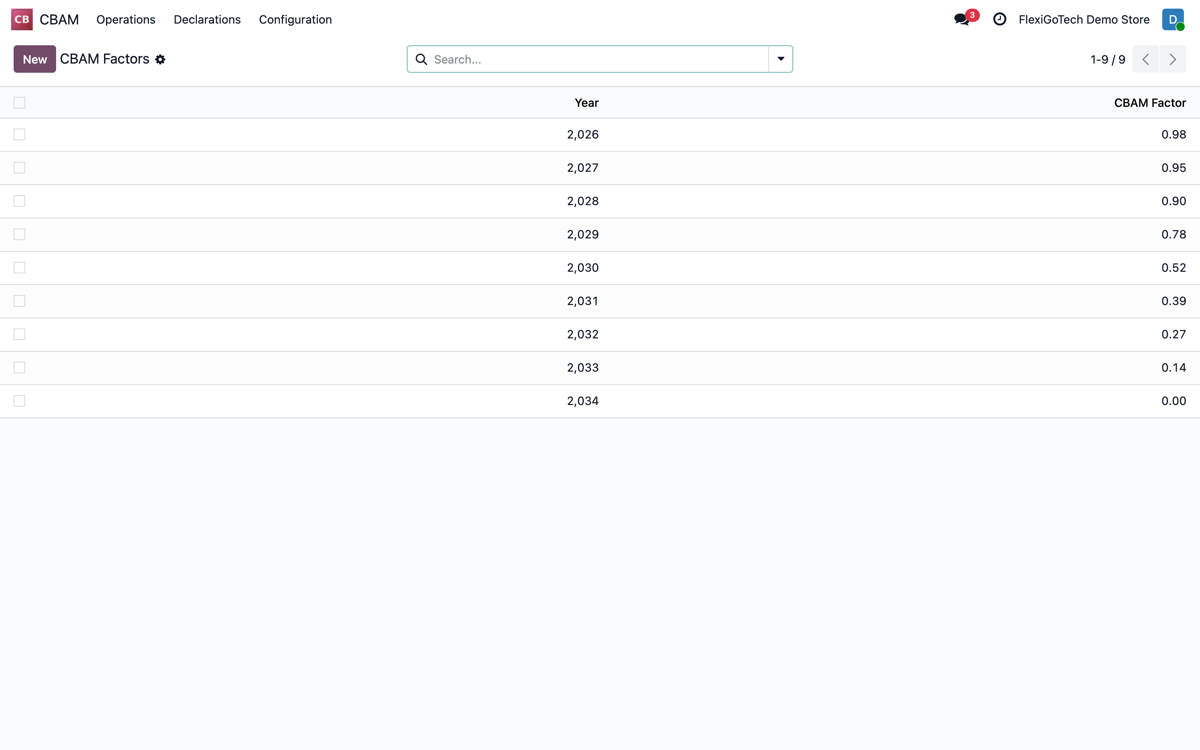
Annual CBAM Factors
Year-by-year phase-in factor (2026-2034) that drives how many certificates you must buy.
At a glance
Frequently asked questions
CBAM (the Carbon Border Adjustment Mechanism) is the EU regulation that puts a price on the carbon embedded in certain imports: iron and steel, aluminium, cement, fertilisers, electricity and hydrogen. The transitional period and its quarterly report ended on 31 December 2025. Since 1 January 2026 the definitive regime applies: authorised declarant status, an annual declaration and CBAM certificates. It affects importing SMEs too, not just large groups.
Not automatically. The module gathers the data of your affected imports inside Odoo, manages your certificates and prepares the structured annual declaration for you to review and submit to the CBAM Registry. The official filing and the legal responsibility stay with the authorised declarant.
Yes. It is a native Odoo module built to run on Odoo 17, 18, 19 and 20, and it works on Community as well as Enterprise. It plugs into the Purchase data you already keep, with no separate SaaS platform to run alongside it.
They are two separate products. CBAM Quarterly Reporting is focused on the quarterly report of the transitional period. This module, EU CBAM Compliance Manager, covers the definitive regime in force since 2026: the annual declaration, the CBAM certificate ledger with its quarterly check, declarant authorisation and a CN code library.
Yes. It is built precisely for SMEs with a moderate volume of affected imports that don't want to build spreadsheets for the annual declaration or pay an external consultancy just to keep certificates and deadlines up to date.
Questions before buying? Talk to the engineer.
We tell you whether the module fits your Odoo and your operations before you pay anything. No middlemen.
EU CBAM Compliance Manager guides
3 practical guides on this module: FAQs and comparisons.