

 Español
 Català
 Deutsch
 Français
 Português
 Italiano
 Nederlands
 Polski
The question behind «gocardless bank integration»
A search such as «gocardless bank integration» comes down to three practical questions: what has been collected, which invoice and customer it belongs to, and whether the money has reached the bank yet. If you collect with GoCardless today and keep your accounts in another program, those three answers are spread over two screens and you do the matching yourself.
A connector deals with that by bringing the GoCardless data into Odoo, where customers and invoices are managed. This is FlexigoTech's connector, and it needs the FlexigoTech Cloud subscription to work. Its listing is on Odoo Apps and its page, with purchase, is on flexigotech.com. The screenshots are from Odoo 20 with demo data (an invented gym and a simulated GoCardless API, in test mode), and the code details are also from Odoo 20.
Comparison: two places against one
| What you want to know | GoCardless and accounting apart | With the connector in Odoo |
|---|---|---|
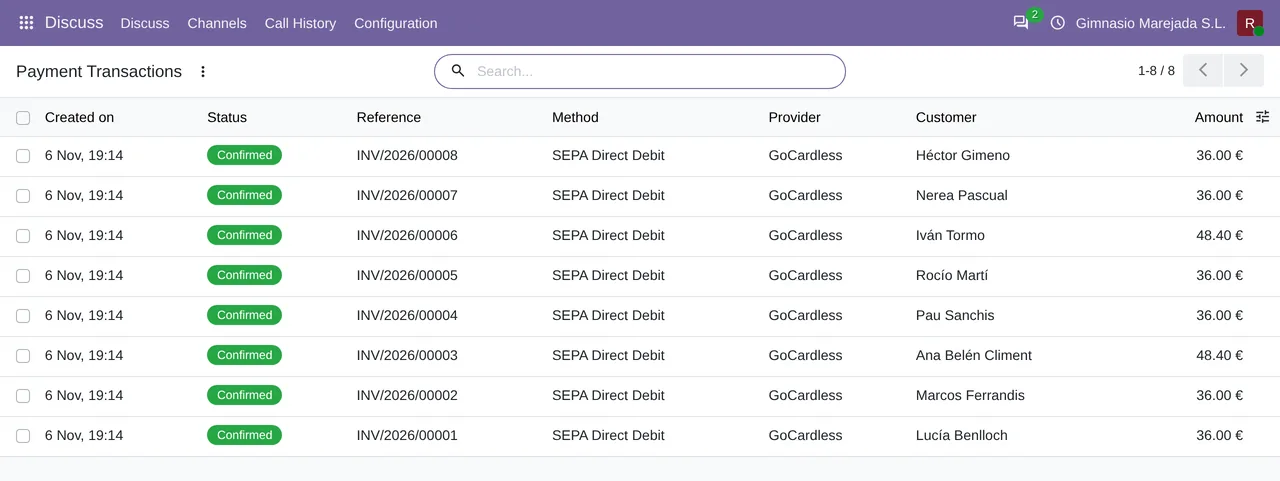
| Which payments exist and whose are they? | Two places to check: the GoCardless dashboard and your accounts | The Payment Transactions list shows payments with the GoCardless provider and the SEPA Direct Debit method, with their invoice reference, customer and amount |
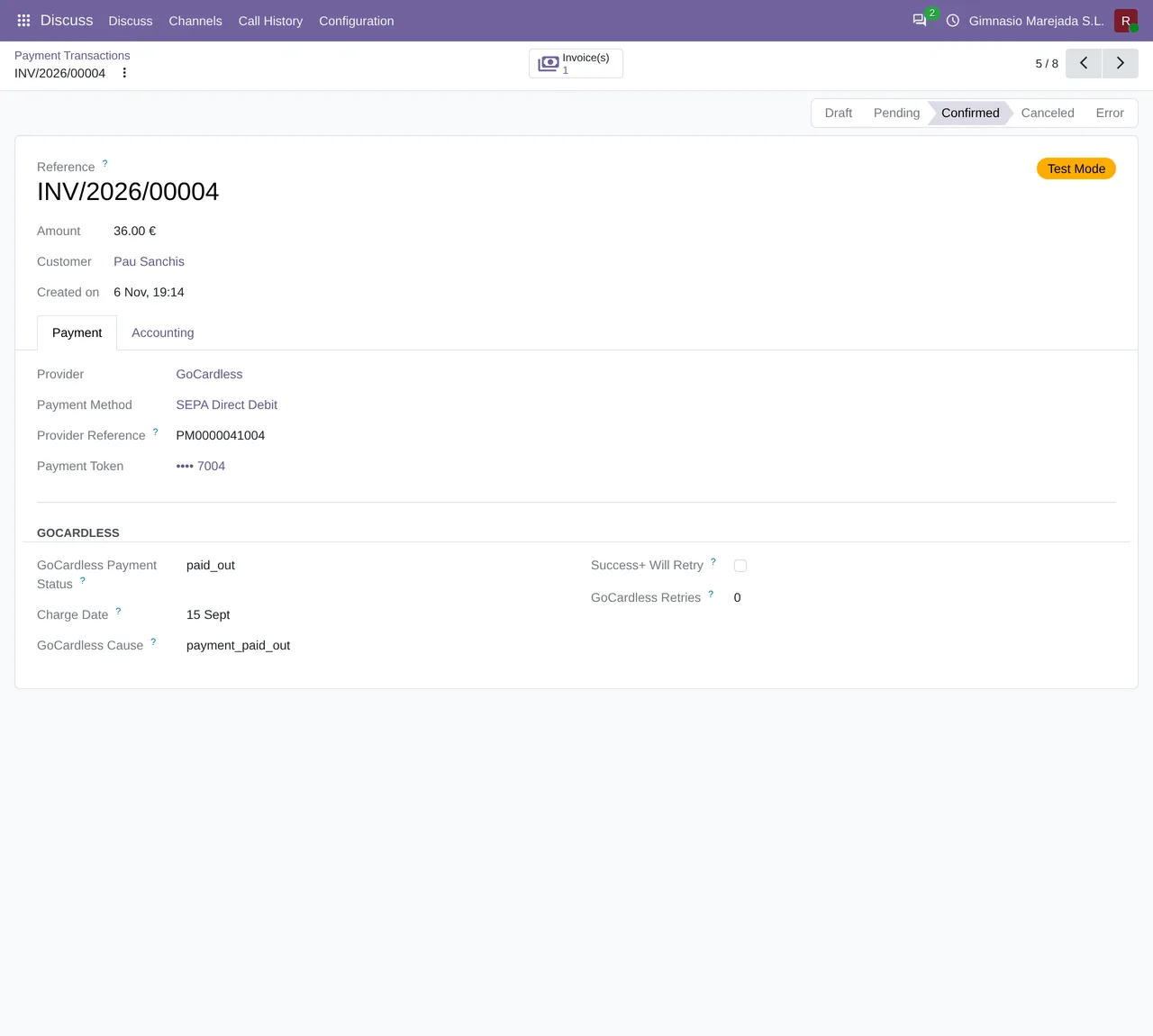
| How is one payment doing? | You find it in one place and match it against the other | The payment form has a GOCARDLESS group with GoCardless Payment Status, Charge Date, GoCardless Cause, Success+ Will Retry and GoCardless Retries |
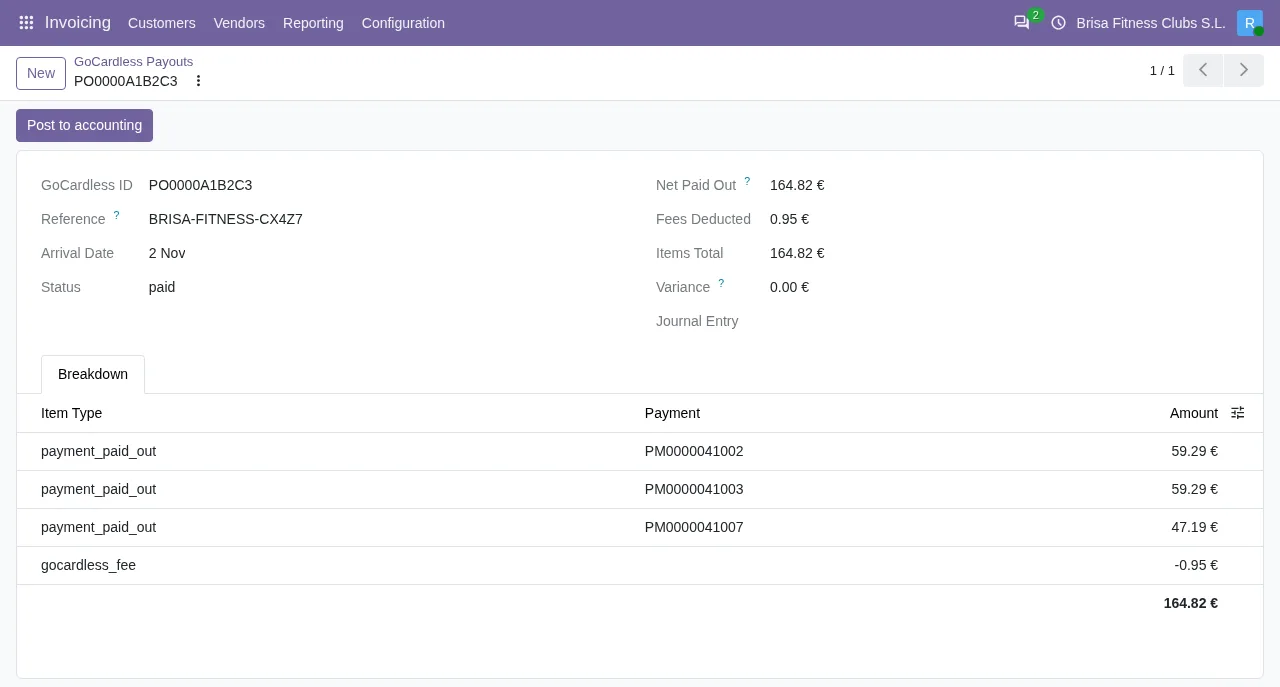
| What is a payout made of? | You rebuild it outside your accounts | The GoCardless Payouts screen shows Arrival Date, Net Paid Out, Fees Deducted, Items Total and Variance, plus the breakdown by payment with its fee |
| Has the money reached the bank? | You look in GoCardless | The payout shows its state (paid in the demo screenshot); the module has a message for payouts whose state is not paid (below) |
| How does the payout get into the accounts? | A separate entry in your accounts | The payout in the screenshot has a Post to accounting button |
The payments inside Odoo
The first thing that changes is where you look. In the payments list in the screenshot, each member's fee appears with its invoice reference, the customer and the amount, and all of them are in the Confirmed state, with GoCardless as the provider and SEPA Direct Debit as the method.
Open a payment and the form shows the Confirmed state, the provider, the method and the mandate as the payment token. Below, the GOCARDLESS group holds the GoCardless-specific data: GoCardless Payment Status (paid_out in the screenshot), Charge Date, GoCardless Cause, Success+ Will Retry and GoCardless Retries.
The payout inside Odoo
The second question is what happened to the money. The GoCardless Payouts screen gathers, for one payout, its arrival date (Arrival Date), the state, the net amount paid out (Net Paid Out), the fees deducted (Fees Deducted), the total of the payments (Items Total) and a Variance line, which is at zero in the demo screenshot. Underneath comes the breakdown by payment with its fee, and the payout in the screenshot carries the Post to accounting button.
What the Odoo 20 code says
The code published for Odoo 20 holds details that matter to anyone reconciling.
The first is a scheduled task called GoCardless: import payouts, which runs every day and is active once the module is installed.
The second is a message for a payout whose status is not paid:
This payout is …, not paid: the money has not reached the bank. Import the payouts again once GoCardless reports it paid.
Where the dots are, the module writes whatever status the payout has at that moment. The message itself tells you what to do: wait until GoCardless reports the payout as paid, then import the payouts again.
The third matters if you work with several companies in the same database. The module has this message for a payout that belongs to a company that is not among the user's companies (unless working with superuser rights):
This payout belongs to a company you do not work for.
What to ask to see before deciding
If you do not use Odoo yet and you are weighing up this route, these are the screens worth reviewing with your own data:
- The
Payment Transactionslist: check that each GoCardless payment carries its invoice and its customer. - The form of one payment, with its
GOCARDLESSgroup. - A payout in
GoCardless Payouts: the breakdown by payment, the fees, theVarianceline and thePost to accountingbutton.
Where to go next: implementation and connector
The connector does not replace Odoo: it installs inside it. If you do not use Odoo yet, the route has three parts: getting Odoo running, adding the connector, and taking out the FlexigoTech Cloud subscription it needs to work. FlexigoTech implements Odoo 17, 18, 19 and 20 and builds custom connectors and integrations, so the parts can come from the same place. Tell us how you collect with GoCardless today and we will look at your case.
Keep reading
Checked in the connector's source code (version 20.0) and the linked sources
Sources
- Module source code: flexigo_payment_gocardless 20.0 (6fe1a716): models/gocardless_payout.py
- Module source code: flexigo_payment_gocardless 20.0 (6fe1a716): data/ir_cron_data.xml
- flexigotech.com/en/services.html