

 Español
 Català
 Deutsch
 Français
 Português
 Italiano
 Nederlands
 Polski
Deel's gross to net report
According to Deel's help center, Deel Global Payroll generates a gross-to-net report for every cycle, in the same format in every country, and each report covers a single cycle. You open it under Analytics, among the payroll reports, and export it as CSV, XLSX or PDF. Deel also warns that the G2N holds payroll outcomes and not accounting rules, so it comes without debit and credit postings, without logic to assign accounts and without validation. Without an integration, someone in accounting prepares the entry for each cycle by hand from that download.
Deel's API returns the same report per cycle with GET /reports/payroll/cycles/{cycle_id}/gross-to-net. For each contract it gives the currency (currency), the exchange rate between the payroll currency and the payment currency (conversion_rate) and the list of concepts, as the connector calls the pay items, each with its name (label), its amount (value), its category and one of these groups (category_group):
| Deel group | What it holds |
|---|---|
ADDITIONS | What is added to gross pay, such as base salary |
DEDUCTIONS | What is withheld from the person, such as income tax and their social security |
BENEFITS | Benefits |
CONTRIBUTIONS | Employer contributions |
INFOS | Information |
TOTALS | Totals, such as net pay |
The connector reads every page of the report and stores each concept as a line of the cycle in Odoo. Deel returns 20 contracts per page unless asked for another size; the connector asks for 50, which has not been tested against a real report.
When a cycle is ready
The connector asks for each legal entity's cycles with GET /legal-entities/{legal_entity_id}/payroll-events, but only for entities that have a Payroll journal. Each new entity takes the first general journal of its company as its payroll journal; if you clear it, that entity stops producing payroll entries. Every read starts at the Import payroll cycles from date, which defaults to 90 days before the day you create the connection: the connector does not keep track of how far it has read, so each run asks again for the cycles since that date.
Deel flags each cycle with has_g2n_report, and its documentation says the flag is only true when the cycle is published and its report has no blocking errors. In Odoo it is the Gross-to-net ready checkbox, and it moves the cycle from Waiting for Deel to To post. From there the cycle gets its entry (Entry created), stops at Map concepts if a concept still lacks accounts, or goes to Error with a warning. The sync runs every 30 minutes; if the connection receives webhooks, Deel's gp.payslips.available event starts the payroll part sooner, and the data is always read again through the API.
Each concept to its accounts
The map lives on the connection's Payroll accounts tab, and each row says what to do with a concept: Post, the default, or Ignore. A row that posts has a Debit account and a Credit account, and the concept's full amount goes to both, so every entry balances by construction. A row without a concept covers its whole group, and one without a legal entity covers every entity of the connection. When several rows fit a line of the report, the most specific one wins: that entity and that concept, then that entity and its group, then any entity with that concept and last any entity with that group.
When a concept arrives without a ready row, the cycle stays at Map concepts: the connector creates the missing row and opens an issue that asks for a debit and a credit account, or for the concept to be ignored. The same happens with a group the connector does not know, which it stores as INFOS and which also needs its row, so no amount is left out without someone having seen it. Each row's Cost centers checkbox comes ticked, and with it the debit line carries the cost centers of that person's Deel contract.
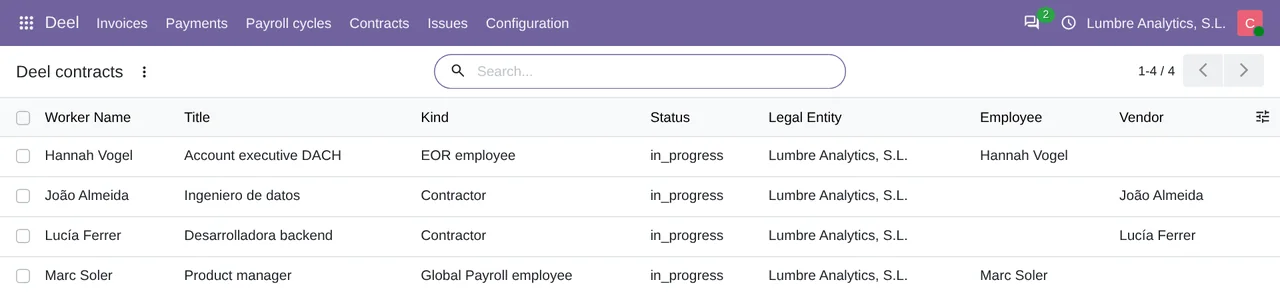
Currency, date and per-person detail
Each concept comes in the currency the report gives its contract, or in the company currency if the report has none. If that currency is not active in Odoo, the cycle stops with a warning asking you to activate it and retry. The amount in your company currency comes from Odoo's exchange rates on the entry date: Deel's conversion_rate is stored on the cycle line, but the entry does not use it.
The entry goes to the legal entity's payroll journal, dated on the cycle's end date, with a reference that carries the cycle's name. Inside it, amounts of the same concept that share accounts, cost centers and currency are added up, so you get one pair of lines per concept and not per person. Each person's detail stays in the cycle lines, which only Odoo accounting administrators can see. But if the entity has a single person, or each person has their own cost center, the entry shows that person's pay to anyone who can see journal entries. Each cycle gives a single entry even if two runs overlap, and the Payroll entries field decides whether it stays as Draft, to review, the default, or comes out Posted.
An example cycle, balanced by hand
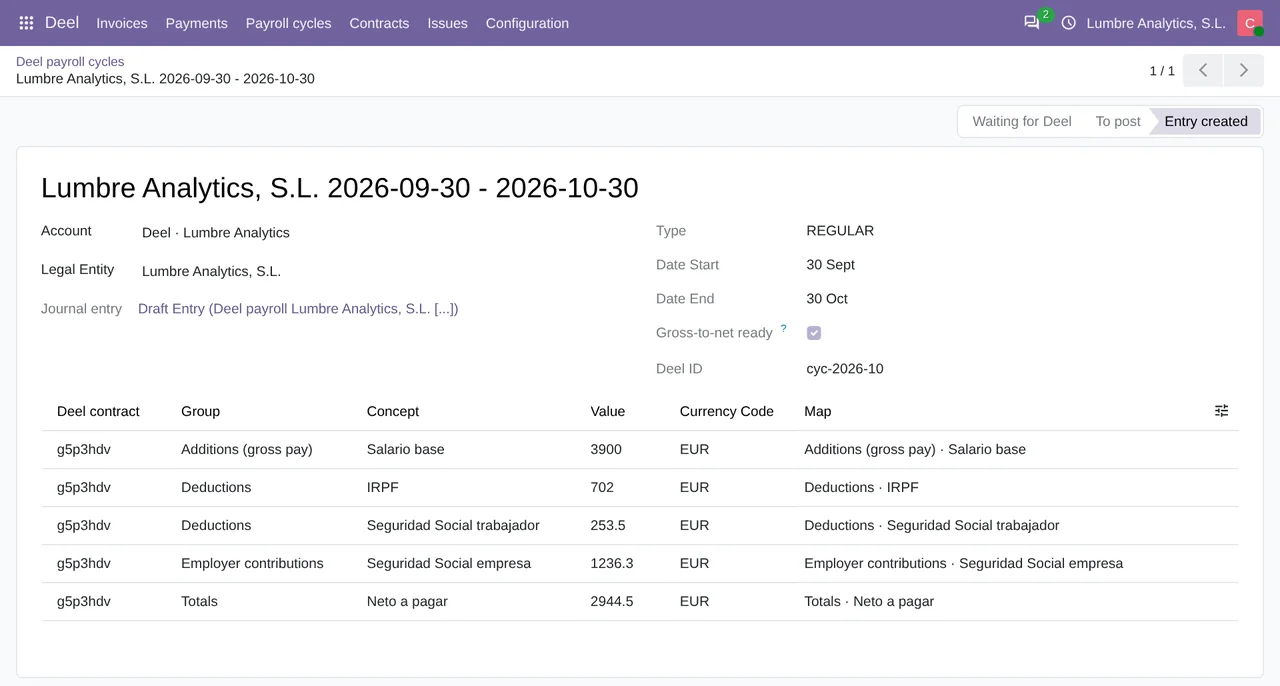
The cycle in the screenshot is a REGULAR cycle of a made-up company, Lumbre Analytics, S.L., from 30 September to 30 October 2026, with one Global Payroll contract in euros. The company is a Spanish S.L., so its map uses accounts from the Spanish chart of accounts (PGC): 640 for salaries, 642 for employer social security, 4751 for withholdings, 476 for social security and 465 for net pay still owed. With that demo data, the connector's code would produce this entry, worked out by hand:
| Concept | Deel group | Debit (account) | Credit (account) |
|---|---|---|---|
Salario base | ADDITIONS | 3,900 (640) | 3,900 (465) |
IRPF | DEDUCTIONS | 702 (465) | 702 (4751) |
Seguridad Social trabajador | DEDUCTIONS | 253.5 (465) | 253.5 (476) |
Seguridad Social empresa | CONTRIBUTIONS | 1,236.3 (642) | 1,236.3 (476) |
Neto a pagar | TOTALS | Set to Ignore, not posted | |
| Total | 6,091.8 | 6,091.8 |
Every concept is posted twice, once as a debit and once as a credit, which is why both columns add up to the same figure. Account 465 receives 3,900 as a credit and 702 and 253.5 as debits, and ends with a credit balance of 2,944.5, the report's Neto a pagar. That is why, in this example, the TOTALS row is set to Ignore: the net amount already comes out of the other lines. Account 476 collects 1,489.8 of social security, 4751 holds the 702 of withholdings, and the cost of the cycle for the company sits in 640 and 642, 5,136.3 between them.
What it does not cover
PEO payroll has no handling of its own: the connector treats PEO contracts as EOR, while GL Sync, Deel's accounting integration, does take PEO to the general ledger. Also, none of this has been tested against Deel's live API. The Deel demo organization the connector was tested against, through FlexigoTech Cloud, had no payroll cycles yet, so cycles were tested with responses modelled on Deel's API reference. The connection, legal entities, a contract with its person and vendor, webhooks and a second sync without duplicates were tested against that organization.
Before you switch it on
- Odoo 17, 18, 19 or 20 on your own server or on Odoo.sh. The module does not work on Odoo Online.
- A Deel organization token with read permissions, created by a Deel admin in the Developer Center. According to Deel's documentation, the gross-to-net report needs
payslips:readand the cycle list needslegal-entity:read. According to the module itself, FlexigoTech Cloud keeps the token encrypted; it never stays in your Odoo. - The
Payroll journalof each legal entity that runs Global Payroll. - The rows of
Payroll accounts. The first time, each new concept holds its cycle until you give it accounts or ignore it. - The
Import payroll cycles fromdate, if you want cycles from more than 90 days back.
Invoices issued by Deel follow another path and arrive as vendor bills, as covered in Deel invoice in Odoo, and their payments are registered as explained in the guide to payments to Deel. What GL Sync does with other accounting systems is compared in Deel's accounting integrations. The connector is explained in full on its page and published on Odoo Apps.
Keep reading
Checked in the connector's source code (version 20.0) and the linked sources
Sources
- help.letsdeel.com/hc/en-gb/articles/12602682257809-Customizing-And-Downloading-Gross-To-Ne
- help.letsdeel.com/hc/en-gb/articles/45125127111825-Accounting-Integrations-Pricing-and-Set
- developer.deel.com/api/reference/endpoints/reports/gets-g-2-n-report-data-for-a-given-payr
- Module source code: flexigo_deel_connector 20.0 (18442307): models/deel_payroll.py
- Module source code: flexigo_deel_connector 20.0 (18442307): models/deel_account.py
- Module source code: flexigo_deel_connector 20.0 (18442307): models/deel_maps.py
- developer.deel.com/api/reference/endpoints/list-cycles/list-payroll-cycles-v-2026-01-01
- Module source code: flexigo_deel_connector 20.0 (18442307): models/deel_legal_entity.py
- Module source code: flexigo_deel_connector 20.0 (18442307): data/deel_cron.xml
- Module source code: flexigo_deel_connector 20.0 (18442307): models/account_move.py
- FlexigoTech calculation with the figures cited
- Module source code: flexigo_deel_connector 20.0 (18442307): models/deel_contract.py
- help.letsdeel.com/hc/en-gb/articles/46057955155217-Accounting-Integrations-Overview
- apps.odoo.com/apps/modules/20.0/flexigo_deel_connector